How Biometric Attendance Systems Work in India
How Biometric Attendance Systems Work in India
Managing employee attendance accurately is important for businesses of all sizes. Traditional attendance registers and Excel sheets can require significant manual effort and may create problems such as missed entries, incorrect working hours, and proxy attendance.
A Biometric Attendance System uses an employee's unique biological or physical characteristics to record attendance. Common technologies include fingerprint and facial recognition. When an employee checks in or checks out, the system verifies their identity and records the attendance event digitally.
For Indian businesses, biometric attendance is commonly considered for offices, factories, warehouses, hospitals, educational institutions, retail stores, and other fixed workplaces.
This guide explains how biometric attendance systems work in India, the different technologies available, their benefits, limitations, and how businesses can integrate them with attendance and payroll processes.
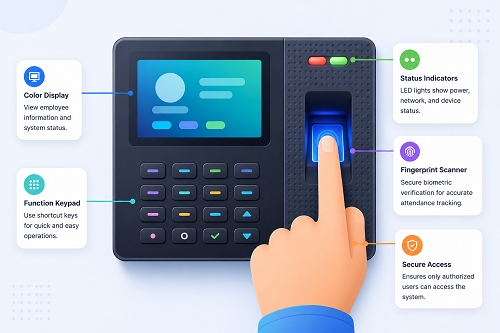
What Is a Biometric Attendance System?
A biometric attendance system is an electronic system that identifies or verifies employees using biometric characteristics.
Instead of using a paper register or relying only on an employee ID card, the system can use:
- Fingerprint
- Face recognition
- Iris recognition
- Other supported biometric methods
The system links the employee's biometric template to an employee record.
A typical process is:
Employee → Biometric Verification → Identity Confirmed → Check-In/Out → Attendance Recorded
The attendance information can then be processed by attendance software.
How Does Biometric Attendance Work?
The basic process can be divided into several steps.
Step 1: Employee Enrollment
Before employees can use a biometric system, they must be enrolled.
For fingerprint attendance, the employee's fingerprint is scanned.
For face recognition, the system captures facial information according to the device's enrollment process.
The system converts the biometric input into a mathematical representation or template that can be used for future verification.
The goal is generally to store a biometric template rather than simply storing a conventional photograph or raw biometric image, although implementation varies by technology and vendor.
Step 2: Employee Identification
When an employee arrives at work, they interact with the biometric device.
For example:
Employee Places Finger on Scanner
or
Employee Looks at Face Recognition Device
The device captures the relevant biometric characteristics.
Step 3: Biometric Matching
The system compares the captured biometric information with enrolled information.
If the system finds a valid match, the employee's identity is verified.
For example:
- Employee: Ravi
- Employee ID: EMP1025
- Verification: Successful
The system can then record the attendance event.
Step 4: Attendance Is Recorded
Once verification succeeds, the system records information such as:
- Employee
- Date
- Time
- Check-in/check-out
- Device
- Location, where supported
For example:
- Employee: Ravi
- Date: 18 August
- Check-In: 9:04 AM
This information becomes part of the employee's attendance record.
How Fingerprint Attendance Works
Fingerprint attendance is one of the commonly used biometric methods.
The process is:
Finger Scan → Fingerprint Features Captured → Template Matching → Employee Identified → Attendance Recorded
The system generally analyzes distinctive features of the fingerprint rather than treating the fingerprint as a normal image.
Advantages
- Fast verification
- Convenient for fixed workplaces
- No attendance card required
- Can help reduce buddy punching
- Suitable for many employees
Limitations
Fingerprint scanners can sometimes have difficulty with fingerprints affected by:
- Dust
- Dirt
- Moisture
- Cuts
- Manual work
- Worn fingerprint patterns
This can be relevant in manufacturing, construction, and other physically demanding workplaces.
How Face Recognition Attendance Works
Face recognition systems use a camera to verify an employee.
The process can be:
Employee Approaches Device → Camera Captures Face → Facial Features Analyzed → Template Compared → Identity Verified → Attendance Recorded
Modern systems may also include liveness detection to help distinguish a real person from a photograph or other presentation attempt. The availability and quality of this feature vary between devices.
Advantages
- Contactless
- Convenient
- Fast
- Useful where employees cannot easily use fingerprint scanners
Limitations
Performance can be affected by:
- Lighting
- Camera positioning
- Face coverings
- Device quality
- Changes in appearance
- Environmental conditions
Businesses should test the system in their actual workplace before deployment.
What Is Biometric Enrollment?
Biometric enrollment is the initial process of registering an employee with the attendance system.
For example:
- Employee ID: EMP1001 | Name: Employee A | Fingerprint: Enrolled
- or
- Face Profile: Enrolled
After enrollment, the system can use the biometric information for attendance verification.
Enrollment should be performed according to the organization's policies and applicable privacy and data-protection requirements.
How Biometric Attendance Prevents Proxy Attendance
One major reason businesses use biometric attendance is to reduce proxy attendance.
With a traditional system, an employee may potentially ask another employee to mark attendance on their behalf.
With biometric verification, the employee needs to provide their own biometric characteristic.
For example:
Employee A → Fingerprint → Verification
This makes it significantly harder to simply transfer an attendance card or share a password.
However, biometric systems should not be treated as completely fraud-proof. Appropriate policies, device security, and exception monitoring are still important.
Biometric Attendance and Working Hours
Biometric devices generally record attendance events.
For example:
- 9:02 AM → Check-In
- 6:11 PM → Check-Out
Attendance software can then calculate working hours according to configured rules.
For example:
- Check-In: 9:02 AM
- Check-Out: 6:11 PM
- Break: 1 hour
- Working Hours: Based on configured calculation rules
The exact calculation depends on company policies and software configuration.
Biometric Attendance and Shift Management
Biometric systems can be connected to shift-management software.
For example:
- General Shift: 9:00 AM–6:00 PM
- Morning Shift: 6:00 AM–2:00 PM
- Night Shift: 10:00 PM–6:00 AM
When employees check in and check out, the attendance system can associate their attendance with the configured shift.
This is particularly useful for:
- Manufacturing
- Hospitals
- Hotels
- Restaurants
- Security agencies
- BPOs
- Logistics companies
How Biometric Attendance Handles Night Shifts
Night shifts can create cross-date attendance.
For example:
- Check-In: 10 PM Monday
- Check-Out: 6 AM Tuesday
A suitable attendance system should recognize that both events belong to the same scheduled shift.
Businesses should test cross-midnight scenarios before implementation because different systems may handle shift boundaries differently.
Biometric Attendance and Leave Management
Biometric attendance can be integrated with leave management software.
For example:
Employee Applies Leave → Manager Approves → Leave Recorded → Attendance Updated
This helps HR maintain a centralized record of attendance and approved leave.
Biometric Attendance and Overtime
Biometric check-in and check-out records can provide the basic data required to identify additional working hours.
For example:
- Scheduled: 8 hours
- Recorded: 10 hours
- Additional: 2 hours
The software can flag this for review.
Actual overtime eligibility, approval, and payment should follow company policy and applicable legal requirements.
Biometric Attendance and Payroll
Attendance information can be used as an input for payroll.
A typical process is:
Biometric Device → Attendance Software → Working Hours → Leave/Overtime → Approval → Payroll
Attendance may affect payroll through:
- Paid days
- Unpaid leave
- Overtime
- Attendance-related deductions
- Other company-specific rules
The attendance system itself may not perform complete payroll calculations unless payroll functionality is included or integrated.
Biometric Attendance for Indian Companies
Biometric attendance can be suitable for Indian businesses with fixed workplaces.
- Offices: Useful for employees working at a common office location.
- Factories: Useful for managing shift-based employees.
- Warehouses: Can help record attendance for warehouse staff.
- Hospitals: Useful for organizations operating multiple shifts.
- Retail Stores: Can support attendance at individual stores.
- Schools and Colleges: Can be used for staff attendance where appropriate.
- Hotels and Restaurants: Can help manage employees working different shifts.
Biometric Attendance for Manufacturing Companies
Manufacturing companies often have complex attendance requirements. They may need:
- Multiple shifts
- Night shifts
- Overtime
- Weekly offs
- Department-wise attendance
- Shift rotations
A biometric system can provide reliable check-in and check-out records at a factory entrance or designated attendance point.
Biometric Attendance for Multiple Branches
Companies with multiple branches can connect biometric devices to centralized attendance software.
For example:
Head Office → Chennai Branch / Bengaluru Branch / Hyderabad Branch / Pune Branch
HR can access centralized reports where the system supports multi-location management.
Branch managers can receive role-based access to relevant employee records.
Cloud-Based Biometric Attendance
Traditional biometric systems may store attendance information locally on the device or within an on-premise application.
Cloud-connected biometric systems can synchronize attendance information with a centralized platform.
A typical process is:
Biometric Device → Internet → Cloud Attendance System → HR Dashboard
Potential benefits include:
- Remote access
- Centralized records
- Multi-branch management
- Online reports
- Payroll integration
- Employee self-service
Cloud deployment also means businesses should carefully evaluate security, connectivity, access control, data backup, and vendor data-handling practices.
What Happens If the Internet Goes Down?
This is an important question when implementing biometric attendance.
Some biometric devices can continue recording attendance locally when the internet is unavailable.
Once connectivity is restored, the device may synchronize the stored attendance records with the central system.
However, this capability varies by device and software.
Before purchasing, ask: Does the biometric device support offline attendance and automatic synchronization?
Businesses should test this feature before deployment.
Biometric Attendance Data Security
Biometric information is sensitive from a security and privacy perspective.
Businesses should understand:
- What data is collected
- Whether templates or raw images are stored
- Where data is stored
- Who can access it
- How long it is retained
- How it is protected
- What happens when an employee leaves
Companies should also review applicable Indian privacy and data-protection requirements and their vendor's data-processing practices.
Advantages of Biometric Attendance
- Reduces Proxy Attendance: Employees generally need to provide their own biometric verification.
- Reduces Manual Data Entry: Attendance is recorded electronically.
- Improves Attendance Accuracy: Automated records can reduce common manual entry mistakes.
- Saves HR Time: HR teams spend less time maintaining registers.
- Supports Shift Management: Useful for organizations with multiple shifts.
- Supports Payroll Processing: Attendance data can be provided to payroll.
- Provides Attendance Reports: Managers can generate attendance reports quickly.
- Improves Transparency: Employees and managers can review attendance information through supported systems.
Limitations of Biometric Attendance
Biometric attendance is not suitable for every situation.
Potential challenges include:
- Hardware cost
- Device maintenance
- Network dependency for centralized synchronization
- Fingerprint recognition issues
- Face recognition limitations
- Hygiene considerations
- Privacy and data-security requirements
- Power interruptions
- Difficulties at outdoor or mobile work locations
For field employees, mobile attendance may be more practical than installing biometric devices at every location.
Biometric Attendance vs. Mobile Attendance
| Feature | Biometric | Mobile |
|---|---|---|
| Fixed workplace | Excellent fit | Suitable |
| Field employees | Limited | Excellent fit |
| Remote employees | Limited | Suitable |
| Fingerprint | Yes | Usually no |
| Face recognition | Available | Available in some apps |
| GPS | Usually not inherent | Available in some systems |
| Geofencing | Software-dependent | Available in some systems |
| Hardware required | Yes | Employee smartphone |
| Multiple locations | Possible | Easy to scale |
| Proxy prevention | Strong | Depends on controls |
Some organizations use both biometric and mobile attendance for different employee groups.
How to Implement a Biometric Attendance System
Step 1: Analyze Workforce
Identify employee count, locations, shifts, remote employees, and field employees.
Step 2: Choose Biometric Technology
Select fingerprint, face recognition, or another suitable method.
Step 3: Select Hardware
Consider number of employees, expected verification volume, environment, connectivity, and power backup.
Step 4: Install Devices
Place devices at appropriate entry or attendance locations.
Step 5: Enroll Employees
Register employee biometric information according to the organization's procedures.
Step 6: Configure Attendance Rules
Set shifts, grace periods, breaks, weekly offs, overtime rules, and regularization.
Step 7: Connect With Software
Synchronize devices with the attendance management platform.
Step 8: Test the System
Test check-in, check-out, night shifts, missed punches, network failure, device failure, overtime, leave, and payroll integration.
Step 9: Train Employees
Explain how to use the device and what to do if attendance fails.
Cost of Biometric Attendance Systems in India
The total cost depends on number of devices, type of biometric technology, number of employees, software subscription, installation, cloud services, maintenance, payroll integration, and support.
A business should evaluate the total cost of ownership, rather than considering only the hardware purchase price.
Features to Look for in Biometric Attendance Software
Before selecting a system, consider:
- Fingerprint support
- Face recognition
- Multiple devices
- Cloud synchronization
- Offline functionality
- Shift management
- Leave management
- Overtime
- Attendance regularization
- Employee self-service
- Multi-branch support
- Reports
- Payroll integration
- Role-based access
- Audit trail
- Data security
- Backup
- Mobile application
- API/integration options
- Customer support
Frequently Asked Questions
How does biometric attendance work?
The employee provides a biometric characteristic such as a fingerprint or face. The system compares it with the enrolled biometric template and, if successfully verified, records the attendance event.
Is biometric attendance suitable for Indian companies?
Yes, it can be suitable for companies with fixed workplaces, particularly offices, factories, warehouses, hospitals, and retail locations.
Can biometric attendance be connected to payroll?
Yes, many attendance systems can export or integrate attendance data with payroll software.
Can biometric attendance prevent proxy attendance?
It can significantly reduce common forms of proxy attendance because the employee's biometric characteristic is required for verification. It is not a complete substitute for attendance policies and monitoring.
What happens if the fingerprint does not work?
Many systems provide alternative verification methods or administrator-assisted attendance correction. Companies should define a clear fallback process.
Can biometric attendance work without the internet?
Some devices can record attendance offline and synchronize later. This depends on the hardware and software.
Is face recognition better than fingerprint attendance?
Neither is universally better. Fingerprint systems can work well in many indoor workplaces, while face recognition provides contactless verification. The best option depends on the work environment and employee requirements.
Can biometric attendance manage multiple shifts?
Yes, attendance software can support multiple shifts when properly configured.
Is biometric attendance suitable for field employees?
Usually, mobile attendance is more practical for employees who frequently move between locations. Biometric devices are better suited to fixed attendance locations.
Conclusion
A Biometric Attendance System in India provides businesses with a digital method of verifying employee identity and recording attendance.
The basic process is:
Enrollment → Biometric Verification → Check-In/Out → Attendance Record → Working Hours → Leave/Overtime → Payroll
Fingerprint and face recognition are common approaches, while mobile attendance can complement biometric systems for field and remote employees.
For companies considering biometric attendance, the decision should go beyond the device itself. Businesses should evaluate attendance software, shift management, payroll integration, offline functionality, security, employee privacy, multi-location requirements, reporting, and support.
When properly implemented, biometric attendance can reduce manual attendance work, discourage proxy attendance, improve attendance visibility, and provide more reliable attendance data for HR and payroll processes.
Biometric device records can be centralised in InnBuilt Attendance Software and matched with employee shifts and policies. The resulting data is easier to approve, report, and use in payroll.