How Face Attendance Improves Employee Attendance Accuracy
How Face Attendance Improves Employee Attendance Accuracy
Accurate employee attendance is essential for effective workforce management. Attendance records influence working hours, leave calculations, overtime, payroll processing, and employee performance tracking. However, traditional attendance methods such as paper registers, attendance cards, PINs, and manual spreadsheets can create errors and administrative challenges.
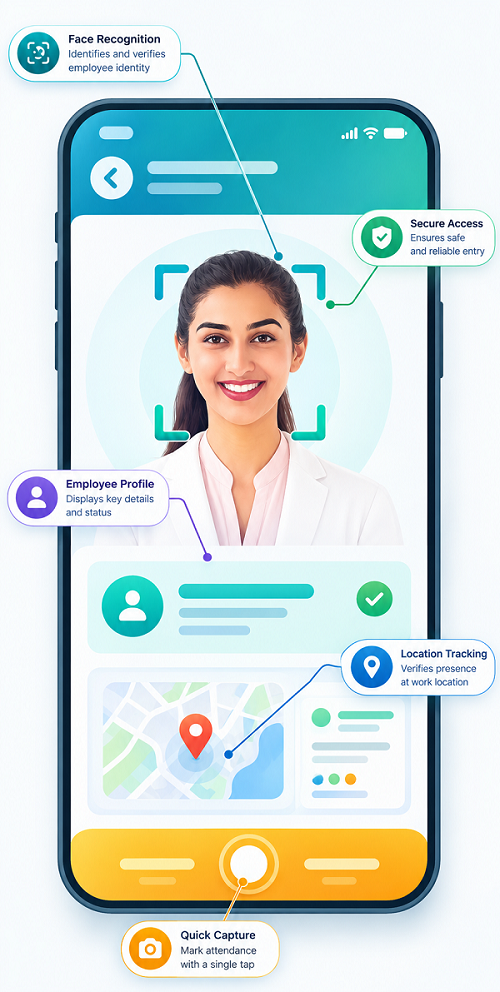
Face attendance software provides a more automated approach by using facial recognition to verify an employee before recording attendance. Instead of relying entirely on cards, passwords, or manual entries, the system can connect an attendance event with the employee being verified.
For businesses managing multiple employees, shifts, branches, or locations, face attendance can help improve attendance accuracy and reduce repetitive HR work.
What Is Face Attendance?
Face attendance is an employee attendance system that uses facial recognition technology to verify an employee's identity and record their attendance.
A typical process works like this:
Employee → Face Detection → Identity Verification → Attendance Recorded
Employees are enrolled in the system, and their authorized facial profile is associated with their employee record. When they check in or check out, the system verifies the face and records the attendance event.
The exact verification method depends on the device, software, and configuration used by the organization.
Why Is Attendance Accuracy Important?
Attendance accuracy is important because attendance information can affect several areas of workforce management.
Accurate records help businesses manage:
- Employee working hours
- Shift attendance
- Late arrivals
- Early departures
- Absences
- Leave
- Overtime
- Payroll processing
- Attendance reports
- Workforce planning
Even small attendance errors can become significant when a business has hundreds of employees.
For example, if employees manually enter working hours incorrectly, HR teams may need to spend considerable time reviewing and correcting records before payroll is processed.
How Face Attendance Improves Attendance Accuracy
1. Verifies Employee Identity
One of the main advantages of face attendance is identity verification.
With a traditional attendance card, an employee may potentially give the card to someone else. With a PIN-based system, credentials can potentially be shared.
Face attendance adds another verification layer by checking whether the person attempting to record attendance matches the authorized employee profile.
This can help create a stronger connection between:
Employee → Identity → Attendance Record
2. Reduces Proxy Attendance
Proxy attendance occurs when one employee records attendance for another.
For example, Employee A gives their attendance card to Employee B. Employee B uses the card to mark Employee A as present.
A properly configured face recognition system can reduce this type of proxy attendance because the person physically recording attendance must pass facial verification.
This helps businesses maintain more reliable attendance records.
3. Reduces Manual Data Entry
Paper registers and spreadsheets depend on employees or supervisors entering information correctly.
Manual entry can result in:
- Incorrect times
- Missing entries
- Duplicate entries
- Wrong employee records
- Calculation mistakes
Face attendance can automatically create digital attendance records after successful verification, reducing the need for repetitive manual data entry.
4. Records Check-In and Check-Out Automatically
A face attendance system can record employee check-in and check-out events digitally.
For example:
Check-In: 9:02 AM
Check-Out: 6:08 PM
The system can use these events to calculate working hours according to configured rules.
This provides a more consistent record than manually entering working times.
5. Improves Working-Hour Calculations
Accurate check-in and check-out information provides better input for calculating working hours.
For example:
Check-In: 9:00 AM
Break: 1:00 PM – 2:00 PM
Check-Out: 6:00 PM
The system can calculate the relevant working duration according to the organization's configured attendance rules.
This can reduce manual calculation errors.
6. Helps Track Late Arrivals
Face attendance can make it easier to compare actual check-in times with scheduled shift timings.
For example:
Scheduled Start: 9:00 AM
Actual Check-In: 9:17 AM
The system can identify the attendance event as a potential late arrival according to company rules.
HR managers can then review recurring attendance patterns.
7. Helps Track Early Departures
The same process can be used to identify employees who leave before the scheduled end of their shift.
For example:
Scheduled End: 6:00 PM
Actual Check-Out: 5:25 PM
Such exceptions can be flagged for review according to the organization's attendance policy.
8. Supports Accurate Shift Attendance
Face attendance becomes particularly useful for organizations with multiple shifts.
| Shift | Timing |
|---|---|
| Morning | 6 AM – 2 PM |
| Evening | 2 PM – 10 PM |
| Night | 10 PM – 6 AM |
The attendance system can associate attendance events with assigned shifts, depending on the software configuration.
This helps managers identify whether employees are attending their scheduled shifts.
9. Handles Multiple Locations
Businesses with multiple branches, stores, offices, factories, or work sites may find attendance management challenging.
A centralized attendance system can help managers view attendance information across locations, depending on the software's capabilities.
This can provide better visibility into:
- Location-wise attendance
- Employee attendance
- Shift coverage
- Absences
- Late arrivals
- Attendance exceptions
10. Creates Digital Attendance Records
Digital attendance records make it easier to search, review, filter, and report attendance information.
Instead of searching through paper registers, HR teams can access attendance data through a software dashboard.
Reports may include:
- Daily attendance
- Monthly attendance
- Employee attendance
- Department attendance
- Shift attendance
- Late arrivals
- Absences
- Working hours
Face Attendance vs. Traditional Attendance Methods
| Feature | Manual Register | Card-Based Attendance | PIN-Based Attendance | Face Attendance |
|---|---|---|---|---|
| Manual entry | High | Low | Low | Low |
| Identity verification | Limited | Limited | Limited | Facial verification |
| Proxy attendance risk | High | Possible | Possible | Reduced |
| Digital records | Limited | Yes | Yes | Yes |
| Automated working-hour calculation | No/limited | Possible | Possible | Possible |
| Shift integration | Limited | Possible | Possible | Possible |
| Reporting | Manual | Digital | Digital | Digital |
No technology can guarantee perfect attendance records in every situation. Device problems, incorrect configuration, connectivity issues, or verification failures can still occur. Businesses should maintain appropriate exception-handling procedures.
How Face Attendance Works With Shift Management
Face attendance can become more useful when connected with shift management software.
A typical workforce workflow can be:
Employee → Shift Roster → Face Verification → Attendance → Working Hours → Leave → Overtime → Payroll
For example, an employee is assigned a 10 PM–6 AM night shift.
At 10 PM, the employee records attendance through face verification. At 6 AM, the employee records the end of the shift.
The system can then compare the attendance events with the assigned shift and identify relevant exceptions.
This can be especially useful for manufacturing companies, hospitals, security agencies, BPOs, hotels, and other businesses operating multiple shifts.
How Face Attendance Supports Payroll Accuracy
Attendance data is often an important input for payroll processing.
Incorrect attendance can affect:
- Working days
- Leave
- Overtime
- Short hours
- Late attendance
- Salary calculations
For example:
Attendance → Working Hours → Leave/Overtime → Payroll
When attendance data is captured automatically and accurately, HR teams have better information available for payroll processing.
Payroll calculations should still follow the organization's approved policies and applicable employment requirements.
Benefits of Face Attendance for Businesses
Improved Attendance Accuracy
Facial verification can help ensure that an attendance event is associated with the person being verified.
Reduced Proxy Attendance
It makes common forms of proxy attendance more difficult than card- or PIN-only systems.
Less Manual HR Work
Automated attendance records reduce repetitive register and spreadsheet management.
Faster Attendance Processing
Employees can record attendance without carrying physical cards or remembering attendance PINs.
Better Attendance Visibility
Managers can view attendance information and exceptions through digital dashboards, depending on the software.
Better Shift Management
Attendance events can be compared with assigned shifts.
Improved Payroll Data
Accurate attendance information can provide better input for leave, overtime, and payroll workflows.
Better Reporting
Digital records make it easier to generate attendance and workforce reports.
Where Can Face Attendance Be Used?
Face attendance can be useful in many industries.
Manufacturing
Factories can use face attendance to manage employees working across multiple production shifts.
Retail
Retail businesses can track attendance across stores and departments.
Hospitals
Hospitals can use attendance systems for employees working morning, evening, and night shifts.
Security Agencies
Security companies can use identity-based attendance systems for employees assigned to different locations, subject to their operational and privacy requirements.
IT Companies
Offices can use face attendance for employee check-in and check-out.
Hotels
Hospitality businesses can use attendance systems for employees working across front office, housekeeping, food service, maintenance, and security.
BPOs and Call Centers
Face attendance can help organizations manage employees working across multiple shifts.
Best Practices for Implementing Face Attendance
Proper Employee Enrollment
Employees should be enrolled correctly so that the system can reliably verify authorized users.
Keep Employee Records Updated
Employee profiles should be maintained accurately when employees join, transfer, or leave the organization.
Define Attendance Policies
Clearly communicate rules for:
- Check-in
- Check-out
- Late arrival
- Early departure
- Missing punches
- Attendance corrections
- Shift changes
- Leave
Have an Exception Process
Businesses should provide a process for genuine situations such as device failure, connectivity problems, or legitimate facial verification difficulties.
Protect Facial Data
Facial information should be handled carefully. Businesses should apply appropriate security, access controls, retention practices, and privacy measures and comply with applicable requirements.
Inform Employees
Employees should understand what information is collected, why it is collected, and how it is used, subject to applicable laws and organizational policies.
Conclusion
Face attendance can improve employee attendance accuracy by combining automated attendance recording with facial identity verification. It reduces dependence on paper registers, cards, PINs, and manual data entry while helping businesses create more reliable digital attendance records.
When integrated with shift management, leave management, overtime tracking, and payroll, face attendance can become an important part of a modern workforce management system.
For businesses with multiple employees, shifts, departments, or locations, adopting a well-configured face attendance solution can reduce administrative work, improve attendance visibility, and support more accurate workforce and payroll management.
Attendance accuracy improves with InnBuilt Face Attendance Software because check-ins are linked to verified employee identities rather than shared cards, registers, or manual entries. Reliable records also strengthen working-hour and payroll calculations.