How Face Recognition Attendance Helps Prevent Proxy Attendance
How Face Recognition Attendance Helps Prevent Proxy Attendance
Accurate employee attendance is important for businesses of every size. However, organizations that rely on manual registers, attendance cards, PINs, or shared credentials may face the problem of proxy attendance.
Proxy attendance occurs when one employee records attendance on behalf of another employee. For example, an employee may use a colleague's attendance card, PIN, or login credentials to mark them as present even though they have not arrived at work.
Face recognition attendance software can help reduce this problem by verifying an employee's identity using their facial features before recording attendance. Instead of relying only on cards, passwords, or manual entries, the system can match the employee's face against an enrolled profile.
What Is Proxy Attendance?
Proxy attendance is a form of attendance manipulation where one person records attendance for another employee.
Common examples include:
- Using another employee's attendance card
- Sharing a PIN or password
- Using another employee's mobile credentials
- Manually signing an attendance register
- Asking a colleague to mark attendance
- Recording attendance and leaving without authorization
Proxy attendance can affect payroll, working-hour calculations, overtime records, and workforce reporting.
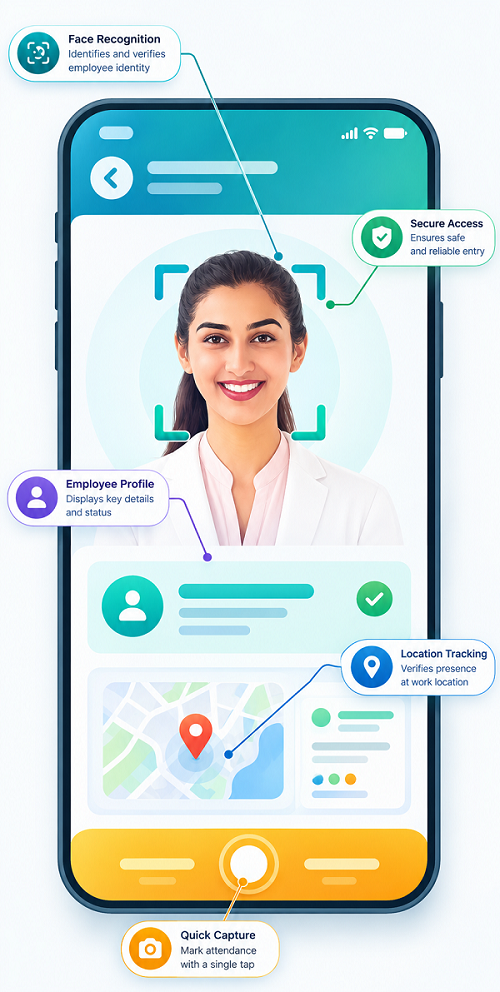
What Is Face Recognition Attendance?
Face recognition attendance is an automated attendance method that uses facial recognition technology to verify an employee before recording attendance.
Employees are first enrolled in the attendance system. During attendance marking, the system captures or analyzes an image of the employee's face and compares it with the authorized facial profile.
If the identity is successfully verified, attendance can be recorded.
The basic process is:
Employee → Face Capture → Identity Verification → Attendance Recorded
The exact verification process depends on the technology and configuration used by the organization.
How Does Face Recognition Prevent Proxy Attendance?
The main advantage of face recognition attendance is that it links an attendance event to a verified person rather than simply to a card, PIN, or shared login.
1. Identifies the Actual Employee
With card- or PIN-based systems, employees may be able to share credentials. Face recognition adds an identity-verification step. The employee's face needs to match the authorized profile before attendance is accepted.
For example:
Employee A's Profile → Employee A's Face → Attendance Recorded
If Employee B attempts to mark attendance using Employee A's credentials, the facial verification may reject the attempt.
2. Reduces Credential Sharing
Passwords, PINs, access cards, and attendance IDs can potentially be shared. Facial verification makes simple credential sharing less useful because the person physically marking attendance still needs to pass the identity check.
3. Makes Attendance More Individualized
Each employee can have a unique facial profile within the attendance system. This creates a direct relationship between:
Employee Profile → Facial Identity → Attendance Record
This can make attendance records more reliable than systems that depend entirely on manually entered information.
4. Reduces Manual Attendance Manipulation
Paper attendance registers depend heavily on employees or supervisors entering information correctly. A digital face attendance system can automatically create attendance records after successful verification, reducing opportunities for employees to manipulate attendance manually.
5. Provides Digital Attendance Records
Face recognition systems can maintain digital attendance records containing information such as:
- Employee
- Date
- Time
- Attendance event
- Location or device, where supported
- Check-in/check-out status
These records can provide managers with better visibility into attendance patterns.
6. Helps Identify Unauthorized Attempts
Depending on the system, unsuccessful verification attempts or attendance exceptions may be logged. For example, if an employee repeatedly attempts to record attendance using an unauthorized identity, the organization may be able to review the event. This can help HR teams investigate unusual attendance activity.
Face Recognition vs. Traditional Attendance Methods
| Feature | Manual Register | Attendance Card | PIN-Based System | Face Recognition |
|---|---|---|---|---|
| Identity verification | Low | Limited | Limited | Stronger |
| Credential sharing risk | High | Possible | Possible | Reduced |
| Manual entry | Yes | No | No | No |
| Digital records | Usually no | Yes | Yes | Yes |
| Proxy attendance prevention | Low | Moderate | Moderate | Higher potential |
| Attendance automation | Low | High | High | High |
No attendance technology is completely immune to misuse, but identity verification can significantly reduce common forms of proxy attendance when properly implemented.
How Face Recognition Attendance Works
A typical face attendance system follows these steps.
Step 1: Employee Enrollment
The employee's facial profile is registered in the attendance system. The organization should collect and process biometric information responsibly and according to applicable privacy requirements.
Step 2: Face Detection
When the employee attempts to record attendance, the system detects the face using a compatible camera or device.
Step 3: Face Verification
The captured facial information is compared with the employee profiles authorized for attendance.
Step 4: Attendance Recording
After successful verification, the system records the attendance event.
Step 5: Attendance Data Processing
The attendance record can be used for working-hour calculations, shift management, leave processing, reporting, and payroll workflows depending on the system.
Example of Preventing Proxy Attendance
Suppose a company uses employee cards to record attendance. Employee A gives their card to Employee B. Employee B enters the workplace and uses Employee A's card to mark attendance. The system may record Employee A as Present even though Employee A was not physically present.
With face recognition attendance, Employee B's face would need to match Employee A's authorized profile. If the face does not match, the attendance event can be rejected. This helps reduce a common form of proxy attendance.
Benefits of Face Recognition for Attendance Management
- Improved Attendance Accuracy: Facial verification can help ensure that attendance records correspond to the person attempting to check in.
- Reduced Proxy Attendance: It makes it more difficult for employees to use another person's credentials to record attendance.
- Faster Attendance Processing: Employees can record attendance quickly without searching for cards or entering PINs.
- Reduced Administrative Work: Automated attendance records reduce the need for HR teams to manually maintain registers.
- Better Attendance Visibility: Managers can view attendance information through digital dashboards and reports, depending on the software.
- Integration With Payroll: Attendance data can be connected with leave, working hours, overtime, and payroll systems where supported.
- Better Workforce Monitoring: Businesses can analyze attendance patterns and identify repeated late arrivals, absences, or other exceptions.
Where Can Face Recognition Attendance Be Used?
Face recognition attendance can be useful across different industries.
- Manufacturing: Factories can use face attendance to manage large workforces across multiple shifts and production areas.
- Offices: Businesses can use facial verification for employee check-in and check-out.
- Retail: Retail chains can use face attendance to manage employees across different stores.
- Hospitals: Hospitals can use attendance systems to manage staff working across day, evening, and night shifts.
- Security Agencies: Security companies can use attendance technology to help record employee attendance at authorized locations, subject to the organization's operational and privacy policies.
- Educational Institutions: Schools and other institutions can use identity-based attendance systems for staff attendance where appropriate.
Face Recognition and Shift Management
Face recognition attendance becomes especially useful when combined with shift management software.
For example:
Shift Roster → Assigned Shift → Face Verification → Attendance → Working Hours → Overtime → Payroll
Suppose an employee is assigned to a night shift from 10 PM to 6 AM. The employee can record attendance through the face recognition system at the beginning and end of the assigned shift. The attendance data can then be compared with the employee's roster.
This can help managers identify:
- Late arrivals
- Early departures
- Absences
- Missing punches
- Unscheduled attendance
- Overtime
How Face Attendance Helps HR Teams
Face recognition can reduce some repetitive attendance-related tasks for HR departments. Instead of manually checking whether employees have signed attendance registers correctly, HR teams can review digital attendance records.
HR managers can focus more on exceptions such as:
- Missing attendance
- Repeated late arrivals
- Unusual attendance patterns
- Shift mismatches
- Overtime
- Leave-related attendance issues
Best Practices for Using Face Recognition Attendance
Businesses should implement face attendance carefully.
- Use Clear Enrollment Procedures: Employees should be properly enrolled so that the system can reliably verify authorized users.
- Maintain Accurate Employee Profiles: Employee records should be updated when required, especially after changes to employment status or organizational structure.
- Define Attendance Rules: Clearly explain check-in, check-out, late arrival, early departure, shift, and attendance correction procedures.
- Provide Alternative Procedures: Businesses should have a process for exceptional situations, such as device failure or legitimate verification difficulties.
- Protect Biometric Information: Facial data is sensitive information. Organizations should apply appropriate security, access controls, retention practices, and privacy measures and comply with applicable laws and internal policies.
- Inform Employees: Employees should understand how the system works, what information is collected, why it is collected, and how it is used, subject to applicable requirements.
Limitations of Face Recognition Attendance
Face recognition is useful, but it should not be treated as a perfect solution. Performance can be affected by:
- Poor lighting
- Camera quality
- Device problems
- Changes in appearance
- Incorrect enrollment
- Network connectivity
- Software configuration
- Environmental conditions
Businesses should therefore maintain appropriate exception-handling procedures.
Face Recognition Attendance and Payroll
Attendance accuracy has a direct impact on payroll processing. Incorrect attendance can affect:
Working Hours → Leave → Overtime → Salary Calculation
For example, if proxy attendance results in an employee being incorrectly marked present, payroll records may also be affected. By creating more reliable attendance records, face recognition technology can help provide better input for payroll processing. However, payroll calculations should always follow the organization's approved policies and applicable employment requirements.
Conclusion
Face recognition attendance helps prevent proxy attendance by adding identity verification to the attendance process. Unlike cards, PINs, or passwords that can potentially be shared, facial verification requires the person recording attendance to match an authorized employee profile.
It can help businesses reduce proxy attendance, improve attendance accuracy, automate record keeping, and connect attendance data with shift management, leave, overtime, and payroll processes.
For organizations with large workforces, multiple shifts, or multiple locations, face recognition attendance can be an effective component of a broader workforce management system. However, successful implementation requires more than facial recognition technology. Businesses should also establish clear attendance policies, maintain secure systems, provide exception procedures, and handle employee biometric information responsibly.
Proxy attendance is reduced when InnBuilt Face Recognition Attendance Software verifies each employee’s identity before accepting a check-in. Time-stamped records and real-time exception visibility make attendance more trustworthy and auditable.