How GPS Alerts Help Businesses Monitor Field Employees
How GPS Alerts Help Businesses Monitor Field Employees
Managing field employees can be challenging because they may spend most of their working day away from the office. Sales representatives, service technicians, delivery teams, construction workers, maintenance staff, and other mobile employees often move between customers, project sites, and different work locations.
Traditional attendance systems may not provide enough visibility into field activities. Managers may need to depend on phone calls, manual reports, spreadsheets, or messages to understand where employees are working.
GPS alerts can help businesses improve visibility by notifying managers when specific location-related events occur. Instead of continuously checking a map, managers can receive alerts based on predefined rules, such as an employee arriving at an approved location, leaving a work area, entering a geo-fenced site, or attempting to mark attendance from an unexpected location.
When combined with mobile attendance, geo-fencing, task management, and workforce scheduling, GPS alerts can become an important part of field employee management.
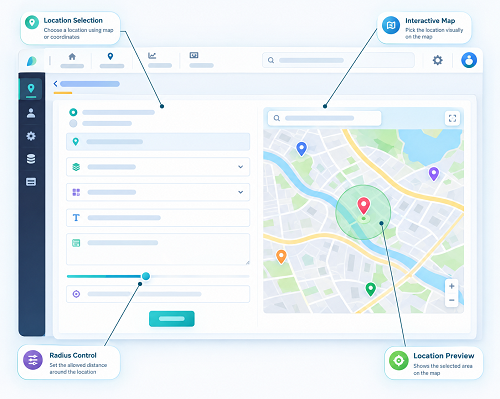
What Are GPS Alerts?
GPS alerts are automated notifications triggered by location-related events involving an employee's mobile device.
Depending on the software and company configuration, alerts may be generated when an employee:
- Enters an approved work area
- Leaves a designated location
- Arrives at a customer site
- Checks in from a location
- Checks out from a location
- Moves outside a defined geo-fence
- Reaches a project site
- Misses a location-based activity
- Triggers a configured location exception
The purpose is not simply to track employees. The main objective is to provide managers with useful information about field activities and attendance when location information is relevant to the job.
How GPS Alerts Work
GPS alerts generally work through a combination of a mobile application, location services, predefined rules, and a management dashboard.
A typical workflow is:
Employee Mobile App → Location Information → Rule Check → GPS Alert → Manager Notification
For example, a service company may assign a technician to a customer location.
The business can configure a location-based rule around the site. When the technician reaches the designated area, the system may generate an arrival notification.
Similarly, if the employee leaves the location unexpectedly, a departure alert may be generated if the business has configured such a rule.
Example of GPS Alerts for a Field Employee
Consider a sales representative who has three customer visits scheduled for the day.
Morning
The employee travels to Customer A.
Employee reaches Customer A → Location detected → Arrival alert → Manager dashboard updated
Afternoon
The employee moves to Customer B.
Customer A visit completed → Employee leaves location → Next location reached → Alert generated
This provides managers with a clearer picture of scheduled field activities without requiring constant phone calls.
1. Improves Field Employee Visibility
One of the biggest benefits of GPS alerts is improved visibility into field operations.
Managers can receive notifications about important location events rather than repeatedly asking employees for updates.
This can help answer questions such as:
- Has the employee reached the assigned site?
- Has the employee left the location?
- Did the employee check in?
- Is the employee at the expected work location?
- Has the employee moved outside an approved area?
This information can help managers coordinate field operations more efficiently.
2. Helps Monitor Customer Visits
Sales and service teams often need to visit customers throughout the day.
GPS alerts can support customer-visit workflows by notifying managers when employees reach approved customer locations, where appropriate.
For example:
Scheduled Customer Visit → Employee Travels → Arrival → GPS Alert → Visit Activity → Departure
This can provide additional context for customer-visit management.
Businesses should configure location collection around legitimate work activities rather than unnecessarily monitoring employees outside working requirements.
3. Supports Geo-fenced Work Locations
GPS alerts can work together with geo-fencing.
A business can create a virtual boundary around a:
- Factory
- Office
- Construction site
- Customer location
- Warehouse
- Retail store
- Project site
When an employee enters or leaves the defined area, the software can generate an alert if the relevant rule is enabled.
This provides a practical way to combine location information with workplace rules.
4. Helps Manage Construction Employees
Construction companies may have employees working at multiple project sites.
Managers may not always be physically present at every site.
GPS alerts can provide notifications related to configured project locations.
For example:
Employee assigned to Project A → Employee arrives at Project A → Location verified → Arrival alert generated → Manager receives notification
This can help managers maintain visibility across distributed project teams.
5. Supports Service Technicians
Service businesses often send technicians to different customer locations.
GPS alerts can help managers understand whether technicians have reached their assigned locations.
For example:
Service Ticket → Technician Assigned → Customer Location → Arrival Alert → Service Task → Completion
This can connect location events with task management.
Managers can use the information to coordinate schedules and respond when appointments change.
6. Improves Attendance Monitoring
GPS alerts can also support employee attendance management.
For example, a business may configure rules around employee check-ins.
The workflow could be:
Employee Arrives → Opens Attendance App → GPS Location Check → Geo-fence Verification → Check-In → Alert/Record
This can provide managers with additional information about attendance events.
GPS alerts should complement attendance policies rather than replace proper attendance review procedures.
7. Helps Identify Location Exceptions
Field work does not always go according to plan.
An employee may be redirected to another customer, assigned to an emergency job, or required to visit an alternative project location.
Location alerts can help managers identify situations that require attention.
For example:
Expected Location: Customer A
Actual Location: Customer B
Alert: Location exception
The manager can then contact the employee or review the assignment.
A location alert should generally be treated as a signal for review rather than automatically interpreted as employee misconduct.
8. Supports Better Route and Schedule Management
Businesses with employees visiting several locations can use location information alongside schedules and tasks.
For example:
Employee Schedule:
9:00 AM → Customer A
11:00 AM → Customer B
2:00 PM → Customer C
Location alerts can provide managers with useful updates as the employee moves between scheduled activities.
This can help identify scheduling delays and allow managers to make adjustments when necessary.
9. Helps Reduce Manual Follow-Ups
Without automated alerts, managers may need to repeatedly call or message field employees for updates.
GPS alerts can automate notifications for predefined events.
Instead of:
Manager → Calls Employee → Requests Status → Waits for Response
the workflow can become:
Location Event → Rule Triggered → Alert Generated → Manager Notified
This can save time for both managers and employees.
10. Supports Faster Operational Decisions
Real-time or event-based location information can help managers respond to operational issues more quickly.
For example, if a technician has not reached a scheduled location within the expected time, the manager may review the situation and contact the employee.
Similarly, if a field employee arrives earlier than expected, the manager may be able to adjust the day's schedule.
The usefulness of GPS alerts depends on the accuracy of the location information, alert configuration, network connectivity, and software capabilities.
Types of GPS Alerts Businesses Can Use
Different businesses may configure different types of alerts.
Arrival Alerts
Notify managers when an employee reaches an approved location.
Departure Alerts
Notify managers when an employee leaves a configured area.
Geo-fence Alerts
Notify managers when an employee enters or exits a defined geo-fence.
Attendance Alerts
Notify managers about configured attendance events.
Location Exception Alerts
Identify situations where an employee's location differs from an expected work location.
Task Location Alerts
Connect location events with assigned jobs or tasks.
Schedule Alerts
Provide notifications when location events may indicate a delay or schedule issue.
The exact alert types available depend on the software solution.
GPS Alerts and Employee Attendance
GPS alerts can become more useful when integrated with attendance management.
For example:
Employee Reaches Workplace → GPS Location Verified → Geo-fence Checked → Employee Marks Attendance → Attendance Recorded → Manager Dashboard Updated
This can help businesses manage field attendance and location-based work more efficiently.
GPS Alerts and Face Attendance
Businesses that use mobile face attendance can combine identity verification with location-based checks.
For example:
Face Verification + GPS Location + Geo-fence + Time = Attendance Event
Face recognition can help verify the employee's identity.
GPS can provide location information.
Geo-fencing can determine whether the employee is within an approved area.
Alerts can notify managers about configured events or exceptions.
This combination can provide multiple layers of attendance verification.
GPS Alerts for Sales Teams
Sales representatives often visit several customers, dealers, distributors, or prospects during the working day.
GPS alerts can help businesses manage location-related field activities.
For example:
Sales Employee → Customer Location → Check-In → Visit Activity → Check-Out → Next Customer
Managers can use configured alerts to gain visibility into important events.
This can help with:
- Customer visit management
- Territory management
- Daily schedules
- Attendance
- Task completion
- Field activity reporting
GPS Alerts for Remote and Mobile Employees
Some employees may work from different approved locations rather than a single office.
GPS alerts can help organizations manage location-related activities when location verification is genuinely required.
For example, employees working across multiple branches or project locations can be assigned different approved workplaces.
The system can use location rules appropriate to each assignment.
GPS Alerts and Task Management
GPS alerts become even more useful when combined with jobs and tasks management.
For example:
Job Assigned → Employee Travels → Reaches Location → GPS Alert → Task Started → Task Completed
This creates a connection between employee movement and assigned work.
For service businesses, this can help managers understand whether employees have reached assigned jobs and whether work activities are progressing as planned.
GPS Alerts vs Continuous GPS Tracking
GPS alerts do not necessarily mean that an organization needs to continuously monitor an employee's location.
There is an important distinction:
| GPS Alerts | Continuous Tracking |
|---|---|
| Triggered by predefined events | Continuously or frequently collects location |
| Focuses on important location events | Provides ongoing location visibility |
| Can reduce unnecessary monitoring | May collect more location information |
| Useful for attendance and work events | Useful for specific operational requirements |
| Can be configured around work activities | Requires stronger privacy considerations |
Businesses should choose the least intrusive approach that meets their legitimate operational requirements.
Employee Privacy and GPS Alerts
Employee location information can be sensitive from a workplace privacy perspective.
Businesses should establish clear policies covering:
- Why GPS information is collected
- When location information is checked
- What alerts are generated
- Who receives the alerts
- How location information is stored
- How long records are retained
- Who can access location data
Employees should be informed about the system and its purpose.
Businesses should avoid unnecessary location monitoring outside working hours and should collect only the information needed for legitimate business purposes.
Applicable privacy and employment requirements should also be considered.
GPS Accuracy and Alert Reliability
GPS alerts depend on location information from mobile devices, so alerts may not always be perfectly accurate.
Accuracy can be affected by:
- Indoor environments
- Buildings
- GPS signal availability
- Device hardware
- Location permissions
- Mobile network conditions
- Battery-saving settings
- Environmental conditions
Businesses should therefore provide an exception or review process for inaccurate or unexpected alerts.
For example, an employee working inside a large building may appear slightly outside a configured geo-fence even though they are physically at the workplace.
Best Practices for Using GPS Alerts
Businesses can improve the effectiveness of GPS alerts by following these practices:
1. Define Clear Use Cases
Decide exactly which business problems GPS alerts should solve.
2. Create Relevant Alerts
Avoid generating notifications for every minor movement. Focus on events that require management attention.
3. Use Practical Geo-fences
Set boundaries that account for the size and physical characteristics of the workplace.
4. Assign Employees Correctly
Ensure employees are associated with the correct project, customer, territory, or workplace.
5. Avoid Alert Overload
Too many notifications can make important alerts difficult to identify.
6. Create an Exception Process
Give employees and managers a way to handle legitimate location discrepancies.
7. Protect Location Information
Use access controls and appropriate security measures to protect employee location data.
8. Inform Employees
Clearly explain how GPS alerts work and when location information is collected.
9. Review Alert Rules
Regularly check whether alert rules remain relevant as business operations change.
10. Integrate With Other HR Tools
Where appropriate, connect GPS alerts with:
- Attendance
- Geo-fencing
- Shift management
- Jobs and tasks
- Leave
- Working hours
- Payroll
- Employee records
A Complete Field Employee Monitoring Workflow
A modern field workforce management process can look like this:
Employee Mobile App → Employee Identity → GPS Location → Geo-fence / Location Rule → Attendance or Task Event → GPS Alert → Manager Dashboard → Task and Schedule Updates → Reports
This allows businesses to manage field operations through a centralized digital system.
Conclusion
GPS alerts can help businesses monitor important field employee location events without requiring managers to manually check every employee's status. By configuring alerts around attendance, geo-fences, customer visits, project sites, tasks, and other legitimate work activities, businesses can improve visibility across mobile workforces.
The technology can be particularly useful for sales teams, service technicians, construction employees, delivery teams, maintenance workers, and other field employees.
However, GPS alerts should be implemented responsibly. Businesses should use practical alert rules, account for GPS accuracy limitations, provide exception processes, protect location information, and clearly communicate how employee location data is used.
When integrated with GPS attendance, geo-fencing, mobile attendance, shift management, task management, and payroll, GPS alerts can become a valuable part of a modern field employee management system.
InnBuilt Field Management Software uses configurable GPS alerts to notify managers about relevant field events, such as employees entering or leaving assigned work areas. Teams can respond faster without repeatedly calling employees for location updates.