How Live Tracking Software Helps Businesses Monitor Field Employees
How Live Tracking Software Helps Businesses Monitor Field Employees
Managing field employees can be challenging because they spend much of their working day away from the office. Sales representatives, service technicians, delivery teams, construction workers, maintenance staff, and other mobile employees may work across different customer locations and project sites.
Traditional methods such as phone calls, spreadsheets, manual reports, and paper attendance registers can make it difficult for managers to understand field operations in real time.
Live tracking software provides businesses with digital tools to monitor authorized field workforce activity, manage schedules, record location-based attendance, and coordinate employees across different locations.
When implemented with clear policies and appropriate privacy safeguards, live tracking can improve operational visibility and reduce manual workforce management.
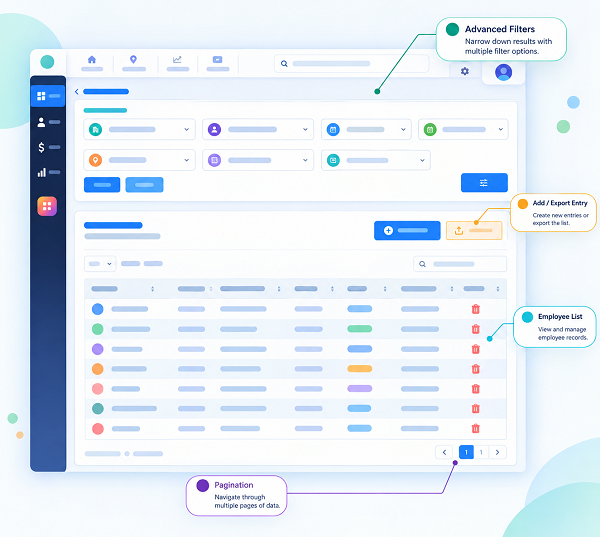
What Is Live Tracking Software?
Live tracking software is a workforce management solution that uses technologies such as GPS, mobile applications, and location services to provide authorized users with employee location information in real time or near real time.
Depending on the software, managers may be able to view:
- Current or recent employee location
- Attendance location
- Check-in and check-out times
- Assigned work locations
- Customer or project locations
- Route information
- Geofence status
- Working status
- Location history
- Shift information
The available features and tracking frequency depend on the software, device, configuration, and organizational policy.
For field employees, live tracking can provide managers with better visibility without requiring employees to constantly call or message their location.
Why Businesses Need Live Tracking for Field Employees
Field employees often work independently and travel between different locations.
Managers may face questions such as:
- Has the employee reached the customer location?
- Which employee is available nearby?
- Did the employee check in at the assigned site?
- Is the employee working according to the scheduled shift?
- Which employees are currently assigned to different locations?
- How can an urgent field assignment be allocated?
Live tracking software can provide relevant location information through a centralized dashboard, helping managers make operational decisions more efficiently.
How Live Tracking Software Helps Monitor Field Employees
1. Provides Location Visibility
One of the primary benefits of live tracking software is location visibility.
Authorized managers can view available location information for field employees through a centralized dashboard.
This can be useful when employees are distributed across:
- Customer locations
- Construction sites
- Service areas
- Project sites
- Branches
- Warehouses
- Delivery locations
Instead of relying entirely on phone calls, managers can use the software to access relevant workforce location information.
2. Supports GPS-Based Attendance
Field employees may not have access to a traditional biometric attendance machine.
A mobile attendance application can allow employees to record attendance from an authorized work location.
A typical process may be:
Employee Opens App → Attendance Check-In → GPS Location Captured → Attendance Recorded
This can provide additional context about where the employee recorded attendance.
Businesses should clearly define their attendance and location policies and inform employees about how the system works.
3. Helps Verify Work Locations
Some businesses require employees to work at specific customer or project locations.
GPS and geofencing features can help businesses verify whether an attendance event occurred within a configured location boundary.
For example, a construction company may create a designated work area around a project site.
When an employee checks in, the system can compare the recorded location with the configured site.
This can help managers maintain more structured field attendance records.
4. Helps Managers Coordinate Field Teams
Field employees may be working at different locations throughout the day.
Live tracking can provide managers with a broader view of field workforce distribution.
For example, a service manager may need to assign an urgent customer request.
If the system provides suitable location information, the manager can identify an appropriate employee based on factors such as:
- Current location
- Availability
- Skills
- Shift
- Assigned workload
- Customer location
This can support faster workforce coordination.
5. Reduces Manual Location Reporting
Without a tracking system, field employees may have to report their location through phone calls, messages, or manual forms.
This creates additional administrative work for both employees and managers.
Live tracking software can automate the collection of relevant location information during authorized work periods.
This reduces repetitive reporting and allows managers to focus on operational activities.
6. Improves Field Schedule Management
Live tracking becomes more useful when combined with employee scheduling and shift management software.
For example:
Employee Shift → Assigned Location → Check-In → Location Information → Work Assignment → Check-Out
Managers can compare the employee's assigned schedule with available attendance and location information.
This can help identify schedule deviations and operational issues.
7. Helps Manage Multiple Customer Visits
Sales representatives and service technicians may visit multiple customers during one working day.
Tracking software can help businesses maintain a digital record of field movements where the feature is enabled and appropriate.
This can be useful for organizations that need to coordinate customer visits or service assignments.
8. Helps Identify Attendance Exceptions
Live tracking can complement attendance management by providing location information associated with attendance events.
Managers may be able to identify:
- Attendance from an unexpected location
- Missing check-ins
- Late check-ins
- Early check-outs
- Location-related exceptions
These records can then be reviewed according to company policies.
Location information should be treated as supporting information rather than automatically assuming misconduct based on a location discrepancy.
9. Supports Remote Workforce Management
Some employees may work partly from home, partly from customer locations, or across different company sites.
Mobile workforce software can provide a common platform for managing attendance and schedules across different work arrangements.
This can make workforce management more flexible for organizations with distributed teams.
10. Helps Track Field Workforce Availability
Managers often need to know which employees are available for new assignments.
A workforce management system can combine information about:
- Employee schedule
- Attendance
- Current assignment
- Location
- Availability
This can help managers make better decisions when allocating field work.
Live Tracking for Different Types of Field Employees
Sales Employees
Sales representatives may visit several customers during a working day. Live tracking can support location-based attendance and help managers coordinate customer visits.
Service Technicians
Technicians may travel to different customer sites for installation, repair, or maintenance work. Location information can help managers coordinate assignments and understand field workforce availability.
Construction Employees
Construction companies may have employees distributed across multiple project sites. GPS-enabled attendance and location features can help managers organize workforce information by site.
Delivery Teams
Delivery employees work across different routes and customer locations. Location information can support operational coordination where appropriate.
Maintenance Teams
Maintenance employees may be assigned to different facilities or customer locations. Managers can use workforce location information to coordinate service assignments.
Security Staff
Security agencies may deploy employees across multiple client locations. Mobile attendance and location-based features can help organizations manage distributed employees.
Live Tracking and Geofencing
Geofencing is a feature that creates a virtual boundary around a specific geographical area.
For example, a company may create geofences around:
- Office locations
- Construction sites
- Customer locations
- Warehouses
- Branches
- Project sites
When an employee records attendance, the software may determine whether the recorded location falls within the configured area.
Geofencing can help businesses implement location-based attendance rules without requiring employees to manually enter their work location.
Live Tracking and Face Attendance
Live tracking can also work alongside face attendance software.
For example:
Face Verification + GPS + Time + Employee ID
An employee may use a mobile application to verify their identity through facial recognition and record attendance along with location information.
This can provide an additional layer of identity and location verification for field attendance.
However, businesses should consider biometric privacy, data security, employee consent or other applicable legal requirements, and appropriate use policies before implementing such systems.
Live Tracking and Shift Management
Field employees may work different shifts depending on customer requirements and business operations.
For example:
| Employee | Shift | Location |
|---|---|---|
| Technician A | 8:00 AM – 5:00 PM | Customer Site A |
| Technician B | 9:00 AM – 6:00 PM | Project Site B |
| Technician C | 10:00 AM – 7:00 PM | Customer Site C |
A shift management system can assign employees to these schedules.
Live tracking and attendance can then provide relevant information about the employee's field activity during the authorized work period.
This creates a connected process:
Shift Scheduling → Field Assignment → Attendance → Location → Working Hours
Live Tracking and Payroll Management
Live tracking itself does not calculate employee salaries.
However, it can complement attendance and working-hour systems.
For example:
Scheduled Shift → Mobile Attendance → Working Hours → Overtime → Payroll
If an employee works beyond the scheduled shift, attendance records can help identify the additional working time.
Approved attendance and overtime information can then be used in payroll processing according to company policies.
Businesses should avoid using location data alone as the basis for salary deductions or disciplinary decisions without appropriate review and policy support.
Benefits of Live Tracking Software for Businesses
Live tracking can provide several operational benefits:
Better Workforce Visibility
Managers can access relevant field workforce location information from a centralized dashboard.
Improved Coordination
Employees can be assigned based on availability, location, skills, and work requirements.
Reduced Manual Reporting
Automated location and attendance records can reduce repetitive administrative tasks.
Better Field Attendance
GPS-enabled attendance can provide location information for mobile employees.
Improved Schedule Management
Managers can compare assigned schedules with available attendance and location information.
Faster Response
Managers can respond more efficiently to changing field requirements when appropriate location information is available.
Centralized Reporting
HR and operations teams can manage workforce information through a single platform.
Privacy and Responsible Employee Tracking
Employee location information can be sensitive. Businesses should therefore implement live tracking carefully.
Define the Purpose
Clearly explain why employee tracking is being introduced.
Limit Tracking to Appropriate Work Periods
Businesses should clearly define when location tracking is active and avoid unnecessary tracking outside authorized working periods.
Inform Employees
Employees should understand what information is collected, when it is collected, and how it will be used.
Protect Location Data
Access to location information should be restricted to authorized personnel.
Establish Retention Rules
Businesses should define how long location records are retained and securely dispose of information when it is no longer required, subject to applicable requirements.
Follow Applicable Requirements
Organizations should review relevant privacy, employment, and data-protection requirements before implementing employee tracking.
Best Practices for Using Live Tracking Software
Businesses can improve the effectiveness of live tracking by following these practices:
- Create a clear employee tracking policy.
- Explain the purpose of tracking to employees.
- Define when tracking is active.
- Collect only necessary location information.
- Limit access to authorized managers.
- Integrate tracking with attendance and shift management.
- Use geofencing only where operationally necessary.
- Protect employee location information.
- Review location exceptions before taking action.
- Regularly evaluate whether tracking remains necessary.
Example: Live Tracking for a Field Service Company
Consider a company with 50 service technicians working across several cities.
Each morning, managers assign technicians to customer locations.
The technician receives the assignment through a mobile application.
At the beginning of the workday:
- Technician views assigned shift.
- The technician travels to the customer location.
- Technicians record attendance through the mobile app.
- GPS information is captured according to company policy.
- The manager can view relevant workforce information.
- Customer service requests can be assigned based on available workforce information.
- The technician completes the assigned work.
- Attendance and working-hour information is used for workforce reporting and, where integrated, payroll processing.
This approach can reduce the need for manual location reporting and provide managers with better operational visibility.
How to Choose Live Tracking Software
Before selecting a solution, businesses should evaluate:
GPS and Location Features
Check how location data is captured and how frequently it is updated.
Mobile Application
Ensure the application works reliably on the smartphones used by field employees.
Attendance Integration
Check whether GPS-based attendance is supported.
Geofencing
Determine whether the software supports location boundaries if required.
Shift Management
Look for features for creating schedules, assigning shifts, and managing changes.
Employee Self-Service
Employees should be able to view their schedules and attendance information through a mobile application or portal where available.
Reporting
Check whether the software provides useful attendance, location, working-hour, and workforce reports.
Security and Privacy
Understand how location information is protected, accessed, and retained.
Payroll Integration
If required, check whether attendance and working-hour information can be integrated with payroll software.
Conclusion
Live tracking software can help businesses manage field employees by providing better visibility into authorized workforce location, attendance, schedules, and field operations.
It can support GPS attendance, geofencing, shift management, employee scheduling, field coordination, and workforce reporting.
For organizations with mobile employees, combining live tracking with attendance software, face attendance, shift management, employee mobile applications, and payroll systems can create a more connected workforce management process.
However, effective employee tracking is not simply about monitoring locations. Businesses should use the technology for a clear operational purpose, communicate transparently with employees, protect location data, and follow applicable privacy and employment requirements.
When implemented responsibly, live tracking can help businesses reduce manual reporting, improve field workforce coordination, strengthen attendance visibility, and manage distributed employees more efficiently.
Field teams can be monitored through InnBuilt Field Management Software with live location, route context, attendance check-ins, and manager dashboards. Deployment decisions become faster.