How Payroll Automation Helps Small and Medium Businesses
How Payroll Automation Helps Small and Medium Businesses
Payroll is an essential part of running any business, but for small and medium businesses, managing it manually can take significant time and effort. HR teams may need to calculate salaries, track attendance, process leave, manage overtime, calculate deductions, generate payslips, and maintain payroll records every month.
As employee numbers grow, managing these activities through spreadsheets and manual processes can become increasingly difficult. Payroll automation helps small and medium businesses simplify salary processing by automating repetitive payroll tasks and bringing employee payroll information into one system.
What Is Payroll Automation?
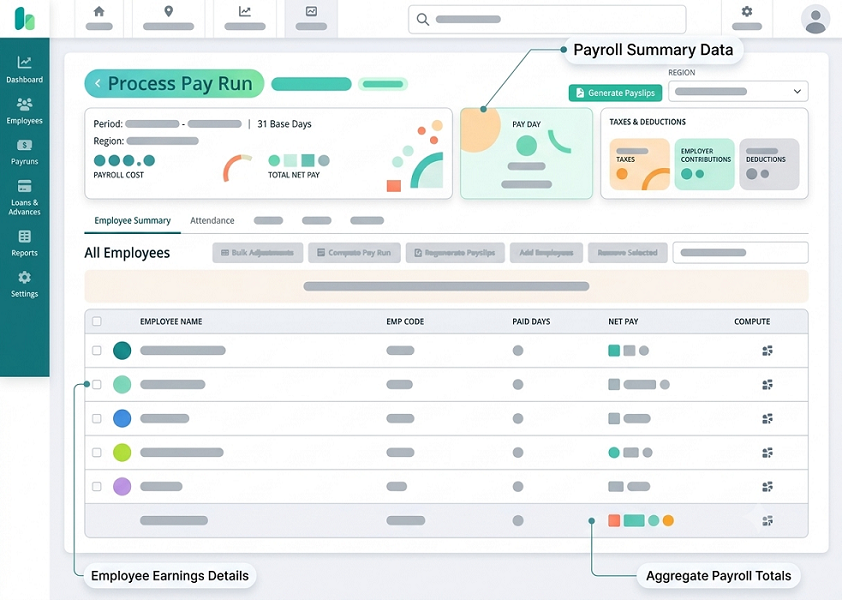
Payroll automation uses software to automate routine payroll activities based on employee information, salary structures, attendance, leave, deductions, and configured payroll rules.
Depending on the software, payroll automation can help businesses manage:
- Employee salary calculations
- Attendance and leave information
- Overtime calculations
- Salary deductions
- PF and ESI calculations
- Professional Tax
- Payslip generation
- Payroll reports
- Payroll approvals
- Payroll records
Instead of manually performing each step, businesses can use software to create a more structured payroll workflow.
Why Payroll Automation Matters for Small and Medium Businesses
Small and medium businesses often operate with limited HR and administrative resources. The same employees may handle recruitment, employee records, attendance, payroll, compliance, and other HR responsibilities.
Payroll automation can reduce the amount of time spent on repetitive administrative work and allow HR teams to focus on activities that contribute more directly to business operations.
1. Saves Time on Monthly Payroll Processing
Salary processing can involve numerous repetitive tasks. HR employees may need to collect attendance information, check leave records, calculate deductions, and prepare individual salary statements.
Payroll automation can process this information using predefined rules. This helps reduce the time required to complete monthly payroll activities.
2. Reduces Manual Data Entry
Maintaining employee information across multiple spreadsheets can result in repeated data entry.
Automated payroll software provides a centralized system for storing employee salary and payroll information. When payroll data is maintained in one place, HR teams can spend less time transferring information between different files.
3. Makes Salary Calculations Easier
Employees may have different salary structures, allowances, deductions, overtime, or attendance-related adjustments.
Payroll software can calculate salaries based on configured salary structures and applicable rules. This reduces the need for HR teams to manually perform calculations for each employee.
4. Connects Attendance With Payroll
Attendance information can directly affect salary calculations when employees have absences, overtime, late attendance, or shift-based schedules.
When attendance and payroll systems are integrated, relevant attendance information can be used during payroll processing. This helps reduce manual transfer of attendance data into payroll spreadsheets.
5. Simplifies Leave and Overtime Calculations
Small businesses may manage leave and overtime using spreadsheets or separate registers.
Payroll automation can use approved leave and overtime records during salary processing. This can reduce the time HR teams spend reviewing separate records before preparing payroll.
6. Helps Manage PF, ESI, and Professional Tax
Eligible employees may have statutory deductions such as Provident Fund, Employees' State Insurance, and Professional Tax, depending on applicable rules.
Payroll software can incorporate configured statutory rules into payroll calculations. This can help businesses calculate applicable deductions more consistently and maintain relevant payroll records.
Statutory rules should still be reviewed and updated when applicable laws, rates, thresholds, or state-specific requirements change.
7. Generates Payslips Automatically
Preparing payslips manually for every employee can be repetitive.
Automated payroll software can generate payslips after payroll processing. Employees may be able to access their payslips digitally, depending on the software's employee self-service features.
This reduces the administrative effort involved in creating and distributing individual salary statements.
8. Reduces Payroll Errors
Manual payroll calculations can result in mistakes caused by incorrect data entry, missed attendance adjustments, or calculation errors.
Automation applies configured rules consistently across payroll calculations. Although HR teams still need to review payroll data and configurations, automation can reduce errors associated with repetitive manual processes.
9. Helps Small HR Teams Do More
A small HR team may be responsible for several activities at the same time.
By automating routine payroll tasks, HR professionals can spend more time on:
- Recruitment
- Employee onboarding
- Employee engagement
- Performance management
- Training and development
- Workforce planning
- Employee support
This allows HR resources to be used more efficiently.
10. Supports Business Growth
Payroll processes that work for a small workforce may become difficult to manage as employee numbers increase.
With payroll automation, businesses can establish structured payroll processes from the beginning. Adding employees, managing salary structures, generating payslips, and processing payroll can become easier as the organization grows.
11. Simplifies Payroll Reporting
Business owners and HR teams may need reports related to salaries, deductions, attendance, overtime, and payroll costs.
Instead of preparing reports manually from multiple spreadsheets, payroll software can generate reports from centralized payroll data.
This can help management access payroll information more quickly for administrative and planning purposes.
12. Improves Payroll Data Organization
Payroll information can include employee salary details, deductions, payslips, attendance-related adjustments, and historical payroll records.
Maintaining this information in a centralized system makes it easier for authorized HR users to find and review payroll information when required.
13. Supports Multiple Locations
Some small and medium businesses operate from multiple branches or have employees working across different locations.
Payroll software can help businesses manage employee information centrally while applying appropriate salary and statutory configurations for different employees or locations, depending on the system's capabilities.
This can be particularly useful when businesses need to manage different Professional Tax rules across applicable states.
14. Provides Better Employee Self-Service
Employee self-service features can reduce routine HR queries.
Depending on the software, employees may be able to access:
- Payslips
- Salary details
- Attendance records
- Leave balances
- Payroll history
- Tax-related documents
Employees can obtain commonly requested information without contacting HR for every request.
15. Creates a More Consistent Payroll Process
Manual payroll can depend heavily on individual employees remembering each step of the process.
Payroll automation allows businesses to establish predefined workflows for salary processing, reviews, approvals, and reporting. This can create a more consistent monthly payroll process.
Manual Payroll vs Payroll Automation for SMBs
| Manual Payroll | Automated Payroll |
|---|---|
| Spreadsheet-based calculations | Software-based calculations |
| Repeated data entry | Centralized employee data |
| Manual attendance transfer | Attendance-payroll integration |
| Manual payslip preparation | Automated payslip generation |
| Time-consuming reporting | Faster report generation |
| Manual payroll workflows | Configurable approval workflows |
| Higher repetitive workload | Reduced administrative work |
| Difficult to scale | Designed to support growing teams |
What Should Small Businesses Look for in Payroll Software?
Before choosing payroll automation software, small and medium businesses should consider features such as:
Easy Employee Management
The system should make it simple to add, update, and manage employee information.
Attendance and Leave Integration
Integration with attendance and leave management can reduce duplicate data entry.
Statutory Payroll Support
Businesses should check whether the software supports applicable payroll requirements such as PF, ESI, Professional Tax, and other relevant deductions.
Payslip Generation
Automated payslips can reduce administrative work and improve employee access to salary information.
Payroll Reports
The software should provide reports useful for payroll review, accounting, and management.
Employee Self-Service
Employee access to payslips, attendance, and leave information can reduce routine HR queries.
Security and Access Control
Payroll contains sensitive employee information, so businesses should consider appropriate user permissions, access controls, and data-security features.
Scalability
The system should be able to support the organization's growing employee count and changing payroll requirements.
Is Payroll Automation Worth It for Small Businesses?
Payroll automation can be particularly useful when HR teams spend substantial time on repetitive payroll activities or when employee numbers and payroll complexity are increasing.
The value depends on factors such as workforce size, payroll complexity, existing processes, software costs, and the amount of administrative time currently spent on payroll.
For many growing businesses, automating repetitive payroll activities can help create a more efficient and organized payroll process.
Conclusion
Payroll automation helps small and medium businesses save time, reduce repetitive HR work, improve payroll organization, and simplify salary processing. By automating calculations, integrating attendance and leave, managing applicable statutory deductions, generating payslips, and providing payroll reports, businesses can reduce their dependence on manual spreadsheets.
As businesses grow, payroll automation can provide a structured foundation for managing salaries and employee payroll information. The right payroll system can help HR teams spend less time on repetitive administrative tasks and more time supporting employees and business growth.
Growing companies often struggle to manage complex payroll processes with limited administrative resources. Small and medium businesses use InnBuilt Payroll to minimize compliance risks, scale HR operations affordably, and ensure error-free salary management. The platform provides enterprise-level efficiency tailored specifically to fit SMB operational budgets.
Frequently Asked Questions
1. Is payroll automation suitable for small businesses?
Yes. Small businesses can use payroll automation to simplify salary calculations, attendance-related payroll processing, payslip generation, deductions, and payroll reporting.
2. How does payroll software reduce HR workload?
It automates repetitive tasks such as salary calculations, deductions, attendance integration, payslip generation, reporting, and payroll workflows.
3. Can small businesses automate PF, ESI, and Professional Tax?
Payroll software can support applicable PF, ESI, and Professional Tax calculations when the relevant rules and employee eligibility are correctly configured.
4. Can payroll software integrate attendance and leave?
Many payroll systems provide attendance and leave integration, allowing relevant records to be used during salary processing.
5. Does payroll automation eliminate manual HR work?
No. Automation reduces repetitive administrative work, but HR teams still need to manage employee data, review payroll, handle exceptions, update configurations, and oversee payroll processes.
6. Can payroll automation support business growth?
Yes. A centralized automated payroll process can make it easier to manage increasing employee numbers, salary structures, payroll records, and reporting requirements.