How Payroll Automation Saves HR Teams Time
How Payroll Automation Saves HR Teams Time
Payroll processing is one of the most repetitive responsibilities handled by HR and payroll teams. Every month, HR professionals may need to collect attendance, verify leave, calculate salaries, process deductions, prepare payslips, generate reports, and respond to employee payroll queries.
When these activities are managed manually using spreadsheets and separate records, they can consume significant time. Payroll Automation helps reduce repetitive administrative work by using software to automate calculations, data processing, approvals, reporting, and other payroll activities.
This article explains how payroll automation can save HR teams time and make payroll processing more efficient.
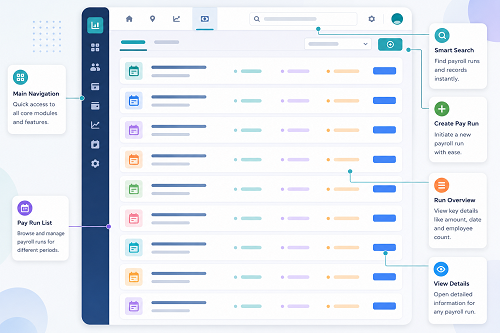
What Is Payroll Automation?
Payroll automation means using software to perform recurring payroll tasks with minimal manual intervention.
A typical automated workflow is:
Employee Data → Attendance & Leave → Salary Calculation → Deductions → Payroll Validation → Payslip → Reports
Instead of manually calculating and transferring information between multiple spreadsheets, HR teams can manage payroll through a centralized system.
Why Does Manual Payroll Take So Much Time?
Manual payroll can involve many repetitive tasks, including:
- Collecting attendance data
- Checking employee records
- Updating leave
- Calculating working days
- Calculating overtime
- Updating salary changes
- Calculating deductions
- Preparing payslips
- Creating payroll reports
- Answering employee queries
- Correcting payroll errors
When the number of employees increases, these tasks become increasingly time-consuming.
1. Automate Employee Data Management
Payroll software stores employee information in a centralized database.
HR teams can maintain details such as:
- Employee name
- Employee ID
- Department
- Designation
- Joining date
- Salary structure
- Bank details
- Statutory information
- Work location
Instead of entering the same information repeatedly, HR can maintain it in one place. This saves time and reduces duplicate data entry.
2. Automate Attendance Collection
Attendance is often an important payroll input. Instead of manually collecting attendance registers, HR can connect payroll with Attendance Management Software.
The workflow can be:
Employee Check-In/Check-Out → Attendance System → Payroll
The attendance system can provide information such as:
- Present days
- Absent days
- Paid leave
- Unpaid leave
- Working hours
- Overtime
- Late coming
- Early leaving
This can significantly reduce the time HR spends preparing payroll inputs.
3. Automatically Calculate Working Hours
Payroll automation can use attendance information to calculate working hours.
For example:
- Check-In: 9:00 AM
- Check-Out: 6:00 PM
- Break: 1 hour
- Net Working Hours: 8 hours
Instead of manually calculating these values for every employee, the attendance system can process them automatically according to configured rules.
4. Automate Leave Processing
Leave management can be connected to payroll. A typical process is:
Employee Applies for Leave → Manager Approves → Attendance Updated → Payroll Updated
This eliminates the need for HR to manually transfer approved leave information between different systems. It also helps ensure that payroll uses the latest approved leave information.
5. Automate Overtime Calculations
HR teams often spend time reviewing overtime records. Payroll automation can use approved attendance data to identify overtime according to configured company rules.
For example:
- Scheduled Working Time: 8 hours
- Net Working Time: 10 hours
- Potential Additional Time: 2 hours
After appropriate approval, the overtime information can be included in payroll. This eliminates the need to manually calculate overtime for every employee.
6. Reduce Manual Salary Calculations
Payroll software can automatically calculate salary based on configured salary structures.
For example:
| Component | Amount |
|---|---|
| Basic Salary | ₹25,000 |
| HRA | ₹10,000 |
| Other Allowances | ₹10,000 |
| Gross Salary | ₹45,000 |
The software can then calculate applicable deductions and arrive at net salary. This saves HR teams from repeatedly creating and checking formulas in spreadsheets.
7. Automate Payroll Deductions
Depending on the organization's requirements, payroll software can process configured deductions such as:
- Provident Fund
- ESI
- Professional Tax
- Income-tax/TDS
- Loan deductions
- Salary advances
- Other authorized deductions
The exact calculation depends on employee eligibility, salary structure, location, and applicable rules. Automation reduces repetitive calculations, but HR should still review payroll results and statutory settings.
8. Generate Payslips Automatically
Preparing payslips manually can consume considerable time, especially for large organizations. Payroll software can generate payslips after payroll is processed.
Employees may receive or access digital payslips containing:
- Employee information
- Pay period
- Earnings
- Deductions
- Gross salary
- Net salary
- Other configured payroll information
This eliminates the need for HR to prepare individual payslips manually.
9. Give Employees Self-Service Access
Many payroll questions are repetitive. Employees may ask:
- Where is my payslip?
- How many leave days do I have?
- What is my attendance status?
- Was my overtime approved?
- What deductions were made?
Employee self-service can allow employees to access relevant information themselves, including:
- Payslips
- Attendance
- Leave balances
- Overtime
- Payroll history
- Tax-related documents
This can reduce the volume of routine HR queries.
10. Automate Payroll Reports
HR and finance teams often need monthly payroll reports. Payroll software can generate reports such as:
- Salary register
- Payroll summary
- Department-wise payroll
- Employee-wise payroll
- Earnings report
- Deductions report
- Overtime report
- Attendance report
- Leave report
- Statutory reports
Instead of manually creating reports from spreadsheets, HR can generate them directly from the system.
11. Reduce Spreadsheet Management
Using multiple Excel files can create administrative work (e.g., Attendance.xlsx, Leave.xlsx, Overtime.xlsx, Salary.xlsx, Deductions.xlsx, Payslip.xlsx).
HR may need to compare and consolidate information from all these files. Payroll automation brings many of these processes into a centralized system.
12. Automate Payroll Workflows
Payroll processing often requires approvals. For example:
Attendance → HR Review → Payroll Processing → Manager/Finance Approval → Final Payroll
A digital workflow helps HR track the status of payroll activities, reducing the need to follow up through emails or messages.
13. Speed Up Payroll Reconciliation
Before payroll is finalized, HR teams need to identify discrepancies. Payroll automation makes it easier to compare:
- Employee count
- Salary totals
- Attendance
- Leave
- Overtime
- Deductions
- Payroll totals
Exception reports help HR focus on unusual records instead of checking every employee manually.
14. Simplify New Employee Processing
Adding new employees manually to multiple spreadsheets takes time. With payroll software, HR can create a centralized employee profile used across all relevant payroll processes. This simplifies onboarding and reduces duplicate data entry.
15. Simplify Salary Revision Management
Employees may receive salary increments, promotions, allowance changes, or role changes. Instead of updating several payroll sheets, HR updates the employee's salary structure in the payroll system, applying the new configuration automatically to the relevant payroll cycle.
16. Manage Employee Exits More Efficiently
When an employee leaves, HR may need to process final attendance, leave balance, salary, deductions, overtime, and full-and-final settlement inputs. A centralized payroll system organizes the relevant information and reduces manual reconciliation.
Example: Manual vs. Automated Payroll
Manual Process
Attendance Collection → Excel Consolidation → Leave Verification → Overtime Calculation → Salary Calculation → Deduction Calculation → Payslip Preparation → Payroll Reports
This process requires HR to perform many repetitive tasks manually.
Automated Process
Attendance & Employee Data → Payroll Software → Automated Calculations → HR Validation → Payslips & Reports
Automation allows HR to spend less time on repetitive calculations and more time reviewing exceptions and managing employees.
Time-Saving Benefits of Payroll Automation
| Payroll Activity | Manual Process | Automated Process |
|---|---|---|
| Employee data | Repeated entry | Centralized |
| Attendance | Manual collection | Integration |
| Working hours | Manual | Automated |
| Leave | Manual update | Integrated |
| Overtime | Manual calculation | Rule-based |
| Salary | Spreadsheet formulas | Automated |
| Deductions | Manual/formulas | Configured |
| Payslips | Manual | Automated |
| Reports | Manual | Generated |
| Employee queries | HR-dependent | Self-service |
How Much Time Can Payroll Automation Save?
The time saved depends on factors such as employee count, payroll complexity, number of locations, shifts, attendance requirements, salary components, and existing manual processes.
A company with 10 employees and simple salaries may save relatively little time. However, a company with hundreds of employees, multiple shifts, attendance integration, overtime, leave, and several salary components can save significant administrative time.
Payroll Automation Does Not Mean No Human Review
Automation should reduce repetitive work, not remove payroll controls. HR teams should still review new joiners, employee exits, salary revisions, unusual deductions, attendance exceptions, overtime, leave, statutory settings, and final payroll totals.
A good payroll process is: Automation + Validation + Approval
Best Practices for Payroll Automation
- Maintain accurate employee master data.
- Integrate attendance and payroll where appropriate.
- Configure salary structures correctly.
- Establish clear leave policies.
- Configure overtime rules.
- Review payroll exceptions before finalization.
- Set payroll cut-off dates.
- Maintain approval workflows.
- Provide employee self-service.
- Protect payroll data.
- Maintain audit trails.
- Regularly review payroll configurations.
- Keep statutory settings updated as required.
- Train HR and payroll users.
Choosing Payroll Software for HR Efficiency
Businesses should look for software that provides employee management, salary management, attendance integration, leave management, overtime management, automated salary calculation, statutory support, payslip generation, employee self-service, payroll reports, approval workflows, audit trails, role-based access, multi-location support, data security, and integration capabilities.
The best solution fits the organization's workforce, payroll process, budget, and future growth.
Conclusion
Payroll automation saves HR teams time by reducing repetitive manual work involved in attendance, leave, salary calculations, deductions, payslip generation, reporting, and administration.
Instead of managing several spreadsheets, businesses can create a connected workflow: Employee Data → Attendance → Leave & Overtime → Payroll Calculation → HR Validation → Payslip → Reports.
HR teams save significant time with InnBuilt Payroll Software automating attendance imports, salaries, deductions, statutory contributions, payslips, and monthly reports. Built-in approvals also reduce follow-ups.