How Shift Management Software Helps Manage Employee Schedules
How Shift Management Software Helps Manage Employee Schedules
Managing employee schedules can be challenging, especially for businesses with multiple shifts, rotating schedules, night shifts, part-time employees, and teams working across different locations. Creating schedules manually using spreadsheets or registers can take considerable time and may lead to scheduling conflicts, attendance issues, and communication gaps.
Shift management software helps businesses simplify employee scheduling by providing a centralized system to create, assign, update, and monitor employee shifts.
What Is Shift Management Software?
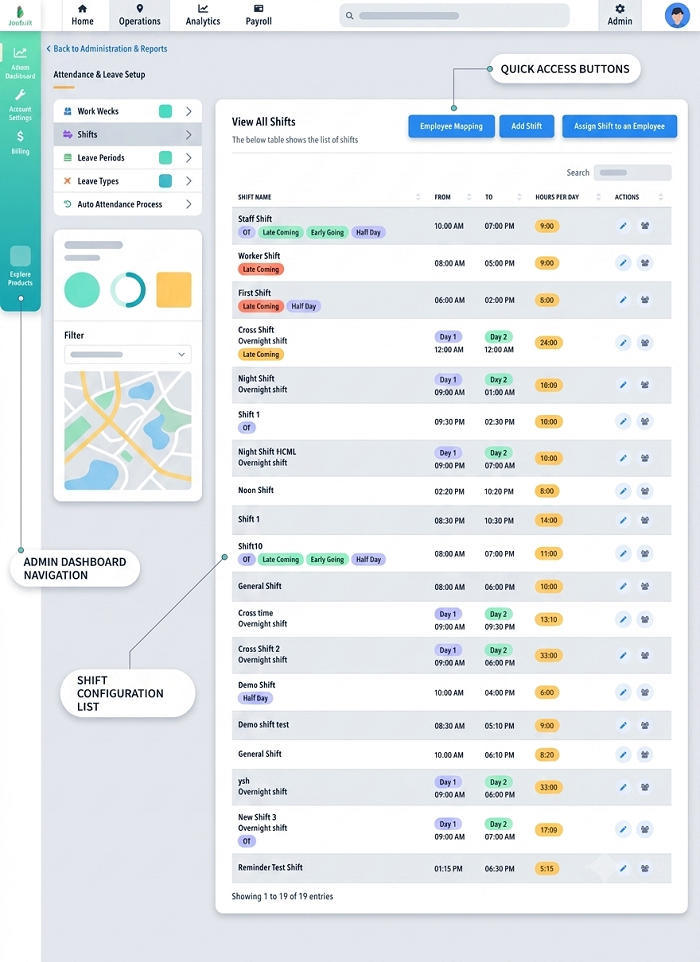
Shift management software is a digital workforce management solution that helps businesses organize employee working schedules. HR teams and managers can create shifts, assign employees, manage shift changes, track attendance, and monitor working hours from a single platform.
Depending on the software, employees can also access their schedules through an employee portal or mobile application.
For example, a business may create:
- Morning Shift: 6:00 AM – 2:00 PM
- General Shift: 9:00 AM – 6:00 PM
- Evening Shift: 2:00 PM – 10:00 PM
- Night Shift: 10:00 PM – 6:00 AM
Managers can assign employees to these shifts and maintain an updated schedule without relying on multiple spreadsheets.
How Shift Management Software Helps Manage Employee Schedules
1. Creates Employee Schedules Quickly
Creating schedules manually can be time-consuming. Managers may need to consider employee availability, departments, roles, weekly offs, leave, and business requirements.
Shift management software provides scheduling tools that allow managers to create employee schedules more efficiently.
Recurring shifts can also be configured where supported, reducing repetitive scheduling work.
2. Assigns Employees to the Right Shifts
The software allows managers to assign employees to specific shifts based on their department, job role, location, or working requirements.
This gives managers a centralized view of who is scheduled to work and when.
For example, a manufacturing company can assign trained machine operators to specific production shifts rather than maintaining separate spreadsheets for each department.
3. Makes Rotational Shift Management Easier
Organizations such as factories, hospitals, security agencies, and logistics companies often use rotational shifts.
Managing these schedules manually can become complicated when employees move between morning, evening, and night shifts.
Shift management software can help create recurring or rotational schedules and maintain employee assignments in an organized manner.
4. Helps Prevent Scheduling Conflicts
A common problem with manual scheduling is accidentally assigning an employee to overlapping shifts or assigning more employees than required to a particular shift.
A centralized scheduling system gives managers greater visibility into employee assignments and helps identify potential conflicts before schedules are finalized.
5. Simplifies Shift Changes
Business requirements can change frequently. Employees may need different working hours, or managers may need to move employees between shifts.
With shift management software, managers can update schedules digitally and maintain a current version of the employee roster.
Employees can also receive notifications about approved schedule changes, depending on the system.
6. Supports Employee Shift Swaps
Employees may sometimes want to exchange shifts with colleagues.
Instead of handling these requests through informal messages or verbal communication, businesses can use a structured shift-swap process.
Employees can submit a request, the manager can review it, and the approved change can be reflected in the schedule.
This provides better control over shift changes.
7. Gives Employees Access to Their Schedules
Employees need to know their assigned shifts in advance.
With an employee mobile app or self-service portal, employees can view:
- Upcoming shifts
- Shift timings
- Working locations
- Weekly schedules
- Shift changes
- Approved requests
This reduces the need for employees to repeatedly contact HR or their managers for schedule information.
8. Improves Attendance Tracking
Shift schedules are closely connected with attendance.
When shift management software is integrated with an attendance system, the employee's actual attendance can be compared with their assigned schedule.
For example, if an employee is scheduled from 9:00 AM to 6:00 PM but records attendance at 9:20 AM, the system can identify the late arrival according to the organization's attendance rules.
This can improve the accuracy of attendance records.
9. Helps Track Working Hours
Shift management software can work with attendance data to help businesses monitor employee working hours.
Managers can identify:
- Scheduled working hours
- Actual working hours
- Late arrivals
- Early departures
- Absences
- Overtime
- Missed attendance records
This provides better visibility into employee schedules and working time.
10. Helps Manage Overtime
Employees may sometimes work beyond their scheduled shift.
When shift and attendance data are connected, businesses can identify additional working hours more efficiently.
For example, if an employee is scheduled for eight hours but works beyond the scheduled shift, the additional time can be reviewed according to company overtime policies.
11. Supports Multiple Locations
Businesses with multiple branches, offices, stores, factories, or project sites may need to manage employees across different locations.
Shift management software can provide a centralized view of schedules across locations, helping managers coordinate workforce requirements more effectively.
12. Connects Leave With Employee Schedules
Employee leave can affect shift coverage. When an employee is on leave, managers may need to assign another employee to the shift.
Integrating leave and shift management allows managers to consider approved leave while preparing schedules.
This can help reduce staffing gaps caused by employees being unavailable.
Shift Management for Different Types of Businesses
Manufacturing Companies
Factories often operate multiple shifts and require specific employees for different production activities. Shift management software can help organize production schedules and workforce assignments.
Hospitals
Healthcare organizations may operate around the clock and need doctors, nurses, technicians, and support staff across multiple shifts.
Retail Businesses
Retail stores can schedule employees according to store hours, weekends, holidays, and peak customer periods.
Restaurants and Hotels
Hospitality businesses often have different staffing requirements throughout the day. Automated scheduling can help managers allocate employees according to operational demand.
Security Agencies
Security companies may need to assign employees to different client locations and manage day and night shifts.
Logistics and Delivery
Logistics companies can organize employees according to operational schedules, locations, and workforce requirements.
Manual Scheduling vs. Shift Management Software
| Manual Scheduling | Shift Management Software |
|---|---|
| Relies heavily on spreadsheets | Centralized digital scheduling |
| Time-consuming updates | Faster schedule updates |
| Higher risk of manual errors | Better scheduling visibility |
| Difficult to manage multiple shifts | Supports multiple shift types |
| Limited employee access | Employee self-service options |
| Shift changes can be difficult to track | Digital shift-change workflows |
| Attendance reconciliation can be manual | Can integrate with attendance |
| Difficult to maintain multiple versions | Centralized schedule |
Shift Management and Payroll Integration
Employee schedules can influence attendance, working hours, overtime, and payroll processing.
When shift management is integrated with attendance and payroll software, HR teams can use updated shift and attendance information when processing salaries.
This can help reduce manual data entry and minimize errors caused by incorrect shift information.
Best Practices for Managing Employee Schedules
Businesses can improve scheduling by following a few practical practices:
- Plan staffing requirements in advance.
- Create clear shift timings and rules.
- Consider employee availability and skills.
- Publish schedules early whenever possible.
- Maintain a structured process for shift changes.
- Track attendance against assigned shifts.
- Monitor overtime regularly.
- Keep employees informed about schedule changes.
- Review staffing levels and adjust schedules when required.
- Use software to automate repetitive scheduling activities.
Conclusion
Shift management software helps businesses create, assign, update, and monitor employee schedules from a centralized platform. It can simplify rotational shift planning, reduce scheduling conflicts, manage shift changes, improve employee communication, and connect schedules with attendance and payroll processes.
For businesses managing multiple shifts or a large workforce, moving from manual spreadsheets to an automated employee scheduling and shift management system can save HR time, improve schedule visibility, and support more accurate workforce management.
Managers can build, publish, and monitor employee schedules using InnBuilt Shift Scheduling Software. Staffing gaps and deviations from assigned shifts are visible immediately.