How to Automate Employee Attendance and Payroll
How to Automate Employee Attendance and Payroll
Managing employee attendance and payroll manually can be time-consuming, especially as a business grows. HR teams may have to collect attendance data, verify working hours, calculate leave and overtime, prepare payroll inputs, and process salaries every month.
When attendance and payroll are managed separately, duplicate data entry can also increase the possibility of errors.
Automating employee attendance and payroll connects these processes into a streamlined workflow. Employees record attendance digitally, the system processes working hours and attendance rules, and the relevant information is transferred to payroll for salary processing.
This guide explains how businesses can automate employee attendance and payroll and what they should consider before implementing an automated system.
What Is Attendance and Payroll Automation?
Attendance and payroll automation means using software to digitally manage employee attendance and use the resulting data as part of the payroll process.
A typical automated workflow is:
Employee → Attendance → Leave & Shift Processing → Overtime → Attendance Validation → Payroll → Salary Processing
Instead of manually transferring attendance information from registers or Excel spreadsheets to payroll, businesses can use integrated systems to reduce repetitive work.
Step 1: Digitize Employee Records
The first step is to maintain employee information in a centralized HR or payroll system.
Important information may include:
- Employee name and ID
- Department
- Designation
- Joining date
- Salary structure
- Work location
- Shift
- Bank/payment information
- Leave details
- Employment status
Keeping employee information centralized makes it easier to connect attendance and payroll.
Step 2: Choose the Right Attendance Method
Different businesses require different attendance methods.
Common options include:
Biometric Attendance
Fingerprint or facial-recognition devices can be used at offices, factories, warehouses, and other fixed workplaces.
Mobile Attendance
Employees can mark attendance using a mobile application. This is useful for remote and field employees.
GPS Attendance
GPS-based attendance can help businesses verify the location from which attendance is marked, subject to applicable policies and privacy requirements.
Web Attendance
Employees can mark attendance through a web portal when working from computers or approved remote locations.
The best approach may involve using more than one attendance method depending on employee roles and locations.
Step 3: Configure Working Hours and Shifts
Attendance automation works effectively only when working schedules are configured correctly.
Businesses should define:
- Working hours
- Shift timings
- Breaks
- Weekly offs
- Holidays
- Grace periods
- Night shifts
- Rotational shifts
- Overtime rules
For example, a retail business may have morning and evening shifts, while a construction company may have site-specific working schedules.
Correct configuration helps the system calculate attendance according to the organization's actual working arrangements.
Step 4: Integrate Leave Management
Attendance should be connected with leave management.
Employees can submit leave requests through the HRMS or attendance system, and managers can approve them digitally.
Once approved, the leave information can be reflected in attendance records.
For example:
Employee requests leave → Manager approves → Attendance updated → Payroll receives applicable leave information
This reduces the need for HR teams to manually compare attendance sheets with separate leave records.
Step 5: Automate Overtime Tracking
If the organization pays or records overtime, the attendance system can help identify additional working hours.
The system can compare scheduled working hours with actual attendance and generate overtime information according to configured rules.
For example:
Scheduled hours: 9:00 AM–6:00 PM
Actual hours: 9:00 AM–8:00 PM
Additional working period: 2 hours, subject to applicable overtime rules and approval
The overtime information can then be reviewed by the authorized manager or HR team before payroll processing.
Step 6: Provide Attendance Regularization
Employees may forget to mark attendance or experience technical problems.
An automated regularization process allows employees to submit correction requests.
For example:
Missing punch → Employee submits request → Manager reviews → HR approves → Attendance updated
This is better than managing corrections through paper forms, emails, or informal messages because the system can maintain a record of the request and approval.
Step 7: Connect Attendance with Payroll
This is one of the most important steps.
The attendance system should be connected with the payroll process so that relevant information can be transferred electronically.
Depending on the organization's payroll rules, information may include:
- Paid days
- Unpaid days
- Leave
- Overtime
- Absence
- Working hours
- Attendance adjustments
The payroll team can then use the approved information when calculating salaries.
Step 8: Create an Attendance Validation Process
Automation does not mean removing HR review completely.
Before payroll is finalized, HR or authorized managers should review attendance exceptions.
Examples include:
- Missing punches
- Unapproved absences
- Unusual overtime
- Incorrect shifts
- Attendance regularization requests
- Employees with incomplete attendance
A simple validation process can be:
Automatic Attendance Processing → Exception Report → HR Review → Approval → Payroll
This provides an additional layer of control.
Step 9: Automate Payroll Calculations
Once attendance information has been validated, payroll software can use the approved data along with employee salary information to process payroll.
The payroll system can calculate applicable salary components and deductions according to the organization's payroll configuration and applicable requirements.
Automation can reduce repetitive calculations and manual data entry.
However, payroll rules should be configured carefully and reviewed regularly.
Step 10: Generate Payslips and Reports
After payroll is processed, the system can generate employee payslips and management reports.
Common reports include:
- Attendance summary
- Payroll summary
- Overtime report
- Leave report
- Absence report
- Department-wise payroll
- Location-wise attendance
- Salary reports
Employees can also access payslips and attendance information through an employee self-service portal where available.
Step 11: Use Employee Self-Service
Employee self-service is an important part of modern HR automation.
Employees can use a web or mobile portal to:
- Mark attendance
- View attendance history
- Apply for leave
- Check leave balances
- Submit attendance corrections
- View payslips
- Review overtime
- Update permitted personal information
This reduces routine administrative requests handled by HR.
Step 12: Secure Attendance and Payroll Data
Attendance and payroll systems contain important employee information. Businesses should implement appropriate security controls.
Important considerations include:
- Role-based access
- Strong authentication
- Data encryption
- Audit trails
- Backup procedures
- Restricted administrator access
- Secure integrations
- Data retention policies
Only authorized users should have access to sensitive payroll and employee information.
Attendance and Payroll Automation for Different Businesses
IT and Technology Companies
Technology companies may benefit from mobile attendance, remote-work support, flexible shifts, employee self-service, and payroll integration.
Construction Companies
Construction businesses can use mobile attendance, GPS, geofencing, project-wise attendance, and centralized payroll processing for workers across different sites.
Retail Businesses
Retail companies can manage attendance across multiple stores, shifts, weekly offs, overtime, and branch-level employees.
Manufacturing Companies
Manufacturing organizations can manage biometric attendance, rotational shifts, overtime, factory locations, and payroll integration.
Small Businesses
Small businesses may begin with cloud-based attendance and payroll software that provides basic attendance, leave, employee records, and salary processing.
Benefits of Automating Attendance and Payroll
Automation can help businesses:
- Reduce manual HR work
- Minimize data-entry errors
- Improve attendance accuracy
- Reduce payroll preparation time
- Simplify leave management
- Automate overtime tracking
- Manage multiple shifts
- Support remote and field employees
- Improve employee transparency
- Generate reports faster
- Centralize employee information
- Improve payroll efficiency
Attendance and Payroll Automation Workflow
A complete automated process can look like this:
Employee Master Data
↓
Biometric / Mobile / GPS Attendance
↓
Attendance Processing
↓
Shift + Leave + Holiday Management
↓
Overtime & Attendance Validation
↓
HR Approval
↓
Payroll Processing
↓
Salary Calculation
↓
Payslip Generation
↓
Payroll Reports
This workflow reduces the need to move information manually between multiple spreadsheets and systems.
Common Mistakes to Avoid
Businesses should avoid automating payroll before properly configuring employee and attendance information.
Common mistakes include:
- Incorrect shift configuration
- Incomplete employee records
- No attendance regularization process
- Incorrect overtime rules
- Poor payroll integration
- Lack of employee training
- Insufficient access controls
- No pre-payroll verification
- Failing to test the system before going live
Automation works best when technology is supported by clear HR policies and well-defined workflows.
Can Payroll Outsourcing Help?
Businesses that do not have a dedicated payroll team may combine attendance software with payroll outsourcing.
In this model, the organization manages attendance through its attendance or HR system, while an external payroll provider processes payroll based on approved employee and attendance information.
A typical process is:
Employee Attendance → Attendance Validation → Payroll Data → Payroll Service Provider → Salary Processing
This can reduce the administrative burden on internal HR teams, particularly for growing businesses.
Conclusion
Automating employee attendance and payroll can transform a time-consuming monthly HR process into a more structured and efficient workflow.
The process starts with digital employee records and attendance tracking and continues through shift management, leave, overtime, attendance validation, payroll integration, salary calculation, and payslip generation.
The key is not simply to automate attendance or payroll independently. The greatest benefit comes from connecting attendance and payroll into one streamlined process.
For businesses with multiple employees, locations, shifts, remote workers, or field teams, an integrated attendance and payroll system can reduce manual work, improve data accuracy, increase transparency, and make monthly payroll processing more efficient.
Before implementing automation, businesses should clearly define their attendance policies, payroll requirements, approval workflows, security controls, and integration needs. With the right technology and processes in place, HR teams can spend less time managing spreadsheets and more time focusing on their people and business.
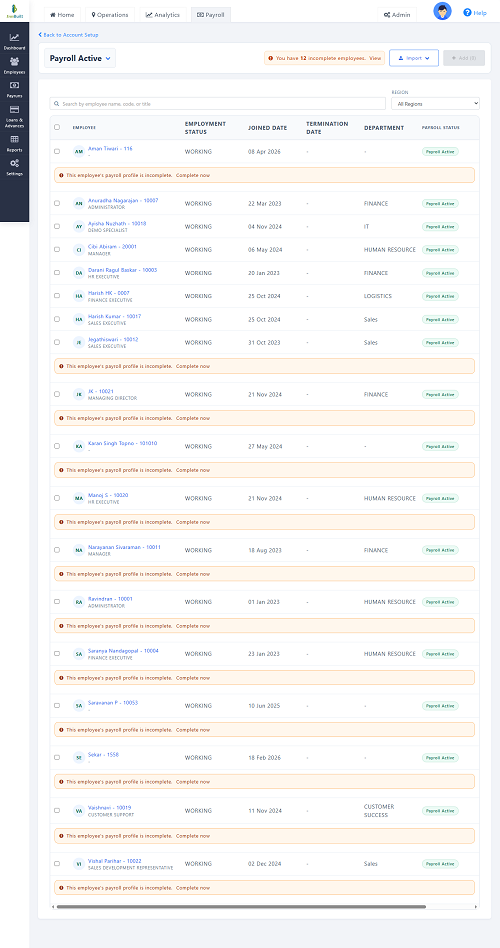
With InnBuilt Attendance and Payroll Software, employee check-ins, shift validation, payable days, and salary processing work as one automated flow. HR saves time and employees receive more accurate payslips.