How to Avoid Payroll Mistakes Caused by Incorrect Attendance Data
How to Avoid Payroll Mistakes Caused by Incorrect Attendance Data
Accurate attendance data is one of the most important inputs for payroll processing. Employee attendance can affect working days, leave, overtime, late coming, early leaving, and other payroll-related calculations.
When attendance information is incomplete or incorrect, payroll teams may spend significant time identifying and correcting errors before salaries are processed.
Manual attendance registers, spreadsheets, missing punches, incorrect shift assignments, and delayed attendance updates are common causes of payroll problems.
A modern Attendance Management Software can help businesses improve attendance accuracy and create a more reliable connection between attendance and payroll.
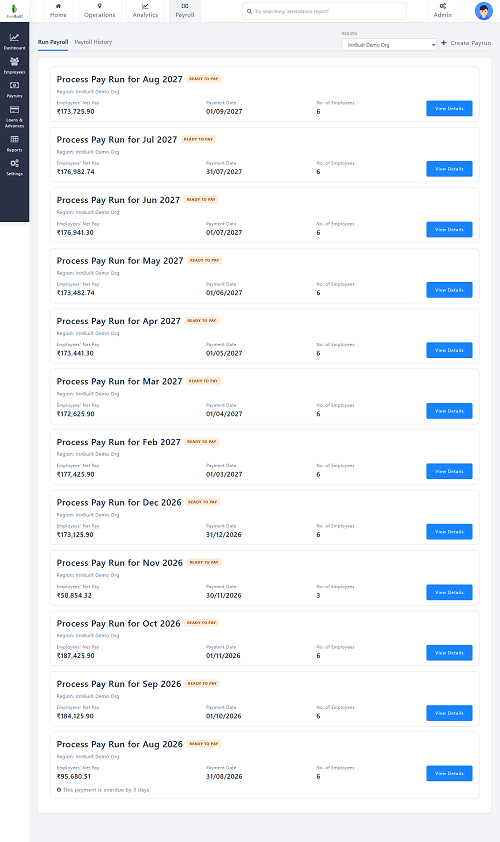
Why Is Attendance Data Important for Payroll?
Payroll teams often require attendance-related information such as:
- Working days
- Paid leave
- Unpaid leave
- Overtime
- Absence
- Late attendance
- Early leaving
- Attendance corrections
- Shift information
For example, if an employee's approved leave is not updated in the attendance system, the payroll team may incorrectly treat the day as unpaid absence.
Similarly, incorrect overtime information can result in payroll discrepancies.
Accurate attendance data helps payroll teams work with reliable inputs.
Common Attendance Errors That Affect Payroll
Several attendance problems can lead to payroll mistakes.
1. Missing Check-In or Check-Out
An employee may forget to record one side of their attendance.
Example:
Check-in: 9:00 AM
Check-out: Missing
The system cannot accurately determine the employee's working hours without additional information.
2. Incorrect Shift Assignment
If an employee is assigned the wrong shift, the system may incorrectly identify them as late or absent.
3. Unapproved Attendance Corrections
Manual changes without proper approval can create inconsistent payroll records.
4. Leave Not Updated
An employee may have approved leave, but the attendance record may still show absence.
5. Incorrect Overtime
Overtime hours may be incorrectly entered or calculated.
6. Duplicate Attendance Records
Multiple records for the same employee and date can create calculation problems.
1. Use Automated Attendance Capture
One of the best ways to reduce attendance-related payroll errors is to automate attendance collection.
Businesses can use:
- Biometric devices
- Mobile applications
- Web attendance
- RFID systems
- Facial recognition
- GPS attendance where appropriate
Automated attendance capture reduces manual data entry and creates a digital record of employee attendance.
2. Integrate Attendance With Payroll
An integrated attendance and payroll workflow can reduce the need to manually transfer attendance information.
A typical process is:
Employee Attendance → Attendance Processing → Leave & Overtime → HR Verification → Payroll
Instead of copying information between spreadsheets, payroll can receive structured attendance data from the attendance system.
3. Keep Employee Master Data Accurate
Attendance calculations depend on accurate employee information.
Important fields may include:
- Employee ID
- Department
- Designation
- Location
- Shift
- Joining date
- Employment status
- Reporting manager
Incorrect employee data can result in incorrect attendance processing. HR should review employee master data regularly.
4. Configure Shifts Correctly
Incorrect shift configuration is a common source of attendance errors.
For example:
Actual shift: 10:00 AM–7:00 PM
System shift: 9:00 AM–6:00 PM
An employee who arrives at 9:45 AM could incorrectly appear as late even though they are actually early for their assigned shift.
Businesses should ensure that employees are assigned to the correct shift before payroll processing.
5. Automate Leave Management
Leave and attendance should ideally be connected.
For example:
Employee Applies for Leave → Manager Approves → Leave Balance Updated → Attendance Updated
This reduces the possibility of an approved leave being incorrectly treated as absence.
The system should support relevant leave categories according to the organization's policies.
6. Create a Missing-Punch Workflow
Missing punches should not simply be ignored or manually edited. Instead, businesses can create a regularization workflow.
For example:
Missing Punch → Employee Submits Correction → Manager Reviews → Approval → Attendance Updated
This creates a record of the correction and provides greater accountability.
7. Automate Working-Hour Calculations
Manual calculation of working hours can result in mistakes.
For example:
Check-in: 9:10 AM
Check-out: 6:20 PM
Break: 1 hour
An attendance system can automatically calculate:
Net Working Hours = 8 hours 10 minutes
This reduces the need for HR teams to perform calculations manually.
8. Automate Overtime Calculations
Overtime should be calculated according to configured business rules and approved before payroll where required.
For example:
Scheduled working time: 8 hours
Net working time: 9 hours
Potential overtime: 1 hour
The system can identify the additional time, while the organization's approval rules determine whether and how it should be treated for payroll.
9. Review Late Coming and Early Leaving
Late arrivals and early departures can affect working hours and attendance status depending on company policy.
Attendance software can automatically identify:
- Late arrivals
- Early departures
- Short working hours
- Repeated attendance exceptions
Managers can review these records before payroll is finalized.
10. Use Attendance Regularization
Not every attendance exception represents an employee error. Examples include:
- Official client visits
- Approved remote work
- Business travel
- Device failure
- Network problems
- Emergency situations
Employees should have a formal method to request corrections. A regularization workflow provides a documented process:
Employee → Request → Manager Approval → HR Review → Attendance Updated
11. Set a Payroll Cut-Off Date
Businesses should establish a clear attendance cut-off date before payroll processing.
For example:
Attendance Period: 1st–31st
Attendance Correction Cut-Off: 2nd of the following month
After the cut-off, changes may require additional authorization. A defined cut-off helps payroll teams avoid processing incomplete or constantly changing attendance data.
12. Perform an Attendance Audit Before Payroll
Before payroll is finalized, HR should review important attendance exceptions.
A pre-payroll checklist can include:
- Missing punches
- Unapproved leave
- Unusual absences
- Late attendance
- Early leaving
- Overtime
- Attendance corrections
- Shift changes
- Employee transfers
- New joiners
- Employee exits
This provides an opportunity to correct problems before they affect salary processing.
13. Use Payroll Validation Reports
Attendance software can generate exception reports for payroll teams. Useful reports include:
- Employee attendance summary
- Missing-punch report
- Leave report
- Overtime report
- Late-coming report
- Early-leaving report
- Unpaid absence report
- Attendance regularization report
- Department-wise attendance
- Location-wise attendance
These reports make it easier to identify potential payroll issues.
14. Give Employees Access to Attendance Records
Employee self-service can help identify errors before payroll. Employees can review:
- Attendance
- Working hours
- Leave
- Overtime
- Attendance corrections
For example, an employee may notice that a business-trip day is incorrectly marked absent and submit a correction before payroll processing. This distributes part of the verification process instead of making HR solely responsible.
15. Use Role-Based Approval
Attendance corrections should be reviewed by authorized people.
For example:
Employee (Submit Request) → Manager (Approve) → HR (Final Review)
This provides better control over changes that could affect payroll.
16. Maintain an Audit Trail
An audit trail records important attendance changes.
| Action | User | Date | Status |
|---|---|---|---|
| Correction Requested | Employee | Aug 15 | Submitted |
| Correction Approved | Manager | Aug 16 | Approved |
| Attendance Updated | System | Aug 16 | Completed |
This helps HR understand how attendance records changed and who approved the changes.
17. Manage Attendance Across Multiple Locations
Businesses with multiple offices, stores, factories, or project sites may collect attendance from different locations. A centralized system can bring all attendance records together.
Branch A / Branch B / Factory / Project Site → Attendance System → Centralized HR Dashboard
This makes it easier to prepare consolidated payroll inputs.
18. Protect Attendance Data
Attendance data should be protected because it can directly affect employee records and payroll. Businesses should consider:
- Role-based access
- Secure authentication
- Audit trails
- Regular backups
- Controlled data modifications
- Appropriate data retention
Only authorized users should be able to modify attendance information.
Example: Preventing a Payroll Error
Suppose an employee takes approved leave on August 15.
Without an Integrated System
Employee applies by email → Manager approves → HR updates leave spreadsheet → Attendance remains absent → Payroll imports attendance → Employee may be incorrectly treated as absent
With Integrated Attendance and Leave
Employee applies through system → Manager approves → Leave balance updated → Attendance updated → Payroll receives approved attendance data
The second process reduces manual intervention and the opportunity for inconsistent records.
Attendance Payroll Checklist
Before processing payroll, HR can review:
Attendance
- Are all employees present in the attendance system?
- Are there missing punches?
- Are shifts correctly assigned?
- Are attendance records complete?
Leave
- Are all approved leaves updated?
- Are leave balances accurate?
- Are unpaid leave records correct?
Overtime
- Are overtime hours reviewed?
- Have required approvals been completed?
Exceptions
- Are late arrivals reviewed?
- Are early departures reviewed?
- Are regularization requests completed?
Employee Changes
- Are new joiners included?
- Are employees who exited processed correctly?
- Have transfers and shift changes been updated?
Manual vs. Automated Attendance for Payroll
| Area | Manual Process | Automated Process |
|---|---|---|
| Attendance capture | Registers/Excel | Digital |
| Working-hour calculation | Manual | Automated |
| Leave update | Manual | Integrated |
| Overtime | Manual | Configurable |
| Missing punches | Manual review | Automatically flagged |
| Corrections | Email/manual | Approval workflow |
| Reports | Manual | Automated |
| Payroll input | Data entry | Integration/export |
| Audit trail | Limited | Available |
| Employee visibility | Limited | Self-service |
Best Practices to Avoid Attendance-Related Payroll Mistakes
Businesses should:
- Automate attendance collection.
- Keep employee master data updated.
- Configure shifts accurately.
- Integrate leave and attendance.
- Automate working-hour calculations.
- Use a formal attendance regularization process.
- Set an attendance cut-off date.
- Review attendance exceptions before payroll.
- Validate overtime records.
- Give employees access to their attendance records.
- Use role-based approvals.
- Maintain an audit trail.
- Generate pre-payroll attendance reports.
- Protect employee attendance information.
Conclusion
Incorrect attendance data can lead to payroll mistakes, unnecessary HR work, and employee dissatisfaction. The best way to reduce these problems is to create a controlled process from attendance capture through payroll.
Modern Attendance Management Software can automate attendance collection, working-hour calculations, leave updates, overtime processing, exception reporting, regularization, and payroll integration.
The ideal workflow is:
Accurate Attendance → Automated Processing → Exception Review → Employee/Manager Approval → Payroll Validation → Salary Processing
By connecting attendance and payroll processes, businesses can reduce manual data entry, identify errors earlier, and provide employees with greater transparency.
For organizations managing large teams, multiple shifts, remote employees, field workers, or multiple locations, an integrated attendance system can become an important part of maintaining accurate attendance records and reliable payroll processing.
Incorrect attendance data is caught before payroll when InnBuilt Attendance Software flags missing punches, wrong shifts, and unapproved overtime. Only verified records move into salary calculations.