How to Calculate Employee Salary Based on Attendance
How to Calculate Employee Salary Based on Attendance
Employee attendance is an important factor in payroll processing, especially for employees whose salary is affected by working days, unpaid leave, absence, overtime, or other attendance-related adjustments.
Businesses often calculate attendance-based salary manually using Excel or attendance registers. However, as the workforce grows, manual calculations can become time-consuming and prone to errors.
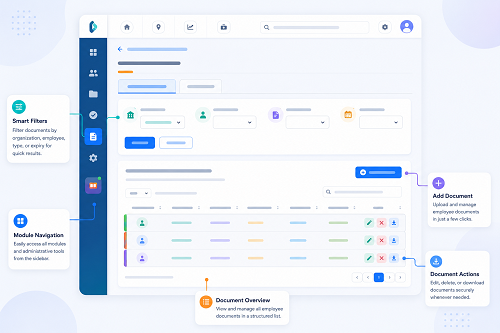
Using Attendance Management Software integrated with Payroll Software can automate attendance calculations and transfer approved payroll inputs into the salary process.
This guide explains how employee salary can be calculated based on attendance, common methods, examples, and ways businesses can automate the process.
What Is Attendance-Based Salary Calculation?
Attendance-based salary calculation means determining the employee's payable salary based on attendance records during a specific payroll period.
Depending on the company's salary structure and applicable rules, payroll may consider:
- Present days
- Paid leave
- Unpaid leave
- Weekly offs
- Holidays
- Working hours
- Overtime
- Late coming
- Early leaving
- Joining date
- Exit date
The exact calculation method should follow the organization's salary policy and applicable employment requirements.
Why Is Attendance Important for Payroll?
An employee may have a fixed monthly salary, but attendance information can still be required to calculate payable salary when there are factors such as:
- Unpaid leave
- Mid-month joining
- Mid-month exit
- Absence
- Approved overtime
- Attendance-based allowances
For example, if an employee takes approved paid leave, the salary may remain unchanged according to the company's leave policy. If the employee has unpaid leave, the payroll calculation may need to be adjusted.
Basic Attendance-Based Salary Formula
A simplified formula for a monthly employee is:
Payable Salary = Monthly Salary − Applicable Unpaid Attendance Deduction + Approved Additional Earnings
However, the actual formula depends on the organization's payroll policy.
A common approach is:
Per-Day Salary = Monthly Salary ÷ Applicable Payroll Days
Then:
Attendance Deduction = Per-Day Salary × Unpaid Days
And:
Payable Salary = Monthly Salary − Attendance Deduction
The divisor used for the per-day salary should be defined by the employer's payroll policy and applicable rules.
Example 1: Salary With Unpaid Leave
Suppose an employee has:
- Monthly Salary: ₹30,000
- Applicable Payroll Days: 30
- Unpaid Leave: 2 days
Step 1: Calculate Per-Day Salary
₹30,000 ÷ 30 = ₹1,000 per day
Step 2: Calculate Unpaid Leave Deduction
₹1,000 × 2 = ₹2,000
Step 3: Calculate Payable Salary
₹30,000 − ₹2,000 = ₹28,000
Therefore, the payable salary under this simplified example is ₹28,000. The actual calculation should follow the organization's salary policy.
How Paid Leave Affects Salary
Paid leave generally does not result in a salary deduction when the employee is eligible and the leave has been approved.
For example:
- Monthly Salary: ₹30,000
- Present: 25 days
- Paid Leave: 3 days
- Unpaid Leave: 0 days
If the company's policy treats the approved paid leave as payable, the employee may receive the full applicable monthly salary.
This is why payroll should distinguish between Present, Paid Leave, Unpaid Leave, and other attendance statuses.
Example 2: Paid Leave and Attendance
Suppose:
- Monthly Salary: ₹30,000
- Present: 25 days
- Paid Leave: 3 days
- Unpaid Leave: 2 days
The key payroll input is the 2 days of unpaid leave, assuming the company's policy treats the 3 days of leave as paid.
Under the same 30-day divisor:
Per-Day Salary = ₹30,000 ÷ 30 = ₹1,000
Unpaid Leave Deduction = ₹1,000 × 2 = ₹2,000
Payable Salary = ₹28,000
How Unpaid Absence Affects Salary
Unpaid absence may reduce payable salary depending on the employee's contract, company policy, and applicable requirements.
For example:
- Monthly Salary: ₹40,000
- Unpaid Days: 3
- Applicable Payroll Days: 30
- Per-Day Salary: ₹40,000 ÷ 30 = ₹1,333.33
- Deduction: ₹1,333.33 × 3 = ₹4,000
- Payable Salary: ₹36,000
This is a simplified example. Businesses should use their approved payroll methodology.
How Attendance Affects New Joiners
Employees who join in the middle of a payroll period may require salary proration.
For example:
- Monthly Salary: ₹36,000
- Payroll Days: 30
- Employee Works: 15 applicable days
Under a simple 30-day proration:
₹36,000 ÷ 30 × 15 = ₹18,000
The actual calculation should follow the employer's payroll policy and applicable requirements.
How Attendance Affects Employees Leaving Mid-Month
The same concept can apply when an employee leaves during a payroll period.
For example:
- Monthly Salary: ₹36,000
- Applicable Paid Days: 20
- Payroll Days: 30
Under a simple proration method:
₹36,000 ÷ 30 × 20 = ₹24,000
Final salary calculations may also need to account for other items as part of the organization's full-and-final process.
How Overtime Can Be Added to Salary
Attendance systems can also help identify potential overtime.
For example:
- Scheduled Working Hours: 8 hours/day
- Approved Overtime: 10 hours/month
If the organization's overtime policy provides an applicable overtime rate, payroll can use the approved overtime hours to calculate additional earnings.
A simplified formula may be:
Overtime Pay = Approved Overtime Hours × Applicable Overtime Rate
The actual overtime rate and eligibility should follow applicable employment requirements and company policy.
Why Overtime Should Be Approved
Not every extra hour recorded by an attendance system should necessarily become payable overtime.
A business may require: Employee Overtime Request → Manager Approval → Payroll. This provides better control over payroll calculations.
How Late Coming and Early Leaving Can Affect Salary
Attendance systems can identify late arrivals and early departures.
For example:
- Shift Start: 9:00 AM | Check-In: 9:25 AM
- Shift End: 6:00 PM | Check-Out: 5:20 PM
Whether these events result in a salary adjustment depends on the company's attendance policy and applicable rules.
Therefore, attendance software should normally flag these events for review rather than automatically making salary deductions unless the relevant rule is properly configured and legally appropriate.
How Shift Attendance Affects Payroll
Shift-based businesses may have different working schedules.
| Shift | Timing |
|---|---|
| Morning | 6 AM–2 PM |
| General | 9 AM–6 PM |
| Evening | 2 PM–10 PM |
| Night | 10 PM–6 AM |
The attendance system should calculate working hours according to the employee's assigned shift. This is important for working-hour calculations, overtime, late coming, early leaving, and shift allowances where applicable.
Night Shift Example
An employee works:
- Check-In: 10:00 PM
- Check-Out: 6:00 AM next day
The system should recognize the overnight attendance as part of the same shift. Incorrect handling of night shifts can result in inaccurate attendance and payroll inputs.
How Attendance Software Calculates Salary Inputs
A modern attendance system can automate several steps.
- Capture Attendance: Employees check in and check out using an approved attendance method.
- Apply Shift Rules: The system identifies the employee's assigned schedule.
- Calculate Working Hours: The software calculates working hours based on configured rules.
- Process Leave: Approved leave is linked to the attendance record.
- Identify Exceptions: The system can flag missing punches, late coming, early leaving, absence, or unusual working hours.
- Calculate Overtime: Potential overtime can be identified according to configured rules.
- Approve Attendance: HR or managers review relevant exceptions.
- Send Data to Payroll: Approved attendance information is transferred to payroll.
The complete process is: Attendance → Working Hours → Leave → Overtime → Validation → Payroll
Manual Attendance-Based Salary Calculation vs. Software
| Activity | Manual Process | Automated System |
|---|---|---|
| Attendance collection | Paper/Excel | Digital |
| Working hours | Manual | Automated |
| Leave | Manual | Integrated |
| Unpaid absence | Manual | Rule-based |
| Overtime | Manual | Configurable |
| Shift calculation | Difficult | Automated |
| Exceptions | Manual checking | Automatic flags |
| Payroll transfer | Manual | Integration/export |
| Reports | Manual | Automated |
Common Mistakes in Attendance-Based Salary Calculation
Businesses should avoid:
- Using Incorrect Attendance Data: Always validate attendance before payroll.
- Treating Paid Leave as Absence: Approved paid leave should be classified correctly.
- Ignoring Unpaid Leave: Unpaid leave may affect salary depending on company policy.
- Using the Wrong Salary Divisor: The applicable divisor should be clearly defined in the payroll policy.
- Incorrect Shift Assignment: The wrong shift can affect working-hour calculations.
- Missing Overtime Approvals: Only approved overtime should generally be included according to company policy.
- Ignoring Missing Punches: Employees should have a formal attendance correction process.
- Manual Data Transfer Errors: Integrating attendance and payroll can reduce duplicate data entry.
Best Practices for Attendance-Based Payroll
Businesses should:
- Maintain accurate employee records.
- Define attendance policies clearly.
- Configure shifts correctly.
- Distinguish paid and unpaid leave.
- Establish a clear salary-proration method.
- Define overtime rules.
- Create an attendance regularization process.
- Review attendance before payroll.
- Set payroll cut-off dates.
- Integrate attendance with payroll.
- Maintain an audit trail.
- Provide employee self-service.
- Protect employee attendance and payroll data.
- Review statutory requirements regularly.
How Attendance and Payroll Software Work Together
Integrating Attendance Management Software with Payroll Software can simplify attendance-based salary processing.
The workflow can be:
Employee Check-In/Check-Out → Attendance Management → Working Hours → Leave & Overtime → HR/Manager Approval → Payroll Calculation → Payslip
This reduces the need for HR teams to manually transfer attendance information into payroll spreadsheets.
Example of a Complete Attendance-Based Payroll Process
Suppose an employee has:
- Monthly Salary: ₹30,000
- Present: 25 days
- Paid Leave: 3 days
- Unpaid Leave: 2 days
- Approved Overtime: 5 hours
The attendance system records all relevant information. HR reviews the attendance and approves the overtime.
Payroll then:
- Calculates the unpaid-leave adjustment according to the company's policy.
- Adds approved overtime according to the applicable overtime rule.
- Calculates applicable deductions.
- Determines net salary.
- Generates the employee's payslip.
This provides a more structured payroll process than manually calculating each component in Excel.
Conclusion
Calculating employee salary based on attendance requires accurate attendance records, clear payroll policies, and proper classification of working days, leave, absence, and overtime.
A simplified workflow is: Attendance → Present/Leave/Absence → Working Hours → Overtime → Salary Adjustment → Payroll
However, there is no single salary formula that applies to every organization. The applicable salary divisor, treatment of leave, overtime, absence, and other attendance-related adjustments should be based on the employer's payroll policy, employment terms, and applicable laws.
Using Attendance Management Software can automate attendance collection, shift calculations, working hours, leave tracking, and attendance exceptions. When integrated with Payroll Software, approved attendance information can flow directly into salary processing.
For growing businesses, this approach can reduce manual calculations, minimize data-entry errors, save HR time, and create a more reliable connection between employee attendance and payroll processing.
InnBuilt Attendance and Payroll Software calculates salary using payable days, leave, absences, overtime, shifts, and loss of pay. Every result follows configured company policies consistently.