How to Choose the Best Attendance Management Software for Your Business
Best Attendance Management Software
Managing employee attendance efficiently is essential for accurate payroll, workforce planning, productivity, and HR administration. As businesses grow, maintaining attendance through paper registers and Excel spreadsheets can become time-consuming and difficult to control.
Best Attendance Management Software helps businesses automate employee attendance tracking, working-hour calculations, shift management, leave, overtime, attendance regularization, and payroll integration from a centralized platform.
Whether you run an IT company, retail business, manufacturing unit, construction company, logistics operation, or small business, the right attendance management system can simplify workforce management.
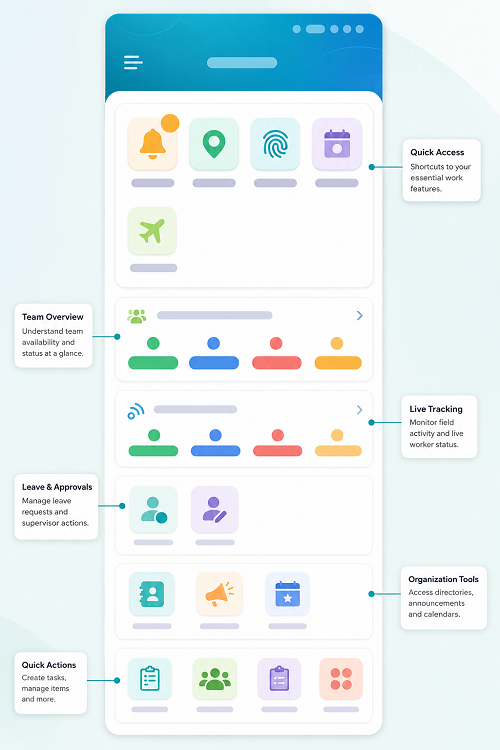
Mobile App for Employees
A mobile app for employees gives employees a convenient way to manage attendance, leave, payroll, and workplace activities directly from their smartphones. Instead of depending on HR teams for routine requests or using manual registers, employees can access important HR services anytime and from anywhere.
For businesses with office, field, remote, or multi-location employees, a mobile employee app can make everyday workforce management faster and more convenient.
What Is a Mobile App for Employees?
A mobile app for employees is a smartphone-based application that connects employees with their company's HR and payroll system. Employees can use the app to record attendance, apply for leave, view salary details, check work schedules, submit requests, and access important employee information.
The app can also provide HR teams with real-time employee data, reducing repetitive administrative work and improving communication between employees and management.
What Is Attendance Management Software?
Attendance Management Software is a digital solution that records and manages employee attendance electronically.
Employees can mark attendance using methods such as:
- Biometric devices
- Mobile applications
- GPS
- Web-based attendance
- RFID cards
- Facial recognition
- Employee self-service portals
The software processes attendance according to configured working hours, shifts, holidays, weekly offs, leave policies, and overtime rules.
HR managers can then monitor attendance, approve corrections, generate reports, and transfer relevant attendance information to payroll.
Why Businesses Need the Best Attendance Management Software
Traditional attendance systems require considerable manual effort. HR teams may have to collect attendance records, verify missing entries, calculate working hours, manage leave, prepare monthly reports, and provide attendance data to payroll.
The right attendance software automates much of this process.
A modern system can provide:
Employee Attendance → Automatic Processing → Leave & Overtime → HR Review → Payroll
This helps reduce repetitive administrative work and gives management better visibility into workforce attendance.
Manual Attendance vs. Modern Attendance Software
| Area | Manual Attendance | Attendance Software |
|---|---|---|
| Data entry | Manual | Automated |
| Attendance tracking | Paper/Excel | Digital |
| Working-hour calculation | Manual | Automated |
| Leave tracking | Separate | Integrated |
| Overtime | Manual | Automated |
| Reports | Manually prepared | Automated |
| Mobile attendance | Limited | Available |
| GPS attendance | Not available | Available |
| Payroll integration | Manual | Integrated |
| Multi-location | Difficult | Centralized |
| Employee self-service | Limited | Available |
For very small businesses, manual attendance may still be practical. However, businesses with growing teams, multiple locations, or complex shifts can benefit significantly from automation.
How to Choose the Best Attendance Management Software
Choosing the right Attendance Management Software is an important decision for businesses that want to automate employee attendance, reduce HR workload, improve payroll accuracy, and manage employees across different locations.
With many attendance solutions available today, businesses may find it difficult to determine which system is suitable for their requirements. The best attendance software is not necessarily the one with the most features. It should be the solution that matches your workforce, attendance policies, work locations, shift patterns, payroll process, and future growth.
This guide explains the key factors businesses should consider when selecting attendance management software.
1. Understand Your Attendance Requirements
Before comparing software providers, identify your organization's current attendance challenges.
Ask questions such as:
- How many employees need to be tracked?
- Do employees work from one location or multiple locations?
- Do you have remote or field employees?
- Do you operate multiple shifts?
- Do employees need mobile attendance?
- Do you require GPS or geofencing?
- Do you use biometric devices?
- How is attendance currently transferred to payroll?
- Do employees need self-service access?
Understanding these requirements will help you create a clear list of essential features.
2. Check Available Attendance Methods
Different businesses require different ways to record attendance.
A good attendance management system may support multiple methods, including:
Biometric Attendance
Fingerprint or facial-recognition devices can be suitable for offices, factories, warehouses, and other fixed locations.
Mobile Attendance
Mobile applications allow employees to mark attendance using smartphones. This can be useful for remote and field employees.
GPS Attendance
GPS-based attendance can help organizations verify employee location when attendance is marked, subject to company policy and applicable privacy requirements.
Web Attendance
Web-based attendance can be useful for employees working from computers or remote locations.
Choose software that supports the attendance methods that match your workforce.
3. Look for GPS and Geofencing Features
If your employees work at customer locations, construction sites, sales territories, or multiple branches, GPS-based attendance can be valuable.
Geofencing allows businesses to create approved attendance locations. Employees can be permitted to mark attendance only within the defined geographical area.
For example, a construction company can create a geofence around a project site and allow authorized workers to mark attendance through a mobile application.
Before using location tracking, businesses should establish appropriate policies regarding privacy, access, data retention, and permitted use.
4. Evaluate Shift Management
Businesses with multiple shifts should pay particular attention to shift management features.
The software should ideally support:
- General shifts
- Rotational shifts
- Night shifts
- Flexible shifts
- Split shifts
- Weekly offs
- Shift changes
- Employee-specific schedules
A system that cannot handle your actual shift structure may create additional administrative work rather than reducing it.
5. Check Leave Management Integration
Attendance and leave are closely connected.
If an employee is on approved leave, the attendance system should reflect the leave appropriately.
Look for software that allows:
- Leave requests
- Manager approvals
- Leave balances
- Holiday calendars
- Leave types
- Leave history
- Attendance and leave integration
Integrating these processes can reduce duplicate data entry.
6. Consider Payroll Integration
Payroll integration should be one of the most important selection criteria.
Attendance information may affect salary calculations through:
- Working days
- Unpaid leave
- Overtime
- Absence
- Late or early attendance according to company policy
- Other attendance-related adjustments
A good system should make it easy to transfer relevant attendance information to payroll.
The ideal workflow is:
Attendance → Leave/Overtime → Attendance Processing → Payroll → Salary Processing
For businesses using payroll outsourcing, easy attendance-data export or integration can also make monthly payroll processing more efficient.
7. Look for Employee Self-Service
Employee self-service reduces the need for HR teams to handle routine attendance questions.
Employees should ideally be able to view:
- Attendance history
- Check-in and check-out times
- Working hours
- Leave balances
- Approved leave
- Overtime
- Missing punches
- Regularization requests
This gives employees greater visibility and can reduce attendance-related disputes.
8. Check Attendance Regularization
Employees may occasionally forget to check in or check out, experience technical problems, or have approved changes to their working schedule.
An attendance regularization feature allows employees to submit correction requests.
Managers or HR can review and approve these requests digitally.
Look for a system that maintains an audit trail showing who requested, approved, rejected, or modified an attendance correction.
9. Evaluate Reporting and Analytics
Attendance data becomes more useful when businesses can easily convert it into reports.
The software should provide reports such as:
- Daily attendance
- Monthly attendance
- Employee attendance summary
- Absence
- Late arrivals
- Early departures
- Overtime
- Working hours
- Missing punches
- Leave
- Department-wise attendance
- Location-wise attendance
Check whether reports can be filtered, exported, scheduled, or customized according to your organization's needs.
10. Consider Multi-Location Support
If your company operates multiple offices, branches, stores, factories, or project sites, choose a system that supports centralized attendance management.
HR should be able to manage employees across locations while giving authorized managers access only to the information relevant to their teams.
This is particularly important for:
- Retail chains
- Construction companies
- Logistics businesses
- Manufacturing organizations
- Security agencies
- Service companies
11. Check Security and Data Protection
Attendance information is employee-related data and should be handled securely.
When evaluating a software provider, ask about:
- User authentication
- Role-based access
- Data encryption
- Backup procedures
- Audit logs
- Data retention
- Access controls
- Data privacy practices
Businesses should also understand where attendance information is stored and who can access it.
12. Evaluate Ease of Use
A technically advanced system is not useful if employees and HR teams find it difficult to operate.
Consider whether:
- Employees can easily mark attendance.
- Managers can approve requests quickly.
- HR can configure shifts and policies.
- Reports are easy to generate.
- The mobile application is user-friendly.
- Training requirements are reasonable.
Ask the provider for a demonstration or trial before making a final decision.
13. Check Scalability
Your attendance requirements may change as your company grows.
A system that works for 50 employees should ideally be capable of supporting a significantly larger workforce.
Consider:
- Maximum employee capacity
- Number of locations
- Number of administrators
- API availability
- Integration capabilities
- Storage requirements
- Pricing as employee numbers increase
Scalability can prevent the need to replace the software later.
14. Review Integration Capabilities
Businesses may already use HRMS, payroll, ERP, accounting, or other business applications.
Check whether the attendance software can integrate with the systems you already use.
Useful integrations may include:
- Payroll software
- HRMS
- Employee databases
- Biometric devices
- ERP systems
- Accounting systems
- APIs
Integration can reduce duplicate data entry and improve information flow between systems.
15. Compare Pricing and Total Cost
Do not compare software based only on the advertised subscription price.
Consider the complete cost, including:
- Software subscription
- Setup charges
- Biometric hardware
- Mobile application charges
- Implementation
- Training
- Customization
- Support
- Integration
- Additional users or locations
A slightly higher-priced solution may provide better value if it significantly reduces HR administration and payroll effort.
16. Evaluate Customer Support
Attendance problems can affect payroll, so reliable support is important.
Ask the provider about:
- Customer support channels
- Response times
- Implementation assistance
- Training
- Software updates
- Troubleshooting
- Technical support
A provider should be able to assist when attendance or payroll-related issues occur.
17. Ask for a Demo or Trial
Before purchasing, request a product demonstration or trial.
Test the system using your actual requirements.
For example, check whether you can:
- Add employees.
- Create shifts.
- Mark attendance.
- Configure holidays.
- Apply leave.
- Submit attendance corrections.
- Generate reports.
- Process overtime.
- Export payroll data.
- Manage multiple locations.
This practical evaluation can reveal limitations that may not be obvious from a feature list.
Conclusion
Choosing the best Attendance Management Software requires more than comparing features and prices. Businesses should evaluate the solution based on their workforce size, attendance methods, shift patterns, locations, remote work requirements, payroll process, reporting needs, security, and future growth.
For a small office, a simple cloud-based attendance system may be sufficient. For a large organization with multiple locations, shifts, field employees, and payroll integration requirements, a more comprehensive workforce management solution may be appropriate.
The right system should make attendance management simpler, more accurate, transparent, and connected to payroll and HR processes.
Before purchasing, clearly define your requirements, compare suitable solutions, request a demo, test important workflows, and evaluate the total cost of ownership. A well-chosen attendance management system can reduce manual HR work and provide businesses with better control over employee attendance and workforce data.
Choosing attendance technology becomes easier when InnBuilt Attendance Software provides mobile check-in, shift rules, leave integration, payroll connectivity, reports, and multi-location support in one configurable platform.