How to Choose the Best Face Attendance Software for Your Business
How to Choose the Best Face Attendance Software for Your Business
Managing employee attendance accurately is important for every business. Traditional methods such as attendance registers, ID cards, PINs, and manual spreadsheets can create problems such as proxy attendance, data-entry errors, missed punches, and time-consuming administrative work.
Face attendance software provides a modern way to record employee attendance by using facial recognition technology. However, with many attendance solutions available, choosing the right software requires careful consideration.
The best face attendance software should not only recognize employees accurately but also support attendance tracking, shift management, leave, working hours, reporting, and payroll processes.
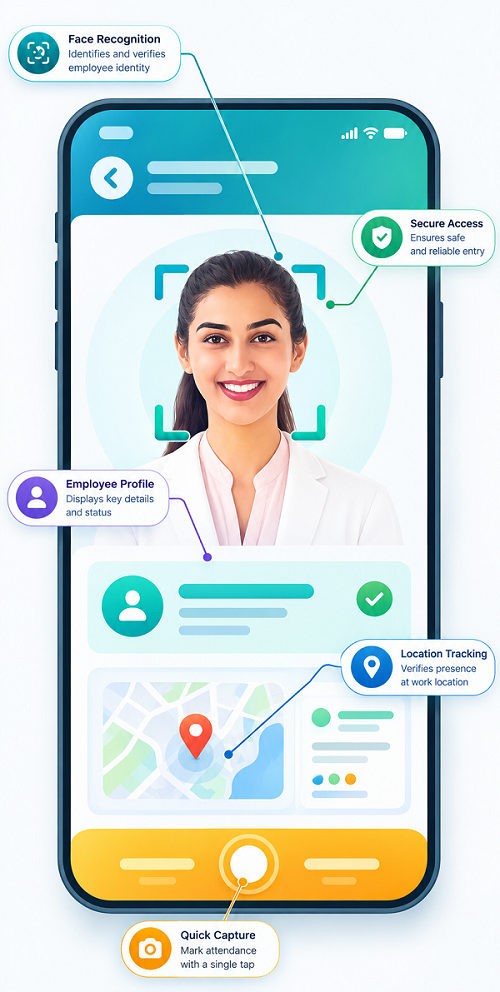
What Is Face Attendance Software?
Face attendance software is an employee attendance system that uses facial recognition to verify an employee's identity and record their attendance.
Instead of entering a PIN or using an attendance card, employees can authenticate themselves using their face. Once the system verifies the employee, it records the check-in or check-out time.
A typical process looks like this:
Employee → Face Detection → Identity Verification → Attendance Recorded → Attendance Report
Depending on the software, the system may also connect attendance data with shifts, leave, overtime, working hours, and payroll.
Why Businesses Need Face Attendance Software
Businesses often face attendance-related challenges such as:
- Proxy attendance
- Lost or damaged attendance cards
- Employees sharing PINs
- Manual attendance errors
- Incorrect working-hour calculations
- Delayed attendance reports
- Difficulty managing multiple branches
- Time-consuming HR administration
- Attendance data errors affecting payroll
Face attendance can help reduce several of these problems by linking an attendance event to the employee's verified identity.
How to Choose the Best Face Attendance Software
Before selecting a solution, businesses should evaluate its features, accuracy, usability, security, scalability, and integration capabilities.
1. Check Face Recognition Accuracy
The most important factor is the accuracy of employee identification.
The software should be capable of recognizing registered employees consistently under normal workplace conditions. Consider factors such as:
- Recognition speed
- Camera quality
- Lighting conditions
- Employee positioning
- Face enrollment process
- Recognition reliability
- Handling of minor appearance changes
A system that frequently fails to recognize employees can create frustration and increase HR workload.
2. Look for Fast Attendance Processing
Employees should be able to mark attendance quickly, especially in businesses with hundreds or thousands of employees.
Slow verification can create queues during shift start times.
A good system should provide:
- Fast face verification
- Quick check-in and check-out
- Minimal employee interaction
- Real-time or near-real-time attendance updates
- Support for large numbers of employees
For high-volume workplaces, speed can be just as important as recognition accuracy.
3. Evaluate Anti-Proxy Attendance Features
One major advantage of face attendance is reducing proxy attendance.
Traditional systems based on cards, PINs, or passwords can sometimes allow employees to share credentials.
Face recognition links attendance with an individual's facial profile, making it more difficult for another person to mark attendance on their behalf.
When evaluating software, check how it handles identity verification and suspicious or unsuccessful verification attempts.
4. Consider Employee Enrollment
Employee enrollment should be simple and properly controlled.
The software should allow administrators to create employee profiles and associate the appropriate facial information with each employee.
Look for features such as:
- Easy employee registration
- Admin-controlled enrollment
- Profile management
- Employee ID integration
- Re-enrollment when necessary
- Secure handling of biometric information
Proper enrollment is important because poor-quality initial data can affect recognition accuracy later.
5. Check Attendance and Working-Hour Tracking
Face attendance should do more than simply record a punch.
The software should ideally help HR teams understand:
- Check-in time
- Check-out time
- Total working hours
- Late arrival
- Early departure
- Breaks
- Absence
- Overtime
- Missing punches
This gives businesses a complete view of employee attendance rather than isolated check-in records.
6. Look for Shift Management Integration
If your organization operates multiple shifts, face attendance software should work together with shift management.
For example:
Shift Roster → Employee Assignment → Face Attendance → Working Hours → Overtime → Payroll
This can be especially useful for:
- Manufacturing companies
- Hospitals
- Security agencies
- Retail businesses
- Hotels
- BPOs and call centers
- Logistics companies
The system should make it easy to determine whether an employee attended the correct shift and whether their working hours meet the organization's rules.
7. Check Leave and Overtime Management
Attendance, leave, and overtime are closely connected.
For example, an employee may have:
- Approved leave
- Half-day leave
- Late arrival
- Early departure
- Extra working hours
A good attendance platform should allow these records to be managed together.
Integration between attendance and leave can also reduce manual reconciliation by HR teams.
8. Evaluate Reporting and Analytics
Attendance reports help managers identify workforce patterns and administrative issues.
Look for reports covering:
- Daily attendance
- Monthly attendance
- Late arrivals
- Early departures
- Absence
- Working hours
- Overtime
- Shift attendance
- Department-wise attendance
- Location-wise attendance
The software should ideally allow reports to be filtered by employee, department, location, date, or shift.
9. Check Multi-Location Support
Businesses with multiple offices, branches, stores, factories, or project locations need centralized attendance management.
Before choosing software, determine whether it can manage employees across multiple locations.
For example:
Head Office → Branch A → Branch B → Factory → Field Location
A centralized system can make it easier for HR and management to monitor attendance without maintaining separate spreadsheets for every location.
10. Evaluate Mobile and Cloud Access
Cloud-based attendance software can allow authorized users to access attendance information from different locations.
Consider whether the system provides:
- Web access
- Mobile access
- Cloud-based records
- Manager dashboards
- Employee attendance visibility
- Notifications
- Remote administrative access
This can be particularly useful for businesses with distributed teams.
11. Check Payroll Integration
Attendance data frequently affects payroll.
Working hours, leave, overtime, late coming, and absences may influence salary calculations according to company policies and applicable requirements.
Therefore, attendance software that can integrate with payroll can reduce duplicate data entry.
A connected workflow may look like:
Face Attendance → Attendance Processing → Leave & Overtime → Payroll
This helps HR teams spend less time transferring information between different systems.
12. Consider Data Security and Privacy
Face recognition involves sensitive biometric information, so businesses should carefully evaluate how the software handles employee data.
Ask vendors about:
- Data encryption
- Access controls
- Administrator permissions
- Data storage
- Data retention
- Backup procedures
- Audit logs
- Data deletion procedures
- Privacy policies
Businesses should also clearly inform employees about how facial recognition is being used and establish appropriate internal policies.
13. Evaluate Ease of Use
A feature-rich system is not useful if employees and HR teams find it difficult to operate.
The interface should be simple enough for:
- HR administrators
- Managers
- Employees
- System administrators
Important functions such as employee registration, attendance review, report generation, and corrections should be easy to find.
14. Check Hardware Compatibility
Before purchasing software, confirm whether it works with your existing attendance devices or whether new hardware is required.
Consider:
- Camera compatibility
- Attendance terminals
- Mobile devices
- Internet connectivity
- Local network requirements
- Device installation
- Backup connectivity
Businesses should calculate the total implementation cost rather than looking only at the software subscription price.
15. Look for Attendance Exception Management
No attendance system is perfect. Employees may sometimes experience situations such as:
- Device failure
- Network problems
- Camera issues
- Forgotten attendance
- Approved manual corrections
- Unexpected shift changes
The software should provide an appropriate process for handling exceptions.
Ideally, corrections should be controlled through authorized approvals and recorded in an audit trail.
Face Attendance Software Comparison Checklist
Before making a final decision, compare potential solutions using the following checklist:
| Feature | What to Check |
|---|---|
| Face recognition | Accuracy and speed |
| Anti-proxy | Identity verification |
| Attendance | Check-in/check-out records |
| Working hours | Automatic calculation |
| Shift management | Fixed and rotational shifts |
| Leave | Leave integration |
| Overtime | Overtime tracking |
| Reports | Customizable attendance reports |
| Multiple locations | Centralized management |
| Mobile access | Access for employees and managers |
| Payroll | Payroll integration |
| Security | Data protection and access controls |
| Scalability | Ability to support business growth |
| Support | Vendor assistance and troubleshooting |
Consider Your Business Size
The best solution depends on your organization's requirements.
Small Businesses
Small companies may prioritize:
- Simple attendance tracking
- Easy setup
- Affordable pricing
- Basic reporting
- Mobile or cloud access
- Payroll integration
Medium Businesses
Medium-sized businesses may need:
- Multiple shifts
- Department-level management
- Leave and overtime
- Multiple locations
- Advanced reporting
- Payroll integration
Large Businesses
Large organizations may require:
- Multiple branches
- Large employee databases
- Advanced access controls
- Centralized administration
- Detailed analytics
- API or software integrations
- Strong security controls
- Scalable infrastructure
Best Practices for Implementation
After selecting the software, businesses should:
- Create accurate employee profiles
- Complete proper face enrollment
- Define attendance rules
- Configure shifts correctly
- Set up leave and overtime policies
- Train HR administrators
- Explain the system to employees
- Test devices before deployment
- Establish an exception-handling process
- Review attendance reports regularly
- Protect employee and biometric information
Conclusion
Choosing the best face attendance software requires more than checking whether a system can recognize faces. Businesses should evaluate the complete attendance management process.
The right solution should provide reliable face verification, reduce proxy attendance, simplify check-in and check-out, manage working hours, support shifts, integrate leave and overtime, provide useful reports, and connect with payroll where required.
Businesses should also pay close attention to security, privacy, scalability, hardware compatibility, ease of use, and customer support.
By evaluating these factors before purchasing, organizations can select a face attendance solution that improves attendance accuracy while reducing manual HR work and supporting more efficient workforce management.
Choosing face attendance technology becomes simpler with InnBuilt Face Attendance Software offering mobile check-in, identity verification, location controls, real-time reporting, shift integration, and payroll connectivity in one configurable platform.