How to Manage Attendance for Remote and Field Employees
How to Manage Attendance for Remote and Field Employees
Managing attendance is relatively straightforward when employees work from a fixed office. A biometric device or office attendance system can record when employees arrive and leave.
However, attendance management becomes more challenging when employees work remotely, travel to customer locations, visit project sites, or spend most of their working day in the field.
Modern Attendance Management Software helps businesses manage remote and field employee attendance through mobile applications, GPS, geofencing, web attendance, employee self-service, and centralized reporting.
This guide explains how businesses can create an effective attendance process for remote and field employees.
What Are Remote and Field Employees?
Remote employees generally work away from the company's physical office. They may work from home, coworking spaces, or other approved locations.
Field employees regularly travel to different locations to perform their duties.
Examples include:
- Sales executives
- Service engineers
- Construction workers
- Delivery teams
- Installation teams
- Customer support staff
- Field technicians
- Project employees
- Insurance representatives
Because these employees are not always present at a fixed workplace, traditional biometric attendance may not be practical for everyone.
Why Is Remote and Field Attendance Difficult?
Businesses may face challenges such as:
- Employees working from different locations
- No fixed biometric device
- Multiple customer locations
- Changing project sites
- Flexible working hours
- Travel between locations
- Internet connectivity problems
- Difficulty verifying attendance
- Manual attendance reporting
- Payroll data collection
A digital attendance system can help address many of these challenges.
1. Create a Clear Attendance Policy
Before implementing technology, businesses should establish clear attendance policies for remote and field employees.
The policy should explain:
- Working hours
- Expected availability
- Check-in and check-out procedures
- Breaks
- Weekly offs
- Leave
- Travel time
- Attendance correction
- Overtime
- Approved work locations
- Mobile attendance rules
Employees should understand exactly when and how they are expected to record attendance.
2. Use Mobile Attendance
A mobile attendance application is one of the most practical solutions for remote and field employees.
Employees can use their smartphones to:
- Check in
- Check out
- View attendance
- Apply for leave
- Submit regularization requests
- Review working hours
For field teams, mobile attendance eliminates the need to return to an office simply to record attendance.
3. Use GPS Attendance Where Appropriate
GPS-based attendance can provide location information when an employee marks attendance.
For example, a service engineer visiting a customer site may use the mobile application to record attendance at the authorized work location.
GPS can help businesses verify that attendance was marked from an expected location.
However, GPS tracking should be used appropriately and transparently. Organizations should establish policies covering employee privacy, location permissions, data access, and retention.
4. Use Geofencing for Approved Locations
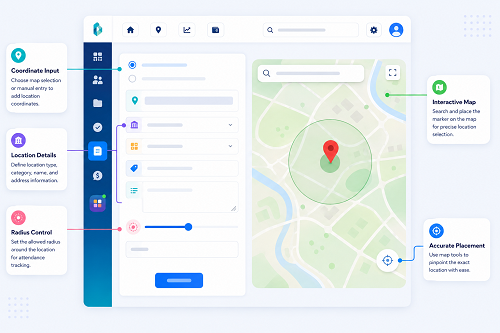
Geofencing allows businesses to create a virtual geographical boundary around an approved work location.
For example, a construction company may create a geofence around a project site.
The employee can then be permitted to mark attendance when inside the authorized area.
This can be useful for:
- Construction sites
- Customer locations
- Warehouses
- Temporary project offices
- Service locations
Geofencing should be configured according to the actual working environment, especially where GPS accuracy may vary.
5. Support Multiple Work Locations
Field employees may work at different customer or project locations during the month.
Attendance software should allow authorized managers or HR administrators to manage multiple work locations.
For example:
Employee → Customer Site A → Customer Site B → Project Site C
The system can maintain attendance records associated with the appropriate work location.
This provides HR with better visibility into where employees are working.
6. Allow Flexible Attendance Rules
Remote and field employees may not always follow the same schedule as office employees.
For example:
- Office Employee: 9:00 AM–6:00 PM
- Field Employee: Customer visits between 8:00 AM and 7:00 PM
- Remote Employee: Flexible schedule based on company policy
Attendance software should allow businesses to configure appropriate schedules and rules for different employee groups.
7. Use Employee Self-Service
Employee self-service is particularly useful for remote teams.
Employees can access attendance information without contacting HR.
Depending on the system, they can:
- View check-in and check-out
- Review working hours
- Apply for leave
- Submit attendance corrections
- View leave balances
- Review overtime
- Check attendance history
This reduces routine administrative work for HR.
8. Provide Attendance Regularization
Remote and field employees may experience situations such as:
- Forgetting to check in
- Mobile battery failure
- Poor internet connectivity
- App problems
- Emergency travel
- Unplanned customer visits
The system should provide an attendance regularization process.
For example:
Missing Attendance → Employee Request → Manager Review → Approval → Attendance Updated
This creates a documented process for correcting attendance instead of relying on informal messages.
9. Handle Internet Connectivity Issues
Field employees may work in areas with poor network coverage.
Businesses should consider what happens when an employee cannot immediately connect to the attendance system.
Depending on the software, options may include offline attendance capture or delayed synchronization.
Before choosing a system, businesses should test attendance functionality in the actual locations where employees work.
10. Track Working Hours Without Excessive Monitoring
Attendance tracking should focus on agreed working schedules rather than unnecessary surveillance.
For remote employees especially, businesses should distinguish between:
Attendance/Availability and Employee Productivity.
An employee being online continuously does not necessarily mean they are productive.
Productivity should generally be assessed through appropriate role-specific goals, deliverables, quality, and performance measures rather than attendance data alone.
11. Manage Remote Work Schedules
Remote employees may work according to different schedules.
Attendance software can help manage:
- Remote work days
- Flexible schedules
- Working hours
- Weekly offs
- Holidays
- Leave
- Attendance exceptions
Businesses can create different attendance policies for office-based and remote employees while maintaining all records in one system.
12. Manage Field Employee Shifts
Field teams may have customer-specific or project-specific schedules.
For example:
- Service Team A: 8:00 AM–5:00 PM
- Service Team B: 10:00 AM–7:00 PM
- Emergency Team: Rotational schedule
Attendance software can assign employees to the appropriate schedule and generate attendance reports based on those configurations.
13. Monitor Attendance Through a Central Dashboard
Managers and HR teams need centralized visibility when employees are distributed across locations.
An attendance dashboard can show:
- Employees currently marked present
- Employees absent
- Employees on leave
- Late attendance
- Missing punches
- Work locations
- Shift information
This makes workforce management easier than collecting individual attendance reports from employees.
14. Generate Remote and Field Attendance Reports
Useful reports may include:
- Employee attendance
- Location-wise attendance
- Daily attendance
- Monthly attendance
- Working hours
- Absence
- Late attendance
- Overtime
- Missing punches
- Leave
- Attendance regularization
These reports can help managers identify attendance patterns and staffing requirements.
15. Connect Attendance With Payroll
Attendance information may affect payroll through working days, unpaid leave, overtime, and other attendance-related calculations.
An automated workflow can be:
Mobile/GPS Attendance → Attendance Processing → Leave & Overtime → HR Review → Payroll
This reduces manual transfer of attendance information into payroll.
For organizations using payroll outsourcing, centralized attendance reports can also make it easier to provide payroll inputs to the payroll service provider.
16. Use Role-Based Access
Remote and field attendance systems may contain location and employee information.
Businesses should ensure that only authorized people can access or modify attendance data.
For example:
- Employee: Own Attendance
- Manager: Assigned Team
- HR: Authorized Employees/Locations
This helps maintain appropriate data security.
17. Protect Employee Privacy
Remote and field attendance systems may collect location information.
Businesses should clearly communicate:
- What information is collected
- When location information is collected
- Why it is required
- Who can access it
- How long it is retained
- How it is protected
Location tracking should be limited to legitimate business purposes and handled according to applicable privacy and employment requirements.
Remote and Field Attendance Workflow
A modern attendance process can look like this:
Employee Starts Work → Mobile/Web Attendance → GPS/Geofence Verification Where Applicable → Attendance Recorded → Working Hours & Shift Processing → Leave/Overtime → Manager/HR Review → Payroll
This creates a structured attendance-to-payroll workflow.
Example: Construction Company
Consider a construction company with employees working across five project sites.
Previously, site supervisors maintained paper attendance registers and sent attendance information to the HR department at the end of the month.
This created challenges in:
- Consolidating attendance
- Tracking worker locations
- Calculating working days
- Managing overtime
- Preparing payroll
With mobile attendance software:
Worker → Mobile Attendance → GPS/Project Location → Central System → Site Manager → HR → Payroll
HR can access attendance information for each project site from a centralized system.
Example: Field Sales Team
A sales employee may visit multiple customers during a working day.
A mobile attendance system can allow the employee to record attendance according to the company's approved policy.
The business can then maintain attendance information without requiring the employee to visit the office.
Best Practices for Remote and Field Attendance
Businesses should:
- Establish clear attendance policies.
- Define expected working hours.
- Choose appropriate attendance methods.
- Use mobile attendance for distributed employees.
- Use GPS/geofencing only where appropriate.
- Provide an attendance regularization process.
- Give employees access to their records.
- Protect attendance and location information.
- Review attendance exceptions before payroll.
- Integrate attendance with leave and payroll.
- Train employees and managers.
- Review the system regularly.
Conclusion
Managing attendance for remote and field employees requires more flexibility than traditional office-based attendance systems.
Attendance Management Software with mobile attendance, GPS, geofencing, flexible schedules, employee self-service, regularization, centralized reporting, and payroll integration can help businesses create a more efficient attendance process.
However, technology alone is not enough. Businesses should establish clear policies, communicate expectations, protect employee privacy, and use attendance data responsibly.
The goal should be to create a system that provides accurate attendance information without unnecessary administrative work or excessive employee monitoring.
For businesses with remote teams, field employees, construction workers, sales teams, service engineers, or employees working across multiple locations, modern attendance software can provide a practical connection between employee attendance, workforce management, HR, and payroll.
Remote and field employees can check in through the InnBuilt Employee Tracking App with time and location verification. Managers gain attendance visibility while flexible rules accommodate off-site work.