How to Manage Attendance for Shift-Based Employees
How to Manage Attendance for Shift-Based Employees
Managing attendance for shift-based employees can be more complicated than managing employees who follow a fixed 9-to-5 schedule. Businesses operating factories, hospitals, retail stores, warehouses, restaurants, security services, logistics operations, and customer support centers may have multiple shifts, rotating schedules, overnight shifts, and employees working on different weekly offs.
Manual attendance registers and spreadsheets can make shift management difficult. A modern Attendance Management Software can automate shift assignment, check-in and check-out, working-hour calculations, late coming, early leaving, overtime, leave, and attendance reporting.
This guide explains how businesses can effectively manage attendance for shift-based employees.
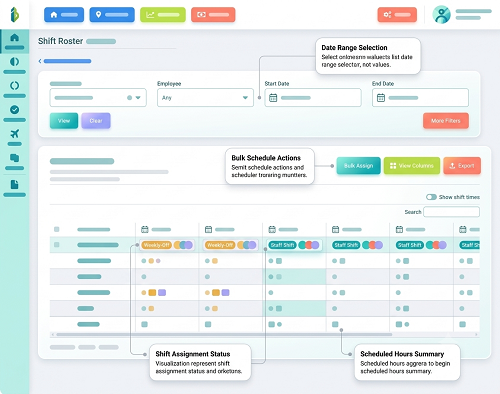
What Is Shift-Based Attendance Management?
Shift-based attendance management means recording and processing employee attendance according to their assigned working schedule.
For example:
- Morning Shift: 6:00 AM–2:00 PM
- General Shift: 9:00 AM–6:00 PM
- Evening Shift: 2:00 PM–10:00 PM
- Night Shift: 10:00 PM–6:00 AM
The attendance system needs to understand which shift applies to each employee before calculating attendance.
A typical workflow is:
Employee → Shift Assignment → Check-In/Check-Out → Working-Hour Calculation → Attendance Validation → Payroll
Why Is Shift Attendance Difficult?
Shift-based businesses may face several challenges:
- Multiple shifts
- Rotating schedules
- Night shifts
- Shift changes
- Different weekly offs
- Overtime
- Shift allowances
- Late coming
- Early leaving
- Missing punches
- Employees working across locations
When these activities are managed manually, attendance errors can easily occur.
1. Create Different Shift Schedules
The first step is to define all shifts in the attendance system.
For example:
| Shift | Start | End |
|---|---|---|
| Morning | 6:00 AM | 2:00 PM |
| General | 9:00 AM | 6:00 PM |
| Evening | 2:00 PM | 10:00 PM |
| Night | 10:00 PM | 6:00 AM |
Each shift can have its own working hours, break rules, grace period, and overtime configuration according to company policy.
2. Assign Employees to the Correct Shift
Employees should be assigned to their appropriate shift.
For example:
- Production Team A → Morning Shift
- Production Team B → Evening Shift
- Security Team → Night Shift
Correct shift assignment is critical because attendance calculations depend on the employee's schedule. If an employee is assigned to the wrong shift, the system may incorrectly mark them late or absent.
3. Use Automated Shift Scheduling
For businesses with regular shift patterns, attendance software can help automate employee scheduling.
For example:
- Week 1 → Morning Shift
- Week 2 → Evening Shift
- Week 3 → Night Shift
The exact rotation can be configured according to business requirements. This reduces the need for HR teams to manually update employee schedules every day.
4. Manage Rotating Shifts
Some organizations do not have permanent shifts. Employees may rotate between morning, evening, and night shifts.
For example:
| Week | Employee Shift |
|---|---|
| Week 1 | Morning |
| Week 2 | Evening |
| Week 3 | Night |
| Week 4 | Morning |
An attendance system should allow managers or HR administrators to update schedules in advance. This helps ensure that attendance is evaluated against the correct shift.
5. Handle Night Shifts Correctly
Night shifts are one of the biggest challenges in attendance management.
For example:
Shift: 10:00 PM–6:00 AM
The employee checks in on Monday at 10:00 PM and checks out on Tuesday at 6:00 AM. A suitable attendance system should recognize that the check-out belongs to the same overnight shift rather than treating it as an unrelated attendance record.
This is especially important for:
- Manufacturing
- Hospitals
- Security
- Hotels
- BPOs
- Logistics
- 24-hour operations
6. Configure Grace Periods
Businesses may provide a grace period for shift-based employees.
For example:
- Shift Start: 9:00 AM
- Grace Period: 10 minutes
An employee checking in at 9:07 AM may be treated as on time according to company policy. An employee checking in at 9:20 AM may be identified as late.
The grace period should be configured according to the organization's documented attendance policy.
7. Track Late Coming Automatically
Once shift timings and grace periods are configured, the software can automatically identify late arrivals.
For example:
| Employee | Shift | Check-In | Status |
|---|---|---|---|
| Employee A | 9 AM–6 PM | 8:55 AM | On Time |
| Employee B | 9 AM–6 PM | 9:06 AM | Within Grace |
| Employee C | 9 AM–6 PM | 9:25 AM | Late |
This saves HR from manually comparing attendance times.
8. Track Early Leaving
The same system can identify employees who leave before their scheduled shift ends.
For example:
- Shift End: 6:00 PM
- Check-Out: 5:25 PM
The system can flag the employee as having left early according to configured rules. Managers can then review the attendance exception.
9. Calculate Working Hours Automatically
Shift-based employees often have different working-hour requirements.
Attendance software can calculate:
Working Hours = Check-Out − Check-In − Applicable Breaks
For example:
- Check-In: 9:00 AM
- Check-Out: 6:00 PM
- Break: 1 hour
- Net Working Hours: 8 hours
This calculation can be performed automatically for each employee.
10. Manage Breaks
Different shifts may have different break schedules.
For example:
- Morning Shift: 30-minute break
- General Shift: 1-hour meal break
- Night Shift: Multiple scheduled breaks
The system can be configured according to the organization's break policy. Depending on the setup, breaks can be automatically deducted or calculated using break punches.
11. Manage Overtime
Shift-based employees may work beyond their scheduled hours.
For example:
- Scheduled: 8 hours
- Net Working: 10 hours
- Potential additional working time: 2 hours
Attendance software can identify potential overtime according to configured rules. Overtime should be reviewed and approved according to company policy and applicable employment requirements before payroll processing.
12. Handle Shift Changes
Employees may occasionally need to change shifts.
For example:
- Original: Morning Shift
- New: Evening Shift
Instead of manually changing attendance records, an authorized manager or HR administrator can update the employee's shift in the system. The attendance system can then apply the new schedule.
13. Manage Weekly Offs
Shift-based employees may not always have Saturday and Sunday as their weekly offs.
For example:
- Employee A: Sunday off
- Employee B: Wednesday off
- Employee C: Friday off
The attendance system should allow different weekly-off patterns. This is particularly useful for businesses that operate seven days a week.
14. Manage Holidays
Shift-based businesses may also need flexible holiday calendars. A company may have employees working across different states, branches, or operational units.
The system can maintain appropriate holiday calendars according to the organization's requirements. Holiday attendance should be processed according to company policy and applicable rules.
15. Handle Missing Punches
Employees may forget to check in or check out.
For example:
- Check-In: 10:00 PM
- Check-Out: Missing
Instead of automatically calculating an incorrect working period, the system can flag the record.
The employee can submit a correction request:
Missing Punch → Regularization Request → Manager Approval → Attendance Updated
This creates a documented process.
16. Use Biometric Attendance
For employees working at fixed locations, biometric attendance can provide a convenient way to record attendance.
Businesses may use:
- Fingerprint
- Facial recognition
- Other supported biometric authentication
This can help ensure that attendance is recorded against the correct employee. Organizations should consider security and privacy requirements when implementing biometric systems.
17. Use Mobile Attendance for Field Employees
Some shift-based employees may work outside a fixed workplace.
For example:
- Security personnel
- Service technicians
- Construction workers
- Delivery teams
- Field support employees
Mobile attendance can allow employees to record attendance from approved work locations. GPS or geofencing can be used where appropriate and in accordance with company policies and applicable privacy requirements.
18. Manage Attendance Across Multiple Locations
Businesses may have employees working across several:
- Factories
- Branches
- Stores
- Warehouses
- Project sites
Centralized attendance software can manage employees, shifts, and attendance across these locations. HR can generate reports by location, department, shift, and employee.
19. Integrate Shift Attendance With Leave
Leave management should be connected with attendance.
For example:
Employee requests leave → Manager approves → Leave balance updated → Attendance status updated
This reduces the chance of an approved leave being incorrectly shown as absence. The system can also support different leave types according to company policy.
20. Connect Attendance With Payroll
Shift attendance often affects payroll through working days, overtime, leave, and other configured attendance inputs.
An integrated workflow can be:
Shift Attendance → Working Hours → Leave & Overtime → Approval → Payroll
This reduces manual transfer of attendance data into payroll. For businesses using payroll outsourcing, centralized attendance reports can make payroll input management easier.
21. Use Employee Self-Service
Employees should be able to access their own attendance information.
Depending on the system, they may view:
- Shift schedule
- Check-in
- Check-out
- Working hours
- Overtime
- Leave
- Attendance exceptions
- Regularization requests
This improves transparency and reduces routine HR queries.
22. Generate Shift-Wise Reports
Attendance software can generate reports such as:
- Shift-wise attendance
- Employee attendance
- Late-coming report
- Early-leaving report
- Overtime report
- Missing-punch report
- Absence report
- Working-hour report
- Location-wise attendance
These reports help managers monitor staffing and attendance trends.
Example: Factory Shift Attendance
Consider a manufacturing company with three shifts:
- Shift A: 6 AM–2 PM
- Shift B: 2 PM–10 PM
- Shift C: 10 PM–6 AM
Employees are assigned to their respective shifts. When an employee checks in, the system identifies the employee's assigned schedule and calculates:
- On-time/late status
- Working hours
- Breaks
- Early leaving
- Overtime
- Attendance status
At the end of the attendance period, HR can generate a consolidated report for payroll.
Manual vs. Automated Shift Attendance
| Area | Manual System | Automated System |
|---|---|---|
| Shift assignment | Spreadsheet | Digital |
| Rotating shifts | Difficult | Configurable |
| Night shifts | Error-prone | Automated |
| Late coming | Manual | Automatic |
| Early leaving | Manual | Automatic |
| Working hours | Manual | Automatic |
| Overtime | Manual | Configurable |
| Leave | Separate | Integrated |
| Reports | Manual | Automated |
| Payroll input | Manual | Export/integration |
Best Practices for Shift-Based Attendance
Businesses should:
- Define all shifts clearly.
- Assign employees to the correct shift.
- Configure grace periods.
- Maintain accurate weekly offs.
- Configure night shifts correctly.
- Establish overtime rules.
- Create a missing-punch process.
- Allow attendance regularization.
- Integrate leave and attendance.
- Review attendance before payroll.
- Provide employee self-service.
- Maintain an audit trail.
- Protect employee attendance information.
- Train managers and employees.
Conclusion
Managing attendance for shift-based employees requires more than simply recording check-in and check-out times.
Businesses need to manage multiple shifts, rotating schedules, night shifts, weekly offs, breaks, overtime, leave, late coming, early leaving, missing punches, and shift changes.
A modern Attendance Management Software can automate many of these activities and provide centralized visibility to HR and managers.
The ideal workflow is:
Shift Planning → Employee Assignment → Attendance Capture → Working-Hour Calculation → Exception Review → Leave & Overtime → Payroll
For factories, hospitals, retail businesses, warehouses, security companies, logistics operations, and other shift-based organizations, automated attendance management can reduce manual work, improve attendance accuracy, and make payroll preparation more efficient.
Fixed, rotational, split, and overnight shifts are supported through InnBuilt Shift Management Software. Automatic attendance matching and exception alerts make complex workforce schedules easier to control.