How to Manage Employee Leave and Attendance in One System
How to Manage Employee Leave and Attendance in One System
Managing employee attendance and leave separately can create unnecessary work for HR teams. Employees may record attendance in one system, apply for leave through email or spreadsheets, and then HR may have to manually update multiple records.
This can lead to missing information, duplicate data entry, attendance errors, and difficulties during payroll processing.
A modern Attendance Management Software with integrated leave management allows businesses to manage both processes through a single system. Employees can record attendance, apply for leave, check leave balances, and view attendance records, while HR and managers can review and approve requests from one platform.
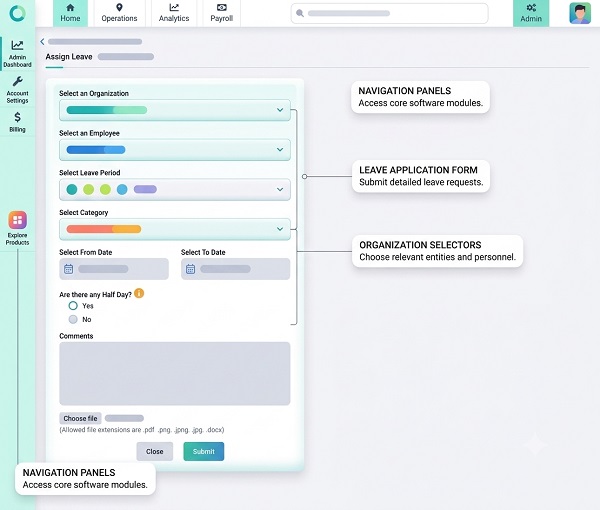
What Is an Integrated Leave and Attendance System?
An integrated leave and attendance system combines two important HR processes:
Employee Attendance
- Check-in
- Check-out
- Working hours
- Shifts
- Late coming
- Early leaving
- Overtime
Employee Leave
- Leave applications
- Leave balances
- Leave approval
- Leave history
- Holiday calendars
- Leave types
Instead of maintaining separate records, both attendance and leave information are connected.
A typical workflow is:
Employee → Attendance / Leave Request → Manager Approval → HR Review → Attendance Update → Payroll
Why Combine Leave and Attendance?
Attendance and leave are closely connected.
For example, an employee who is on approved leave should not normally be treated as absent for that day under the organization's attendance policy.
If the systems are separate, HR may have to manually reconcile the two records.
With an integrated system:
Approved Leave → Attendance Updated Automatically
This can reduce manual work and improve attendance accuracy.
1. Centralize Employee Records
A single system provides HR with a centralized employee record.
Depending on the software, HR can view:
- Employee details
- Attendance history
- Leave history
- Leave balance
- Working hours
- Shift
- Overtime
- Attendance corrections
This eliminates the need to search through different spreadsheets, emails, or registers.
2. Allow Employees to Apply for Leave Online
Employees can submit leave requests through a web portal or mobile application.
A leave request may include:
- Leave type
- Start date
- End date
- Number of days
- Reason, where required
- Supporting information, where applicable
Once submitted, the request can be automatically routed to the appropriate manager.
This is much more efficient than managing leave through paper forms or email chains.
3. Automate Leave Approval
Managers can review leave requests from the same system.
A typical process is:
Employee Applies for Leave → Manager Receives Request → Manager Approves/Rejects → Leave Balance Updated → Attendance Updated
This creates a clear record of who submitted and approved the leave request.
4. Automatically Update Attendance
One of the biggest benefits of integrating leave and attendance is automatic attendance updating.
For example:
Employee: ABC
Date: August 20
Leave: Approved
The system can mark the appropriate attendance status based on the organization's configuration.
HR does not need to manually change the employee's attendance from absent to leave.
5. Manage Different Leave Types
Businesses may have different leave categories.
Examples include:
- Casual leave
- Sick leave
- Earned leave
- Annual leave
- Maternity leave
- Paternity leave
- Compensatory leave
- Unpaid leave
The exact leave types and rules should be configured according to the organization's policies and applicable requirements.
The system can maintain separate balances for different leave categories.
6. Track Leave Balances Automatically
Employees and managers should be able to see current leave balances.
For example:
| Leave Type | Opening Balance | Used | Available |
|---|---|---|---|
| Casual Leave | 12 | 4 | 8 |
| Earned Leave | 18 | 6 | 12 |
| Sick Leave | 10 | 2 | 8 |
Automatic balance calculation reduces the need for HR to manually update spreadsheets.
7. Prevent Duplicate or Incorrect Entries
Separate attendance and leave records can create inconsistencies.
For example:
Attendance: Absent
Leave: Approved
Without integration, HR may need to manually identify and correct the conflict.
An integrated system can connect the two records and apply configured rules automatically.
This helps reduce duplicate data entry and attendance inconsistencies.
8. Manage Holidays and Weekly Offs
Leave calculations should consider the organization's holiday and weekly-off calendar.
For example, if an employee applies for leave around a weekend, the system should calculate the leave period according to the configured company policy.
Businesses with multiple locations can also maintain different holiday calendars where required.
This is particularly useful for organizations with:
- Multiple branches
- Different states
- Different work locations
- Multiple shift patterns
9. Manage Half-Day Leave
Employees may not always need a full day of leave.
A leave and attendance system can support half-day or partial-day leave according to company policy.
For example:
Morning: Employee works
Afternoon: Approved leave
The attendance and leave records can reflect the appropriate status.
10. Handle Leave During Different Shifts
Shift-based organizations need leave management that works with different schedules.
For example:
Employee A: 9:00 AM–6:00 PM
Employee B: 2:00 PM–11:00 PM
Employee C: 10:00 PM–6:00 AM
The leave system should apply the employee's assigned schedule when processing attendance.
This is important for manufacturing, healthcare, hospitality, security, logistics, and other shift-based businesses.
11. Connect Leave With Payroll
Leave information may affect payroll depending on the type of leave and company policy.
For example, approved paid leave may be treated differently from unpaid leave.
An integrated workflow can provide payroll with relevant information:
Attendance + Leave + Overtime → Payroll
This reduces manual data entry and helps payroll teams work with more consistent attendance information.
For businesses using payroll outsourcing, centralized leave and attendance records can also simplify the preparation and transfer of payroll inputs.
12. Manage Attendance Regularization
Employees may occasionally have attendance problems even when they were working.
Examples include:
- Missing check-in
- Missing check-out
- Incorrect shift
- Approved work outside the office
- Technical problems
The system can provide an attendance regularization workflow.
Employee Request → Manager Review → Approval → Attendance Updated
This is separate from leave but can be managed within the same platform.
13. Provide Employee Self-Service
Employee self-service is an important feature of integrated HR software.
Employees can access:
- Attendance history
- Leave balance
- Leave applications
- Leave approval status
- Working hours
- Overtime
- Attendance regularization
- Holiday calendar
This reduces routine questions to HR and gives employees greater visibility into their records.
14. Give Managers a Team Dashboard
Managers can use a dashboard to see team attendance and leave information.
They may be able to view:
- Employees present
- Employees absent
- Employees on leave
- Pending leave requests
- Late arrivals
- Early departures
- Attendance exceptions
This helps managers plan workloads and staffing.
15. Improve Workforce Planning
Combining attendance and leave data gives managers a better understanding of workforce availability.
For example, if five employees from the same department have approved leave on the same day, the manager can identify the potential staffing gap in advance.
This allows the organization to:
- Reassign work
- Adjust schedules
- Arrange replacements
- Plan resources
Better workforce planning can help reduce operational disruptions.
16. Support Multiple Locations
Businesses with several offices, branches, stores, factories, or project sites can manage leave and attendance centrally.
HR can maintain:
- Location-wise employees
- Location-specific shifts
- Holiday calendars
- Attendance
- Leave policies
Managers can receive access to the employees they are responsible for.
17. Generate Useful Reports
An integrated system can provide reports covering both attendance and leave.
Common reports include:
- Employee attendance report
- Leave report
- Leave balance report
- Absence report
- Late-coming report
- Early-leaving report
- Overtime report
- Department-wise attendance
- Location-wise attendance
- Leave utilization report
These reports can help HR identify workforce patterns.
Example: Leave and Attendance Workflow
Consider an employee who wants to take leave on Friday.
Traditional Process
Employee → Email HR → Manager Approval → HR Updates Spreadsheet → Attendance Updated → Payroll
This requires several manual steps.
Automated Process
Employee → Mobile/Web Leave Request → Manager Approval → Leave Balance Updated → Attendance Updated → Payroll
The second workflow is faster and reduces repetitive administrative work.
Manual vs. Integrated Leave and Attendance
| Area | Separate/Manual System | Integrated System |
|---|---|---|
| Leave application | Email/paper | Online |
| Leave approval | Manual | Workflow |
| Leave balance | Spreadsheet | Automatic |
| Attendance | Separate | Connected |
| Holiday calendar | Manual | Configurable |
| Regularization | Email/manual | Digital workflow |
| Reports | Manual | Automated |
| Payroll input | Manual consolidation | Integration/export |
| Employee access | Limited | Self-service |
| Workforce visibility | Lower | Centralized |
Best Practices for Managing Leave and Attendance
Businesses should:
- Define clear attendance and leave policies.
- Configure leave types correctly.
- Set appropriate approval workflows.
- Maintain accurate holiday calendars.
- Give employees access to their records.
- Allow attendance regularization where appropriate.
- Review leave and attendance exceptions before payroll.
- Restrict access to authorized users.
- Maintain an audit trail for important changes.
- Keep employee information secure.
- Train employees and managers.
- Review reports regularly.
What to Look for in Leave and Attendance Software
Before choosing a system, businesses should consider whether it supports:
- Employee self-service
- Mobile applications
- Biometric attendance
- GPS attendance where required
- Shift management
- Multiple leave types
- Leave approval workflows
- Automatic leave balance
- Half-day leave
- Holiday calendars
- Attendance regularization
- Overtime tracking
- Multi-location management
- Reports and dashboards
- Payroll integration
- Role-based access
- Audit trails
Conclusion
Managing employee leave and attendance in one system can simplify HR administration and improve the accuracy of workforce records.
Instead of maintaining separate attendance registers, leave spreadsheets, emails, and payroll inputs, businesses can use one centralized platform to manage attendance, leave, shifts, working hours, overtime, regularization, reports, and payroll-related data.
The key benefit is the connection between leave and attendance. When an approved leave request automatically updates the relevant attendance record, HR teams spend less time reconciling information manually.
For small businesses, an integrated system can reduce administrative work. For larger organizations with multiple locations and complex shifts, it can provide centralized workforce visibility.
A well-designed leave and attendance system ultimately helps businesses create a more efficient, transparent, and organized employee management process while giving employees and managers convenient access to the information they need.
Leave and attendance operate together in InnBuilt Attendance Management Software, so approved leave updates attendance status and payable days automatically. Employees and managers can view balances and staffing impact centrally.