How to Manage Night Shifts and Flexible Working Hours
How to Manage Night Shifts and Flexible Working Hours
Managing employees who work night shifts or flexible working hours can be challenging for HR teams and managers. Unlike traditional 9-to-5 schedules, these work arrangements require careful planning of employee schedules, attendance, working hours, leave, overtime, and staffing requirements.
A well-organized shift management system can help businesses maintain productivity while giving employees greater flexibility. With the right processes and technology, companies can manage night shifts and flexible working hours more efficiently and reduce scheduling conflicts.
What Are Night Shifts and Flexible Working Hours?
Night shifts are work schedules where employees work during evening or overnight hours, such as 10 PM to 6 AM. They are common in industries such as manufacturing, healthcare, security, hospitality, transportation, BPO, and customer support.
Flexible working hours allow employees to work outside fixed schedules. Depending on company policy, employees may have flexible start and end times, different shift timings, compressed work schedules, or other approved arrangements.
Both require accurate scheduling and attendance tracking to ensure that employees work their assigned hours.
Why Are Night Shifts Difficult to Manage?
Night shift management can create several challenges for businesses, including:
- Employees working across different calendar dates
- Difficulty tracking overnight attendance
- Late arrivals and early departures
- Shift swaps and last-minute changes
- Overtime management
- Employee fatigue and reduced productivity
- Difficulty coordinating with day-shift teams
- Payroll calculation issues
- Leave management across different shifts
- Maintaining adequate staffing levels
Manual attendance registers and spreadsheets can make these problems more difficult, especially when a company has multiple shifts or locations.
How to Manage Night Shifts Efficiently
1. Create Clear Shift Schedules
Start by defining clear shift timings for every department and employee. Employees should know their scheduled start and end times in advance.
For example:
| Shift | Timing |
|---|---|
| Morning Shift | 6:00 AM – 2:00 PM |
| General Shift | 9:00 AM – 6:00 PM |
| Evening Shift | 2:00 PM – 10:00 PM |
| Night Shift | 10:00 PM – 6:00 AM |
Clearly defined schedules reduce confusion and make attendance tracking easier.
2. Publish Rosters in Advance
Employees should receive their schedules before the work period begins. Advance scheduling allows employees to plan their personal commitments and gives managers enough time to identify staffing shortages.
A digital shift roster can make it easier to publish schedules and communicate changes.
3. Track Overnight Attendance Correctly
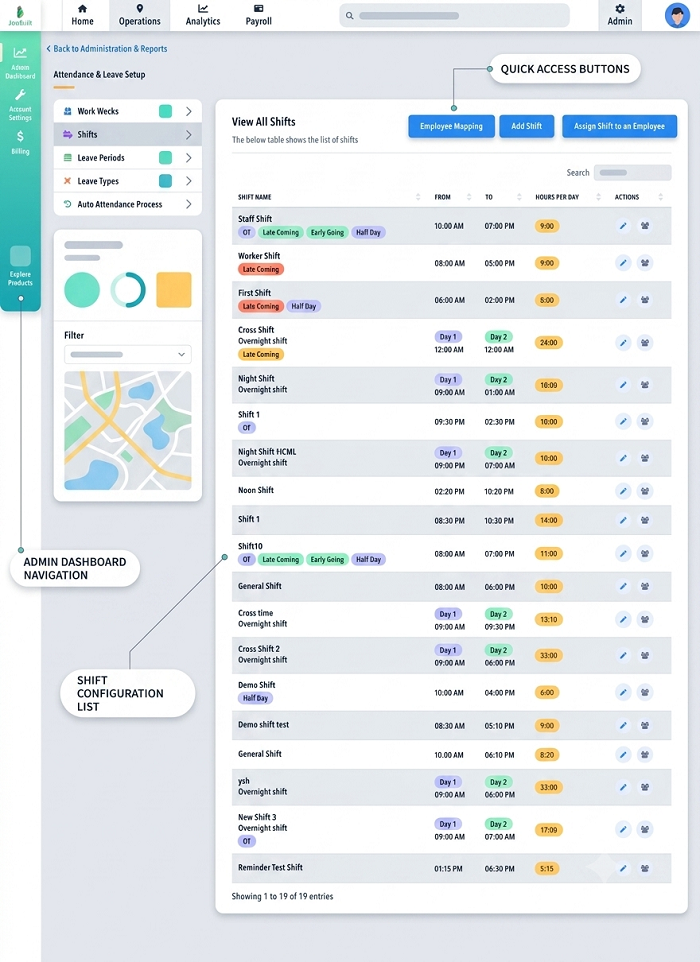
Night shifts can cross midnight. For example, an employee may clock in at 10:00 PM on Monday and clock out at 6:00 AM on Tuesday.
The attendance system should recognize this as one work shift, rather than incorrectly treating the two entries as separate workdays.
Automated attendance software can simplify overnight attendance calculations and reduce manual corrections.
4. Define Rules for Flexible Working Hours
Flexible schedules should have clear rules. Employees should understand:
- Permitted start and end times
- Required working hours
- Core working hours, if applicable
- Break requirements
- Attendance rules
- Approval requirements
- Overtime policies
- Remote or hybrid work expectations
Clear policies prevent flexibility from creating scheduling problems.
5. Allow Employees to View Their Schedules
Giving employees access to their schedules can significantly reduce communication gaps.
A mobile employee application can allow employees to check:
- Assigned shifts
- Upcoming schedules
- Attendance records
- Leave information
- Shift changes
- Approved requests
This reduces the need for employees to repeatedly contact HR or supervisors.
6. Manage Shift Changes and Swaps
Employees may occasionally need to exchange shifts because of personal commitments or unexpected situations.
Instead of managing swaps through informal messages, companies can establish an approval-based process.
A good shift-swap process should:
- Allow employees to request a swap.
- Check whether the replacement employee is available.
- Verify that required skills are available.
- Send the request to the manager.
- Update the roster after approval.
- Record the change for attendance and payroll purposes.
7. Monitor Working Hours
Flexible schedules should still be monitored to ensure employees complete their required working hours.
Managers can compare:
Scheduled Hours → Actual Hours → Breaks → Overtime → Shortfall
This helps identify employees who regularly work beyond their scheduled hours or fail to complete required working time.
8. Manage Overtime Carefully
Night shifts and flexible schedules can sometimes result in additional working hours.
Businesses should establish clear overtime approval and recording procedures. Attendance data can be connected with payroll calculations so that approved overtime is properly considered during payroll processing.
The applicable company policy and employment requirements should always be followed.
9. Plan Adequate Night-Shift Staffing
Night shifts should not be treated as simply moving daytime employees to nighttime schedules.
Managers should consider:
- Expected workload
- Employee availability
- Required skills
- Backup employees
- Emergency coverage
- Leave availability
- Department requirements
Maintaining backup staffing is particularly important for operations that cannot stop during the night.
10. Consider Employee Well-Being
Night work can be physically and mentally demanding. Businesses should take reasonable steps to create a safe and supportive working environment.
Depending on the workplace, this can include appropriate breaks, adequate facilities, safe transportation arrangements where applicable, and reasonable shift planning.
Managers should also monitor excessive overtime and repeated schedule changes.
How Technology Helps Manage Night and Flexible Shifts
Modern workforce management software can simplify many tasks associated with non-traditional schedules.
A centralized system can connect:
Employee → Shift Roster → Attendance → Leave → Overtime → Payroll
Instead of maintaining separate spreadsheets, HR teams can manage workforce information from a centralized platform.
Automated Shift Scheduling
Managers can create and assign shifts based on employee availability, departments, locations, and required staffing.
Mobile Attendance
Employees can record attendance through supported mobile or workplace attendance methods, depending on company requirements.
Real-Time Attendance Information
Managers can quickly view attendance information and identify missing punches, late arrivals, absences, or other exceptions.
Automated Notifications
Employees can receive notifications about upcoming shifts, roster changes, approvals, or other important updates.
Attendance and Payroll Integration
Connecting attendance with payroll can reduce manual data entry and help payroll teams use approved attendance, leave, and overtime information during salary processing.
Managing Flexible Working Hours: Best Practices
Businesses can follow these practices to make flexible working arrangements more effective:
Set Clear Expectations
Flexibility should not mean that employees have unlimited or undefined working hours. Define responsibilities, expected working time, availability requirements, and communication rules.
Focus on Results
For suitable roles, managers can focus on work completion and productivity rather than monitoring every minute of an employee's day.
Maintain Core Hours
Some businesses use core working hours when employees are expected to be available, while allowing flexibility around those hours.
For example:
Flexible Window: 8:00 AM – 7:00 PM
Core Hours: 10:00 AM – 4:00 PM
This approach provides flexibility while maintaining team coordination.
Maintain Accurate Records
Even flexible employees need accurate attendance and working-hour records when required by company policy or applicable rules.
Review Flexible Schedules Regularly
Managers should periodically evaluate whether flexible working arrangements are helping employees and the business.
Key factors can include productivity, attendance, employee availability, workload, and team coordination.
Example of a Flexible Shift Schedule
Consider a customer support company that operates 24 hours a day.
| Employee | Shift | Working Hours |
|---|---|---|
| Employee A | Morning | 6 AM – 2 PM |
| Employee B | General | 9 AM – 6 PM |
| Employee C | Evening | 2 PM – 10 PM |
| Employee D | Night | 10 PM – 6 AM |
The company can use an automated roster to assign shifts and an attendance system to record actual working hours.
If Employee D works from 10 PM to 6 AM, the system should correctly associate the overnight attendance with the assigned night shift.
Common Mistakes to Avoid
Businesses should avoid these common mistakes when managing night and flexible schedules:
- Preparing schedules at the last minute
- Relying entirely on spreadsheets
- Ignoring overnight attendance rules
- Allowing unauthorized shift swaps
- Not tracking overtime
- Frequently changing employee schedules
- Failing to maintain backup staffing
- Not communicating roster changes
- Applying unclear flexible-working policies
- Separating attendance and payroll data
These problems can lead to employee dissatisfaction, payroll errors, staffing gaps, and administrative workload.
Benefits of Effective Night Shift and Flexible Work Management
A well-managed system can help businesses achieve:
- Better workforce planning
- More accurate attendance records
- Reduced scheduling conflicts
- Improved employee flexibility
- Better shift coverage
- Reduced manual HR work
- More accurate overtime records
- Faster payroll processing
- Better visibility into working hours
- Improved employee experience
Conclusion
Managing night shifts and flexible working hours requires more than simply assigning different working times. Businesses need a structured approach to shift scheduling, attendance tracking, leave management, overtime, employee communication, and payroll.
Automated workforce management software can help HR teams manage these processes from a centralized system. By combining accurate shift rosters with attendance and payroll data, businesses can reduce administrative work while maintaining better control over their workforce.
Whether a company operates 24/7 shifts, rotational schedules, flexible hours, or multiple locations, a well-designed shift management process can make workforce management more efficient, transparent, and scalable.
InnBuilt Shift Management Software supports night shifts and flexible working hours with cross-date attendance, configurable start times, breaks, allowances, and overtime rules. Employees receive clear schedules while payroll receives accurate working-hour data.