How to Manage Rotational Shifts Efficiently
How to Manage Rotational Shifts Efficiently
Many businesses operate across multiple shifts to maintain continuous operations, serve customers for extended hours, or meet production requirements. In these organizations, employees may rotate between morning, evening, and night shifts based on a planned schedule.
Rotational shift management can become complicated when businesses have a large workforce, multiple departments, frequent leave, employee absences, and changing operational requirements. Poorly planned rotations can result in scheduling conflicts, excessive overtime, attendance issues, and employee dissatisfaction.
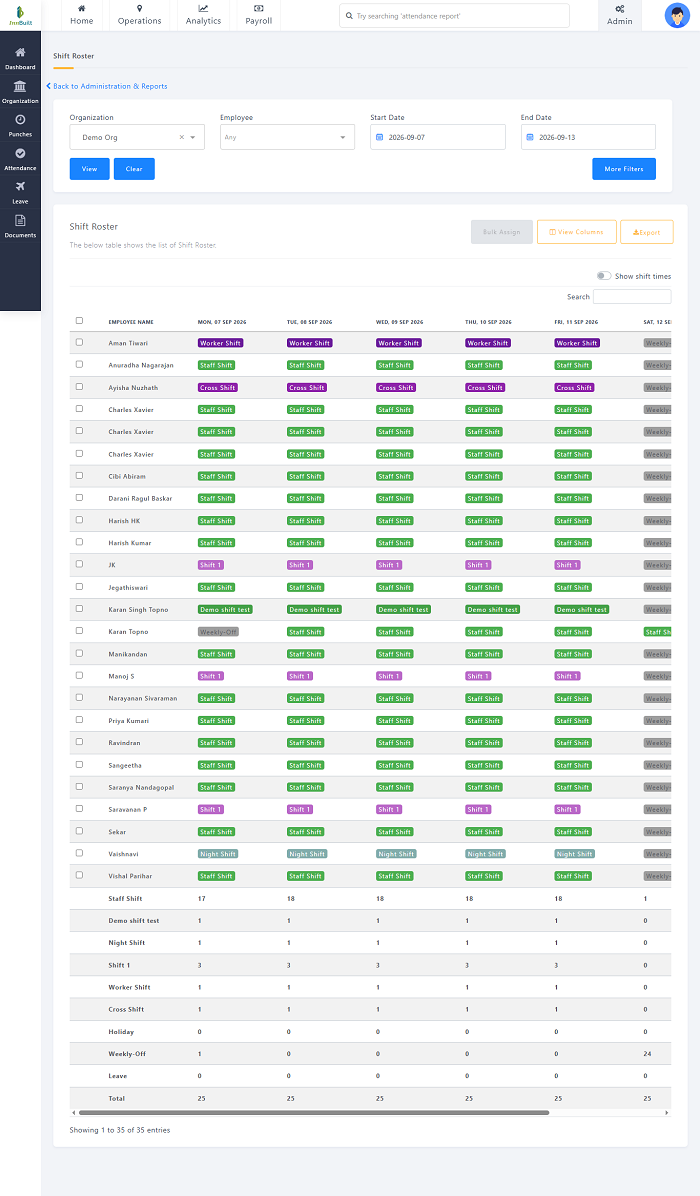
Using shift management software can help businesses create structured rosters, automate recurring schedules, manage shift changes, track attendance, and connect working hours with payroll.
This guide explains how businesses can manage rotational shifts efficiently.
What Are Rotational Shifts?
A rotational shift is a work schedule in which employees move between different shifts according to a planned rotation.
For example, an employee may follow:
- Week 1: Morning shift
- Week 2: Evening shift
- Week 3: Night shift
- Week 4: Morning shift
Another organization may rotate employees every few days or according to a monthly roster.
The rotation pattern depends on the organization's operating hours, workforce requirements, employee roles, and internal policies.
Why Is Rotational Shift Management Challenging?
Managing rotational shifts manually can become difficult because managers need to consider several factors simultaneously.
These may include:
- Employee availability
- Shift requirements
- Weekly offs
- Leave
- Skills and roles
- Attendance
- Overtime
- Shift swaps
- Employee preferences
- Multiple locations
- Unexpected absences
A change to one employee's schedule can affect several other employees.
For example, if an employee assigned to a night shift takes unexpected leave, the manager may need to find a replacement without creating another staffing shortage.
1. Create a Clear Rotation Pattern
The first step in managing rotational shifts is to establish a predictable rotation pattern.
For example:
| Week | Shift |
|---|---|
| Week 1 | Morning |
| Week 2 | Evening |
| Week 3 | Night |
| Week 4 | Morning |
Employees should know their expected rotation in advance.
A clearly defined pattern makes it easier for employees and managers to plan work, leave, and personal commitments.
Best Practice
Document the rotation rules and communicate them to employees before the schedule begins.
2. Plan Shifts in Advance
Last-minute scheduling can create confusion and increase the risk of staffing gaps.
Managers should prepare rosters as far in advance as practical.
When preparing a rotational schedule, consider:
- Business demand
- Employee availability
- Approved leave
- Required staffing
- Employee skills
- Weekly offs
- Holidays
- Planned maintenance or projects
Advance planning gives employees better visibility into their upcoming schedules.
3. Avoid Frequent Unplanned Changes
Rotational schedules can become difficult when employees are repeatedly moved between shifts without sufficient notice.
For example, changing an employee from a morning shift to a night shift at short notice may create operational and employee-management challenges.
Solution
Use planned rotation cycles and make schedule changes only when necessary.
When changes are required, communicate them through a centralized scheduling system.
4. Maintain Balanced Shift Assignments
Managers should distribute shifts fairly across eligible employees.
This is especially important for night and weekend shifts.
A scheduling system can help managers review how often employees are assigned to different shifts.
For example:
| Employee | Morning | Evening | Night |
|---|---|---|---|
| Employee A | 5 | 3 | 2 |
| Employee B | 4 | 4 | 2 |
| Employee C | 5 | 2 | 3 |
The exact distribution should be based on the organization's policies and operational requirements.
5. Consider Employee Availability
Employees may have approved availability restrictions or other scheduling requirements.
Managers should consider these when creating the roster.
A scheduling system can maintain employee availability information and help prevent avoidable conflicts.
However, operational requirements and applicable employment rules should always be considered when designing schedules.
6. Manage Night Shifts Carefully
Night shifts require additional planning because they may affect employee availability and create shifts that cross midnight.
For example:
10:00 PM – 6:00 AM
The shift starts on one calendar day and ends on the next.
Solution
Use scheduling and attendance software that correctly supports overnight shifts.
The system should be able to associate the employee's attendance with the appropriate shift.
7. Integrate Leave With Shift Scheduling
Approved leave should be considered before finalizing the roster.
Without integration, a manager may accidentally assign an employee to a shift during approved leave.
Solution
Connect leave management with shift scheduling.
A typical workflow is:
Leave Request → Approval → Schedule Update → Replacement Planning
This can reduce scheduling conflicts.
8. Manage Shift Swaps
Employees may occasionally need to exchange shifts.
A formal shift-swap process can help managers maintain accurate schedules.
A typical process is:
Employee Request → Eligible Colleague → Manager Approval → Schedule Update → Notification
The official roster should be updated after approval so that attendance and payroll records remain consistent.
9. Maintain Backup Staffing
Unexpected absences can create staffing gaps.
Businesses operating rotational shifts should maintain a backup staffing plan.
Potential options may include:
- Cross-trained employees
- Part-time employees
- Temporary workers
- On-call staff
- Approved overtime
- Shift swaps
The appropriate approach depends on the organization's workforce policies and applicable requirements.
10. Cross-Train Employees
Cross-training can provide managers with greater flexibility when employees are absent.
For example, if employees are trained to perform more than one role, a qualified employee may be able to cover another team's shift when required.
Employees should only be assigned to roles for which they are properly trained and authorized.
11. Monitor Working Hours and Overtime
Rotational shifts can result in additional working hours when employees cover vacancies or stay beyond their scheduled shift.
Managers should monitor:
- Scheduled hours
- Actual hours
- Overtime
- Late arrivals
- Early departures
- Missed punches
Attendance and shift management software can automate many of these reports.
Overtime should be reviewed and approved according to company policies and applicable employment requirements.
12. Use Automated Shift Rostering
Manual spreadsheets can become difficult to manage as the workforce grows.
Shift management software can help automate recurring shift schedules.
Managers can create:
- Fixed rotations
- Weekly rotations
- Monthly rotations
- Morning/evening/night schedules
- Location-based shifts
- Department-based rosters
Automation can reduce repetitive scheduling work and make roster updates easier.
13. Give Employees Mobile Access to Their Schedules
Employees should have easy access to their current and upcoming shifts.
An employee mobile app can allow workers to view:
- Today's shift
- Upcoming shifts
- Shift timing
- Work location
- Weekly offs
- Leave status
- Schedule changes
- Notifications
This reduces the need for employees to repeatedly contact HR or supervisors for schedule information.
14. Send Schedule Notifications
When a shift changes, employees should be informed quickly.
Digital notifications can help communicate:
- New shift assignments
- Shift changes
- Shift swaps
- Approved leave
- Schedule reminders
This can reduce confusion caused by outdated schedules.
15. Manage Multiple Locations
Businesses with several branches, factories, stores, or project sites may need to manage rotational shifts across multiple locations.
Managers should be able to organize schedules by:
- Location
- Department
- Team
- Employee
- Role
- Shift
A centralized platform can provide better visibility than maintaining separate spreadsheets for each location.
16. Track Attendance Against the Roster
A planned shift and actual attendance are not always the same.
Employees may:
- Arrive late
- Leave early
- Be absent
- Work overtime
- Miss a punch
- Work a different approved shift
Integrating attendance with shift management allows managers to compare scheduled and actual working hours.
For example:
Scheduled: 9:00 AM – 6:00 PM
Actual: 9:15 AM – 6:30 PM
The system can flag the relevant attendance deviation for review.
17. Connect Shift Management With Payroll
Shift schedules can influence attendance, working hours, overtime, and payroll.
A connected workforce system can provide a workflow such as:
Shift Roster → Attendance → Working Hours → Overtime → Payroll
This reduces the need to manually transfer attendance information between spreadsheets and payroll systems.
Payroll calculations should follow company policies and applicable employment requirements.
How Shift Management Software Helps With Rotational Shifts
Dedicated shift management software can simplify several scheduling activities.
Automated Rostering
Create recurring rotation patterns without manually rebuilding the roster every week.
Shift Templates
Create reusable morning, evening, and night-shift templates.
Employee Scheduling
Assign employees to specific shifts based on role, location, and availability.
Leave Integration
Consider approved leave when preparing schedules.
Shift Swaps
Allow employees to submit shift-change requests through a defined approval process.
Attendance Integration
Compare actual attendance with assigned shifts.
Overtime Monitoring
Identify working hours beyond scheduled shifts.
Mobile Employee Access
Employees can view their schedules through a mobile application.
Notifications
Employees can receive alerts about schedule assignments and changes.
Reports
Managers can review shift coverage, attendance, working hours, and overtime.
Best Practices for Efficient Rotational Shift Management
Businesses can improve rotational scheduling by following these practices:
Plan Ahead
Publish schedules as early as practical.
Keep Rotation Patterns Consistent
Use predictable rotation cycles whenever possible.
Consider Staffing Requirements
Make sure every shift has sufficient employees.
Account for Skills
Ensure critical roles are covered by qualified employees.
Integrate Leave
Consider approved leave before publishing rosters.
Maintain Backup Staffing
Have a process for handling unexpected absences.
Monitor Overtime
Avoid relying on excessive overtime to cover permanent staffing shortages.
Provide Mobile Access
Allow employees to view their schedules through an employee application.
Communicate Changes Quickly
Notify employees whenever approved schedule changes occur.
Review Attendance Data
Compare planned shifts with actual attendance.
Automate Repetitive Scheduling
Use shift management software as workforce complexity increases.
Conclusion
Managing rotational shifts efficiently requires careful planning, consistent scheduling, accurate attendance tracking, and clear communication.
Businesses should create predictable rotation patterns, plan schedules in advance, consider employee availability and skills, integrate leave, maintain backup staffing, monitor overtime, and provide employees with easy access to their schedules.
For organizations managing multiple teams or complex shift patterns, shift management software can simplify the entire process.
By connecting:
Shift Roster → Employee Scheduling → Attendance → Leave → Overtime → Payroll
businesses can reduce manual work and gain better visibility into workforce operations.
The goal of rotational shift management should be to maintain adequate staffing while creating schedules that are organized, transparent, and aligned with business requirements.
When supported by the right technology and clear workforce policies, businesses can manage rotational shifts more efficiently and create a more reliable scheduling process for both managers and employees.
Rotational schedules become easier to control with InnBuilt Shift Management Software using reusable shift cycles, automatic employee assignments, swap approvals, and attendance matching. Managers can maintain fair coverage while reducing roster conflicts and overtime surprises.