How to Manage Shift Scheduling for Remote and Field Employees
How to Manage Shift Scheduling for Remote and Field Employees
Managing employee schedules is relatively straightforward when everyone works from the same office. However, scheduling becomes more challenging when employees work remotely, travel between customer locations, or operate from different project sites.
Remote and field employees may have different working hours, locations, availability, and responsibilities. Managers need to ensure that employees know when they are expected to work while maintaining accurate records of shifts, attendance, leave, and overtime.
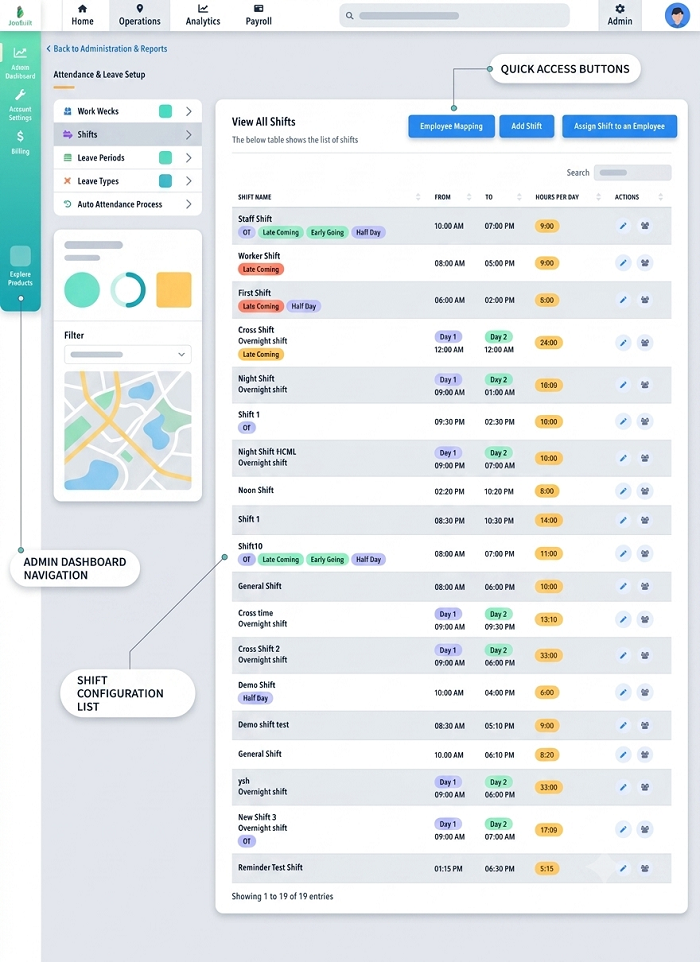
Shift management software can help businesses create centralized schedules, communicate shift assignments, track attendance, and manage workforce information across different locations.
What Is Shift Scheduling for Remote and Field Employees?
Shift scheduling for remote and field employees is the process of assigning employees specific working hours, dates, locations, and responsibilities when they are not working from a single fixed office.
A schedule may include:
- Employee name
- Date
- Shift timing
- Work location
- Customer or project site
- Assigned role
- Weekly off
- Leave
- Shift changes
- Attendance requirements
For remote employees, the schedule may primarily define working hours and availability. For field employees, it may also include the location or site where the employee is expected to work.
Why Remote and Field Employee Scheduling Is Challenging
Remote and field employees are often distributed across different locations.
Managers may need to coordinate:
- Different work schedules
- Multiple time zones
- Customer appointments
- Project locations
- Employee availability
- Travel time
- Shift changes
- Leave
- Attendance
- Overtime
Using spreadsheets and messages to manage these activities can become difficult as the workforce grows.
1. Create Clear Shift Schedules
The first step is to create a clear schedule that employees can easily understand.
Each assignment should specify the expected working period and, where relevant, the work location.
Solution
Create standardized shift templates for common working patterns.
For example:
| Shift | Timing | Employee Type |
|---|---|---|
| Morning | 9:00 AM – 6:00 PM | Remote |
| Field Shift A | 8:00 AM – 5:00 PM | Field |
| Field Shift B | 10:00 AM – 7:00 PM | Field |
The exact timings should be based on the organization's operational requirements.
2. Manage Different Employee Availability
Remote and field employees may have different availability depending on their role and work requirements.
For example, a field service technician may be available only during certain customer-service hours, while a remote employee may follow a fixed company schedule.
Solution
Maintain employee availability information within the scheduling system.
Managers can consider availability when assigning shifts and avoid unnecessary scheduling conflicts.
3. Manage Multiple Work Locations
Field employees may work at different customer sites, project locations, branches, or service areas.
A single employee may even visit multiple locations during the same day.
Solution
Use scheduling software that supports location-based assignments.
Managers can associate employees with specific projects, customers, branches, or work locations where required.
This creates better visibility into where employees are expected to work.
4. Provide Employees With Schedule Visibility
Remote and field employees cannot always rely on physical notice boards or direct communication from managers.
If they do not have access to the latest schedule, they may miss important changes.
Solution
Provide employees with a self-service portal or employee mobile app.
Employees can use the application to view:
- Current shifts
- Upcoming shifts
- Working hours
- Assigned locations
- Schedule changes
- Weekly offs
- Leave information
This gives employees direct access to their schedules.
5. Handle Last-Minute Schedule Changes
Customer requirements, project delays, emergencies, and employee absences can require managers to change schedules quickly.
For field employees, these changes may happen more frequently because work depends on customer appointments and project requirements.
Solution
Use a centralized scheduling system where managers can update the official schedule.
Employees should receive notifications when a change affects their assigned shift.
This helps ensure that employees are working from the latest approved schedule.
6. Manage Shift Swaps
Remote and field employees may sometimes need to exchange shifts with colleagues.
If employees arrange swaps through informal messages, the official schedule may remain unchanged.
Solution
Create a formal shift-swap process.
Employees can request a shift swap through the system, and managers can approve or reject the request.
Once approved, the official schedule should be updated.
7. Track Remote Employee Attendance
Remote employees may not use a physical biometric device to record attendance.
Businesses may need a digital attendance method that works from an employee's approved remote location.
Solution
Use an attendance system that supports suitable remote attendance methods.
Depending on company policy and the software, employees may be able to record attendance through a web or mobile application.
Organizations should establish clear policies regarding remote attendance and working hours.
8. Track Field Employee Attendance
Field employees may begin their workday at a customer location or project site instead of the company office.
A traditional fingerprint device may therefore be impractical.
Solution
Mobile attendance can allow field employees to record attendance using a supported smartphone application.
Some solutions combine:
Face Verification + GPS + Time
This can provide additional information about when and, where permitted, where attendance was recorded.
Location tracking should be implemented transparently and in accordance with applicable privacy requirements and company policies.
9. Manage Multiple Time Zones
Businesses with remote employees in different cities or countries may need to manage multiple time zones.
A shift scheduled at 9:00 AM in one location may not correspond to 9:00 AM in another.
Solution
Clearly define the time zone associated with each employee, location, or schedule.
Scheduling software that supports multiple time zones can reduce confusion when assigning shifts to geographically distributed teams.
10. Manage Overtime
Remote and field employees may work beyond their scheduled hours because of customer requirements, project deadlines, or workload.
Without proper tracking, managers may have limited visibility into additional working hours.
Solution
Compare scheduled working hours with actual attendance.
Attendance and shift management software can help identify employees who work beyond their scheduled shifts and provide overtime reports for review.
Businesses should apply their established overtime policies and applicable employment requirements.
11. Coordinate Customer Appointments
Field employees often work according to customer appointments.
A technician may need to visit several customers during a single working day.
Solution
Integrate employee scheduling with work assignments or service-management processes where available.
Managers can assign employees based on:
- Availability
- Location
- Skills
- Shift
- Customer requirements
- Existing assignments
This can help improve workforce utilization.
12. Schedule Employees Based on Skills
Field and remote roles may require specialized skills.
For example, a company may need a certified technician for a particular project or an employee with specific technical expertise for a customer assignment.
Solution
Maintain employee skill and qualification information.
When creating schedules, managers can assign employees based on their roles, skills, certifications, and job requirements.
13. Manage Leave and Weekly Offs
Leave and weekly offs need to be considered when preparing remote and field employee schedules.
Assigning an employee to a shift during approved leave can create unnecessary conflicts.
Solution
Integrate leave management with shift scheduling.
Before publishing schedules, managers can review approved leave and employee availability.
14. Maintain a Centralized Schedule
A common problem with remote and field workforce management is the use of multiple communication channels.
Managers may use:
- Excel
- Phone calls
- Shared documents
When information is spread across different channels, employees may not know which schedule is current.
Solution
Use one centralized scheduling platform as the official source of employee schedules.
Managers can update the schedule in one location, while employees can access the latest version through the employee portal or mobile app.
15. Connect Scheduling With Payroll
Employee schedules can influence attendance, working hours, overtime, and payroll.
For example, a field employee may work a different schedule on a particular day because of a customer requirement.
If the schedule is not updated, attendance and payroll calculations may be affected.
Solution
Integrate shift management, attendance, leave, and payroll software.
A connected workflow can look like:
Shift Schedule → Attendance → Working Hours → Leave & Overtime → Payroll
This reduces duplicate data entry and can improve payroll processing efficiency.
How Shift Management Software Helps Remote and Field Employees
Dedicated shift management software can provide several features for distributed workforces.
1. Digital Shift Scheduling
Managers can create and assign shifts without maintaining multiple spreadsheets.
2. Mobile Employee Access
Employees can view schedules through their smartphones.
3. Location-Based Scheduling
Managers can associate shifts with specific locations or projects where supported.
4. Shift Notifications
Employees can receive notifications about new assignments and schedule changes.
5. Shift Swap Requests
Employees can request shift changes through a structured approval process.
6. Attendance Integration
Scheduled shifts can be compared with actual attendance.
7. Leave Integration
Approved leave can be considered during schedule creation.
8. Overtime Monitoring
Managers can review scheduled hours versus actual working hours.
9. Multiple-Location Management
HR teams can manage distributed employees from a centralized system.
10. Payroll Integration
Attendance and working-hour information can be transferred to payroll systems where supported.
Best Practices for Remote and Field Employee Scheduling
Businesses can improve scheduling by following these practices:
Plan Schedules in Advance
Give employees sufficient notice of upcoming shifts whenever possible.
Use Clear Scheduling Rules
Define working hours, shift assignments, attendance requirements, weekly offs, and overtime policies.
Keep Employee Information Updated
Maintain accurate information about employee availability, skills, locations, and assignments.
Use One Official Schedule
Avoid maintaining multiple versions of the employee roster.
Communicate Schedule Changes Quickly
Employees should be notified when approved changes affect their shifts.
Consider Location and Travel Requirements
For field employees, scheduling should account for work locations and practical travel requirements.
Monitor Actual Working Hours
Compare schedules with attendance to identify overtime, late arrivals, early departures, and other deviations.
Protect Employee Data
If using GPS or face recognition for attendance, establish appropriate data-handling policies and follow applicable privacy requirements.
Automate Repetitive Tasks
Businesses with large distributed teams can use shift management software to reduce manual scheduling work.
Example of Remote and Field Employee Scheduling
Consider a service company with three types of employees:
| Employee Type | Schedule | Work Location |
|---|---|---|
| Remote Support Team | 9:00 AM – 6:00 PM | Remote |
| Field Technician A | 8:00 AM – 5:00 PM | Customer Sites |
| Field Technician B | 10:00 AM – 7:00 PM | Project Locations |
The manager can assign each employee to an appropriate shift and location.
Employees can then view their schedules through a mobile application, while attendance can be recorded digitally.
If a technician's customer appointment changes, the manager can update the schedule and notify the employee.
Conclusion
Managing shifts for remote and field employees requires more than simply assigning working hours. Businesses need to coordinate employee availability, locations, customer assignments, attendance, leave, shift changes, overtime, and payroll.
Manual spreadsheets may work for small teams, but they can become difficult to maintain as the workforce becomes larger and more distributed.
Shift management software with mobile employee access can provide a centralized way to create schedules, communicate changes, manage shift swaps, track attendance, and monitor working hours.
By integrating shift scheduling, mobile attendance, leave management, and payroll, businesses can create a more organized workforce management process while giving remote and field employees better visibility into their schedules.
Remote and field schedules can be published through InnBuilt Shift Management Software, while the InnBuilt Employee Tracking App verifies attendance and location outside the office.