How to Reduce Time Theft and Proxy Attendance in the Workplace
How to Reduce Time Theft and Proxy Attendance in the Workplace
Time theft and proxy attendance can create significant challenges for businesses. When employees record attendance inaccurately, ask someone else to mark attendance on their behalf, or remain away from work while appearing present, organizations may face productivity, payroll, and workforce management issues.
Traditional attendance registers and manual systems can make these problems difficult to identify. Modern Attendance Management Software can help businesses create a more accurate, transparent, and controlled attendance process.
This guide explains practical ways businesses can reduce time theft and proxy attendance in the workplace.
What Is Time Theft?
Time theft generally refers to situations where an employee is paid for working time that was not actually worked, according to the organization's attendance and working-time policies.
Examples may include:
- Unreported extended breaks
- Repeated late arrivals
- Leaving work early without approval
- Recording inaccurate working hours
- Falsifying attendance records
- Remaining marked as present when not actually working
Not every attendance irregularity is intentional. Technical problems, approved work outside the office, or misunderstandings about schedules can also create inaccurate records. Businesses should therefore investigate attendance exceptions fairly before taking disciplinary action.
What Is Proxy Attendance?
Proxy attendance occurs when one person records attendance on behalf of another employee.
For example, an employee may ask a colleague to mark their attendance even though they have not yet arrived at the workplace.
This can be difficult to prevent with paper registers or systems that rely on easily transferable attendance credentials.
Biometric and authenticated digital attendance methods can significantly reduce this risk.
Why Time Theft and Proxy Attendance Matter
Inaccurate attendance can affect several areas of a business.
Payroll
Incorrect attendance records may result in inaccurate salary calculations, overtime records, or attendance-related adjustments.
Productivity
If employees are regularly absent while recorded as present, managers may have difficulty planning workloads and staffing.
Workforce Planning
Incorrect attendance information can make it harder to understand actual workforce availability.
Employee Fairness
Employees who follow attendance policies may feel that inaccurate attendance practices create an unfair working environment.
1. Use Biometric Attendance
Biometric attendance is one of the most common methods for reducing proxy attendance.
Depending on the device, employees may authenticate themselves using:
- Fingerprints
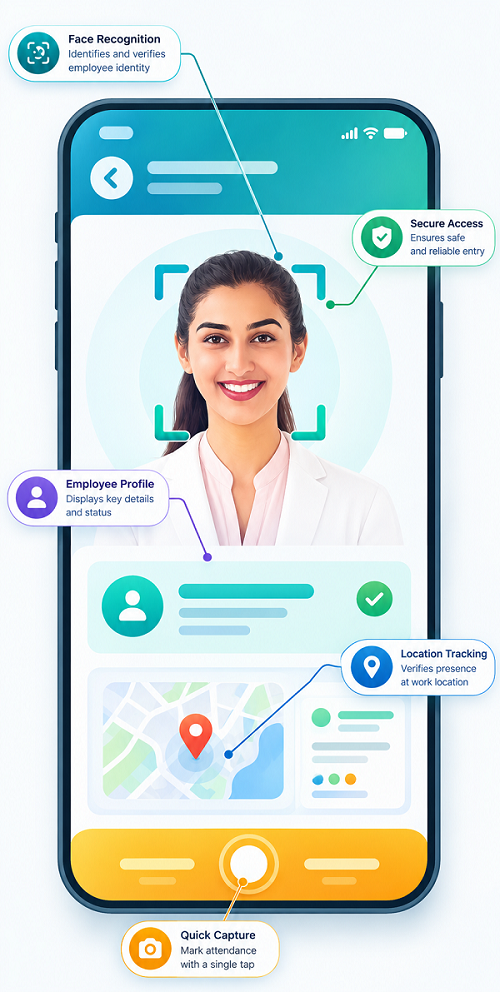
- Facial recognition
- Other supported biometric methods
Because biometric characteristics are associated with the individual employee, it is considerably harder for another person to record attendance on their behalf than with a paper register or shared password.
Businesses should ensure that biometric systems are implemented with appropriate security, privacy, and data-protection practices.
2. Use Facial Recognition Where Appropriate
Facial recognition attendance systems can provide another method of employee authentication.
An employee's face is used to verify their identity when attendance is recorded.
This can be useful in:
- Offices
- Factories
- Warehouses
- Retail stores
- Large workplaces
Organizations should evaluate the technology's accuracy, security, privacy implications, and applicable legal requirements before implementation.
3. Use Secure Mobile Attendance
Field and remote employees may not be able to use an office biometric device.
Mobile attendance can provide an alternative.
Depending on the system, the employee may authenticate through:
- Secure login
- Device authentication
- Mobile application
- GPS
- Geofencing
For example, an authorized field employee can mark attendance from an approved customer or project location.
4. Use GPS and Geofencing for Field Teams
GPS and geofencing can help businesses manage attendance when employees work at different locations.
For example, a construction company may define an approved project location.
The employee can mark attendance through the mobile application according to the company's location-based attendance policy.
This can make it more difficult to record attendance from an unrelated location.
However, businesses should clearly communicate when location information is collected and why it is required.
5. Avoid Shared Attendance Credentials
Shared usernames, passwords, cards, or attendance credentials can increase the risk of unauthorized attendance marking.
Businesses should provide individual credentials to employees and implement appropriate authentication controls.
Where possible, the attendance system should associate each attendance record with a specific employee account or authentication method.
6. Use Employee Self-Service
Employee self-service provides employees with access to their own attendance records.
They may be able to view:
- Check-in time
- Check-out time
- Working hours
- Attendance history
- Leave
- Overtime
- Attendance exceptions
This creates transparency and allows employees to identify incorrect records quickly.
7. Monitor Attendance Exceptions
Attendance software can automatically identify unusual attendance patterns.
Examples include:
- Repeated late arrivals
- Frequent early departures
- Missing check-outs
- Unusual working hours
- Multiple attendance corrections
- Repeated attendance from unexpected locations
These records can be reviewed by authorized managers or HR.
The objective should be to identify patterns for review, not to automatically assume misconduct.
8. Maintain an Audit Trail
An audit trail records important attendance-related actions.
For example, the system may record:
Original Attendance → Correction Request → Manager Approval → Updated Attendance
An audit trail can help HR determine:
- Who changed a record
- When it was changed
- What was changed
- Who approved the change
This improves accountability and reduces unauthorized attendance modifications.
9. Create an Attendance Regularization Process
Employees may have legitimate reasons for attendance irregularities.
For example:
- Official client visits
- Approved remote work
- Business travel
- Emergency situations
- Device malfunction
- Network problems
Instead of allowing informal attendance changes, businesses can use a formal regularization process.
Employee Request → Manager Review → Approval → Attendance Updated
This creates a documented and transparent process.
10. Set Clear Attendance Policies
Technology works best when supported by clear policies.
An attendance policy should explain:
- Working hours
- Shift timings
- Check-in and check-out requirements
- Grace periods
- Breaks
- Leave
- Overtime
- Attendance corrections
- Proxy attendance restrictions
- Disciplinary procedures
- Remote and field attendance
Employees should understand the policy before the system is implemented.
11. Integrate Attendance With Payroll
Attendance data can affect payroll through working days, leave, overtime, and other configured attendance rules.
A centralized workflow can help reduce manual manipulation:
Attendance → Validation → Leave & Overtime → HR Approval → Payroll
This makes it easier to identify attendance discrepancies before payroll processing.
For businesses using payroll outsourcing, accurate attendance reports can also make monthly payroll inputs easier to manage.
12. Generate Attendance Reports
Regular attendance reports can help managers identify unusual patterns.
Useful reports include:
- Daily attendance
- Monthly attendance
- Late-coming report
- Early-leaving report
- Absence report
- Overtime report
- Missing-punch report
- Attendance correction report
- Location-wise attendance
- Employee-wise attendance
Reports can be reviewed periodically rather than requiring HR to manually check every attendance record.
13. Use Role-Based Access
Not every employee should have the ability to modify attendance information.
A role-based system can provide different permissions.
For example:
- Employee: View Own Attendance + Submit Requests
- Manager: Review Team Attendance
- HR: Manage Authorized Attendance Records
- Administrator: System Configuration
This reduces the risk of unauthorized changes.
14. Manage Multiple Locations Centrally
Businesses with several offices, stores, factories, or project sites can use centralized attendance software.
Instead of maintaining separate registers, HR can monitor attendance from different locations through one system.
This is particularly useful for:
- Retail chains
- Manufacturing businesses
- Construction companies
- Logistics companies
- Service organizations
- Multi-branch businesses
15. Train Employees and Managers
Technology alone cannot eliminate attendance problems.
Employees should be trained on:
- How to mark attendance
- When to check in and out
- How to apply for leave
- How to report technical problems
- How to request attendance corrections
Managers should also understand how to review and approve attendance exceptions.
16. Balance Monitoring With Employee Privacy
Reducing time theft should not mean excessive employee surveillance.
Businesses should collect only attendance information that is necessary for legitimate business purposes.
For systems using GPS, facial recognition, or other advanced technologies, organizations should clearly explain:
- What data is collected
- Why it is collected
- When it is collected
- Who can access it
- How it is protected
- How long it is retained
A transparent approach can improve employee acceptance of attendance technology.
Example: Preventing Proxy Attendance
Consider a company using a traditional attendance register.
An employee can ask a colleague to sign the register on their behalf.
The business moves to biometric attendance:
Employee → Biometric Authentication → Attendance System → Timestamp → HR Dashboard
The attendance record is associated with the employee's biometric authentication rather than a handwritten signature.
This can significantly reduce the opportunity for traditional proxy attendance.
Manual Attendance vs. Automated Attendance
| Area | Manual Attendance | Automated Attendance |
|---|---|---|
| Identity verification | Limited | Biometric/digital options |
| Proxy attendance | Higher risk | Reduced with authentication |
| Attendance records | Manual | Digital |
| Corrections | Difficult to track | Approval workflow |
| Audit trail | Limited | Available |
| Reports | Manual | Automated |
| Location tracking | Limited | GPS/geofencing options |
| Payroll data | Manual | Integration/export |
| Employee access | Limited | Self-service |
Best Practices to Reduce Time Theft
Businesses should:
- Use individual employee authentication.
- Consider biometric attendance for fixed workplaces.
- Use mobile/GPS attendance for field employees where appropriate.
- Configure clear shift timings.
- Establish reasonable grace periods.
- Maintain attendance audit trails.
- Provide employee self-service.
- Create a formal regularization process.
- Review attendance exceptions regularly.
- Integrate attendance with payroll.
- Restrict attendance-editing permissions.
- Protect employee data and privacy.
- Apply policies consistently.
- Investigate unusual patterns before taking action.
Conclusion
Time theft and proxy attendance can be reduced through a combination of technology, clear policies, employee transparency, and appropriate management controls.
Modern Attendance Management Software can provide biometric authentication, facial recognition, mobile attendance, GPS, geofencing, audit trails, regularization workflows, employee self-service, and centralized reporting.
The most effective approach is not simply to monitor employees more closely. It is to create an attendance process where employees can easily record their own attendance, managers can review exceptions, HR can maintain accurate records, and payroll receives reliable attendance information.
For businesses moving away from paper registers and spreadsheets, automated attendance management can provide a more accurate, transparent, secure, and efficient way to manage employee attendance while reducing opportunities for proxy attendance and inaccurate time records.
Proxy attendance and time theft can be reduced through InnBuilt Face Attendance Software, verified mobile check-ins, and location controls. Real-time exceptions help managers review suspicious entries quickly.