How to Track Employee Attendance in Multiple Locations
How to Track Employee Attendance in Multiple Locations
Managing employee attendance becomes more challenging when a business operates across multiple offices, branches, stores, factories, construction sites, or customer locations. HR teams may have to collect attendance data from different locations, consolidate spreadsheets, verify working hours, and prepare the information for payroll.
A centralized Attendance Management Software can simplify this process by allowing businesses to track employees across multiple locations through a single platform.
Whether employees use biometric devices, mobile applications, GPS, or web-based attendance, businesses can create a structured system for recording and managing attendance across different workplaces.
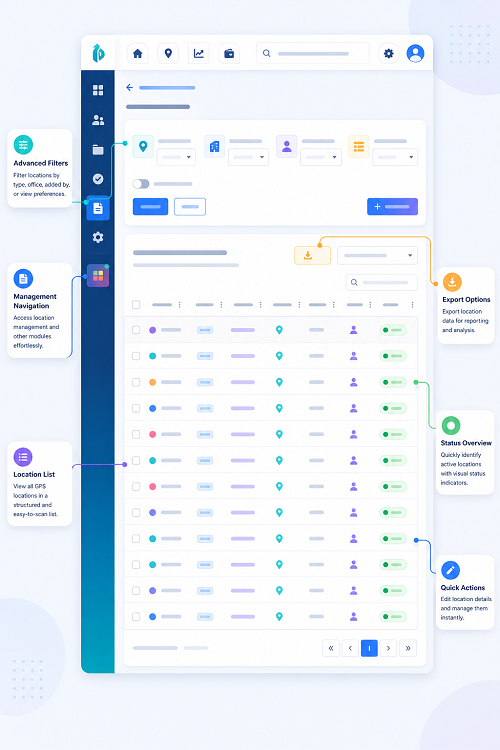
What Is Multi-Location Attendance Tracking?
Multi-location attendance tracking is the process of recording and managing employee attendance across multiple physical work locations through a centralized system.
For example, a company may have:
- Head office
- Regional offices
- Retail stores
- Manufacturing units
- Warehouses
- Construction sites
- Customer locations
Instead of maintaining separate attendance registers for each location, the business can use one centralized attendance platform.
A typical workflow is:
Employee → Attendance Device/Mobile App → Location → Centralized Attendance Software → HR Dashboard → Payroll
Why Is Multi-Location Attendance Management Important?
When attendance is managed separately at each location, HR teams may face several challenges.
These can include:
- Multiple attendance registers
- Separate Excel files
- Delayed attendance information
- Duplicate employee records
- Difficulty monitoring remote locations
- Manual consolidation
- Payroll errors
- Lack of real-time visibility
Centralized attendance software helps bring this information together.
1. Create Multiple Work Locations
The first step is to configure all business locations within the attendance system.
For example:
- Location 1: Chennai Head Office
- Location 2: Coimbatore Branch
- Location 3: Madurai Branch
- Location 4: Manufacturing Unit
- Location 5: Project Site
Each employee can then be assigned to the appropriate workplace according to their role and schedule.
This gives HR a structured view of where employees are expected to work.
2. Assign Employees to Locations
After creating locations, employees can be assigned to their respective workplaces.
Employee records may include:
- Employee name
- Employee ID
- Department
- Designation
- Work location
- Shift
- Reporting manager
If employees regularly move between locations, the system should support authorized location changes.
This is particularly useful for employees working across branches, project sites, or customer locations.
3. Use Biometric Attendance at Fixed Locations
For employees working at fixed locations, biometric attendance can be an effective option.
Businesses can install compatible biometric devices at offices, factories, warehouses, and stores.
For example:
Employee → Fingerprint/Facial Recognition → Branch Device → Central Attendance System
Attendance records from multiple devices can then be consolidated into the centralized platform.
This reduces the need for HR teams to manually collect attendance information from every location.
4. Use Mobile Attendance for Field Employees
Not all employees work from fixed locations.
Sales teams, service engineers, construction workers, delivery teams, and other field employees may need to record attendance through mobile applications.
Mobile attendance allows authorized employees to check in and check out using their smartphones.
This makes it easier to manage employees who work:
- At customer locations
- At construction sites
- On service calls
- Across different branches
- In the field
5. Use GPS and Geofencing
GPS-based attendance can provide location information when an employee marks attendance.
Geofencing can be used to define approved attendance areas.
For example, a construction company can create a geofence around a project site. Employees assigned to that site can be permitted to mark attendance within the approved area.
This can help businesses manage attendance across temporary or changing work locations.
However, organizations should establish clear policies regarding location tracking, privacy, data access, and data retention.
6. Manage Multiple Shifts
Different locations may operate different shifts.
For example:
- Head Office: 9:00 AM–6:00 PM
- Factory: 8:00 AM–5:00 PM
- Retail Store: 10:00 AM–7:00 PM
- Security Team: Rotational shifts
Attendance software should allow HR to assign different shifts to employees according to their location and role.
The system can then process attendance based on the appropriate schedule.
7. Centralize Attendance Data
One of the biggest advantages of multi-location attendance software is centralized data.
Instead of receiving separate attendance files from every branch, HR can access information through a centralized dashboard.
For example:
| Location | Employees | Present | Absent | On Leave |
|---|---|---|---|---|
| Head Office | 100 | 92 | 5 | 3 |
| Branch A | 50 | 45 | 3 | 2 |
| Branch B | 40 | 36 | 2 | 2 |
| Factory | 150 | 142 | 5 | 3 |
This provides management with a quick overview of workforce availability.
8. Give Managers Location-Based Access
Not every manager needs access to every employee's attendance information.
A good attendance system should support role-based access.
For example:
- Branch Manager → Branch Employees
- Factory Manager → Factory Employees
- HR Administrator → All Locations
This improves data security while allowing managers to manage their own teams.
9. Monitor Attendance in Real Time
Centralized attendance software can provide current attendance information to authorized HR users and managers.
They may be able to see:
- Employees present
- Employees absent
- Late arrivals
- Employees on leave
- Missing punches
- Shift attendance
This can help managers respond quickly to staffing shortages.
10. Manage Employee Transfers
Employees may occasionally move between locations.
For example, an employee may be temporarily transferred from one branch to another.
The attendance system should allow authorized HR users to update the employee's location and shift.
This helps ensure that attendance is recorded against the correct workplace.
11. Track Attendance for Construction Sites
Construction businesses often have employees working at multiple project sites.
Managing attendance through paper registers can make payroll preparation difficult.
A mobile attendance system with GPS or geofencing can allow workers to record attendance at authorized project locations.
The company can then view attendance by:
- Employee
- Project
- Site
- Date
- Shift
This can be particularly useful for organizations managing multiple construction projects simultaneously.
12. Integrate Attendance With Leave Management
Employees working across different locations should be able to apply for leave through the same system.
Managers can approve leave digitally, and the approved leave can be reflected in attendance records.
This creates a simple workflow:
Leave Request → Manager Approval → Attendance Update → Payroll
It also reduces the need for separate leave spreadsheets at each branch.
13. Track Overtime Across Locations
Different locations may have different working-hour requirements.
Attendance software can help identify overtime based on configured schedules and rules.
HR can generate location-wise overtime reports to understand where additional working hours are occurring.
For example, management may discover that one factory consistently records more overtime than another. This could lead to a review of staffing levels, production schedules, or shift planning.
14. Generate Location-Wise Reports
Multi-location attendance software should provide useful reports.
Common reports include:
- Location-wise attendance
- Department-wise attendance
- Employee attendance
- Shift-wise attendance
- Absence reports
- Late-coming reports
- Overtime reports
- Leave reports
- Working-hour reports
- Missing-punch reports
These reports can help management identify staffing patterns and operational issues.
15. Connect Attendance With Payroll
Attendance information from multiple locations often needs to be consolidated before payroll processing.
An integrated system can simplify the process:
Multiple Locations → Centralized Attendance → Leave + Overtime + Attendance Validation → HR Approval → Payroll
This reduces the need to manually combine attendance spreadsheets from different branches.
For businesses using payroll outsourcing, centralized attendance data can also make it easier to provide standardized payroll inputs to the payroll service provider.
16. Provide Employee Self-Service
Employees across different locations should have access to their own attendance information.
Through an employee self-service portal or mobile application, they may be able to:
- View attendance
- Check working hours
- Apply for leave
- Submit attendance regularization
- Review overtime
- View attendance history
This improves transparency and reduces routine queries to HR.
17. Maintain Security and Audit Trails
Multi-location attendance systems contain employee-related information, so access should be controlled.
Important security features include:
- Role-based access
- Secure authentication
- Audit logs
- Data encryption
- Backup
- Controlled attendance modifications
An audit trail can also show who made an attendance correction and when it was approved.
Manual vs. Automated Multi-Location Attendance
| Area | Manual Method | Centralized Software |
|---|---|---|
| Attendance collection | Separate registers/files | Centralized |
| Data consolidation | Manual | Automated |
| Location monitoring | Difficult | Easier |
| Shift management | Manual | Digital |
| Leave tracking | Separate | Integrated |
| Overtime | Manual | Automated/configurable |
| Reports | Manually prepared | Automated |
| Payroll data | Manual consolidation | Integration/export |
| Employee self-service | Limited | Available |
| Scalability | Difficult | Better suited for growth |
Best Practices for Multi-Location Attendance
Businesses can improve attendance management by following these practices:
- Create a master list of all work locations.
- Assign employees to the correct location and shift.
- Use biometric attendance for fixed workplaces where appropriate.
- Use mobile/GPS attendance for field employees where appropriate.
- Establish clear attendance policies.
- Provide employees with self-service access.
- Review missing punches before payroll.
- Maintain approval workflows for attendance corrections.
- Generate location-wise attendance reports.
- Protect employee attendance and location information.
- Review overtime and absenteeism trends.
- Integrate attendance with payroll and leave management.
Conclusion
Tracking employee attendance across multiple locations becomes much easier when businesses move from separate registers and spreadsheets to a centralized attendance management system.
A modern solution can combine biometric attendance, mobile attendance, GPS, geofencing, shift management, leave, overtime, employee self-service, reporting, and payroll integration within one platform.
For businesses with offices, branches, factories, retail stores, warehouses, construction sites, or field teams, centralized attendance management provides better visibility and reduces the administrative work involved in collecting and consolidating attendance data.
The ideal system should not only record where and when employees mark attendance. It should connect attendance with HR, leave, workforce management, and payroll processes, creating a more efficient and transparent way to manage employees across multiple locations.
Attendance across branches and worksites can be centralised using InnBuilt Attendance Management Software. Each location follows its own policies while head office receives a consolidated workforce view.