Integrated Attendance and Payroll Software vs. Separate Systems
Integrated Attendance and Payroll Software vs. Separate Systems
Managing employee attendance and payroll is a critical responsibility for HR and payroll teams. Attendance information such as working days, leave, overtime, late coming, and absences can directly affect salary processing.
Many businesses manage attendance and payroll using separate systems. For example, employees record attendance in one application, while HR processes salaries in another. Other businesses choose integrated Attendance and Payroll Software, where attendance and payroll work together in a connected system.
Both approaches can work, but they differ significantly in terms of data flow, automation, reporting, maintenance, and risk of manual errors.
This guide compares Integrated Attendance and Payroll Software vs. Separate Systems and explains which approach may be better for different types of businesses.
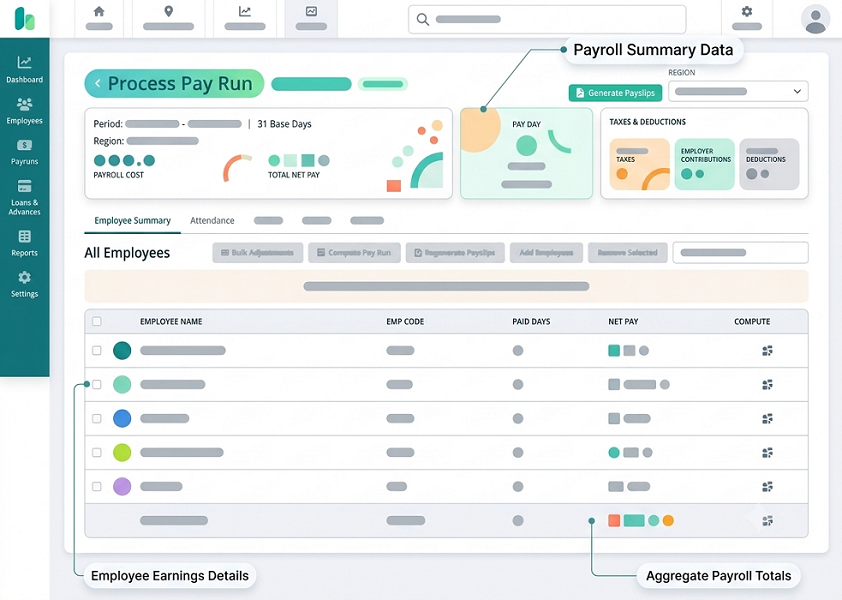
What Is Integrated Attendance and Payroll Software?
Integrated attendance and payroll software combines employee attendance and payroll processes within a connected platform.
A typical workflow is:
Employee Check-In → Attendance → Working Hours → Leave & Overtime → Approval → Payroll → Payslip
Attendance information can be used as an input for payroll processing without requiring HR to manually re-enter the same data.
Depending on the software, employees may record attendance through:
- Biometric devices
- Mobile applications
- Web applications
- GPS-enabled attendance
- Face recognition
The attendance system can then process the information and pass approved data into payroll.
What Are Separate Attendance and Payroll Systems?
With separate systems, attendance and payroll are managed independently.
For example:
Attendance Software → Export Attendance Data → Excel/CSV/Integration → Payroll Software → Salary Processing
HR may need to transfer or reconcile information between the two systems.
This approach can still work effectively if the systems have reliable integration or if the organization has simple payroll requirements.
Integrated vs. Separate Systems: Quick Comparison
| Feature | Integrated System | Separate Systems |
|---|---|---|
| Attendance management | ✓ | ✓ |
| Payroll management | ✓ | ✓ |
| Data transfer | Automated/connected | Often manual or separately integrated |
| Duplicate data entry | Lower | Potentially higher |
| Payroll processing | Faster | More reconciliation may be needed |
| Leave integration | Usually connected | May require synchronization |
| Overtime integration | Connected where supported | May require transfer |
| Employee data | Centralized | May exist in multiple systems |
| Reports | Centralized | Separate reports |
| Implementation | One ecosystem | Multiple systems |
| Vendor flexibility | May be less flexible | More flexibility |
| Maintenance | Centralized | Multiple systems |
| Scalability | Generally easier | Depends on integrations |
| Cost | Depends on solution | Can vary significantly |
1. Data Entry
One of the biggest differences is how attendance data reaches payroll.
Separate Systems
HR may need to export attendance information and import it into payroll.
For example:
Attendance System → Excel File → Payroll System
This creates additional steps.
Integrated System
The workflow can be:
Attendance → Approved Attendance → Payroll
This can reduce duplicate data entry.
Advantage: Integrated system
2. Payroll Accuracy
Payroll calculations depend on accurate employee information and approved attendance data.
Attendance can affect:
- Paid days
- Unpaid leave
- Overtime
- Attendance-based deductions
- Working days
With separate systems, HR may need to reconcile data between applications.
For example:
Attendance says: 25 payable days
Payroll says: 26 payable days
HR must identify the reason for the difference.
An integrated system can reduce these reconciliation steps when the system is correctly configured.
However, integration does not automatically guarantee payroll accuracy. Attendance policies, employee master data, approvals, and payroll rules must also be configured correctly.
3. Leave Management
Leave is closely connected to both attendance and payroll.
Consider this workflow:
Employee Applies Leave → Manager Approves → Leave Balance Updated → Attendance Updated → Payroll Adjusted Where Applicable
An integrated system can connect these steps.
With separate systems, HR may need to update leave information in both systems or ensure that data is synchronized correctly.
4. Overtime Processing
Overtime is another area where attendance and payroll overlap.
For example:
Scheduled Hours: 8 hours
Actual Hours: 10 hours
Potential Overtime: 2 hours
An integrated system can pass approved overtime information into payroll where supported.
With separate systems, HR may need to export overtime data and upload it to payroll.
The actual overtime eligibility and payment should always follow the organization's policy and applicable legal requirements.
5. Working-Hour Calculation
Attendance software calculates employee working hours based on check-in and check-out information.
For example:
Check-In: 9:00 AM
Check-Out: 6:00 PM
Break: 1 hour
Net Working Hours: 8 hours
In an integrated environment, this information can feed into the payroll process according to configured rules.
With separate systems, HR may need to transfer the processed attendance information.
6. Employee Master Data
Employee information is often maintained in both attendance and payroll systems.
Examples include:
- Employee name
- Employee ID
- Department
- Designation
- Joining date
- Location
- Salary information
With separate systems, changes need to be synchronized.
For example:
Employee changes department → The HR team may need to update the information in both applications.
An integrated platform can reduce duplicate maintenance by using a shared employee database or connected records.
7. Attendance Regularization
Employees sometimes forget to mark attendance.
A connected workflow may look like:
Employee → Attendance Correction Request → Manager Approval → Attendance Updated → Payroll Data Updated
This can provide better control over changes.
In separate systems, HR may need to ensure that approved attendance corrections are also reflected in the payroll system.
8. Multiple Locations
Consider a business operating:
- Head Office
- Branch A
- Branch B
- Warehouse
- Project Sites
Attendance may be collected from different locations.
An integrated platform can consolidate attendance and payroll information.
For example:
Multiple Locations → Central Attendance → Leave & Overtime → Payroll
Separate systems can also support multiple locations, but businesses may need to configure integrations and data transfer carefully.
9. Remote and Field Employees
Modern businesses may have employees working:
- From home
- At customer locations
- At project sites
- Across multiple cities
Mobile attendance can record employee attendance through supported mobile applications.
The data can then flow into payroll.
For example:
Mobile Check-In → Attendance → Working Hours → Payroll
This can be particularly useful for businesses with distributed employees.
10. Reporting
An integrated system can provide a more centralized view of workforce information.
HR may be able to review:
- Attendance
- Leave
- Overtime
- Working hours
- Payroll
- Salary information
Separate systems require HR to generate reports from different applications and reconcile them where necessary.
However, separate systems may offer more specialized reporting capabilities depending on the products selected.
11. Employee Self-Service
An integrated platform can provide employees with a single portal or application.
Employees may be able to:
- Mark attendance
- View attendance
- Apply for leave
- View leave balance
- Request attendance correction
- View payslips
- Review payroll information
With separate systems, employees may need to use different applications for attendance and payroll.
12. HR Workload
Separate systems can create additional administrative tasks.
HR may need to:
- Download attendance data
- Check missing punches
- Verify leave
- Check overtime
- Correct attendance
- Export data
- Import payroll information
- Reconcile differences
- Process payroll
An integrated system can reduce some of these repetitive steps.
This allows HR to spend more time on activities such as:
- Employee engagement
- Recruitment
- Performance management
- Workforce planning
- Compliance
13. Payroll Processing Speed
An integrated system can shorten the attendance-to-payroll workflow.
Instead of:
Attendance → Export → Edit → Import → Reconcile → Payroll
The workflow can become:
Attendance → Approval → Payroll
This can be particularly valuable during monthly payroll processing when HR teams work under tight deadlines.
14. Audit Trail
Payroll-related attendance changes should be traceable.
For example:
Original Attendance → Regularization Request → Manager Approval → Updated Attendance
An integrated system may provide a connected audit trail across attendance and payroll workflows.
Businesses should check exactly what changes are logged and how long records are retained.
15. System Maintenance
Integrated System
The business manages one connected platform or ecosystem. This can simplify user management, updates, employee configuration, support, and reporting.
Separate Systems
The business may need to manage attendance software, payroll software, integration tools, multiple user accounts, and multiple support channels. This can increase administrative complexity.
16. Integration Risk
Integrated systems reduce the need for manual data transfer, but they also create dependence on the quality of the integration.
Businesses should ask:
- How does attendance data move to payroll?
- Is synchronization automatic?
- How frequently does synchronization occur?
- What happens if synchronization fails?
- Is there an error log?
- Can HR manually correct rejected records?
- Is an API available?
A good integration should provide visibility into data-transfer errors.
17. Cost Considerations
An integrated system does not automatically mean lower cost.
Businesses should compare:
Integrated System Costs
- Subscription
- Implementation
- Employee count
- Modules
- Support
- Hardware
- Optional integrations
Separate System Costs
- Attendance software
- Payroll software
- Integration costs
- Hardware
- Implementation
- Maintenance
- Support for multiple systems
The correct comparison is the total cost of ownership, not simply the monthly subscription.
18. Flexibility
Separate systems can provide greater flexibility.
For example, a business might choose Attendance Software A and Payroll Software B because each product provides specialized features.
An integrated system may offer a more unified experience but potentially fewer choices between independent products.
Therefore, businesses should determine whether they prioritize integration and simplicity or best-of-breed flexibility.
19. Security
Both approaches require strong security controls.
For integrated systems, businesses should evaluate user permissions, authentication, encryption, data access, audit trails, backups, and API security.
For separate systems, security must be considered for each application and any data-transfer mechanism between them.
Employee attendance and payroll information should only be accessible to authorized users.
20. Scalability
As the company grows, the relationship between attendance and payroll becomes more complex.
A business may grow from 20 employees to 100 or 500 employees, and from 1 location to 5 or 20 locations.
An integrated platform can simplify scaling by maintaining connected employee, attendance, leave, and payroll data.
However, separate systems can also scale successfully if they have robust integrations and are properly configured.
Example: Separate Attendance and Payroll
Imagine a company with 100 employees.
At the end of the month:
Attendance Software → Export Excel → HR checks leave → HR checks overtime → HR edits file → Payroll Software → Salary Processing
This process can work, but it requires careful reconciliation.
Example: Integrated Attendance and Payroll
The same company could use:
Employee Check-In → Attendance → Working Hours → Leave & Overtime → Manager Approval → Payroll Processing → Payslip
This reduces the number of manual handoffs.
Advantages of Integrated Attendance and Payroll Software
An integrated solution can provide:
- Centralized employee data
- Reduced duplicate data entry
- Automated attendance-to-payroll flow
- Connected leave management
- Overtime integration
- Faster payroll preparation
- Centralized reports
- Employee self-service
- Easier workflow management
- Reduced reconciliation work
Limitations of Integrated Systems
An integrated platform may also have some considerations:
- Higher subscription cost depending on features
- Dependence on one software ecosystem
- Migration can be more complicated
- Customization may be limited
- Businesses may prefer specialized payroll or attendance products
- Vendor dependency
Therefore, integration should not be the only purchasing criterion.
Advantages of Separate Systems
Separate systems can provide:
- Freedom to choose different vendors
- Specialized attendance features
- Specialized payroll features
- Flexibility to replace one system independently
- Potentially lower cost for simple requirements
Businesses with experienced HR and IT teams may successfully manage separate systems.
Limitations of Separate Systems
Potential challenges include:
- Duplicate employee data
- Manual data transfer
- Reconciliation work
- Higher risk of inconsistent information
- Multiple login systems
- Separate reporting
- Multiple vendor relationships
- More complex integrations
Which Is Better for Small Businesses?
For a small business with few employees, one location, simple shifts, limited overtime, and simple payroll, separate systems can work effectively.
However, if the business wants a simple HR workflow with minimal manual data transfer, an integrated solution can be more convenient.
Which Is Better for Growing Businesses?
Growing businesses often benefit from integration because attendance and payroll become increasingly interconnected.
For example:
Employee Growth → More Shifts → More Locations → More Leave & Overtime → More Payroll Complexity
At this stage, automated data flow can save significant administrative time.
Which Is Better for Multi-Location Businesses?
An integrated solution can be particularly useful when a business operates multiple branches.
For example:
Branch A / Branch B / Branch C / Warehouse → Central Attendance → Central Payroll
This provides HR with a unified view of employee attendance and payroll information.
When Should You Choose Separate Systems?
Separate systems may be appropriate when:
- Your existing payroll system is already working well.
- You need specialized attendance features.
- You want to use different vendors.
- Your attendance requirements are simple.
- Your systems have reliable integration capabilities.
- Your IT team can manage data synchronization.
When Should You Choose Integrated Software?
An integrated system may be a better choice when:
- Attendance directly affects payroll.
- HR spends significant time transferring data.
- You have many employees.
- Multiple locations are involved.
- You have multiple shifts.
- You manage overtime.
- You need employee self-service.
- You want centralized reporting.
- You want to reduce manual reconciliation.
- You are building a new HR technology system.
Integrated vs. Separate Systems: Decision Guide
Choose Integrated Attendance and Payroll Software if you want:
- One connected platform
- Automated data flow
- Less duplicate data entry
- Connected leave and overtime
- Centralized employee records
- Faster payroll processing
- Simplified reporting
- Employee self-service
Choose Separate Systems if you need:
- Vendor flexibility
- Specialized applications
- Existing payroll software
- Specialized attendance features
- Independent system replacement
- Greater control over individual software choices
Conclusion
The choice between Integrated Attendance and Payroll Software vs. Separate Systems depends on your organization's size, workforce structure, HR processes, and technology requirements.
Separate systems can be effective when businesses want flexibility or already have specialized applications. However, they may require more effort to transfer, reconcile, and maintain data.
Integrated software connects the complete workflow:
Employee Attendance → Working Hours → Leave & Overtime → Approval → Payroll → Payslip
For growing businesses, this can reduce repetitive HR work, minimize duplicate data entry, improve visibility, and make payroll preparation more efficient.
Before choosing a solution, businesses should evaluate integration capabilities, attendance methods, payroll rules, employee self-service, reporting, security, scalability, support, and total cost of ownership.
The best solution is not necessarily the one with the most features. It is the one that creates a reliable and efficient flow of employee data from attendance to payroll while fitting the organization's current needs and future growth.
A single InnBuilt Attendance and Payroll Software platform prevents duplicate records and integration gaps between separate systems. Approved attendance changes are reflected directly in payroll.