Managing Rotational Shifts: Common Challenges and Solutions
Managing Rotational Shifts: Common Challenges and Solutions
Rotational shifts are common in businesses that operate beyond traditional working hours. Manufacturing companies, hospitals, hotels, restaurants, security agencies, logistics businesses, call centers, and other organizations may use rotating schedules to maintain continuous operations.
Managing rotational shifts, however, can be challenging. Employees may move between morning, evening, and night shifts, while managers need to maintain adequate staffing, track attendance, manage leave, control overtime, and ensure accurate payroll processing.
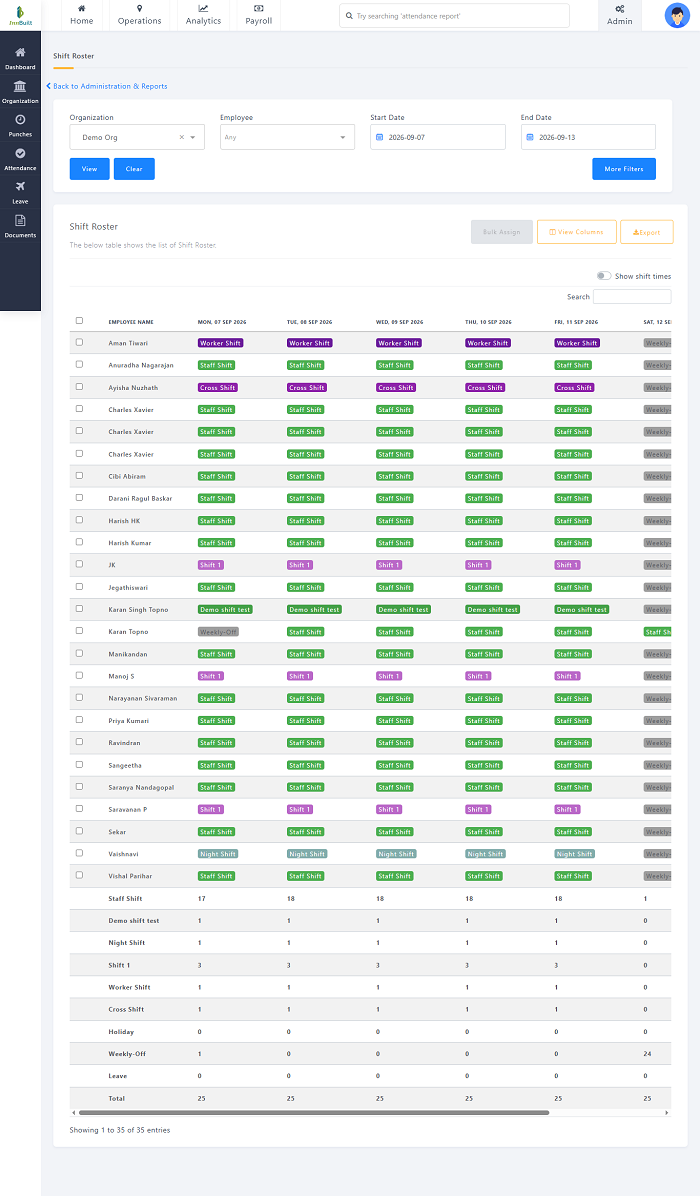
Manual scheduling through spreadsheets or registers can become increasingly difficult as the workforce grows. Shift management software can help businesses automate scheduling and provide better visibility into employee working patterns.
This guide explains the common challenges of managing rotational shifts and practical solutions businesses can use to improve shift management.
What Are Rotational Shifts?
Rotational shifts are work schedules in which employees regularly move between different shifts according to a predefined schedule.
For example, employees may follow a rotation such as:
- Week 1: Morning shift
- Week 2: Evening shift
- Week 3: Night shift
- Week 4: Morning shift
The exact rotation depends on the organization's operational requirements.
Rotational shifts can help businesses maintain continuous coverage while distributing different working hours among employees.
Why Do Businesses Use Rotational Shifts?
Businesses may use rotational shifts to:
- Maintain 24/7 operations
- Cover extended business hours
- Support production requirements
- Provide continuous customer service
- Manage peak operating periods
- Distribute shifts among employees
- Maintain staffing across different time periods
However, effective rotation requires careful planning and communication.
Common Challenges of Managing Rotational Shifts
1. Creating Complex Shift Schedules
One of the biggest challenges is creating schedules that provide adequate staffing while considering employee availability, skills, leave, weekly offs, and shift rotation rules.
When schedules are created manually, HR managers may spend considerable time updating spreadsheets and checking assignments.
Solution
Use standardized shift patterns and predefined rotation rules. Shift management software can help managers create recurring schedules and assign employees to different shift cycles.
This reduces repetitive scheduling work and makes the roster easier to manage.
2. Maintaining Adequate Shift Coverage
Every shift needs enough employees to perform the required work.
Understaffing can increase workload and affect productivity, while overstaffing can increase labor costs.
Solution
Determine staffing requirements for each shift based on workload, employee roles, business demand, and operational requirements.
Managers should review schedules before publishing them to ensure that every important shift has sufficient coverage.
3. Managing Employee Availability
Employees may have planned leave, personal commitments, or availability restrictions.
Assigning an employee to a shift when they are unavailable can create scheduling conflicts.
Solution
Maintain updated employee availability information and connect leave management with shift scheduling.
Before finalizing a roster, managers should review approved leave and employee availability.
4. Frequent Shift Changes
Business requirements can change unexpectedly. An employee may need to be moved from one shift to another because of absence, workload, or operational requirements.
Frequent changes can create confusion if employees are not informed properly.
Solution
Use a centralized scheduling system where managers can update the official shift roster.
Employees should be notified whenever an approved change affects their schedule.
A mobile employee app can make it easier for employees to view their latest shift assignments.
5. Managing Shift Swaps
Employees working rotational shifts may occasionally want to exchange shifts with colleagues.
If these swaps are handled informally, the official roster may not reflect the actual arrangement.
Solution
Create a formal shift-swap process.
Employees can submit a swap request, managers can review the request, and approved changes can automatically update the schedule.
This helps maintain consistency between the schedule and actual attendance records.
6. Tracking Attendance Against Rotational Shifts
Different employees may have different shift timings on different days.
For example, an employee might work a morning shift on Monday and a night shift on Tuesday.
Manually comparing attendance records with changing schedules can be difficult.
Solution
Integrate attendance software with shift management.
The system can compare actual punch-in and punch-out records with the employee's assigned shift and help identify:
- Late arrivals
- Early departures
- Absences
- Missed punches
- Overtime
- Shift deviations
7. Managing Night Shifts
Night shifts can create additional scheduling complexity because the working period may cross midnight.
For example, a shift may start at 10:00 PM and end at 6:00 AM the following day.
Manual attendance systems may incorrectly interpret the start and end dates if the shift configuration is not handled properly.
Solution
Use attendance and shift management software that supports overnight shifts and allows organizations to configure appropriate shift rules.
This helps ensure that attendance records are associated with the correct working shift.
8. Controlling Overtime
Rotational shifts can sometimes result in employees working beyond their scheduled hours, particularly when shifts overlap or employees cover for absent colleagues.
Excessive overtime can increase labor costs and contribute to employee fatigue.
Solution
Track scheduled hours against actual working hours.
Attendance and shift management software can help managers identify employees who regularly work beyond their scheduled shifts.
Organizations should also maintain clear overtime approval policies.
9. Employee Fatigue
Frequent changes between working hours can make it difficult for employees to maintain consistent routines.
Rapid movement between shifts, particularly when night shifts are involved, may contribute to fatigue and affect employee well-being.
Solution
Develop predictable rotation patterns and provide employees with sufficient notice of upcoming schedules.
Where appropriate, managers should avoid unnecessary last-minute changes and consider reasonable rest periods when designing shift patterns.
10. Communication Problems
Employees need to know their upcoming shifts and any changes to their schedules.
If managers communicate changes through different channels, employees may receive outdated information.
Solution
Maintain one official source for shift information.
An employee mobile application or self-service portal can allow workers to view:
- Current shift
- Upcoming shifts
- Shift timing
- Weekly offs
- Schedule changes
- Notifications
This reduces dependency on HR for routine schedule information.
11. Managing Multiple Teams and Departments
Large organizations may have different shift patterns for different departments.
For example:
- Production may operate three shifts.
- Administration may work one shift.
- Maintenance may operate across multiple shifts.
- Security may require 24/7 coverage.
Managing all these schedules manually can become complicated.
Solution
Use a centralized shift management platform that allows employees to be organized by department, location, role, and shift.
This provides managers with a more complete view of workforce availability.
12. Managing Multiple Locations
Businesses with several factories, branches, stores, or project sites may have different shift requirements at each location.
Maintaining separate schedules can make it difficult to obtain a centralized view.
Solution
Use a workforce management system that supports multiple locations.
Managers can maintain location-specific schedules while HR teams can access consolidated workforce information where supported.
13. Skill-Based Shift Assignment
Not every employee may be qualified to perform every task.
For example, a manufacturing shift may require trained machine operators, technicians, supervisors, and maintenance staff.
Simply filling a shift with the required number of employees may not guarantee that the right skills are available.
Solution
Consider employee roles, qualifications, skills, and certifications when creating rotational schedules.
Managers should ensure that each shift has the required skill coverage.
14. Payroll Errors
Incorrect shift schedules can affect attendance, working hours, overtime, and payroll.
For example, if an approved shift change is not updated in the attendance system, the employee's attendance may be evaluated against the wrong schedule.
Solution
Integrate shift management, attendance, leave, and payroll software.
A connected workflow can help ensure that approved schedule changes are reflected in attendance and payroll processing.
How Shift Management Software Helps With Rotational Shifts
Dedicated shift management software can automate several parts of the scheduling process.
Common capabilities may include:
- Shift Templates: Managers can create standard templates for morning, evening, night, and other shifts.
- Rotational Scheduling: Recurring rotation patterns can be configured to reduce manual schedule creation.
- Employee Availability: Managers can consider employee availability when assigning shifts.
- Shift Swaps: Employees can submit shift-swap requests through the system, subject to approval workflows.
- Leave Integration: Approved leave can be considered when preparing employee schedules.
- Attendance Integration: Actual attendance can be compared with assigned shifts.
- Overtime Monitoring: Managers can identify working hours that extend beyond scheduled shifts.
- Mobile Access: Employees can check their schedules through a mobile app where supported.
- Notifications: Employees can receive notifications when schedules are assigned or changed.
- Reports: HR teams can analyze schedules, attendance, working hours, overtime, and other workforce information.
Best Practices for Managing Rotational Shifts
Businesses can improve rotational shift management by following these practices:
- Plan Schedules in Advance: Prepare schedules early enough to give employees time to plan their personal commitments.
- Use Consistent Rotation Patterns: Predictable rotation cycles can make schedules easier for employees and managers to understand.
- Avoid Unnecessary Last-Minute Changes: Frequent unexpected schedule changes can create confusion and make workforce planning difficult.
- Consider Employee Skills: Assign employees based on their job responsibilities, qualifications, and required skills.
- Monitor Working Hours: Compare scheduled working hours with actual attendance to identify overtime and scheduling issues.
- Integrate Leave and Attendance: Connecting related HR processes reduces duplicate data entry and improves schedule accuracy.
- Give Employees Schedule Visibility: Allow employees to access their current and upcoming shifts through an employee portal or mobile application.
- Establish Clear Shift-Swap Rules: Define who can request, approve, and modify shift swaps.
- Maintain Accurate Records: Keep schedules, attendance, leave, and overtime information updated and centralized.
- Automate When Complexity Increases: Spreadsheets may work for small teams with simple schedules, but businesses with large teams and complex rotations can benefit from dedicated shift management software.
Example of a Rotational Shift Schedule
A simple three-shift rotation might look like this:
| Week | Team A | Team B | Team C |
|---|---|---|---|
| Week 1 | Morning | Evening | Night |
| Week 2 | Evening | Night | Morning |
| Week 3 | Night | Morning | Evening |
| Week 4 | Morning | Evening | Night |
The actual rotation pattern should be designed according to the organization's operational requirements and applicable workplace policies.
Using software can make it easier to create and maintain such recurring schedules.
Conclusion
Managing rotational shifts requires careful planning, accurate employee information, clear communication, and effective attendance tracking. Common challenges include complex scheduling, shift coverage, employee availability, shift swaps, night shifts, overtime, attendance discrepancies, and payroll errors.
Businesses can address these challenges by establishing clear scheduling policies and using technology to automate repetitive tasks.
For organizations managing multiple shifts, departments, or locations, shift management software can provide a centralized solution for creating rosters, managing shift changes, tracking attendance, monitoring working hours, and integrating payroll processes.
By connecting shift scheduling, attendance, leave, and payroll, businesses can build a more organized workforce management process while giving employees better visibility into their schedules.
Rotational schedules become easier with InnBuilt Shift Scheduling Software using reusable cycles, automatic assignments, notifications, and attendance matching.