Manual Attendance vs. Attendance Management Software: Which Is Better?
Manual Attendance vs. Attendance Management Software: Which Is Better?
Employee attendance is an essential part of HR and payroll management. Businesses need accurate information about employee working hours, absences, leave, overtime, late arrivals, and shift schedules to manage their workforce effectively.
Traditionally, organizations have used manual attendance methods such as paper registers, punch cards, Excel spreadsheets, and manual timesheets. While these methods may work for very small teams, they can become difficult to manage as the workforce grows.
Attendance Management Software provides a modern alternative by automating attendance recording, calculations, reporting, leave management, shift tracking, and payroll integration.
So, which is better—manual attendance or attendance management software? Let's compare both approaches.
What Is Manual Attendance?
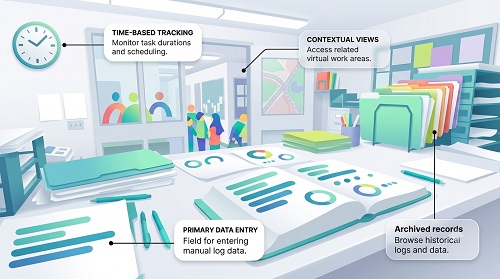
Manual attendance refers to recording and managing employee attendance without a dedicated automated attendance system.
Common methods include:
- Paper attendance registers
- Excel spreadsheets
- Manual timesheets
- Punch cards
- Attendance sheets
- Email-based attendance reporting
In a traditional process, employees record their attendance, and HR or supervisors collect and verify the information before preparing monthly attendance reports.
What Is Attendance Management Software?
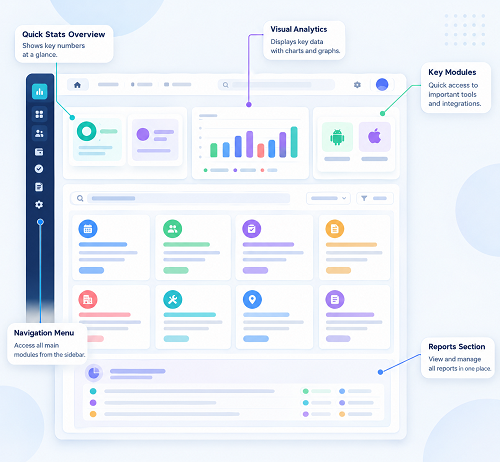
Attendance Management Software is a digital system that automatically records and manages employee attendance.
Employees can mark attendance using:
- Biometric devices
- Mobile applications
- GPS
- Web portals
- RFID cards
- Facial recognition
The software processes attendance data based on configured working hours, shifts, weekly offs, holidays, leave policies, and overtime rules.
Manual Attendance vs. Attendance Software
Manual attendance relies on paper logs or basic spreadsheets, offering low setup costs but high error rates and time theft risks. Attendance management software automates tracking via biometrics or apps, streamlining payroll, reducing human error, and providing real-time analytics for growing organizations.
Key Differences
- Accuracy: Manual logs invite human error and buddy punching; software uses biometrics or secure mobile check-ins.
- Cost & Setup: Manual systems cost next to nothing upfront; software requires an initial investment that saves labor costs over time.
- Payroll & Reporting: Manual tracking demands tedious data entry and math; software syncs instantly with payroll and creates fast reports.
- Scalability: Manual methods break down with remote workers or large teams; software scales effortlessly across multiple locations.
Comparison Matrix
| Feature | Manual Attendance | Attendance Management Software |
|---|---|---|
| Attendance recording | Manual | Automated |
| Data entry | Required | Minimal |
| Accuracy | More prone to errors | Higher consistency |
| Working-hour calculation | Manual | Automated |
| Late/early tracking | Manual | Automatic |
| Leave integration | Usually separate | Integrated |
| Overtime calculation | Manual | Automated |
| Shift management | Difficult | Automated |
| Mobile attendance | Usually unavailable | Available |
| GPS attendance | Not available | Available in supported systems |
| Reports | Manually prepared | Automatically generated |
| Payroll integration | Manual transfer | Direct/integrated |
| Employee self-service | Limited | Usually available |
| Multi-location management | Difficult | Centralized |
| Real-time visibility | Limited | Available |
| Scalability | Limited | Highly scalable |
1. Attendance Accuracy
Manual attendance depends on employees and HR staff entering information correctly. A missed entry, incorrect time, or spreadsheet formula can affect attendance calculations.
Attendance software automatically records check-in and check-out information and applies predefined rules.
Winner: Attendance Management Software
2. HR Time and Productivity
Manual attendance requires HR teams to collect records, verify data, calculate working hours, prepare reports, and update payroll information.
Automated attendance software performs many of these activities automatically.
This allows HR professionals to spend more time on recruitment, employee engagement, performance management, and other strategic activities.
Winner: Attendance Management Software
3. Payroll Processing
Attendance information can directly affect payroll through working days, unpaid leave, overtime, and other attendance-related adjustments.
With manual attendance, HR or payroll teams may need to transfer information from registers or spreadsheets into payroll.
With attendance software, attendance information can often be integrated directly with payroll.
Winner: Attendance Management Software
4. Cost
Manual attendance may appear less expensive because a business does not need dedicated software or devices.
However, businesses should consider the hidden costs of manual administration, including HR time, paperwork, data correction, and payroll errors.
Attendance software requires an initial or recurring investment but can reduce administrative effort as the business grows.
Winner: Depends on business size
For a very small business with a handful of employees, manual attendance may still be practical. For growing organizations, automated software is generally more efficient.
5. Shift Management
Managing multiple shifts manually can become complicated.
For example, a manufacturing company may have morning, afternoon, evening, and night shifts. HR teams need to track different schedules, weekly offs, and employee assignments.
Attendance software can automate shift assignment and attendance calculations based on configured schedules.
Winner: Attendance Management Software
6. Remote and Field Employees
Manual registers work well when employees are physically present at one location.
However, tracking attendance for field employees, sales teams, service engineers, and remote workers can be difficult.
Mobile and GPS-based attendance software provides organizations with additional options for recording attendance outside the traditional office.
Winner: Attendance Management Software
7. Attendance Reports
With manual attendance, HR teams often need to prepare monthly reports using spreadsheets.
Attendance software can automatically generate reports such as:
- Daily attendance
- Monthly attendance
- Late arrivals
- Absences
- Overtime
- Working hours
- Missing punches
- Leave
- Department-wise attendance
Winner: Attendance Management Software
8. Employee Transparency
Manual attendance systems may require employees to contact HR to check their attendance records or correct missing entries.
Modern systems often provide employee self-service portals where employees can view attendance information and submit regularization requests.
This can improve transparency and reduce unnecessary HR queries.
Winner: Attendance Management Software
9. Multi-Location Management
Managing attendance manually across multiple offices, stores, factories, or construction sites can be difficult.
A centralized attendance management system allows authorized HR and management teams to monitor employees across different locations from one platform.
Winner: Attendance Management Software
10. Scalability
Manual attendance may work for a small organization with 10 or 20 employees. As the workforce increases, maintaining accurate attendance records becomes increasingly difficult.
Attendance software can support hundreds or thousands of employees depending on the system's capacity.
Winner: Attendance Management Software
When Is Manual Attendance Still Suitable?
Manual attendance may be appropriate for:
- Very small businesses
- Businesses with a small number of employees
- Organizations with simple working schedules
- Temporary operations
- Businesses that do not require complex reporting
However, even small businesses should consider future growth before relying entirely on manual systems.
When Should a Business Switch to Attendance Software?
A business should consider automated attendance software when it experiences:
- Rapid employee growth
- Multiple shifts
- Multiple branches
- Remote employees
- Field employees
- Frequent attendance disputes
- Increasing HR workload
- Complex payroll calculations
- Manual overtime calculations
- Difficulty maintaining Excel attendance records
Final Verdict: Which Is Better?
For most growing businesses, Attendance Management Software is better than manual attendance because it provides automation, accuracy, reporting, employee self-service, shift management, and payroll integration.
Manual attendance can still be practical for very small organizations with simple attendance requirements. However, as the workforce and operational complexity increase, the administrative burden of manual attendance also increases.
The modern attendance workflow is:
Employee → Biometric/Mobile/GPS → Attendance Software → Attendance Processing → Leave & Overtime → Payroll
This approach reduces repetitive HR work and provides better visibility into workforce attendance.
Conclusion
The choice between manual attendance and attendance management software ultimately depends on the size and requirements of the business.
Manual attendance may be sufficient for a small workforce, but it becomes increasingly difficult to maintain as employee numbers, locations, shifts, and payroll requirements increase.
Attendance Management Software offers a more scalable solution by automating attendance tracking, working-hour calculations, leave, overtime, shift management, reports, and payroll integration.
For businesses looking to reduce manual HR work and improve attendance accuracy, moving from spreadsheets and registers to an automated attendance management system can be an important step toward modern workforce management.
Compared with manual registers, InnBuilt Attendance Software provides live records, automatic calculations, searchable reports, and connections to leave, shifts, overtime, and payroll.