Manual Shift Scheduling vs. Shift Management Software: Which Is Better?
Manual Shift Scheduling vs. Shift Management Software: Which Is Better?
Managing employee shifts is an important part of workforce management. Businesses need to ensure that the right employees are available at the right time while maintaining accurate schedules, attendance records, working hours, and overtime information.
Many small businesses still use manual shift scheduling through Excel spreadsheets, paper registers, or other basic methods. As the workforce grows, however, maintaining these schedules can become difficult.
Shift management software provides a digital alternative that helps businesses automate employee scheduling and connect shifts with attendance, leave, and payroll processes.
So, which is better—manual shift scheduling or shift management software? The answer depends on the size of the workforce, number of shifts, operational complexity, and business requirements.
What Is Manual Shift Scheduling?
Manual shift scheduling is the process of creating and managing employee schedules without dedicated shift management software.
Businesses may use:
- Excel or Google Sheets
- Paper registers
- Printed rosters
- WhatsApp or other communication channels
- Notice boards
- Basic HR records
For example, an HR manager may create a monthly spreadsheet showing which employees are assigned to morning, evening, and night shifts.
While this approach can work for a small team with simple schedules, it becomes increasingly difficult as the number of employees and shifts increases.
What Is Shift Management Software?
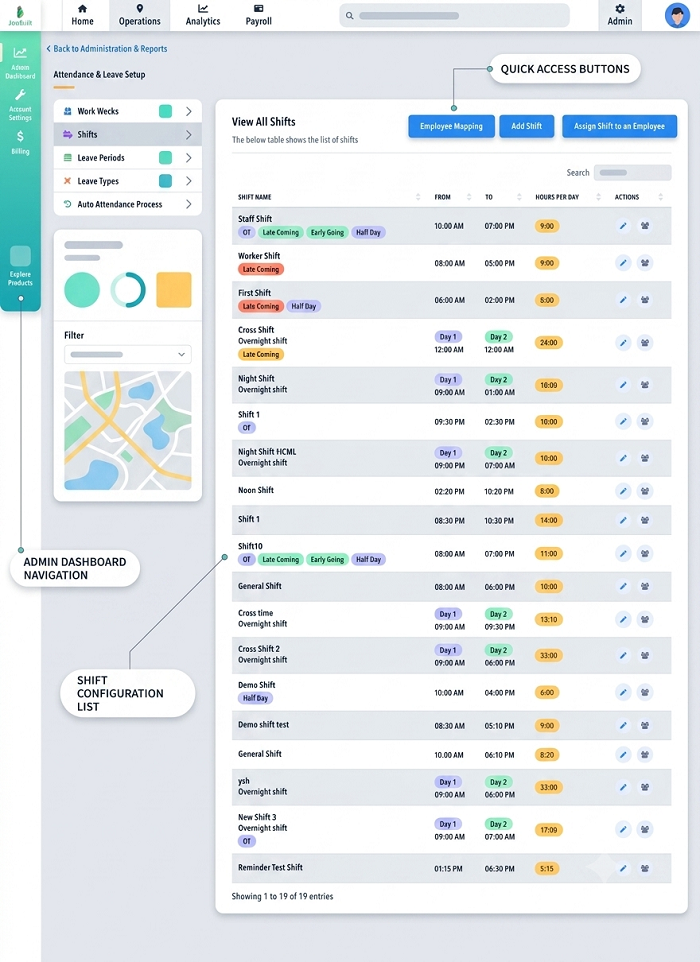
Shift management software is a digital system designed to help businesses create, assign, update, and monitor employee schedules.
Depending on the solution, it may provide features such as:
- Employee shift scheduling
- Rotational shift management
- Shift templates
- Employee availability
- Shift-change requests
- Shift swapping
- Attendance integration
- Leave management
- Overtime tracking
- Employee mobile app
- Multiple-location management
- Payroll integration
- Reports and dashboards
Instead of maintaining separate spreadsheets, managers can manage schedules through a centralized platform.
Manual Shift Scheduling vs. Shift Management Software
| Feature | Manual Shift Scheduling | Shift Management Software |
|---|---|---|
| Creating schedules | Manual | Digital and automated |
| Updating shifts | Time-consuming | Quick updates |
| Scheduling conflicts | Difficult to identify | Easier to manage |
| Rotational shifts | Can be complicated | Easier to configure |
| Shift swaps | Usually handled manually | Can be managed digitally |
| Employee access | Limited | Portal/mobile app options |
| Attendance integration | Usually manual | Often available |
| Leave integration | Separate process | Can be integrated |
| Overtime tracking | Manual calculation | Can use attendance data |
| Multiple locations | Difficult to manage | Centralized management |
| Reports | Manual preparation | Automated reports |
| Payroll integration | Limited | Often available |
1. Ease of Creating Employee Schedules
Manual Scheduling
With manual scheduling, HR teams need to enter employee names, shifts, working days, weekly offs, and other information themselves.
For a small team, this may not be a major problem. However, scheduling hundreds of employees can take considerable time.
Shift Management Software
Software provides dedicated scheduling tools that allow managers to create and assign shifts more efficiently. Recurring schedules and shift templates can reduce repetitive work.
Winner: Shift Management Software
2. Managing Rotational Shifts
Manual Scheduling
Rotational shifts can be difficult to manage using spreadsheets, particularly when employees regularly move between morning, evening, and night shifts.
Managers need to manually update schedules and ensure employees are assigned correctly.
Shift Management Software
Dedicated software can simplify rotational schedules by allowing managers to configure recurring shift patterns and assign employees accordingly.
Winner: Shift Management Software
3. Handling Shift Changes
Manual Scheduling
When an employee requests a shift change, the manager may need to update the spreadsheet and inform the employee and other team members.
If the old version of the schedule has already been shared, confusion can occur.
Shift Management Software
Managers can update schedules centrally. Depending on the software, employees may also submit shift-change requests through a self-service portal or mobile app.
Winner: Shift Management Software
4. Managing Shift Swaps
Manual Scheduling
Employees may arrange shift swaps through messages or verbal communication. HR then has to manually update the roster.
This can create problems if a swap is not properly recorded.
Shift Management Software
Employees can submit shift-swap requests through the system, while managers can approve or reject them. The approved schedule can then be updated centrally.
Winner: Shift Management Software
5. Employee Access to Schedules
Manual Scheduling
Employees may need to check a notice board, spreadsheet, email, or message to find their schedules.
When changes occur, HR needs to communicate them again.
Shift Management Software
Employees can often view their upcoming schedules through an employee portal or mobile app and receive notifications about schedule changes.
Winner: Shift Management Software
6. Attendance Management
Manual Scheduling
With manual scheduling, HR teams may need to compare employee attendance records with spreadsheets to determine whether employees worked their assigned shifts.
This can require significant manual effort.
Shift Management Software
When shift scheduling is integrated with attendance software, actual attendance can be compared with scheduled working hours.
Businesses can identify issues such as:
- Late coming
- Early leaving
- Absence
- Missed punches
- Overtime
- Shift deviations
Winner: Shift Management Software
7. Overtime Management
Manual Scheduling
Calculating overtime from manual attendance and shift records can be time-consuming and may result in errors.
Shift Management Software
Integrated systems can use scheduled shift timings and actual attendance data to help identify additional working hours. Overtime can then be reviewed according to company policies.
Winner: Shift Management Software
8. Managing Multiple Locations
Manual Scheduling
Businesses with multiple branches, factories, stores, or project sites may need separate spreadsheets for each location. Keeping these records synchronized can become difficult.
Shift Management Software
A centralized system can provide managers with visibility into schedules across multiple locations, depending on the software's capabilities.
Winner: Shift Management Software
9. Cost Considerations
Manual Scheduling
Manual scheduling does not generally require dedicated software expenses. Small businesses with a few employees may find spreadsheets sufficient for basic scheduling.
However, the hidden costs can include:
- HR time
- Manual data entry
- Schedule corrections
- Communication effort
- Payroll reconciliation
- Errors and rework
Shift Management Software
Software typically involves subscription or implementation costs. However, automation can reduce repetitive administrative work and improve scheduling efficiency.
For businesses with complex schedules, the productivity benefits may justify the investment.
Winner: Depends on Business Size and Requirements
10. Accuracy and Data Management
Manual Scheduling
Spreadsheets can be changed by multiple people, creating the possibility of outdated or conflicting versions.
Shift Management Software
A centralized platform provides one primary source for employee schedules. Updates can be managed within the system, improving schedule visibility and consistency.
Winner: Shift Management Software
When Is Manual Shift Scheduling Suitable?
Manual scheduling may still be suitable when:
- The business has a small workforce.
- Employees work mostly fixed hours.
- There are only one or two shifts.
- Schedules rarely change.
- There is a limited need for automation.
- HR can manage the schedule without significant administrative effort.
For a small organization with ten employees working the same shift every day, a simple spreadsheet may be sufficient.
When Should Businesses Use Shift Management Software?
Shift management software becomes more useful when a business has:
- A large number of employees
- Multiple shifts
- Rotational schedules
- Night shifts
- Frequent shift changes
- Multiple locations
- Field employees
- Complex attendance requirements
- Significant overtime
- Integrated payroll requirements
For example, a manufacturing company operating three shifts with hundreds of employees may find manual scheduling difficult to maintain.
How Shift Management Software Works With Attendance and Payroll
One of the biggest advantages of digital shift management is the ability to connect employee schedules with other workforce systems.
A typical process may look like this:
Shift Schedule → Employee Attendance → Working Hours → Overtime → Payroll
When an employee is assigned a shift, the attendance system can record actual punch-in and punch-out times. The resulting attendance information can then be used to calculate working hours and identify overtime or attendance deviations.
This reduces the need for HR teams to manually transfer information between different systems.
Which Is Better for Your Business?
There is no single answer for every organization.
Manual shift scheduling can be practical for small businesses with simple and stable schedules. It is inexpensive and easy to start with.
However, as the workforce grows and scheduling becomes more complex, shift management software is generally the more scalable option.
It provides centralized scheduling, better visibility, employee self-service, easier shift changes, and potential integration with attendance, leave, and payroll systems.
Conclusion
Manual shift scheduling can work for small businesses with simple workforce requirements, but it can become difficult to manage as the organization grows.
Shift management software provides a more structured approach to creating and managing employee schedules. It can help businesses manage rotational shifts, shift changes, employee attendance, overtime, multiple locations, and payroll-related information more efficiently.
For businesses looking to reduce manual HR work and improve workforce visibility, integrating shift management software with attendance and payroll software can provide a more efficient solution for modern employee scheduling.
Manual rosters can be replaced with InnBuilt Shift Management Software offering reusable patterns, automated assignments, conflict alerts, and employee notifications.