Payroll and Attendance Software for Small Businesses in India
Payroll and Attendance Software for Small Businesses in India
Managing employee attendance and payroll can be challenging for small businesses in India. When employee numbers are limited, many businesses rely on Excel spreadsheets, attendance registers, calculators, and manual payroll processes.
These methods may work initially, but as the business grows, HR and business owners may spend more time managing attendance, leave, overtime, salary calculations, deductions, and payroll records.
Payroll and Attendance Software for Small Businesses in India combines attendance tracking and payroll processing into a more organized digital workflow. It can help businesses record employee attendance, calculate working hours, manage leave and overtime, prepare payroll, and generate reports from a centralized system.
What Is Payroll and Attendance Software?
Payroll and attendance software is a system that connects employee attendance information with payroll processing.
Instead of managing attendance and salary calculations separately, businesses can create a workflow such as:
Employee Attendance → Working Hours → Leave/Overtime → Payroll Calculation → Salary Processing → Reports
Depending on the software, attendance can be recorded through:
- Biometric devices
- Fingerprint
- Face recognition
- Mobile applications
- Web applications
- GPS-based attendance
- Geofencing
Payroll functionality may include salary structures, earnings, deductions, payslips, payroll reports, and applicable statutory calculations.
Why Small Businesses in India Need Payroll and Attendance Software
Small businesses often have limited HR resources.
One HR or administrative employee may be responsible for:
- Employee records
- Attendance
- Leave
- Payroll
- Recruitment
- Salary coordination
- Employee queries
- HR documentation
When attendance and payroll are handled manually, even simple tasks can consume considerable time.
For example:
Attendance Register → Excel Entry → Working-Hour Calculation → Leave Adjustment → Overtime Calculation → Salary Calculation → Payslip Preparation
An integrated system can simplify this workflow.
1. Automates Employee Attendance
Employees can record attendance digitally rather than signing a paper register.
Depending on the workplace, businesses can use:
Biometric Attendance
Suitable for fixed workplaces such as offices, factories, and warehouses.
Mobile Attendance
Useful for field and remote employees.
Web Attendance
Useful for employees working through computers or approved devices.
The best method depends on the business's workforce and policies.
2. Connects Attendance With Payroll
Attendance information can affect payroll through:
- Paid days
- Unpaid leave
- Overtime
- Attendance-related deductions
- Other company-specific payroll rules
An integrated workflow can reduce the need to manually transfer attendance data into payroll.
For example:
Employee Works 25 Days → Attendance Approved → Payroll Uses Approved Attendance → Salary Processed
Businesses should review attendance and payroll exceptions before finalizing salary.
3. Reduces Manual Payroll Work
Manual payroll can require repeated calculations.
HR may need to consider:
- Basic salary
- Allowances
- Deductions
- Leave
- Overtime
- Attendance
- Statutory deductions
- Other salary components
Payroll software can automate calculations based on configured salary structures and rules.
4. Helps Reduce Payroll Errors
Payroll errors can occur because of:
- Incorrect attendance
- Wrong leave data
- Missing overtime
- Incorrect salary inputs
- Manual data entry
- Duplicate information
Integrating attendance with payroll can reduce the number of manual data transfers.
For example: Attendance Data → Payroll (instead of Attendance Register → Excel → Manual Review → Payroll Excel).
The payroll team should still review exceptions and statutory calculations before processing.
5. Simplifies Leave Management
Leave and attendance are closely connected.
Employees can submit leave requests through the system where supported.
A typical process is:
Employee Applies Leave → Manager Approval → Leave Balance Updated → Attendance Updated → Payroll Uses Approved Data
This creates a more structured leave process.
6. Helps Manage Overtime
Small businesses may have employees working beyond their scheduled hours.
For example:
- Scheduled Working Hours: 8 hours
- Actual Working Hours: 10 hours
- Additional Hours: 2 hours
Attendance software can identify additional working time for review.
Payroll can then process approved overtime according to the company's policy and applicable requirements.
7. Supports Small Businesses With Multiple Shifts
Businesses such as manufacturing units, restaurants, hotels, hospitals, security agencies, and BPOs may have multiple shifts.
| Shift | Timing |
|---|---|
| Morning | 6 AM–2 PM |
| General | 9 AM–6 PM |
| Evening | 2 PM–10 PM |
| Night | 10 PM–6 AM |
Attendance software can manage shift assignments and calculate attendance according to configured rules.
8. Handles Night-Shift Attendance
Night shifts can create a special situation because check-in and check-out may occur on different calendar dates.
For example:
- Check-In: 10 PM, Monday
- Check-Out: 6 AM, Tuesday
The system should correctly process the employee's shift according to the configured attendance rules.
Businesses should test their actual shift patterns before implementation.
9. Supports Mobile and Field Employees
Small businesses increasingly employ staff who work outside the office, such as sales representatives, technicians, delivery employees, service engineers, construction workers, and field executives.
Mobile attendance can allow these employees to record attendance from approved locations. GPS or geofencing may be used where appropriate.
Businesses should clearly communicate location tracking and follow applicable privacy requirements.
10. Helps Remote and Hybrid Employees
Some small businesses use remote or hybrid work models. Employees may work from home, office, customer locations, or approved remote locations.
Web and mobile attendance can help organizations record attendance without requiring every employee to be physically present in the office.
11. Employee Self-Service
A good payroll and attendance system can provide employees with self-service functionality. Employees may be able to:
- View attendance
- View working hours
- Apply for leave
- View leave balance
- Submit attendance correction requests
- View payslips
- Review payroll information
This reduces routine questions to HR and business owners.
12. Attendance Regularization
Employees may occasionally forget to check in or check out.
For example: An employee worked for the full day but forgot to record the check-out.
The employee can submit a regularization request where supported. The workflow can be:
Employee Request → Manager Review → Approval → Attendance Updated
The system can maintain an audit trail of approved changes.
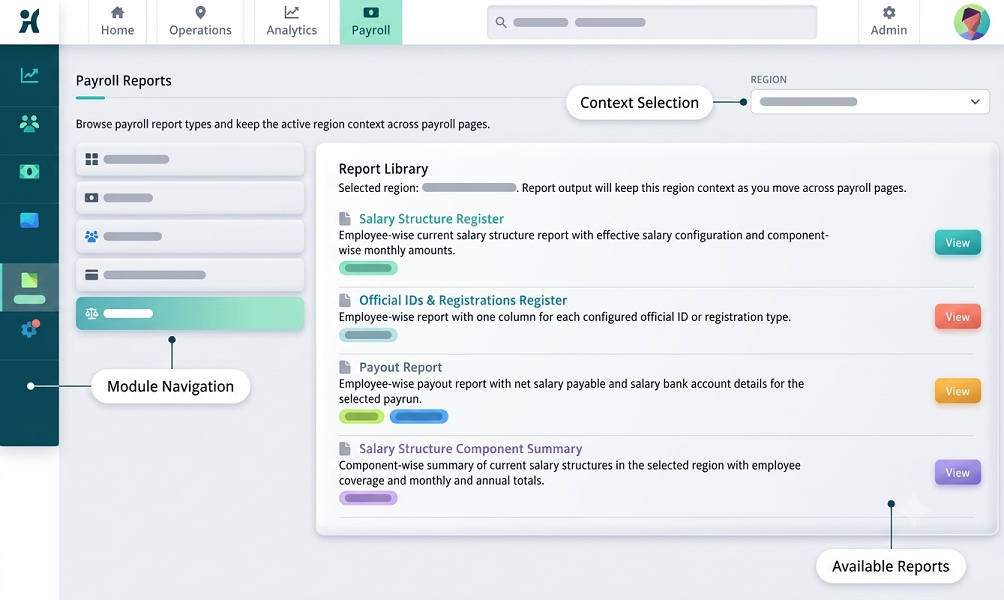
13. Payroll Reports
Payroll software can generate useful reports such as:
- Salary register
- Employee salary report
- Earnings report
- Deduction report
- Payslip
- Attendance report
- Leave report
- Overtime report
- Payroll summary
The exact reports depend on the software.
14. Payslip Generation
Small businesses can generate digital payslips instead of preparing them manually. A payslip may include:
- Employee information
- Salary period
- Earnings
- Deductions
- Net salary
- Other configured payroll information
Employees can access payslips through supported self-service features.
15. Supports Payroll Compliance Processes
Payroll in India may involve statutory requirements depending on the organization, employee category, location, and applicable laws.
Depending on the software, payroll systems may support calculations or records related to areas such as Provident Fund, ESI, Professional Tax, Labour Welfare Fund, and TDS.
However, businesses should verify current statutory rules and ensure the software is properly configured for their specific circumstances. Software supports compliance—it does not replace professional review or the employer's legal responsibilities.
16. Helps Manage Professional Tax
Professional Tax is applicable according to state-specific rules where imposed. For businesses operating in applicable states, payroll software can help calculate and record Professional Tax based on configured rules.
Because Professional Tax slabs and requirements vary by state, businesses should verify that the software supports the applicable state configuration.
17. Helps Manage Provident Fund and ESI
Eligible businesses may have obligations relating to Employees' Provident Fund and Employees' State Insurance. Payroll software can assist with applicable calculations and payroll records when properly configured.
Businesses should verify current statutory thresholds, rates, wage definitions, and applicability before processing payroll.
18. Cloud-Based Payroll and Attendance
Cloud-based software can allow business owners, HR teams, managers, and employees to access the system from supported devices.
Potential benefits include:
- Remote access
- Centralized employee records
- Multi-location support
- Online reports
- Employee self-service
- Easier system administration
Businesses should assess data security, access controls, backup, availability, and data handling before selecting a provider.
19. Helps Businesses With Multiple Branches
Even a small business may operate several locations (e.g., Head Office → Chennai → Coimbatore → Bengaluru → Hyderabad).
Integrated software can provide centralized attendance and payroll management across branches. Branch-level access can also be configured according to user roles where supported.
20. Improves HR Efficiency
Without integrated software:
Attendance → Excel → Payroll Excel → Manual Review
With integrated software:
Attendance → Approval → Payroll → Reports
This can reduce repetitive work and allow HR employees to focus on more strategic activities.
21. Provides Better Employee Transparency
Employees can access their attendance and payroll information rather than depending entirely on HR. They may be able to see attendance, leave, working hours, overtime, payslips, and salary information.
This can make it easier to identify and resolve discrepancies.
22. Provides an Attendance and Payroll Audit Trail
Payroll changes can occur because of attendance corrections, leave adjustments, salary revisions, overtime approvals, or payroll corrections.
An audit trail can help identify: Who changed the information → What changed → When it changed
This is useful for internal control and record management.
23. Helps Business Owners Monitor Payroll
Small business owners often want a simple overview of payroll. A dashboard may show total employees, attendance, leave, payroll amount, overtime, and payroll status.
This can help owners understand payroll-related information without manually reviewing multiple spreadsheets.
24. Payroll and Attendance Software for Different Small Businesses
Small IT Companies
Useful features: Web attendance, remote attendance, leave management, payroll, payslips, employee self-service.
Retail Stores
Useful features: Branch-wise attendance, multiple shifts, mobile/biometric attendance, leave, payroll.
Manufacturing Units
Useful features: Biometric attendance, shift management, overtime, weekly offs, payroll integration.
Restaurants and Hotels
Useful features: Shift management, night shifts, overtime, department-wise attendance, payroll.
Construction Companies
Useful features: Mobile attendance, GPS, geofencing, site-wise attendance, payroll.
Service Businesses
Useful features: Mobile attendance, field employee tracking, working hours, leave, payroll.
Payroll and Attendance Software vs. Excel
| Feature | Excel/Manual | Integrated Software |
|---|---|---|
| Attendance | Manual | Digital |
| Working hours | Manual/formulas | Automated/configurable |
| Leave | Separate tracking | Integrated in many systems |
| Overtime | Manual | Automated/configurable |
| Payroll | Manual calculations | Automated/configurable |
| Payslips | Manual | Automated |
| Multiple branches | Difficult | Supported |
| Employee self-service | Limited | Available |
| Reports | Manual | Automated |
| Audit trail | Limited | Available in many systems |
| Payroll integration | Not applicable | Built-in/integrated |
| Statutory calculations | Manual/configuration | Available depending on system |
How to Choose Payroll and Attendance Software for a Small Business
Before selecting software, consider:
- Number of employees
- Number of locations
- Industry
- Fixed or field workforce
- Remote employees
- Shift requirements
- Night shifts
- Biometric requirements
- Mobile attendance
- GPS/geofencing
- Leave management
- Overtime
- Payroll requirements
- Payslip generation
- Employee self-service
- Statutory payroll requirements
- Reports
- Data security
- Integration capabilities
- Pricing and scalability
Benefits for Small Business Owners
Payroll and attendance software can help small business owners:
- Reduce administrative work
- Improve attendance visibility
- Reduce repetitive calculations
- Organize employee information
- Improve payroll preparation
- Generate payslips faster
- Manage leave more efficiently
- Track overtime
- Support multiple locations
- Improve employee self-service
- Maintain better records
Example of an Integrated Payroll Process
Consider a small business with 50 employees.
Step 1: Attendance
Employees record daily attendance.
Step 2: Leave
Approved leave is updated in the attendance system.
Step 3: Working Hours
The system calculates working hours based on configured rules.
Step 4: Overtime
Approved overtime is added where applicable.
Step 5: Payroll
Payroll uses the approved attendance and salary information.
Step 6: Statutory Processing
Applicable statutory deductions and contributions are calculated according to configured rules.
Step 7: Payslip
Payslips are generated.
Step 8: Reports
Management can access payroll and attendance reports.
Frequently Asked Questions
What is payroll and attendance software?
It is a system that combines employee attendance management with payroll processing. It can connect attendance, leave, overtime, salary calculations, payslips, and payroll reports.
Is payroll and attendance software suitable for small businesses?
Yes. It can be useful for small businesses that want to reduce manual attendance and payroll work, particularly as their workforce grows.
Can attendance software calculate salary?
Attendance software can provide attendance-related inputs to payroll. Full salary calculation generally requires payroll functionality or integration with payroll software.
Can it manage Indian payroll?
Many payroll systems are designed to support Indian payroll requirements. Businesses should verify current statutory configurations and applicability before implementation.
Can it manage PF, ESI and Professional Tax?
Some payroll systems support these calculations and records. Applicability and calculations should be verified against current rules and the business's specific circumstances.
Can employees access payslips?
Many systems provide employee self-service portals or mobile applications through which employees can access payslips and other payroll information.
Can it manage remote employees?
Yes, systems with mobile or web attendance can support remote employees. GPS functionality may be available where required.
Is cloud-based payroll software suitable for small businesses?
Cloud-based software can be useful because businesses can access the system remotely and avoid maintaining traditional on-premise infrastructure. Security and data-handling practices should be evaluated before purchase.
Conclusion
Payroll and Attendance Software for Small Businesses in India can bring attendance, leave, working hours, overtime, payroll, payslips, and employee self-service into a more organized workflow.
Instead of managing multiple spreadsheets and manually transferring information, businesses can use:
Attendance → Leave → Overtime → Approval → Payroll → Payslip → Reports
For small businesses, the goal should not be to choose the software with the largest number of features. The better approach is to choose a system that matches the company's employee size, industry, attendance method, shifts, locations, payroll requirements, statutory needs, and future growth.
A well-configured payroll and attendance system can reduce administrative effort, improve payroll preparation, provide better employee visibility, and give small business owners a more structured approach to workforce management.
InnBuilt Payroll and Attendance Software gives small Indian businesses one solution for payable days, leave, overtime, salaries, statutory deductions, and payslips.