Payroll Automation in India: Features, Benefits, and Best Practices
Payroll Automation in India: Features, Benefits, and Best Practices
Payroll processing is a critical part of HR operations in every organization. In India, payroll can involve salary calculations, attendance, leave, overtime, deductions, payslips, statutory contributions, and payroll records. Managing these activities manually can take considerable time, especially when a business has a growing workforce or employees working across multiple locations.
Payroll automation in India helps businesses streamline these processes by using software to automate repetitive payroll activities. Instead of relying heavily on spreadsheets and manual calculations, HR teams can use automated payroll software to calculate salaries, manage deductions, generate payslips, and prepare payroll reports.
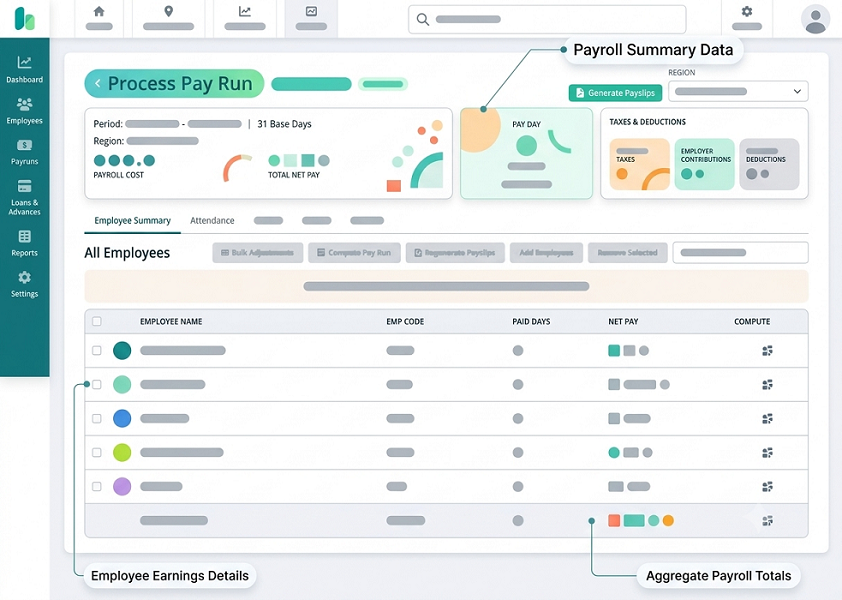
What Is Payroll Automation?
Payroll automation is the use of software to manage and automate routine payroll processes. The system uses employee information, salary structures, attendance, leave records, deductions, and configured payroll rules to calculate salaries.
A typical automated payroll process may include:
Employee Data → Salary Structure → Attendance & Leave → Payroll Calculations → Statutory Deductions → Review & Approval → Payslip Generation → Reports
The exact features vary between payroll platforms, but the goal is to reduce repetitive manual work and create a consistent payroll workflow.
Why Payroll Automation Is Important in India
Indian businesses may need to manage several payroll components at the same time. Depending on the organization and employee circumstances, these can include PF, ESI, Professional Tax, income-tax-related deductions, bonuses, overtime, leave adjustments, and other salary components.
Businesses operating in multiple states may also need to consider state-specific payroll requirements, particularly for Professional Tax where applicable.
Manual payroll management can make these processes difficult to coordinate. Payroll automation brings relevant information into a centralized system and can help HR teams manage salary processing more efficiently.
Key Features of Payroll Automation Software in India
1. Automated Salary Calculation
Payroll software can calculate employee salaries based on predefined salary structures.
The system can consider components such as:
- Basic salary
- Allowances
- Incentives
- Bonuses
- Overtime
- Leave adjustments
- Deductions
- Other configured salary components
This reduces the need for HR teams to perform calculations manually for every employee.
2. Attendance and Leave Integration
Attendance and leave information can directly affect payroll. When payroll is integrated with attendance and leave management, the system can use relevant records to calculate working days, unpaid leave, overtime, and other applicable adjustments. This reduces the need to manually transfer attendance data from one system or spreadsheet to another.
3. PF Management
Payroll automation can support Provident Fund calculations using applicable employee information and configured statutory rules. The system can calculate relevant employee and employer contributions and include applicable employee deductions in payroll records and payslips. Businesses should ensure that PF configurations are kept updated according to applicable statutory requirements.
4. ESI Management
For eligible employees, payroll software can calculate applicable Employees' State Insurance contributions based on configured rules and employee information. This can reduce repetitive manual calculations and help payroll teams maintain organized ESI-related payroll records.
5. Professional Tax Management
Professional Tax is governed by applicable state rules and is not uniformly applicable across all Indian states. Payroll software can allow businesses to configure applicable Professional Tax rules based on employee location and other relevant criteria. This is particularly useful for organizations operating across multiple states.
6. Income Tax and TDS Support
Payroll systems may provide features for managing salary-related income tax calculations and deductions. Depending on the software, HR and payroll teams may be able to manage employee tax declarations, deductions, taxable salary components, and related payroll reports. Tax rules and calculations should be reviewed regularly because applicable requirements can change.
7. Automated Payslip Generation
Creating payslips manually can be time-consuming. Payroll automation allows businesses to generate employee payslips after payroll processing. Employees can often access their payslips through an employee portal or mobile application, depending on the system.
8. Payroll Reports
Payroll software can generate reports based on processed payroll data. Common reports may include:
- Salary reports
- Deduction reports
- Attendance-related payroll reports
- Overtime reports
- Department-wise payroll reports
- Statutory reports
- Payroll summaries
These reports can help HR and management review payroll information.
9. Payroll Approval Workflow
Businesses may require payroll to be reviewed and approved before salaries are finalized. Automated payroll systems can provide approval workflows in which payroll is submitted to authorized users for review and approval.
10. Employee Self-Service
Employee self-service can reduce routine HR queries by allowing employees to access selected payroll information. Depending on the software, employees may be able to view:
- Payslips
- Salary information
- Payroll history
- Tax documents
- Attendance records
- Leave balances
11. Multi-Location Payroll Management
Organizations with branches in multiple locations can use centralized payroll software to manage employees across different offices. The system can support different salary structures and applicable location-specific configurations, depending on its capabilities.
Benefits of Payroll Automation in India
1. Saves HR Time
Payroll automation reduces the time spent on repetitive calculations, data entry, payslip preparation, and payroll reporting.
2. Reduces Manual Work
Instead of maintaining multiple spreadsheets and manually transferring information, HR teams can manage payroll through a centralized platform.
3. Helps Reduce Payroll Errors
Automated calculations can reduce errors caused by repetitive manual calculations and data-entry mistakes. However, automation does not remove the need for accurate employee data, correct configurations, and payroll review.
4. Improves Payroll Accuracy
When salary structures and payroll rules are configured correctly, the system can apply them consistently across payroll calculations.
5. Simplifies Statutory Payroll Management
Payroll software can incorporate applicable statutory calculations into the payroll process, helping HR teams manage PF, ESI, Professional Tax, and other relevant deductions more efficiently.
6. Improves Employee Transparency
Digital payslips allow employees to see salary components and applicable deductions in an organized format.
7. Provides Faster Payroll Reports
Instead of manually preparing reports from spreadsheets, HR teams can generate reports from centralized payroll information.
8. Supports Business Growth
As employee numbers increase, manual payroll processes can become increasingly difficult to manage. Automated payroll provides a scalable process for growing organizations.
9. Improves Payroll Data Organization
Centralized payroll records make it easier for authorized users to access historical payroll information and employee salary records.
10. Allows HR to Focus on Strategic Work
By reducing repetitive payroll tasks, automation can give HR teams more time for recruitment, employee engagement, performance management, training, and workforce planning.
Best Practices for Payroll Automation in India
Implementing payroll software successfully requires more than simply purchasing a system. Businesses should establish appropriate processes and regularly review payroll data.
1. Maintain Accurate Employee Data
Before automating payroll, ensure that employee information is complete and accurate. Important information may include:
- Employee name and identification details
- Joining date
- Department
- Designation
- Salary structure
- Bank details
- Attendance information
- Leave information
- Applicable statutory information
Accurate input data is essential for accurate payroll processing.
2. Define Salary Structures Clearly
Different employees may have different salary components. Businesses should clearly define salary structures and configure applicable components before starting automated payroll processing.
3. Integrate Attendance and Leave
Where possible, integrate attendance and leave management with payroll. This can reduce duplicate data entry and ensure that approved attendance-related information is considered during salary processing.
4. Keep Statutory Rules Updated
Payroll teams should regularly review applicable statutory requirements, including PF, ESI, Professional Tax, and income-tax-related payroll rules. Software configurations should be updated whenever applicable rules change.
5. Use Payroll Approval Workflows
Establish a clear review and approval process before finalizing payroll.
A typical workflow may be:
HR Processing → Payroll Review → Management Approval → Payroll Finalization → Payslip Generation
6. Perform Payroll Reconciliation
Before finalizing payroll, compare payroll calculations against relevant employee and financial records. Review items such as:
- Employee headcount
- Gross salary
- Net salary
- Deductions
- Overtime
- Leave adjustments
- Statutory contributions
7. Protect Payroll Data
Payroll information contains sensitive employee and financial data. Businesses should use appropriate access controls and permissions so that payroll information is accessible only to authorized users.
8. Keep Payroll Records Organized
Maintain payroll records in a structured and accessible manner according to the organization's record-retention and legal requirements.
9. Train HR and Payroll Teams
HR employees should understand how to use the payroll system, configure salary structures, review calculations, handle exceptions, and generate reports. Proper training helps organizations make better use of payroll automation.
10. Review Payroll Before Finalization
Automation should support HR professionals rather than replace payroll oversight. Before finalizing salaries, HR teams should review unusual changes, employee additions or exits, deductions, attendance adjustments, and other exceptions.
Payroll Automation for Different Types of Indian Businesses
Payroll automation can support organizations across different industries.
Small and Medium Businesses
SMBs can use automation to reduce administrative workload and manage payroll without maintaining complex spreadsheets.
IT and Technology Companies
Technology companies may need to manage different salary structures, incentives, deductions, and employee benefits.
Manufacturing Companies
Manufacturing organizations may benefit from integrating attendance, shifts, overtime, and payroll.
Retail Businesses
Retail businesses with multiple branches can use centralized payroll management to process salaries across locations.
Construction Companies
Construction organizations may have employees working across projects and locations, making centralized payroll and attendance information useful.
Field-Based Organizations
Businesses with sales, service, logistics, or field employees can integrate attendance and other workforce information with payroll, depending on their software setup.
Manual Payroll vs Automated Payroll
| Manual Payroll | Automated Payroll |
|---|---|
| Spreadsheet-based calculations | Software-based calculations |
| Repeated data entry | Centralized employee information |
| Manual attendance transfer | Attendance integration |
| Manual statutory calculations | Configured statutory calculations |
| Manual payslip preparation | Automated payslip generation |
| Time-consuming reports | Automated reports |
| Manual approvals | Digital approval workflows |
| Difficult to scale | Easier to scale |
How to Choose Payroll Automation Software in India
Businesses should evaluate payroll software based on their specific workforce and payroll requirements.
Consider:
- Employee count
- Salary complexity
- Attendance integration
- Leave management
- PF and ESI support
- Professional Tax support
- Tax and TDS features
- Payslip generation
- Employee self-service
- Payroll reports
- Approval workflows
- Multi-location support
- Security and access controls
- Scalability
- Customer support
Businesses should also confirm that the software supports the specific statutory requirements applicable to their organization and that the vendor provides a process for keeping statutory configurations updated.
Conclusion
Payroll automation in India helps businesses streamline salary processing, reduce repetitive HR work, manage statutory deductions, generate payslips, and organize payroll information.
Features such as automated salary calculations, attendance integration, PF and ESI support, Professional Tax management, payroll reporting, employee self-service, and approval workflows can make payroll operations more efficient.
For successful implementation, businesses should maintain accurate employee data, configure salary structures correctly, keep statutory rules updated, protect payroll information, and review payroll before finalization.
With the right processes and software, payroll automation can help Indian businesses create a more organized, efficient, and scalable payroll management system.
Navigating Indian payroll regulations requires accounting for dynamic labor laws and varying regional tax structures. InnBuilt Payroll helps Indian businesses navigate complex labor laws, manage multi-state taxes, and streamline employee self-service options. This provides employees with transparent payslips while giving administrators complete operational control.
Frequently Asked Questions
1. What is payroll automation in India?
Payroll automation in India is the use of software to automate salary calculations, deductions, attendance-related payroll processing, statutory calculations, payslip generation, reporting, and other payroll activities.
2. Can payroll software manage PF and ESI?
Yes. Payroll software can support applicable PF and ESI calculations when the relevant employee eligibility and statutory rules are correctly configured.
3. Can payroll software calculate Professional Tax?
Many payroll systems support Professional Tax calculations based on applicable state-specific rules. Businesses should verify that the software supports the states and current rules relevant to their employees.
4. Does payroll automation reduce HR workload?
Yes. Automation can reduce repetitive tasks such as salary calculations, data entry, payslip preparation, payroll reporting, and attendance-related payroll processing.
5. Can payroll automation support multiple locations?
Many payroll platforms support multi-location payroll management. The exact capabilities depend on the software, including support for location-specific salary and statutory configurations.
6. Is payroll automation suitable for small businesses?
Yes. Small businesses can use payroll automation to simplify payroll processing, reduce spreadsheet-based work, and create a structured process as their workforce grows.
7. Does automated payroll guarantee compliance?
No. Businesses remain responsible for maintaining accurate data, reviewing payroll configurations, monitoring applicable statutory changes, and completing required payments and filings. Software should be treated as a tool that supports payroll compliance rather than a guarantee of compliance.