Payroll Software for Small Businesses: A Complete Guide
Payroll Software for Small Businesses: A Complete Guide
Managing payroll is an important responsibility for every small business. Employees expect their salaries to be calculated correctly and paid on time, while business owners need to maintain accurate payroll records and meet applicable statutory requirements.
For a small business, payroll may initially be managed using Excel spreadsheets or manual calculations. As the number of employees increases, however, tasks such as attendance processing, leave management, salary calculations, deductions, payslip generation, and payroll reporting can become difficult to manage manually.
Payroll Software can help small businesses automate many of these repetitive tasks and create a more organized payroll process.
This complete guide explains what payroll software is, how it works, its benefits, important features, costs, and how small businesses can choose the right solution.
What Is Payroll Software?
Payroll Software is a digital system that helps businesses manage employee salary processing.
Depending on the software, it can manage:
- Employee information
- Salary structures
- Attendance
- Leave
- Overtime
- Earnings
- Deductions
- Statutory payroll calculations
- Payslips
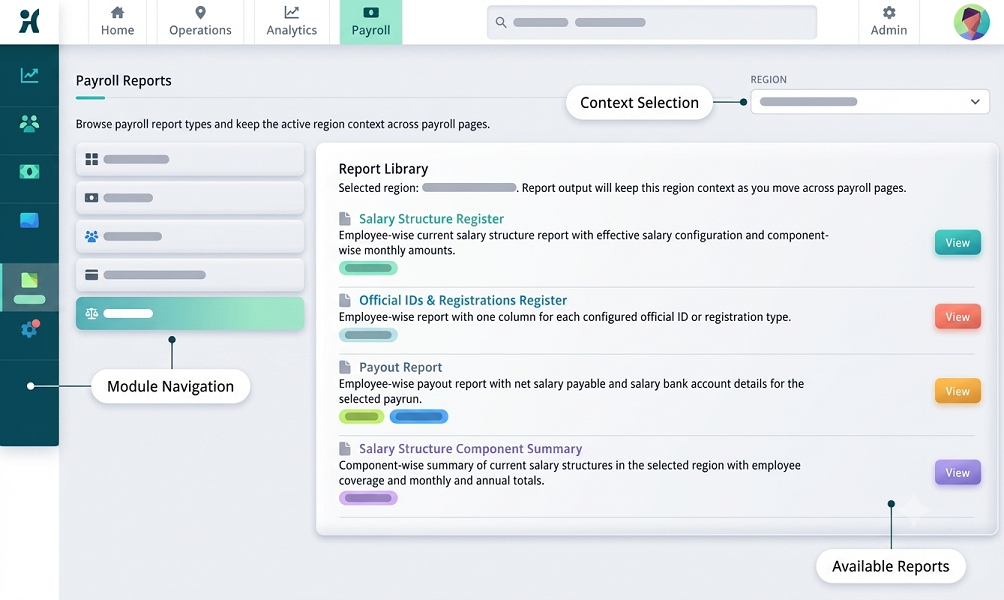
- Payroll reports
- Employee self-service
A typical payroll workflow is:
Employee Data → Attendance & Leave → Salary Calculation → Deductions → Payroll Validation → Payslip → Reports
Instead of maintaining several spreadsheets, a business can manage payroll information through a centralized system.
Why Do Small Businesses Need Payroll Software?
Small businesses often have limited HR and finance resources.
The same person may be responsible for:
- Recruitment
- Employee records
- Attendance
- Leave
- Payroll
- Compliance
- Employee queries
As the business grows, manually performing all these tasks can consume considerable time.
Payroll software can automate recurring calculations and allow HR or business owners to focus on reviewing exceptions rather than performing every calculation manually.
How Payroll Software Works
A basic payroll process can include the following steps.
Step 1: Add Employee Information
HR creates employee profiles containing relevant information such as:
- Name
- Employee ID
- Department
- Designation
- Joining date
- Salary
- Bank details
- Applicable payroll information
Step 2: Configure Salary Structure
The salary structure can include applicable earnings and deductions.
For example:
| Component | Amount |
|---|---|
| Basic Salary | ₹20,000 |
| HRA | ₹8,000 |
| Allowances | ₹7,000 |
| Gross Salary | ₹35,000 |
The actual salary structure depends on the employer's policies and employment terms.
Step 3: Process Attendance
Attendance information can be entered manually, imported, or integrated from attendance software.
The system may process:
- Present days
- Absent days
- Paid leave
- Unpaid leave
- Working hours
- Overtime
Step 4: Calculate Payroll
The software processes earnings and applicable deductions according to configured rules.
Step 5: Review Payroll
HR or management reviews the payroll summary and exceptions.
Step 6: Generate Payslips
Once payroll is approved, the system can generate employee payslips.
Key Benefits of Payroll Software for Small Businesses
1. Saves HR Time
Manual payroll requires repeated data entry and calculations. Payroll software can automate many routine tasks, allowing HR teams to spend more time on employee management and other business activities.
2. Reduces Manual Calculations
Salary calculations can involve multiple components. Payroll software can calculate configured earnings and deductions automatically, reducing dependence on manual spreadsheet formulas.
3. Connects Attendance With Payroll
Attendance can be an important payroll input. When attendance and payroll are integrated:
Attendance → Leave → Overtime → Payroll
HR does not need to manually transfer every attendance value into the payroll sheet.
4. Simplifies Leave Management
Employees can submit leave requests through the system. A typical workflow is:
Employee → Leave Request → Manager Approval → Attendance Update → Payroll
This helps keep leave information organized.
5. Automates Payslip Generation
Instead of creating payslips individually, payroll software can generate them after payroll processing. Employees can often access payslips through an employee portal or mobile application.
6. Improves Payroll Organization
All employee payroll information can be maintained in a centralized system. This makes it easier to find:
- Salary records
- Payroll history
- Attendance
- Leave
- Payslips
- Payroll reports
7. Supports Employee Self-Service
Depending on the software, employees may be able to access:
- Payslips
- Attendance
- Leave balances
- Overtime
- Payroll information
This can reduce routine questions to HR.
8. Generates Payroll Reports
Payroll software can generate reports such as:
- Salary register
- Payroll summary
- Employee-wise payroll
- Department-wise payroll
- Earnings report
- Deductions report
- Attendance report
- Leave report
- Overtime report
9. Supports Multiple Locations
A growing small business may have employees working from:
- Head office
- Branch offices
- Retail stores
- Client locations
- Project sites
A centralized payroll system can make it easier to manage employee records across locations.
10. Creates an Audit Trail
Payroll software can maintain records of important changes and approvals. For example:
Salary Change → Approval → Updated Payroll Record
This improves accountability.
Payroll Software for Businesses With Attendance
For businesses where attendance affects payroll, integrating attendance software can be especially useful.
For example:
Employee Check-In → Attendance System → Working Hours → Leave & Overtime → Approval → Payroll
This can reduce manual data entry and improve the consistency of payroll inputs.
Payroll Software for Small Businesses With Shift Employees
Some small businesses operate multiple shifts, including retail, restaurants, security services, manufacturing, logistics, healthcare, and BPOs. Payroll software integrated with attendance can help manage different working schedules.
For example:
| Shift | Timing |
|---|---|
| Morning | 6 AM–2 PM |
| General | 9 AM–6 PM |
| Evening | 2 PM–10 PM |
| Night | 10 PM–6 AM |
Correct shift configuration can help process working hours, late coming, early leaving, and potential overtime according to company rules.
Payroll Software for Remote and Field Employees
Small businesses may also have employees working outside the office. Depending on the system, attendance can be captured using:
- Mobile attendance
- Location-enabled attendance
- Web-based attendance
- Approved field attendance methods
This can help businesses maintain attendance records for employees who do not work from a fixed office.
What Features Should Small Businesses Look For?
Not every business needs a complex payroll system. Small businesses should prioritize features that solve their actual payroll problems. Important features include:
Employee Management
Centralized employee profiles and payroll information.
Salary Management
Configurable salary structures and payroll components.
Attendance Integration
Ability to import or connect attendance information.
Leave Management
Leave application, approval, and balance tracking.
Overtime Management
Recording and approval of overtime.
Payslip Generation
Automatic digital payslips.
Payroll Reports
Salary and payroll reports for HR and management.
Employee Self-Service
Employee access to payslips, attendance, and leave.
Statutory Payroll Support
Support for applicable statutory payroll requirements.
Role-Based Access
Different access levels for employees, managers, HR, and finance users.
Audit Trail
Records of important payroll changes and approvals.
Multi-Location Support
Useful for businesses operating across branches or project sites.
Manual Payroll vs. Payroll Software
| Area | Manual Payroll | Payroll Software |
|---|---|---|
| Salary calculation | Manual | Automated |
| Attendance | Excel/register | Digital/integrated |
| Leave | Manual | Automated workflow |
| Overtime | Manual | Configurable |
| Payslips | Manual | Automated |
| Reports | Manual | Automated |
| Employee self-service | Limited | Available |
| Data management | Multiple files | Centralized |
| Audit trail | Limited | Available |
| Scalability | Limited | Better |
Is Payroll Software Expensive for Small Businesses?
The cost depends on factors such as employee count, features, users, frequency, attendance integration, mobile applications, support, implementation, and statutory requirements. Some software providers offer subscription-based plans based on employee count.
What Is the Real Cost of Manual Payroll?
Manual payroll may appear inexpensive because there is no dedicated software subscription. However, businesses also spend time on Excel maintenance, salary calculations, attendance reconciliation, leave updates, payslip preparation, payroll corrections, report preparation, and employee queries. For a growing business, these administrative costs can become significant.
How to Choose Payroll Software for a Small Business
Before selecting payroll software, consider the following questions:
1. How Many Employees Do You Have?
Choose a solution that can support both your current workforce and expected growth.
2. Do You Need Attendance Integration?
If attendance affects salary, integration can be particularly valuable.
3. Do Employees Work in Shifts?
If yes, verify that the software supports shift management.
4. Do You Need Employee Self-Service?
Self-service can reduce routine HR queries.
5. Does It Support Your Payroll Requirements?
Check whether the system supports the payroll calculations and statutory requirements applicable to your business.
6. Is It Easy to Use?
A small HR team may not have time for complicated software.
7. Does It Provide Reports?
Make sure required payroll reports can be generated easily.
8. Is Data Secure?
Payroll contains sensitive employee information. Check access controls, security measures, backups, and data handling practices.
9. Can It Scale?
The software should continue to work as employee numbers increase.
Common Payroll Mistakes Small Businesses Should Avoid
Small businesses should watch for:
- Incorrect employee information
- Missing attendance
- Incorrect leave status
- Incorrect overtime
- Wrong salary structure
- Incorrect deductions
- Missing new employees
- Employees not removed after exit
- Spreadsheet formula errors
- Incorrect payroll cut-off dates
- Missing payroll approvals
- Incomplete payroll records
Best Practices for Small Business Payroll
- Maintain accurate employee records.
- Keep salary structures updated.
- Integrate attendance and payroll where appropriate.
- Establish clear attendance and leave policies.
- Create an overtime approval process.
- Set monthly payroll cut-off dates.
- Review payroll exceptions.
- Reconcile payroll before payment.
- Generate and distribute payslips.
- Maintain appropriate payroll records.
- Restrict access to sensitive information.
- Keep applicable statutory settings updated.
- Review payroll software configuration regularly.
Example: Small Business Payroll Workflow
Consider a company with 30 employees using integrated attendance and payroll software. The monthly process can be:
Employee Check-In/Check-Out → Attendance Processing → Leave & Overtime → Manager Approval → Payroll Calculation → HR Review → Payroll Approval → Payslip Generation
When Should a Small Business Move to Payroll Software?
A business should consider payroll software when:
- Employee numbers are increasing.
- Payroll takes too much HR time.
- Attendance is managed manually.
- Overtime is difficult to track.
- Multiple spreadsheets are being used.
- Payroll errors are increasing.
- Employees frequently request payslips.
- Multiple locations are involved.
- The business needs better payroll reports.
- HR wants to automate repetitive tasks.
Conclusion
Payroll Software can help small businesses simplify salary processing, reduce repetitive HR work, improve payroll organization, and create a more scalable payroll process.
Instead of managing multiple spreadsheets, businesses can use a centralized workflow:
Employee Data → Attendance → Leave → Overtime → Salary Calculation → Payroll Validation → Payslip
When choosing payroll software, small businesses should focus on ease of use, attendance and leave integration, salary calculation, statutory payroll support, payslips, reports, employee self-service, security, and scalability.
Small businesses can manage employee records, attendance, salary calculations, statutory deductions, payslips, and reports through InnBuilt Payroll Software without needing a large HR team.