Real-Time GPS Alerts for Employee Location Monitoring
Real-Time GPS Alerts for Employee Location Monitoring
Managing employees who work outside the office can be challenging. Businesses may need to know whether field employees have reached assigned locations, left customer sites, or moved outside their designated work areas. Real-time GPS alerts for employee location monitoring help businesses stay informed about employee movements and respond quickly when location-based events occur.
When integrated with employee attendance software, mobile workforce management, GPS tracking, and geo-fencing, real-time alerts can improve visibility into field operations while reducing the need for manual follow-ups.
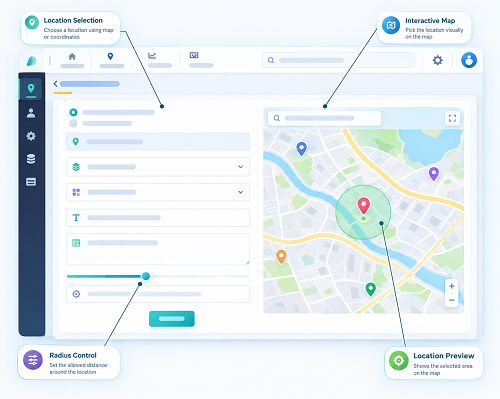
What Are Real-Time GPS Alerts?
Real-time GPS alerts are automated notifications generated when an employee's mobile device meets a predefined location or movement condition.
For example, a business can configure an alert when an employee:
- Enters an assigned work location
- Leaves a customer location
- Moves outside a geo-fenced area
- Reaches a designated site
- Fails to reach an assigned location within a scheduled period
- Moves between multiple assigned locations
These alerts provide managers with timely information about field employees without requiring them to constantly check a tracking dashboard.
How GPS Alerts Help Monitor Employee Locations
1. Track Field Employees in Real Time
Field employees may spend most of their working day visiting customers, project sites, branches, or other locations. Managers may not always be able to contact every employee for regular status updates.
GPS alerts provide location-based updates that help managers understand where employees are during assigned work activities.
This can improve visibility without relying entirely on phone calls, messages, or manual reports.
2. Know When Employees Reach Assigned Locations
Businesses can define specific locations for employees to visit. When an employee enters the designated area, the system can trigger an alert.
For example, a service technician assigned to a customer location can generate an arrival notification when they reach the site.
This helps managers confirm field visits and coordinate the next activity.
3. Get Alerts When Employees Leave Locations
GPS alerts can also notify managers when an employee leaves a designated location.
This can be useful for organizations that need to monitor customer visits, service calls, project-site attendance, or scheduled field activities.
Managers can use departure information to understand whether an assignment has been completed and whether the employee is ready for the next task.
4. Improve Geo-fencing Management
GPS alerts and geo-fencing can work together to create location-based workforce rules.
A company can create a virtual boundary around an office, construction site, warehouse, customer location, or other approved workplace. Alerts can then be configured for events such as entering or exiting that boundary.
This provides businesses with a practical way to manage location-specific attendance and field activities.
5. Identify Location Exceptions
Not every employee movement requires an alert. Businesses can configure notifications for specific exceptions that require attention.
For example, a manager may receive an alert when an employee leaves an assigned project site before the scheduled completion time.
This allows managers to focus on unusual events instead of continuously monitoring every employee.
6. Support Faster Response
Real-time alerts can help managers respond quickly when field operations do not go according to plan.
If an employee has not reached an assigned location or has unexpectedly left a work area, the manager can contact the employee or adjust the assignment.
This can be particularly useful for service, maintenance, delivery, sales, and field-support teams.
7. Improve Field Visit Verification
Field visits can be difficult to verify when businesses rely solely on employee-reported information.
Location-based alerts can provide supporting information about whether an employee reached a designated location.
When combined with attendance records, task information, and visit reports, GPS data can help create a clearer picture of field activities.
8. Support Remote Employee Management
Remote employees may work from approved locations rather than a traditional office. Businesses can use location-based rules where appropriate to support attendance and work-location management.
For example, employees may be permitted to check in from an approved remote work location. The system can generate an alert when the employee enters or leaves that area.
Businesses should clearly communicate their location-monitoring policies and collect only the information necessary for legitimate business purposes.
Common GPS Alerts for Employee Monitoring
A workforce management system may provide different types of GPS alerts, depending on business requirements.
Entry Alert
Notifies the manager when an employee enters a designated location or geo-fenced area.
Exit Alert
Notifies the manager when an employee leaves an assigned location.
Geo-fence Breach Alert
Generates a notification when an employee moves outside an approved geographic boundary.
Late Arrival Alert
Can notify managers when an employee has not reached an assigned location within the expected timeframe.
Location Exception Alert
Can highlight unusual location events that require manager attention.
Assignment Location Alert
Helps managers know when an employee reaches a location associated with a particular job or task.
Benefits of Real-Time GPS Alerts
Businesses can use GPS alerts to improve several aspects of workforce management.
Key benefits include:
- Real-time visibility into field operations
- Faster response to location exceptions
- Better field visit verification
- Improved geo-fencing management
- Reduced manual status checking
- Better coordination of field employees
- More accurate location-based attendance
- Improved customer-service coordination
- Better management of multiple work locations
- Centralized workforce activity information
GPS Alerts for Different Industries
Construction
Construction companies can use geo-fenced project sites to monitor employee arrival and departure events.
Field Service
Service organizations can receive alerts when technicians reach or leave customer locations.
Sales
Sales teams can use location-based monitoring to support customer visit management and territory coordination.
Logistics
GPS alerts can help businesses coordinate employees working across delivery and distribution locations.
Retail
Organizations with multiple stores can use location-based attendance and alerts to manage employees across branches.
Facility Management
Facility-management companies can use GPS alerts to monitor employees assigned to different client locations.
GPS Alerts and Employee Privacy
Employee location monitoring should be implemented responsibly. Employees should be informed about what location information is collected, when tracking occurs, why it is required, and how the information is handled.
Businesses should establish clear policies and comply with applicable privacy, employment, and data-protection requirements.
GPS monitoring should support legitimate workforce-management purposes rather than unnecessary or excessive surveillance.
How to Use GPS Alerts Effectively
Businesses should first identify which location events genuinely require notifications. Sending too many alerts can make it difficult for managers to identify important exceptions.
A practical approach is to:
- Identify important employee work locations.
- Create appropriate geo-fenced areas.
- Assign employees to locations and tasks.
- Define entry and exit alert rules.
- Configure alerts for important exceptions.
- Integrate GPS information with attendance and shift records.
- Review location reports periodically.
- Maintain a clear employee location-monitoring policy.
GPS Alerts and Attendance Management Software
Real-time GPS alerts become more useful when connected with an employee attendance system. Businesses can combine location information with attendance, shifts, leave, overtime, tasks, and field visits.
For example, an employee may check in through a mobile application at an assigned customer location. The system can verify the location, record attendance, and notify the manager that the employee has arrived.
This creates a more connected approach to managing employees who work away from the office.
Conclusion
Real-time GPS alerts help businesses monitor employee locations, verify field activities, manage geo-fenced workplaces, and respond quickly to location-based events. They are particularly useful for organizations with field employees, remote teams, mobile workers, service technicians, sales representatives, and employees working across multiple locations.
When combined with GPS tracking, geo-fencing, mobile attendance, shift management, and task management, GPS alerts can provide better visibility into field operations and help businesses manage their workforce more efficiently.
The most effective approach is to use GPS alerts selectively, transparently, and for clearly defined business purposes. This helps organizations gain operational visibility while maintaining responsible employee location-monitoring practices.
Real-time location events can trigger GPS alerts in the InnBuilt Employee Tracking App when field employees enter, leave, or move outside configured work areas. Permission controls ensure alerts are aligned with authorised working hours and business policies.