Shift Management for Hospitals, Security Agencies, and 24/7 Businesses
Shift Management for Hospitals, Security Agencies, and 24/7 Businesses
Businesses that operate 24 hours a day need a reliable way to manage employee shifts. Hospitals, security agencies, manufacturing plants, hotels, BPOs, call centers, logistics companies, transportation businesses, and other 24/7 organizations cannot afford staffing gaps.
Unlike regular office schedules, 24/7 operations require employees to work across morning, evening, night, weekend, and rotational shifts. Managers must ensure that the right number of employees are available at every hour while also managing attendance, leave, overtime, shift changes, and employee availability.
Manual shift planning can become difficult when hundreds of employees work across multiple locations. Shift management software can help businesses automate scheduling, monitor attendance, manage shift rosters, and improve workforce planning.
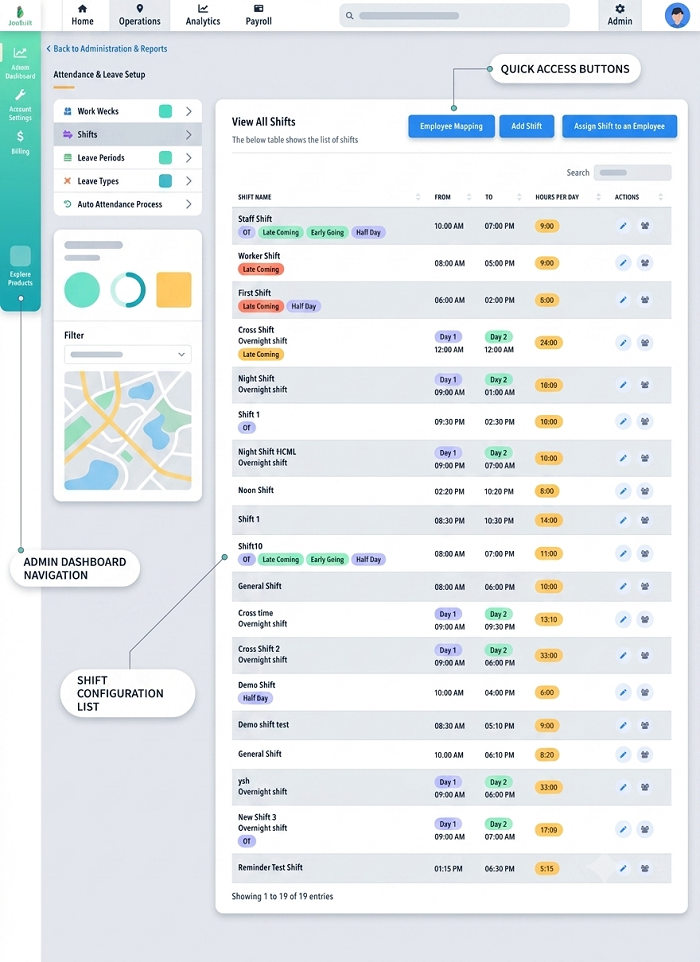
What Is Shift Management for 24/7 Businesses?
Shift management is the process of planning, assigning, monitoring, and adjusting employee working schedules according to business requirements.
A 24/7 organization may use:
- Morning shifts
- Afternoon shifts
- Evening shifts
- Night shifts
- Rotational shifts
- Fixed shifts
- Weekend shifts
- Holiday shifts
- Emergency or backup shifts
The objective is to maintain continuous operations while ensuring that employees are assigned appropriate working hours.
Why Is Shift Management Important for 24/7 Operations?
A 24/7 business needs employees available throughout the day and night. Even a small staffing gap can affect operations.
For example:
- A hospital needs nurses and support staff available overnight.
- A security agency needs guards at client locations throughout the day.
- A manufacturing plant may need operators to keep production running.
- A BPO may need customer support employees across different time zones.
- A hotel needs front-office, housekeeping, and security staff around the clock.
Effective shift management helps organizations maintain staffing continuity and improve operational efficiency.
Shift Management Challenges in Hospitals
Hospitals have particularly complex workforce scheduling requirements because staffing levels can directly affect patient care and hospital operations.
1. Continuous Staffing
Hospitals may require doctors, nurses, technicians, attendants, security personnel, housekeeping staff, and other employees across multiple shifts.
2. Skill-Based Scheduling
Not every employee can perform every role. Shift planning may need to consider qualifications, departments, experience, and assigned responsibilities.
3. Emergency Situations
Unexpected emergencies can require additional employees or schedule changes.
4. Employee Leave and Absence
Unplanned absence can create immediate staffing gaps, particularly in critical departments.
5. Night Shifts
Night schedules need careful planning to ensure adequate staffing while avoiding excessive consecutive night work or unnecessary overtime.
How Software Can Help Hospitals
A workforce scheduling system can help hospitals:
- Create department-wise rosters
- Assign employees to shifts
- Track attendance
- Manage leave
- Handle shift swaps
- Monitor overtime
- Identify staffing gaps
- Maintain shift history
Scheduling decisions should continue to follow the hospital's staffing policies and applicable professional or employment requirements.
Shift Management for Security Agencies
Security agencies often manage employees across many client locations. A single security company may have hundreds or thousands of guards working at different sites.
This makes shift management especially challenging.
Common Security Staffing Challenges
Security agencies may need to manage:
- Multiple client locations
- Different site timings
- Day and night guards
- Weekly offs
- Relief guards
- Emergency replacements
- Shift changes
- Employee attendance
- Site-based reporting
Site-Based Shift Scheduling
A security agency can create separate schedules for each client location.
For example:
| Location | Shift | Required Guards |
|---|---|---|
| Office Building | Day | 4 |
| Office Building | Night | 4 |
| Warehouse | Day | 3 |
| Warehouse | Night | 3 |
| Residential Complex | Day | 6 |
| Residential Complex | Night | 5 |
This helps supervisors understand staffing requirements at each location.
Managing Guard Replacements
If a security guard is absent, the supervisor needs to identify a suitable replacement quickly.
A digital scheduling system can make it easier to identify available employees and update the shift roster after approval.
Attendance at Client Locations
Security agencies may need to verify attendance at assigned sites. Depending on the organization's processes and technology, attendance can be captured through biometric devices, mobile applications, location-based methods, or other approved systems.
Shift Management for Manufacturing Companies
Manufacturing plants frequently operate multiple shifts to maintain production continuity.
Typical schedules may include:
| Shift | Example Timing |
|---|---|
| Morning | 6 AM – 2 PM |
| Evening | 2 PM – 10 PM |
| Night | 10 PM – 6 AM |
Manufacturing companies need to consider:
- Production requirements
- Machine operators
- Maintenance employees
- Quality-control staff
- Supervisors
- Employee skills
- Production targets
- Planned maintenance
- Overtime
Skill-based scheduling is especially important when only certain employees are trained to operate specific machines or processes.
Shift Management for BPOs and Call Centers
BPOs and customer support organizations may operate around the clock to serve customers across different regions.
They may use:
- Fixed shifts
- Rotational shifts
- Split schedules
- Weekend shifts
- Night shifts
Managers need to consider employee availability, expected call volumes, team requirements, breaks, attendance, and staffing levels.
Historical workload data can also help managers determine how many employees are needed during different periods.
Shift Management for Hotels and Hospitality Businesses
Hotels operate continuously and require different teams across multiple shifts.
Employees may include:
- Front-office staff
- Housekeeping employees
- Kitchen staff
- Restaurant employees
- Maintenance staff
- Security personnel
- Managers
Shift planning should ensure that essential departments have appropriate coverage throughout the day and night.
Shift Management for Logistics and Transportation
Logistics and transportation companies often operate beyond standard office hours.
Employees may include:
- Drivers
- Warehouse workers
- Dispatch teams
- Loading and unloading staff
- Supervisors
- Customer support teams
Shift management helps coordinate employee availability with delivery schedules, warehouse operations, and transportation requirements.
How to Manage Shifts in 24/7 Businesses
1. Identify Staffing Requirements
Determine the number and type of employees required for each shift.
Consider:
- Business workload
- Customer demand
- Location
- Department
- Employee skills
- Operational requirements
2. Create a Clear Shift Pattern
Define standard shift timings where practical.
For example:
Shift 1: 6 AM – 2 PM
Shift 2: 2 PM – 10 PM
Shift 3: 10 PM – 6 AM
Consistent patterns make scheduling easier for managers and employees.
3. Prepare Rosters in Advance
Publish shift rosters before the scheduled working period.
Employees should be able to see:
- Shift date
- Shift timing
- Location
- Department
- Weekly off
- Approved leave
4. Match Employees With Required Skills
Ensure every shift has employees capable of performing the required duties.
This is particularly important in hospitals, manufacturing plants, technical operations, and security services.
5. Maintain Backup Staffing
A backup workforce can help businesses respond to unexpected absences.
Possible backup options include:
- Relief employees
- Cross-trained employees
- Part-time employees
- Floating staff
- Approved overtime
6. Manage Shift Swaps
Employees should have a formal process for requesting shift exchanges.
A typical workflow can be:
Employee Request → Supervisor Review → Approval → Roster Update
This prevents unauthorized schedule changes.
7. Track Attendance Against the Roster
Attendance should be compared with scheduled shifts.
For example:
Scheduled: 10 PM – 6 AM
Actual: 10:05 PM – 6:10 AM
The system can record the actual working period and identify relevant attendance exceptions according to company rules.
8. Handle Overnight Attendance Correctly
Night shifts often cross midnight.
An employee who starts at 10 PM and finishes at 6 AM should generally be associated with the appropriate overnight shift rather than having the attendance incorrectly split into unrelated calendar days.
An attendance system designed for shift-based businesses can simplify this process.
9. Monitor Overtime
24/7 operations can generate significant overtime if staffing is not planned properly.
Managers should regularly review:
- Scheduled hours
- Actual hours
- Overtime
- Approved overtime
- Department-wise overtime
- Location-wise overtime
This can help identify recurring staffing shortages.
10. Integrate Leave Management
Leave information should be considered when preparing shift rosters.
If several employees are on leave during the same period, managers can arrange replacements before the shift begins.
11. Communicate Schedule Changes
Last-minute changes should be communicated quickly to affected employees.
Mobile notifications can make it easier to inform employees about:
- New shifts
- Shift changes
- Shift cancellations
- Shift swaps
- Leave approvals
12. Review Scheduling Data
Managers can use historical scheduling and attendance data to identify patterns.
For example, data may show that:
- A particular shift regularly has absences.
- A location frequently requires replacement staff.
- One department consistently generates overtime.
- Certain time periods require additional employees.
These insights can be used to improve future rosters.
How Shift Management Software Helps 24/7 Businesses
Managing 24/7 operations through spreadsheets and manual registers can become increasingly difficult.
Shift management software can centralize:
Employee Data → Shift Roster → Attendance → Leave → Overtime → Payroll
Automated Rostering
Managers can create and assign shifts more efficiently.
Multi-Location Scheduling
Organizations can manage employees working at different branches, sites, hospitals, offices, or client locations.
Attendance Integration
Attendance can be compared with assigned shifts to identify discrepancies.
Leave Management
Approved leave can be considered while planning schedules.
Overtime Tracking
Actual working hours can be analyzed to identify overtime according to company policies.
Employee Mobile Access
Employees can view schedules, attendance information, leave details, and approved changes through supported mobile applications.
Payroll Integration
Shift, attendance, leave, and approved overtime information can be connected with payroll processes, reducing repetitive data entry.
Example: 24/7 Security Agency
Consider a security agency managing 100 guards across 20 client locations.
Instead of maintaining separate spreadsheets, the agency can create:
Client Location → Site → Shift → Guard → Attendance → Replacement
If a guard assigned to a night shift is unexpectedly unavailable, the supervisor can identify an available replacement and update the schedule.
The attendance record can then be matched against the updated roster.
This creates better visibility for both supervisors and HR teams.
Best Practices for 24/7 Shift Management
Businesses can improve shift scheduling by following these practices:
- Understand staffing requirements for every shift.
- Create consistent shift patterns where possible.
- Publish rosters in advance.
- Consider employee availability.
- Assign employees based on skills.
- Maintain trained backup employees.
- Establish a formal shift-swap process.
- Integrate leave with scheduling.
- Track attendance against assigned shifts.
- Handle overnight shifts correctly.
- Monitor overtime regularly.
- Communicate schedule changes quickly.
- Review staffing data periodically.
- Use technology to reduce manual scheduling work.
- Connect attendance and shift information with payroll.
Benefits of Effective 24/7 Shift Management
A well-organized shift management process can help businesses achieve:
Continuous Operations
Adequate staffing helps maintain business operations throughout the day and night.
Better Workforce Planning
Managers can understand staffing requirements and allocate employees more efficiently.
Reduced Scheduling Conflicts
Clear rosters and controlled shift changes reduce confusion.
Improved Attendance Accuracy
Connecting schedules with attendance provides better visibility into employee working hours.
Better Overtime Control
Managers can identify excessive overtime and recurring staffing gaps.
Faster Payroll Processing
Accurate attendance, shift, leave, and overtime information can support more efficient payroll processing.
Improved Employee Experience
Employees can access their schedules and receive timely information about changes.
Conclusion
Shift management for hospitals, security agencies, and 24/7 businesses requires careful planning and continuous coordination. Organizations need to balance staffing requirements, employee availability, skills, leave, attendance, overtime, and unexpected absences.
For organizations with multiple shifts and locations, manual scheduling can quickly become difficult to manage. A centralized shift management software solution can simplify employee scheduling, shift rosters, attendance tracking, leave management, overtime monitoring, and payroll coordination.
Whether you operate a hospital, security agency, manufacturing facility, hotel, BPO, logistics company, or another 24/7 business, an organized shift management process can help maintain workforce coverage and improve operational efficiency.
Round-the-clock organisations can manage complex coverage through InnBuilt Shift Management Software, including hospital duties, security posts, overnight rotations, emergency replacements, and overtime. Centralised rosters help ensure every critical shift is staffed.