Shift Management for Retail Businesses: A Complete Guide
Shift Management for Retail Businesses: A Complete Guide
Retail businesses depend on the right employees being available at the right time. Unlike many office-based organizations, retail stores operate around customer traffic, store hours, weekends, holidays, seasonal demand, and changing staffing requirements.
Managing employee shifts manually can become difficult when a business has multiple stores, departments, shifts, and part-time or full-time employees. Poor shift planning can result in understaffing, employee conflicts, excessive overtime, attendance problems, and poor customer service.
Shift management for retail businesses involves planning employee schedules, assigning shifts, managing attendance, handling leave and shift swaps, monitoring working hours, and ensuring that each store has adequate staffing.
With a structured shift management process and the right software, retailers can simplify scheduling while improving workforce efficiency.
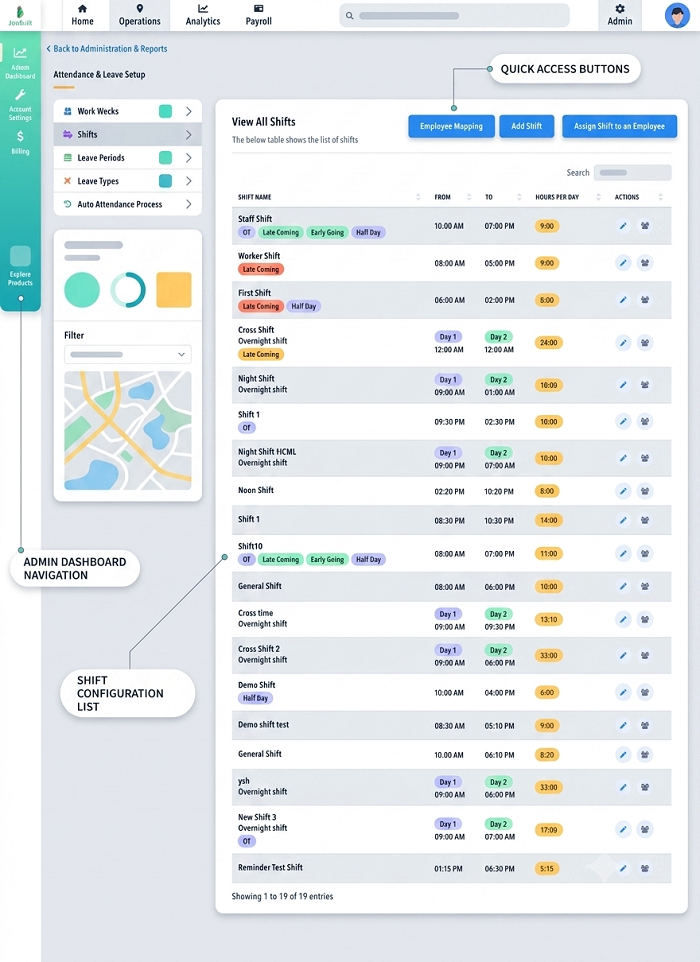
What Is Shift Management in Retail?
Retail shift management is the process of planning and managing employee working schedules based on store operating hours and business requirements.
A retail business may use:
- Morning shifts
- Afternoon shifts
- Evening shifts
- Night shifts
- Weekend shifts
- Rotational shifts
- Part-time shifts
- Seasonal shifts
- Holiday shifts
The objective is to make sure each store has enough employees to handle customers and daily operations without unnecessarily increasing labor costs.
Why Is Shift Management Important for Retail Businesses?
Retail staffing requirements can change throughout the day.
For example, a clothing store may need more employees during evening hours and weekends than during quiet weekday mornings. A supermarket may require additional workers during peak shopping periods. During festivals or sales events, staffing requirements may increase further.
Effective shift management helps retailers:
- Maintain adequate store staffing
- Reduce employee scheduling conflicts
- Improve customer service
- Control overtime
- Manage employee availability
- Handle leave and absences
- Improve attendance accuracy
- Manage multiple locations
- Reduce manual HR work
- Support accurate payroll processing
Common Shift Management Challenges in Retail
1. Changing Customer Demand
Customer traffic is rarely consistent throughout the day. Retailers need to schedule employees according to expected demand.
2. Employee Availability
Part-time employees and employees with different availability can make scheduling complicated.
3. Weekend and Holiday Staffing
Retail businesses often experience higher demand during weekends, holidays, festivals, and promotional events.
4. Unexpected Absences
An employee calling in sick shortly before a shift can leave a store understaffed.
5. Shift Swaps
Employees may need to exchange shifts because of personal commitments.
6. Multiple Store Locations
Retail chains need to coordinate employees across multiple stores while maintaining location-specific staffing requirements.
7. Overtime
Last-minute staffing shortages and extended store hours can result in additional working hours.
How to Manage Retail Employee Shifts Effectively
1. Understand Store Staffing Requirements
Before preparing a roster, managers should determine how many employees are required during different periods.
Consider:
- Store opening hours
- Customer traffic
- Department requirements
- Expected sales volume
- Promotional events
- Weekends and holidays
- Employee skills
- Minimum staffing requirements
This creates a foundation for effective scheduling.
2. Create Clear Shift Patterns
Retailers should establish standard shift timings where possible.
For example:
| Shift | Timing |
|---|---|
| Morning | 8:00 AM – 4:00 PM |
| General | 10:00 AM – 6:00 PM |
| Evening | 2:00 PM – 10:00 PM |
Actual timings can be adjusted according to store operating hours and business requirements.
3. Prepare Schedules in Advance
Employees should receive their schedules early enough to plan their personal commitments.
A digital shift roster can show:
- Employee name
- Date
- Store
- Department
- Shift timing
- Weekly off
- Leave status
- Shift changes
Advance scheduling can reduce confusion and last-minute staffing problems.
4. Schedule Employees Based on Availability
Retail businesses often employ people with different availability.
For example:
- Full-time employees
- Part-time employees
- Weekend employees
- Students
- Temporary employees
Managers should consider employee availability before assigning shifts.
5. Match Employees to the Right Departments
Retail employees may have different skills and responsibilities.
A store could require:
- Sales staff
- Cashiers
- Store supervisors
- Stock handlers
- Customer service employees
- Security personnel
- Visual merchandising staff
Shift planning should ensure that critical positions are covered.
6. Schedule More Employees During Peak Hours
Retailers should analyze customer traffic and schedule additional employees during busy periods.
For example:
| Time | Expected Demand | Staffing |
|---|---|---|
| 9 AM – 11 AM | Low | Low |
| 11 AM – 2 PM | Medium | Medium |
| 2 PM – 6 PM | High | High |
| 6 PM – 9 PM | Very High | Higher |
| 9 PM – 10 PM | Medium | Medium |
This approach helps businesses avoid both understaffing and unnecessary labor costs.
7. Manage Weekend and Holiday Shifts Fairly
Retail employees often work weekends and holidays. Managers should create fair scheduling practices to distribute these shifts appropriately.
A transparent roster can help employees understand their assigned schedules and reduce disputes.
8. Create a Shift-Swap Process
Employees may occasionally need to exchange shifts.
A controlled shift-swap process can work as follows:
Employee Request → Replacement Employee → Manager Approval → Roster Update
This prevents unauthorized changes and ensures that staffing requirements are maintained.
9. Plan for Unexpected Absences
Retail managers should have a backup staffing plan.
Possible options include:
- Backup employees
- Cross-trained employees
- Part-time workers
- Approved shift swaps
- Temporary staffing arrangements
Having backup options makes it easier to respond to unexpected absences.
10. Track Attendance Against Scheduled Shifts
Attendance information becomes more useful when it is compared with the employee's assigned shift.
For example:
Scheduled: 10:00 AM – 6:00 PM
Actual: 10:12 AM – 6:05 PM
Managers can identify attendance exceptions according to company policy. This also helps reduce manual calculations when preparing payroll.
11. Monitor Overtime
Retail businesses should monitor additional working hours, especially during busy periods.
Managers can review:
- Scheduled hours
- Actual hours
- Overtime
- Approved overtime
- Department-wise overtime
Regular monitoring can help control unnecessary overtime and improve workforce planning.
12. Integrate Leave With Shift Scheduling
Leave information should be visible while preparing the roster.
If an employee is on approved leave, managers should be able to identify the affected shift and arrange replacement staffing.
This reduces the possibility of creating rosters with unavailable employees.
How Shift Management Software Helps Retail Businesses
Managing schedules through spreadsheets may become difficult when a retailer has many employees or multiple stores.
Shift management software can centralize workforce scheduling and attendance information.
Automated Shift Scheduling
Managers can create employee schedules based on business requirements, availability, departments, and locations.
Mobile Access
Employees can use a mobile application to view their upcoming shifts, attendance information, leave status, and approved schedule changes, depending on the software.
Shift Notifications
Employees can receive notifications about new schedules or changes, reducing communication gaps.
Attendance Integration
Actual attendance can be compared with assigned shifts, helping managers identify late arrivals, absences, early departures, and missing attendance records.
Leave Management
Approved leave can be considered when preparing employee schedules.
Overtime Tracking
Working hours can be analyzed to identify overtime and support payroll processing according to company rules.
Multi-Store Management
Retail chains can manage employee schedules across multiple branches from a centralized system.
Example of a Retail Shift Roster
Consider a retail store operating from 9 AM to 10 PM.
| Employee | Role | Shift |
|---|---|---|
| Employee A | Sales | 9 AM – 5 PM |
| Employee B | Cashier | 10 AM – 6 PM |
| Employee C | Sales | 2 PM – 10 PM |
| Employee D | Store Supervisor | 1 PM – 9 PM |
| Employee E | Stock | 9 AM – 5 PM |
During the evening peak period, the store has additional employees available to support customers.
If an employee is absent, the manager can identify a suitable replacement and update the roster through the scheduling system.
Best Practices for Retail Shift Management
Retail businesses can improve employee scheduling by following these practices:
- Analyze customer traffic before creating schedules.
- Plan shifts in advance.
- Consider employee availability.
- Assign employees according to skills and roles.
- Maintain adequate staffing during peak hours.
- Distribute weekend and holiday shifts fairly.
- Establish clear shift-swap procedures.
- Maintain backup staffing.
- Integrate leave with shift planning.
- Track attendance against scheduled shifts.
- Monitor overtime regularly.
- Communicate roster changes quickly.
- Review staffing requirements for each store.
- Use historical data to improve future schedules.
- Connect attendance and shift data with payroll.
Benefits of Effective Retail Shift Management
A structured shift management process can help retailers achieve:
Better Customer Service
Adequate staffing during busy periods allows employees to serve customers more effectively.
Improved Employee Satisfaction
Employees can better plan their personal schedules when rosters are communicated in advance.
Lower Scheduling Errors
Digital scheduling reduces manual mistakes and duplicate assignments.
Better Attendance Visibility
Managers can easily compare scheduled working hours with actual attendance.
Improved Labor Cost Control
Better staffing planning can reduce unnecessary overtime and overstaffing.
Faster Payroll Processing
Accurate shift, attendance, leave, and overtime information can support more efficient payroll processing.
Easier Multi-Store Management
Retail chains can coordinate schedules across multiple locations using centralized workforce management tools.
Conclusion
Effective shift management for retail businesses is essential for maintaining adequate staffing, delivering good customer service, and controlling workforce costs. Retailers need to balance customer demand, employee availability, skills, leave, attendance, overtime, and store operating hours when creating schedules.
Manual scheduling can become increasingly difficult as employee numbers and store locations grow. Shift management software can simplify the process by connecting employee scheduling, shift rosters, attendance, leave, overtime, and payroll.
With better planning and the right technology, retail businesses can create more reliable schedules, respond quickly to staffing changes, and manage their workforce more efficiently.
For retail businesses, InnBuilt Shift Scheduling Software organises store-wise rosters, weekly offs, peak-hour staffing, replacements, and employee availability. Branch managers can adjust schedules quickly while head office maintains consolidated control.