What Features Should You Look for in Attendance Software?
What Features Should You Look for in Attendance Software?
Choosing the right Attendance Software is an important decision for businesses that want to automate employee attendance, reduce HR workload, improve payroll accuracy, and manage employees across different locations.
Basic attendance software may only record employee check-in and check-out times. Modern Employee Attendance Management Software can do much more—it can manage shifts, leave, overtime, mobile attendance, GPS, employee self-service, reports, and payroll integration.
But with so many options available, what features should a business actually look for?
This guide covers the most important features to consider when selecting attendance software.
1. Multiple Attendance Options
The first feature to consider is how employees will record their attendance.
Depending on your workforce, the software may need to support:
- Biometric attendance
- Fingerprint recognition
- Facial recognition
- Mobile attendance
- GPS attendance
- Web-based attendance
- RFID cards
A business with office-based employees may prefer biometric attendance, while field employees may need mobile or GPS-based attendance.
Ideally, choose software that supports multiple attendance methods so the system can accommodate different employee groups.
2. Mobile Attendance
Mobile attendance is becoming increasingly important for modern businesses.
Employees who work outside the office can use a smartphone application to record attendance.
This can be useful for:
- Sales employees
- Field service teams
- Construction workers
- Delivery teams
- Remote employees
- Employees working at customer locations
Depending on the software, mobile attendance may also support GPS and geofencing.
3. GPS and Geofencing
If your employees work at different locations, GPS attendance can provide useful location information when attendance is marked.
Geofencing allows businesses to define approved geographical areas where employees can mark attendance.
For example, a construction company can create a geofence around a project site and allow employees to mark attendance within the authorized location.
Businesses should establish appropriate policies regarding location tracking, employee privacy, data access, and data retention.
4. Biometric Integration
Biometric attendance is useful for fixed workplaces such as:
- Offices
- Factories
- Warehouses
- Hospitals
- Retail stores
- Educational institutions
A good attendance platform should be able to integrate with compatible biometric devices and transfer attendance information into the centralized system.
This allows organizations to combine physical attendance authentication with modern software-based workforce management.
5. Shift Management
If your business operates multiple shifts, shift management is an essential feature.
The software should support different schedules such as:
- General shifts
- Rotational shifts
- Night shifts
- Flexible shifts
- Split shifts
- Weekly offs
- Employee-specific schedules
It should also make it easy for HR managers to assign, modify, and monitor employee shifts.
6. Leave Management
Attendance and leave should ideally be managed together.
Look for software that allows employees to:
- Apply for leave
- Check leave balances
- View leave history
- Receive approval or rejection
- Track pending requests
Approved leave should automatically be reflected in attendance records where appropriate.
This reduces the need to maintain separate attendance and leave spreadsheets.
7. Overtime Tracking
Businesses that manage overtime should look for software with overtime tracking capabilities.
The system should be able to identify working hours beyond scheduled hours according to configured rules.
For example:
Scheduled shift: 9:00 AM–6:00 PM
Actual attendance: 9:00 AM–8:00 PM
The system can identify the additional working period for review and approval.
Overtime rules should be configured according to the organization's policies and applicable requirements.
8. Attendance Regularization
Employees may occasionally forget to mark their attendance or experience technical issues.
Attendance regularization allows employees to request corrections for issues such as:
- Missing check-in
- Missing check-out
- Incorrect attendance
- Wrong shift
- Approved schedule changes
Managers or HR can review these requests before making changes.
An approval workflow also provides better control over attendance corrections.
9. Employee Self-Service
Employee self-service is an important feature of modern attendance software.
Employees should ideally be able to access their attendance information through a web portal or mobile application.
Depending on the system, employees may view:
- Attendance history
- Check-in and check-out times
- Working hours
- Leave balances
- Overtime
- Missing punches
- Regularization requests
This improves transparency and reduces routine attendance-related queries to HR.
10. Payroll Integration
One of the most valuable features to look for is payroll integration.
Attendance information may affect salary calculations through:
- Working days
- Paid days
- Unpaid leave
- Absence
- Overtime
- Other attendance-related adjustments
An integrated system can transfer relevant attendance information to payroll without requiring repeated manual entry.
A typical workflow is:
Attendance → Leave & Overtime → Attendance Validation → Payroll → Salary Processing
For businesses using payroll outsourcing, easy data export or integration can also make monthly payroll processing more efficient.
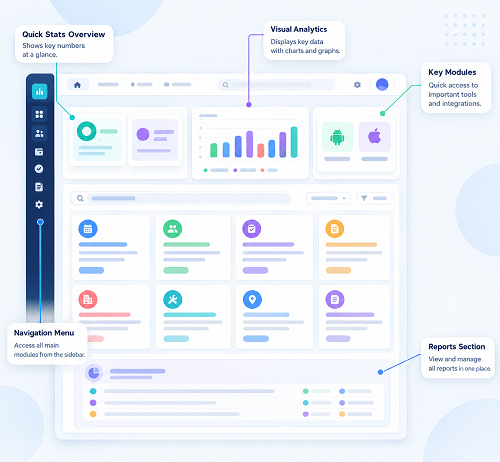
11. Real-Time Attendance Dashboard
A good attendance system should provide HR and managers with an easy-to-understand dashboard.
A dashboard can show:
- Employees present
- Employees absent
- Late arrivals
- Employees on leave
- Missing punches
- Overtime
- Shift attendance
Real-time or near-real-time visibility helps managers respond quickly to workforce issues.
12. Attendance Reports
Reporting is another essential feature.
Look for software that can generate:
- Daily attendance reports
- Monthly attendance reports
- Employee attendance summaries
- Late-coming reports
- Absence reports
- Overtime reports
- Working-hour reports
- Missing-punch reports
- Leave reports
- Department-wise reports
- Location-wise reports
The ability to filter reports by employee, department, location, shift, or date can make the system much more useful.
13. Multi-Location Management
Businesses with multiple offices, branches, stores, factories, or project sites need centralized attendance management.
The software should allow HR to manage employees across locations while giving authorized managers access to the information relevant to their teams.
This is particularly useful for:
- Retail chains
- Construction companies
- Manufacturing organizations
- Logistics companies
- Service businesses
- Security agencies
14. Holiday and Weekly-Off Management
Attendance calculations depend on the organization's holiday and weekly-off calendar.
The software should allow HR to configure:
- Public holidays
- Company holidays
- Weekly offs
- Location-specific holidays
- Department-specific holidays
- Shift-specific offs
This helps ensure attendance is processed according to the organization's calendar.
15. Notifications and Alerts
Automated notifications can help employees and managers stay informed.
Examples include:
- Late attendance alerts
- Missing-punch notifications
- Leave approval notifications
- Regularization updates
- Shift-change notifications
- Overtime alerts
Notifications can reduce the need for HR teams to manually communicate routine attendance information.
16. Security and Access Control
Attendance information is employee-related data, so security should be an important consideration.
Look for features such as:
- Role-based access
- Secure authentication
- Audit logs
- Data encryption
- Backup
- Administrator controls
- Restricted access to employee information
Only authorized users should be able to view or modify attendance records.
17. Cloud-Based Access
Cloud-based attendance software allows authorized users to access the system through an internet connection.
This can be particularly useful for organizations with multiple locations.
HR teams can manage attendance centrally instead of maintaining separate systems for every branch.
Cloud software can also make software updates and system maintenance easier, depending on the provider.
18. Integration and API Support
Businesses may already use HRMS, payroll, ERP, accounting, or other systems.
Check whether the attendance software can integrate with existing applications.
Useful integration options may include:
- Payroll software
- HRMS
- ERP
- Biometric devices
- Employee databases
- APIs
Good integration reduces duplicate data entry and improves information flow between systems.
19. Scalability
The attendance system should be able to grow with your organization.
Before selecting software, consider:
- Current employee count
- Expected workforce growth
- Number of locations
- Number of administrators
- Future integration requirements
A system that works well for 50 employees should ideally be capable of supporting a much larger workforce as the company expands.
20. Ease of Use
A feature-rich system is not useful if employees and HR teams find it difficult to use.
Look for a simple interface that allows:
- Easy employee onboarding
- Quick attendance marking
- Simple shift configuration
- Easy leave applications
- Fast report generation
- Simple approval workflows
Requesting a demo or trial before purchasing can help you evaluate usability.
21. Customer Support
Reliable customer support is particularly important when attendance software is connected to payroll.
Before choosing a provider, understand:
- Support channels
- Response times
- Implementation assistance
- Training
- Technical support
- Software updates
- Troubleshooting procedures
Good support can make implementation and ongoing usage much easier.
Attendance Software Feature Checklist
Before choosing a solution, ask:
- Does it support our preferred attendance methods?
- Does it support biometric devices?
- Is mobile attendance available?
- Does it provide GPS and geofencing?
- Can it manage multiple shifts?
- Does it include leave management?
- Can it track overtime?
- Is attendance regularization available?
- Does it provide employee self-service?
- Can it integrate with payroll?
- Does it support multiple locations?
- Are reports customizable?
- Is the system secure?
- Can it scale with our business?
- Does it integrate with our existing HR systems?
- Is customer support available?
Conclusion
The right Attendance Software should do more than record employee check-in and check-out times. It should help businesses manage the complete attendance process—from attendance capture and shift scheduling to leave, overtime, regularization, reporting, and payroll integration.
The most important features to consider are multiple attendance methods, mobile attendance, GPS and geofencing, biometric integration, shift management, leave management, overtime tracking, employee self-service, payroll integration, reporting, security, scalability, and ease of use.
Before purchasing, businesses should identify their specific attendance challenges, compare suitable solutions, request a demonstration, and test important workflows.
A well-chosen attendance management system can reduce manual HR work, improve attendance accuracy, increase employee transparency, and create a smoother connection between attendance, HR, and payroll.
Key attendance capabilities are available in InnBuilt Attendance Software, including mobile check-in, geolocation, shifts, leave, overtime, approvals, alerts, payroll integration, and configurable reports.