What Features Should You Look for in Payroll Software?
What Features Should You Look for in Payroll Software?
Choosing the right Payroll Software is an important decision for businesses of all sizes. Payroll involves employee information, salary calculations, attendance, leave, overtime, deductions, payslips, reports, and applicable statutory requirements. A good payroll system should make these processes easier to manage while reducing repetitive manual work.
With many payroll solutions available, businesses should focus on features that match their actual payroll requirements rather than simply choosing software with the largest number of features.
This guide explains the most important features to look for in payroll software and how each feature can benefit your business.
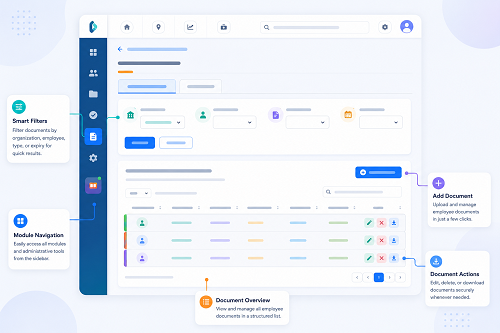
1. Employee Management
Employee management is the foundation of payroll software.
The system should allow HR teams to maintain employee information in one centralized location.
Important information may include:
- Employee name
- Employee ID
- Department
- Designation
- Joining date
- Work location
- Salary structure
- Bank details
- Statutory information
- Employment status
A centralized employee database reduces duplicate data entry and makes payroll administration easier.
2. Salary Structure Management
Every organization may have different salary structures.
Payroll software should allow businesses to configure components such as:
- Basic salary
- HRA
- Allowances
- Incentives
- Bonuses
- Overtime
- Reimbursements
- Deductions
The software should also support different salary structures for different employees where required.
For example:
| Component | Amount |
|---|---|
| Basic Salary | ₹25,000 |
| HRA | ₹10,000 |
| Allowances | ₹5,000 |
| Gross Salary | ₹40,000 |
The actual structure depends on the organization's employment terms and payroll policies.
3. Attendance Integration
For many businesses, attendance is an important payroll input.
Payroll software should ideally integrate with Attendance Management Software.
The integration can transfer information such as:
- Present days
- Absent days
- Paid leave
- Unpaid leave
- Working hours
- Overtime
- Attendance adjustments
The workflow becomes:
Attendance → Leave & Overtime → Approval → Payroll
This can reduce manual data entry and improve payroll processing efficiency.
4. Leave Management
Leave management is another important feature.
The software should allow businesses to:
- Create leave types
- Define leave policies
- Set leave balances
- Accept leave requests
- Approve or reject leave
- Track leave history
- Connect approved leave with attendance and payroll
Employees should ideally be able to apply for leave through an employee portal or mobile application.
5. Overtime Management
Businesses with shift-based or extended working hours should consider overtime management an important feature.
The software should support:
- Overtime recording
- Overtime approval
- Overtime reports
- Configurable overtime rules
- Integration with attendance
For example:
Attendance Records → Potential Overtime → Manager Approval → Payroll
The actual overtime calculation should follow applicable employment requirements and the organization's policy.
6. Automated Salary Calculation
One of the primary reasons businesses choose payroll software is to automate salary calculations.
The system should calculate configured:
- Earnings
- Deductions
- Attendance adjustments
- Overtime
- Applicable statutory components
- Net salary
Instead of manually updating Excel formulas every month, payroll teams can process salary using the configured payroll rules.
7. Statutory Payroll Support
For businesses in India, statutory payroll requirements can be an important consideration.
Depending on employee eligibility and applicable rules, payroll software may support calculations and reporting related to areas such as:
- Provident Fund
- ESI
- Professional Tax
- TDS
- Other applicable statutory requirements
Businesses should verify that the software supports the specific state and statutory requirements relevant to their workforce.
It is also important to ensure that statutory settings are kept updated.
8. Payslip Generation
Payroll software should generate professional payslips automatically after payroll is finalized.
A payslip may include:
- Employee information
- Pay period
- Earnings
- Deductions
- Gross salary
- Net salary
- Other applicable payroll information
Digital payslips save HR teams from preparing individual documents manually.
9. Employee Self-Service
Employee self-service can significantly reduce routine HR queries.
Depending on the software, employees may be able to access:
- Payslips
- Attendance
- Leave balances
- Leave applications
- Overtime
- Payroll history
- Tax-related documents
This allows employees to access their information without contacting HR for every request.
10. Payroll Reports
A good payroll system should provide useful reports for HR, finance, and management.
Common reports include:
- Salary register
- Payroll summary
- Employee-wise payroll
- Department-wise payroll
- Earnings report
- Deductions report
- Overtime report
- Attendance report
- Leave report
- Statutory reports
Automated reports can save HR teams considerable time compared with manually preparing Excel reports.
11. Payroll Approval Workflow
Payroll should generally be reviewed before finalization.
A good payroll system should support approval workflows such as:
Payroll Preparation → HR Review → Finance/Management Approval → Final Payroll
Approval workflows can help prevent unauthorized payroll changes.
12. Attendance Regularization
Attendance errors can affect payroll.
Employees may occasionally forget to:
- Check in
- Check out
- Record attendance
- Follow the normal attendance process
Payroll software or integrated attendance software should provide a regularization workflow.
For example:
Employee Request → Manager Approval → Attendance Updated → Payroll
This provides better control than directly editing attendance records.
13. Support for Multiple Shifts
Businesses operating different shifts should check whether the software supports shift management.
For example:
| Shift | Timing |
|---|---|
| Morning | 6 AM–2 PM |
| General | 9 AM–6 PM |
| Evening | 2 PM–10 PM |
| Night | 10 PM–6 AM |
The system should handle different schedules and calculate working hours according to the assigned shift.
14. Night-Shift Support
Night shifts can cross midnight.
For example:
Check-In: 10:00 PM
Check-Out: 6:00 AM next day
The attendance system should correctly process overnight shifts so that working hours and attendance information are not incorrectly split across dates.
This is particularly important for:
- Security companies
- Hospitals
- Manufacturing
- BPOs
- Hospitality
- Logistics
15. Multi-Location Support
Businesses with multiple offices, branches, factories, stores, or project sites should look for multi-location support.
The system should allow HR to manage employee information centrally while still generating location-wise reports where required.
For example:
Head Office | Branch A | Branch B | Factory → Centralized Payroll
This can simplify payroll administration as the business grows.
16. Mobile Access
Mobile access can be useful for employees, managers, and field staff.
Depending on the software, mobile applications may allow users to:
- Check attendance
- Apply for leave
- View payslips
- Approve requests
- Review payroll information
Mobile functionality is particularly useful for organizations with employees who do not work at a fixed desk.
17. Role-Based Access
Payroll contains sensitive employee information.
The software should provide role-based permissions.
For example:
- Employee: Own payroll information
- Manager: Team-related approvals
- HR: Employee and payroll administration
- Finance: Payroll processing and reports
The exact access structure should match the organization's responsibilities.
18. Audit Trail
An audit trail records important actions and changes.
For example:
Salary Changed → Approved → Payroll Updated
The system may record:
- Who made the change
- What was changed
- When it was changed
- Approval status
This can improve accountability and make payroll investigations easier.
19. Payroll Data Security
Payroll contains sensitive information such as salary, bank details, deductions, and employee records.
Businesses should evaluate:
- Access controls
- Authentication
- Data encryption
- Backups
- User permissions
- Security monitoring
- Data retention
- Vendor security practices
Businesses should understand how the payroll provider stores, processes, and protects employee information.
20. Integration With Other Business Systems
Payroll software should ideally integrate with other systems used by the organization.
Useful integrations may include:
- Attendance software
- HR management systems
- Accounting software
- Banking/payment systems
- Employee portals
- Expense management systems
Integration can reduce duplicate data entry.
21. Payroll Processing for New Joiners
New employees often need to be added during an existing payroll period.
The system should support:
- Employee onboarding
- Joining dates
- Salary configuration
- Attendance setup
- Salary proration where applicable
- Payroll eligibility
This makes payroll processing easier when employees join throughout the month.
22. Employee Exit and Full-and-Final Support
Payroll software should also support employee exits.
Relevant information may include:
- Last working date
- Final attendance
- Leave information
- Salary payable
- Deductions
- Other final-settlement components
The exact full-and-final calculation should follow the organization's policies and applicable requirements.
23. Salary Revision Management
Employees may receive salary changes because of:
- Annual increments
- Promotions
- Role changes
- Allowance revisions
The software should allow HR to record the new salary structure and effective date.
This helps ensure the correct salary is used during the relevant payroll period.
24. Payroll History
A payroll system should maintain historical payroll records.
HR may need to review previous:
- Payslips
- Salary calculations
- Deductions
- Payroll periods
- Salary revisions
Payroll history can also help when responding to employee queries.
25. Easy-to-Use Interface
A payroll system may have many features, but it should still be easy for HR teams to use.
Look for:
- Simple navigation
- Clear dashboards
- Easy payroll processing
- Search functionality
- Easy report generation
- Employee self-service
- Clear error messages
Complex software can increase training requirements and reduce adoption.
Manual Payroll vs. Feature-Rich Payroll Software
| Feature | Manual/Excel | Payroll Software |
|---|---|---|
| Employee database | Basic | Centralized |
| Salary calculation | Manual | Automated |
| Attendance integration | Limited | Available |
| Leave management | Manual | Integrated |
| Overtime | Manual | Configurable |
| Payslips | Manual | Automated |
| Reports | Manual | Automated |
| Employee self-service | Limited | Available |
| Audit trail | Limited | Available |
| Multi-location | Difficult | Supported by many systems |
| Role-based access | Basic | Advanced options may be available |
| Payroll history | Spreadsheet | Centralized |
How to Choose the Right Payroll Software
Before selecting payroll software, businesses should ask:
Does it support our employee count?
Choose software that can handle both your current workforce and expected growth.
Does it integrate with attendance?
This is particularly important when attendance affects salary.
Does it support our payroll structure?
Check whether the software can handle your earnings, deductions, overtime, and other payroll components.
Does it support applicable statutory requirements?
Verify the specific requirements relevant to your business locations and workforce.
Is it easy for HR and employees?
A simple interface can improve adoption.
Does it provide reports?
Make sure the system generates the reports required by HR, finance, and management.
Is employee data secure?
Understand the provider's security, access control, backup, and data protection practices.
Can it scale?
The system should support future employee growth and additional locations.
Must-Have vs. Nice-to-Have Features
Not every feature is equally important.
| Must-Have | Nice-to-Have |
|---|---|
| Employee management | Advanced dashboards |
| Salary calculation | Advanced analytics |
| Attendance integration | Custom branding |
| Leave management | Advanced mobile features |
| Payslip generation | Custom workflows |
| Payroll reports | Advanced integrations |
| Statutory support | Advanced automation |
| Security | Advanced visualization |
| Role-based access | Custom notifications |
Small businesses should prioritize features that directly improve their payroll process.
Conclusion
Choosing the right Payroll Software is about more than finding a system that calculates salaries. A complete payroll solution should help businesses manage the entire payroll workflow—from employee information and attendance to leave, overtime, salary calculations, deductions, payslips, reports, and approvals.
The most important features to consider include:
Employee Management + Salary Management + Attendance + Leave + Overtime + Payroll Calculation + Statutory Support + Payslips + Reports + Employee Self-Service + Security
For businesses where attendance directly influences payroll, integrating Attendance Management Software with payroll can provide additional benefits by reducing manual data entry and improving the accuracy of payroll inputs.
The best payroll software is ultimately the one that fits your business size, payroll complexity, workforce structure, compliance requirements, budget, and future growth plans.
Before making a decision, evaluate the software using real payroll scenarios from your business. Test attendance, leave, overtime, salary revisions, new joiners, employee exits, payslips, reports, and payroll approvals. This practical approach can help you choose a system that genuinely saves HR time and makes payroll processing more efficient.
InnBuilt Payroll Software includes configurable salary structures, attendance integration, statutory compliance, reimbursements, loans, approvals, payslips, and detailed reporting for different employee groups.