What Is a Shift Roster? A Complete Guide for Businesses
What Is a Shift Roster? A Complete Guide for Businesses
Managing employee schedules is an important part of workforce management, especially for businesses that operate in multiple shifts. Manufacturing companies, hospitals, retail stores, security agencies, hotels, BPOs, logistics companies, and other organizations need to ensure that the right employees are available at the right time.
A shift roster provides a structured way to organize employee working schedules. It shows which employee is assigned to which shift, on which date, and sometimes at which location or department.
A well-prepared shift roster can help businesses improve staffing, reduce scheduling conflicts, manage employee attendance, control overtime, and support accurate payroll processing.
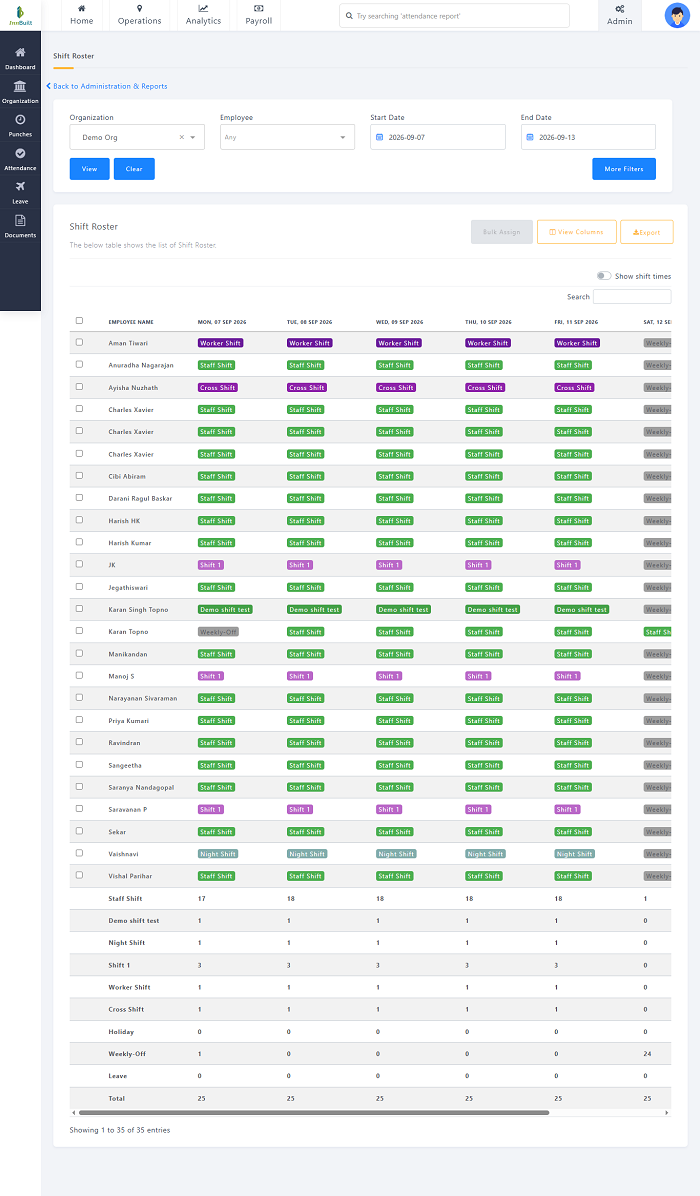
What Is a Shift Roster?
A shift roster is a schedule that shows the working shifts assigned to employees over a specific period.
A typical roster may include:
- Employee name
- Employee ID
- Department
- Date
- Shift timing
- Work location
- Weekly off
- Leave status
- Shift type
- Shift changes
- Supervisor or team information
For example:
| Employee | Department | Date | Shift | Timing |
|---|---|---|---|---|
| Employee A | Production | Monday | Morning | 6 AM – 2 PM |
| Employee B | Production | Monday | Evening | 2 PM – 10 PM |
| Employee C | Production | Monday | Night | 10 PM – 6 AM |
| Employee D | Quality | Monday | Morning | 6 AM – 2 PM |
The roster gives managers and employees a clear view of who is expected to work and when.
Why Is a Shift Roster Important?
A shift roster is more than just a list of employee schedules. It helps businesses coordinate their workforce according to operational requirements.
Better Workforce Planning
Managers can determine whether enough employees are available for each shift.
Reduced Scheduling Conflicts
A structured roster reduces the risk of assigning an employee to overlapping shifts or forgetting important staffing requirements.
Improved Employee Communication
Employees know their assigned working hours in advance.
Better Attendance Management
Attendance can be compared with scheduled shifts to identify late arrivals, absences, early departures, or missing punches.
Overtime Control
Managers can compare scheduled hours with actual working hours to identify overtime.
Easier Payroll Processing
Shift and attendance information can be connected with leave and overtime data to support payroll processing.
What Information Should a Shift Roster Include?
An effective roster should contain enough information for employees and managers to understand their schedules.
Employee Details
Include the employee's name, ID, department, role, or other relevant information.
Shift Details
Clearly mention the assigned shift and start and end times.
Date
Every roster should specify the date or period covered.
Location
For businesses operating across multiple branches or sites, the assigned location should be included.
Weekly Off
The employee's scheduled weekly off can be shown where applicable.
Leave
Approved leave should be considered when preparing the roster.
Shift Changes
Any approved changes should be reflected in the latest version of the roster.
Types of Shift Rosters
Businesses can use different types of rosters depending on their operations.
1. Fixed Shift Roster
Employees work the same shift regularly.
Example: Employee A → Morning Shift → Monday to Saturday
Fixed schedules are easier to manage and can provide predictable working hours.
2. Rotational Shift Roster
Employees move between different shifts according to a planned rotation.
Example:
Week 1 → Morning
Week 2 → Evening
Week 3 → Night
Rotational schedules are commonly used in manufacturing, healthcare, security, and other businesses that operate continuously.
3. Flexible Shift Roster
Employees may have different approved start and end times depending on company policies and job requirements.
4. Split Shift Roster
An employee works two separate periods during the same day, with a break between them.
This can be useful for businesses with demand concentrated during specific periods.
5. 24/7 Shift Roster
Businesses that operate continuously may use three or more shifts to provide round-the-clock coverage.
For example:
| Shift | Timing |
|---|---|
| Shift A | 6 AM – 2 PM |
| Shift B | 2 PM – 10 PM |
| Shift C | 10 PM – 6 AM |
How to Create an Effective Shift Roster
Step 1: Identify Business Requirements
Start by determining how many employees are needed during each shift.
Consider:
- Business operating hours
- Customer demand
- Production requirements
- Department workload
- Required skills
- Location
- Expected employee availability
Step 2: Define Shift Timings
Create clear shift timings that employees and managers can easily understand.
Avoid unnecessary variations unless the business requires them.
Step 3: Check Employee Availability
Before assigning shifts, consider employee availability, approved leave, weekly offs, and other scheduling constraints.
Step 4: Assign Employees Based on Skills
Some positions require specific qualifications or experience.
For example, a manufacturing company may need trained machine operators on every production shift, while a hospital may need appropriately qualified staff in particular departments.
Step 5: Maintain Adequate Staffing
Make sure every shift has enough employees to handle the expected workload.
Avoid both understaffing and unnecessary overstaffing.
Step 6: Publish the Roster in Advance
Employees should receive their schedules with sufficient notice to plan their personal commitments.
Step 7: Handle Shift Changes Properly
If an employee requests a shift change or swap, use a defined approval process.
A typical process is:
Request → Review → Approval → Roster Update
Step 8: Compare Attendance With the Roster
After the shift begins, compare actual attendance with the assigned schedule.
This helps identify scheduling and attendance exceptions.
Shift Roster Example
Consider a retail store operating three shifts.
| Employee | Role | Monday | Tuesday | Wednesday |
|---|---|---|---|---|
| Employee A | Sales | Morning | Morning | Off |
| Employee B | Cashier | Evening | Evening | Evening |
| Employee C | Sales | Evening | Off | Morning |
| Employee D | Supervisor | General | General | General |
This roster allows the store manager to see staffing coverage across multiple days.
Shift Roster for Different Industries
Manufacturing
Manufacturing businesses may use fixed or rotational shifts to maintain production.
A roster can help assign machine operators, supervisors, maintenance employees, quality-control staff, and warehouse workers.
Hospitals
Hospitals require continuous staffing across departments. Rosters can help coordinate nurses, technicians, support staff, housekeeping, security, and other employees.
Security Agencies
Security companies often manage guards across multiple client locations and shifts.
A roster can show:
Client Site → Guard → Shift → Date → Attendance
Retail
Retail stores can use rosters to increase staffing during peak customer hours, weekends, holidays, and promotional events.
Hotels
Hotels may require front-office, housekeeping, restaurant, maintenance, and security employees across different shifts.
BPOs and Call Centers
BPOs can use shift rosters to manage employees working across different time zones and customer-support schedules.
Logistics
Logistics businesses can use rosters to coordinate warehouse, dispatch, delivery, loading, and support employees.
Shift Roster vs. Work Schedule
The terms shift roster and work schedule are often used interchangeably, but they can have slightly different meanings.
A work schedule generally describes an employee's working hours.
A shift roster usually provides a broader view of employee assignments across a team, department, location, or period.
For example:
Work Schedule:
Employee A → Monday → 9 AM–6 PM
Shift Roster:
Multiple employees → Multiple shifts → Multiple dates → Multiple locations
Manual Shift Roster vs. Digital Shift Roster
Businesses can create rosters manually using paper registers or spreadsheets, but this becomes difficult as the workforce grows.
| Feature | Manual Roster | Digital Roster |
|---|---|---|
| Schedule creation | Manual | Faster |
| Shift changes | Manual updates | Centralized updates |
| Employee access | Limited | Mobile/web access |
| Attendance integration | Usually separate | Can be integrated |
| Leave integration | Manual | Can be integrated |
| Overtime tracking | Manual | Automated/assisted |
| Multi-location management | Difficult | Easier |
| Notifications | Manual | Can be automated |
A digital system can reduce repetitive administrative work and improve schedule visibility.
How Shift Management Software Helps
Shift management software can automate many parts of roster management.
Automated Roster Creation
Managers can create employee schedules using predefined shifts and workforce requirements.
Employee Availability
Scheduling can take employee availability into account, depending on the software configuration.
Leave Integration
Approved leave can be visible while preparing the roster.
Shift Swap Requests
Employees can request shift swaps while managers retain control over approvals.
Attendance Integration
Actual attendance can be compared with assigned shifts.
Overtime Tracking
The system can help identify additional working hours based on scheduled and actual attendance.
Mobile Access
Employees can check their assigned shifts through a mobile application where supported.
Notifications
Employees can receive updates when new rosters are published or schedules change.
Multi-Location Management
Businesses with multiple branches or work sites can manage employee rosters from a centralized platform.
Best Practices for Creating a Shift Roster
Businesses should follow these practices when preparing employee rosters:
- Plan schedules according to actual business demand.
- Publish rosters in advance.
- Consider employee availability.
- Assign employees according to skills.
- Maintain sufficient staffing for every shift.
- Avoid unnecessary last-minute changes.
- Create a formal shift-swap process.
- Integrate leave information with scheduling.
- Track attendance against assigned shifts.
- Monitor overtime regularly.
- Communicate schedule changes quickly.
- Maintain backup employees where necessary.
- Review historical staffing data.
- Use digital scheduling tools as the workforce grows.
Benefits of Using a Digital Shift Roster
A digital shift roster can provide several benefits:
Improved Scheduling Accuracy
Automated tools can reduce common manual scheduling errors.
Better Employee Visibility
Employees can access their schedules without repeatedly contacting HR or supervisors.
Faster Schedule Changes
Managers can update schedules and communicate changes more efficiently.
Better Attendance Monitoring
Scheduled and actual working hours can be compared more easily.
Reduced Administrative Work
HR teams and managers spend less time maintaining spreadsheets and manual registers.
Better Workforce Utilization
Managers can identify staffing gaps and distribute employees more effectively.
Improved Payroll Coordination
Roster, attendance, leave, and overtime information can support more efficient payroll processing.
Conclusion
A shift roster is an essential workforce management tool for businesses that operate with multiple working schedules. It provides a clear view of employee assignments and helps managers maintain adequate staffing across different shifts and locations.
An effective roster should consider business requirements, employee availability, skills, leave, attendance, overtime, and shift changes.
For smaller businesses, a simple roster may be sufficient. As the workforce grows, shift management software can provide a more efficient way to create schedules, manage shift changes, track attendance, handle leave, monitor overtime, and connect workforce information with payroll.
By moving from manual scheduling to a structured digital shift roster, businesses can improve workforce visibility, reduce scheduling errors, and manage employee shifts more efficiently.
A shift roster can be created, published, and updated digitally through InnBuilt Shift Scheduling Software. Employees can view assignments and changes, while managers monitor availability, coverage gaps, swaps, and actual attendance.