What Is Attendance Management Software? A Complete Guide for Businesses
What Is Attendance Management Software? A Complete Guide for Businesses
Attendance management software helps businesses replace manual attendance systems with a centralized and automated system. By recording employee attendance, managing shifts, tracking leave and overtime, generating reports, and integrating with payroll, it can reduce administrative work and improve the accuracy of workforce data.
For businesses with multiple locations, remote employees, field workers, or complex workforce structures, choosing the right attendance management system can make workforce management significantly easier.
When selecting software, businesses should focus not only on attendance tracking but also on payroll integration, reporting, employee self-service, scalability, security, and ease of use. A well-implemented attendance system can become an important part of an organization's overall HR and payroll management process.
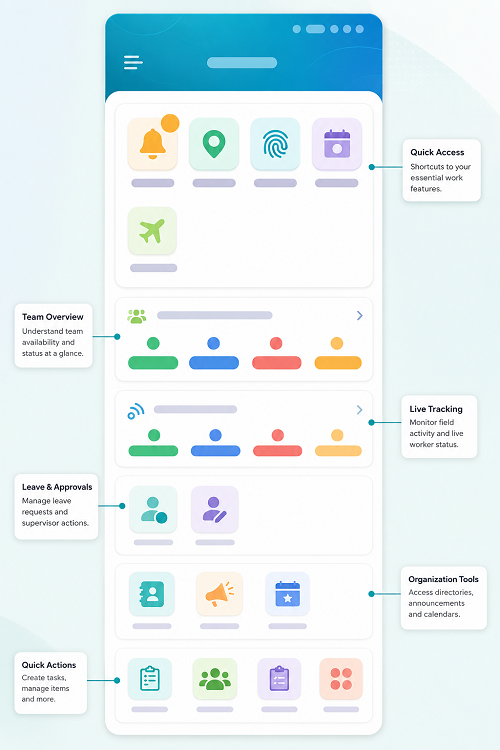
Difference Between Old Attendance Methods and Modern Attendance Management Software
The biggest difference is that old attendance systems depend heavily on manual recording, while modern attendance management software automates attendance collection, validation, reporting, and payroll integration.
| Feature | Old Attendance System | Modern Attendance Management Software |
|---|---|---|
| Attendance Recording | Register, punch card, or spreadsheet | Mobile, biometric, web, GPS, RFID, facial recognition |
| Data Entry | Mostly manual | Automated |
| Accuracy | Higher risk of errors | More accurate and consistent |
| Time Tracking | Manual calculation | Automatic calculation |
| Late/Early Tracking | Manually checked | Automatically identified |
| Leave Management | Separate registers or spreadsheets | Integrated leave management |
| Overtime | Manual calculation | Automatically calculated based on configured rules |
| Shift Management | Difficult to maintain | Automated shift scheduling and tracking |
| Remote Employees | Difficult to track | Mobile/GPS-based attendance available |
| Field Employees | Paper or manual reporting | GPS/mobile attendance |
| Payroll Integration | Manual transfer of attendance data | Direct payroll integration |
| Reports | Prepared manually | Real-time automated reports |
| Employee Access | Usually no self-service | Employee mobile/web portal |
| Attendance Corrections | Paper/email requests | Digital regularization workflow |
| Multi-Location Management | Difficult | Centralized management |
| Data Storage | Registers/files/spreadsheets | Cloud or centralized database |
| Monitoring | Periodic | Real-time visibility |
| HR Workload | High | Lower due to automation |
| Scalability | Difficult for large workforce | Suitable for growing organizations |
| Security | Physical records can be lost or altered | Role-based access and digital records |
| Cost of Administration | Higher manual effort | Lower administrative effort |
Example Workflow Comparison
Old Model: Employee → Punch/Register → HR Collects Attendance → Excel → Manual Calculation → Payroll
Modern Model: Employee → Mobile/Biometric/GPS → Attendance Software → Automatic Processing → Payroll → Reports
Key Transformation
The old model primarily answers "Was the employee present?" Modern attendance management software can provide a much broader picture:
- When did the employee check in?
- When did they check out?
- Were they late?
- Did they leave early?
- How many hours did they work?
- Was overtime applicable?
- Was the employee on approved leave?
- Where was a field employee when attendance was marked?
- Are there missing punches?
- What attendance data should be transferred to payroll?
Why Businesses Are Moving to Modern Attendance Software
Modern attendance management software is particularly useful for businesses with multiple branches, shifts, remote employees, field staff, construction workers, retail employees, or large workforces. It reduces manual HR work and makes attendance data easier to connect with payroll.
For a payroll-focused business website such as InnBuilt, a strong positioning statement would be: “From manual attendance registers to automated workforce management—modern attendance software helps businesses track employees, manage shifts, monitor working hours, and connect attendance directly with payroll.”
Old Attendance Methods and Modern Attendance Management Software
Older, legacy attendance management systems typically relied on standalone hardware—like physical punch-card time clocks or basic fingerprint biometric scanners—paired with manual or local desktop software. These traditional tools often suffer from data silos, high maintenance overhead, and a lack of real-time visibility compared to modern cloud-based solutions.
Limitations of Legacy Systems
- Data Silos: Attendance data stored locally on a single machine requires manual exports and re-entry into payroll platforms.
- Hardware Wear: Older optical fingerprint sensors or magnetic card swipes frequently fail due to dust, smudge build-up, or worn-out mechanical parts.
- Vulnerability to Fraud: Traditional systems easily permit "buddy punching" (clocking in for a coworker) because they lack biometric facial verification or geo-fencing.
- Rigid Shift Rules: Inability to handle complex or dynamic hybrid schedules, rotating rosters, and remote work check-ins.
How Does Attendance Management Software Work?
First, employee information is added to the system. The organization can configure departments, locations, shifts, working hours, weekly offs, and leave policies
Employees then mark their attendance using an approved method. The software records the attendance date and time and, depending on the system, may also capture the employee's location, device information, or shift details.
The system processes the attendance data according to the company's rules. It can identify late arrivals, early departures, missing punches, absences, overtime, and insufficient working hours.
HR managers can review attendance reports, make authorized corrections, and export or integrate attendance data with payroll software.
Key Features of Attendance Management Software
- Automated Attendance Tracking: The software automatically records employee check-in and check-out information, reducing dependence on manual registers and spreadsheets.
- Biometric Attendance: Businesses can integrate biometric devices such as fingerprint or facial-recognition systems to authenticate employees when they enter or leave the workplace.
- GPS-Based Attendance: For employees working outside the office, field teams, sales representatives, and mobile workers, GPS attendance can help businesses record attendance based on an employee's location.
- Mobile Attendance: Mobile attendance allows employees to mark attendance using smartphones. Depending on the system, organizations can apply location-based rules, geofencing, or other authentication controls.
- Shift Management: Organizations with multiple shifts can configure shift timings, rotational schedules, night shifts, weekly offs, and employee-specific schedules
- Leave Management: Attendance software may integrate attendance and leave management so that approved leave is automatically reflected in employee attendance records.
- Overtime Tracking: The system can identify working hours beyond scheduled shifts and generate overtime reports based on configured company rules.
- Attendance Reports: HR and managers can generate reports covering attendance, absenteeism, late arrivals, early departures, overtime, missing punches, and working hours.
Benefits of Attendance Management Software
- Reduces Manual Work: Manual attendance management requires HR teams to collect registers, verify working hours, calculate attendance, and prepare payroll inputs. Automation reduces repetitive administrative work.
- Improves Accuracy: Manual data entry can result in incorrect attendance calculations. Digital attendance records can reduce common errors such as duplicate entries, missed calculations, and incorrect working-day totals.
- Supports Payroll Processing: Attendance is closely connected to payroll. Working days, leave without pay, overtime, late deductions, and other attendance-related information may affect salary calculations.
- Improves Employee Transparency: Employees can often access their attendance records through an employee self-service portal or mobile application. This allows them to review attendance, leave, missing punches, and related information.
- Supports Multi-Location Businesses: Businesses with employees working across multiple offices, branches, stores, factories, or project sites can manage attendance from a centralized platform.
Additional Considerations
- Attendance Management Software for Remote and Field Employees
- Who Can Use Attendance Management Software?
- How to Choose Attendance Management Software
Conclusion
Attendance Management Software helps businesses replace manual attendance processes with a centralized and automated system. By recording employee attendance, managing shifts, tracking leave and overtime, generating reports, and integrating with payroll, it can reduce administrative work and improve the accuracy of workforce data.
For businesses with multiple locations, remote employees, field workers, or complex shift structures, choosing the right attendance management system can make workforce management significantly easier.
When selecting software, businesses should focus not only on attendance tracking but also on payroll integration, reporting, employee self-service, scalability, security, and ease of use. A well-implemented attendance system can become an important part of an organization's overall HR and payroll management process.
InnBuilt Attendance Software captures work hours, shifts, leave, late arrivals, and overtime in one system. Reliable attendance data can then flow directly into payroll and workforce reports.