What Is Employee Shift Management and How Does It Work?
What Is Employee Shift Management and How Does It Work?
Managing employees becomes more challenging when a business operates across multiple shifts, locations, or working schedules. Employees may work morning, evening, night, rotational, or flexible shifts depending on the organization's requirements. Employee shift management helps businesses plan these schedules, assign employees, track attendance, and manage changes efficiently.
A structured shift management process ensures that the right number of employees are available at the right time while helping HR teams maintain accurate attendance and working-hour records.
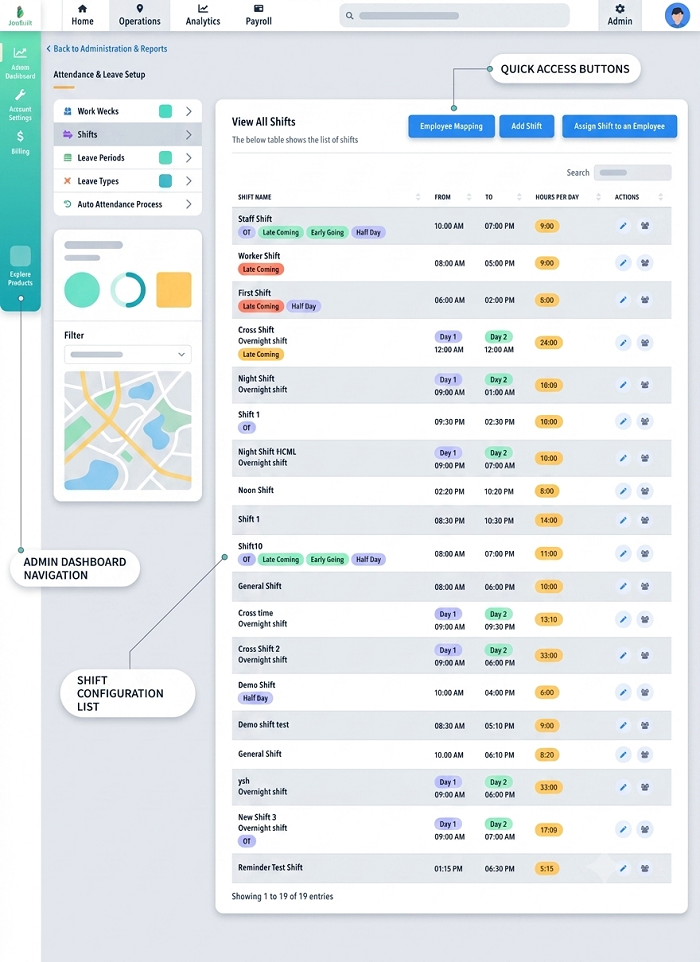
What Is Employee Shift Management?
Employee shift management is the process of planning, scheduling, assigning, and monitoring employee working shifts. It involves creating shift schedules based on business requirements and ensuring that employees know when and where they are expected to work.
Shift management may include:
- Creating employee shift schedules
- Assigning employees to shifts
- Managing rotational shifts
- Tracking attendance and working hours
- Handling shift changes
- Managing shift swaps
- Monitoring overtime
- Managing employee availability
- Connecting shifts with payroll
- Generating workforce reports
Businesses can manage shifts manually using spreadsheets and registers or automate the process with employee shift management software.
Why Is Employee Shift Management Important?
Effective shift management helps businesses maintain adequate staffing throughout operating hours. Without proper scheduling, organizations may face understaffing, employee conflicts, excessive overtime, attendance problems, and payroll discrepancies.
A well-organized shift management system can help businesses:
- Improve workforce planning
- Reduce scheduling conflicts
- Maintain proper staffing levels
- Improve employee attendance
- Track working hours accurately
- Manage overtime efficiently
- Reduce payroll-related errors
- Give employees visibility into their schedules
- Simplify HR administration
How Does Employee Shift Management Work?
Employee shift management generally follows a series of steps, from identifying staffing requirements to monitoring attendance and updating schedules.
1. Identify Business Staffing Requirements
The first step is understanding how many employees are needed for each shift.
For example, a manufacturing company operating 24 hours may require separate teams for morning, evening, and night shifts. A retail store may require more employees during weekends or peak shopping hours.
Managers can determine staffing requirements based on:
- Business operating hours
- Workload
- Employee roles
- Department requirements
- Customer demand
- Employee availability
2. Create Shift Timings
The organization defines its standard shift timings.
For example:
| Shift | Timing |
|---|---|
| Morning Shift | 6:00 AM – 2:00 PM |
| General Shift | 9:00 AM – 6:00 PM |
| Evening Shift | 2:00 PM – 10:00 PM |
| Night Shift | 10:00 PM – 6:00 AM |
Businesses can create different schedules depending on their operational requirements.
3. Assign Employees to Shifts
Once shift timings are established, employees are assigned to specific shifts.
Managers may consider employee roles, skills, availability, department requirements, and workload when making assignments.
For example, a production supervisor may need to assign trained machine operators to every production shift to ensure continuous operations.
4. Publish the Shift Schedule
Employees need to know their assigned working schedule. Businesses can communicate schedules through notice boards, email, spreadsheets, employee portals, or mobile applications.
With shift management software, employees can often view their schedules directly from their smartphones.
5. Track Employee Attendance
After employees are assigned to shifts, their actual attendance can be compared with their scheduled working hours.
For example, if an employee is assigned to a 9:00 AM shift but records attendance at 9:25 AM, the system can identify the late arrival based on the company's attendance rules.
Attendance can be recorded through methods such as:
- Biometric devices
- Face recognition
- Mobile applications
- GPS-based attendance
- QR codes
- Web-based attendance systems
6. Manage Shift Changes and Swaps
Employees may sometimes need to change their shifts. Managers may also need to adjust schedules because of absences, workload changes, or business requirements.
A proper shift management process provides a controlled way to:
- Request shift changes
- Approve or reject requests
- Swap shifts
- Reassign employees
- Update schedules
- Notify affected employees
7. Monitor Overtime
Employees may work beyond their scheduled shift. The system can compare scheduled hours with actual working hours to identify additional time worked.
This information can be useful for overtime approval and payroll processing, depending on the company's policies.
8. Connect Shift Data With Payroll
Shift information can be integrated with attendance and payroll systems. This allows payroll teams to use accurate attendance, working-hour, leave, and overtime data when processing salaries.
This integration can help reduce manual data entry and minimize payroll discrepancies caused by incorrect attendance or shift information.
Types of Employee Shifts
Businesses can use different types of shifts depending on their operational requirements.
Fixed Shifts
Employees work the same shift regularly. For example, an employee may work from 9:00 AM to 6:00 PM every working day.
Rotational Shifts
Employees move between different shifts according to a predefined schedule. For example, an employee may work the morning shift for one week and the evening shift the following week.
Split Shifts
An employee's working hours are divided into two separate periods during the same day. This type of schedule can be useful in industries where demand changes throughout the day.
Night Shifts
Employees work primarily during nighttime hours. Night shifts are common in hospitals, manufacturing, security, logistics, and 24/7 service organizations.
Flexible Shifts
Employees may have some flexibility in choosing their working hours within company-defined rules.
Common Employee Shift Management Challenges
Managing shifts manually can become difficult as the workforce grows.
Scheduling Conflicts
Employees may accidentally be assigned to overlapping shifts or unavailable working hours.
Last-Minute Absences
An unexpected absence can leave a shift understaffed and force managers to find replacements quickly.
Managing Multiple Locations
Companies with several branches or project sites may find it difficult to maintain accurate schedules across locations.
Shift Swapping
Informal shift swaps can create discrepancies if HR or managers are not informed about the changes.
Attendance Mismatches
When employees work different shifts, manually comparing attendance with schedules can lead to errors.
Payroll Errors
Incorrect shift and attendance records can affect overtime, working hours, deductions, and payroll calculations.
What Is Employee Shift Management Software?
Employee shift management software is a digital solution that helps organizations automate employee scheduling and shift-related activities.
Instead of maintaining multiple spreadsheets, HR teams and managers can create schedules, assign employees, monitor attendance, and manage shift changes from a centralized system.
Common features include:
- Employee scheduling
- Shift templates
- Rotational shift management
- Attendance integration
- Shift notifications
- Employee self-service
- Shift-change requests
- Shift swapping
- Overtime tracking
- Leave integration
- Multi-location management
- Reports and dashboards
- Payroll integration
Benefits of Using Shift Management Software
Saves Time
Automated scheduling reduces the amount of time HR teams spend preparing and updating employee rosters.
Reduces Errors
Centralized scheduling helps reduce manual mistakes and outdated shift information.
Improves Attendance Management
When shifts and attendance are integrated, businesses can compare actual working hours with assigned schedules more efficiently.
Improves Employee Communication
Employees can receive notifications about new schedules, shift changes, and approvals.
Supports Multiple Shifts
Businesses can manage fixed, rotational, flexible, and night shifts from a single system.
Helps With Payroll
Accurate shift and attendance information can support more efficient payroll processing.
Who Can Benefit From Employee Shift Management?
Employee shift management is particularly useful for businesses with non-standard or extended working hours, including:
- Manufacturing companies
- Hospitals and healthcare organizations
- Retail stores
- Restaurants and hotels
- Security agencies
- Logistics companies
- Construction companies
- Call centers
- IT and service companies
- Warehouses
- Field-service organizations
Conclusion
Employee shift management is the process of organizing employee schedules, assigning shifts, tracking attendance, managing changes, and monitoring working hours. It helps businesses maintain the right workforce coverage while providing employees with clear information about their schedules.
For organizations managing multiple shifts or a growing workforce, shift management software integrated with attendance and payroll systems can reduce manual work, improve scheduling accuracy, and simplify workforce management.
By replacing spreadsheets and manual scheduling processes with an organized digital system, businesses can create a more efficient and transparent approach to employee shift management.
Employee schedules, assignments, swaps, attendance matching, and manager approvals are handled digitally through InnBuilt Shift Management Software.