What Is Live Employee Tracking? A Complete Guide for Businesses
What Is Live Employee Tracking? A Complete Guide for Businesses
Managing employees who work outside a traditional office can be challenging. Businesses may need to know whether field employees have reached a customer location, whether service teams are following their assigned schedules, or whether employees are working at approved locations.
Live employee tracking uses technology such as GPS, mobile applications, and workforce management software to provide businesses with location and workforce information in real time or near real time, depending on the system and device.
It can be particularly useful for businesses with field employees, mobile teams, multiple work locations, delivery staff, service technicians, sales representatives, and project-based workers.
This guide explains what live employee tracking is, how it works, its benefits, common use cases, and important considerations for businesses.
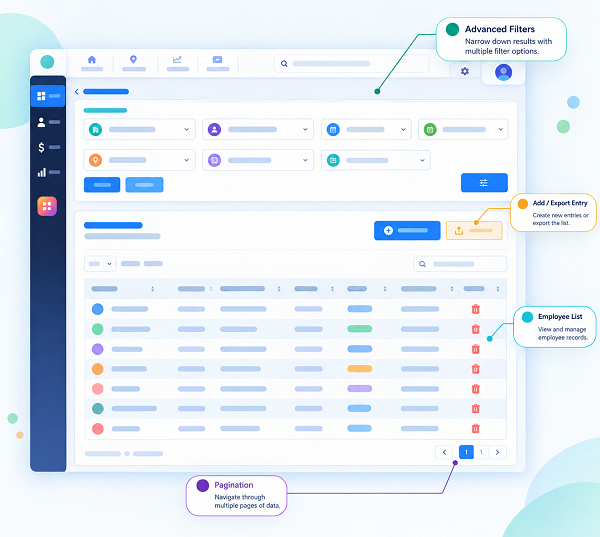
What Is Live Employee Tracking?
Live employee tracking is a workforce management feature that allows authorized managers or administrators to monitor an employee's location or work-related activity using a connected device, usually a smartphone or GPS-enabled device.
Depending on the software, businesses may be able to view:
- Employee location
- Attendance location
- Work status
- Assigned work location
- Route information
- Check-in and check-out time
- Customer or project location
- Geofencing status
- Location history
The exact capabilities vary between software platforms.
Live tracking should be implemented transparently, with employees informed about when tracking occurs, what information is collected, why it is collected, who can access it, and how long it is retained.
How Does Live Employee Tracking Work?
A typical live employee tracking system works through a combination of a mobile application, GPS, internet connectivity, and workforce management software.
The basic process is:
Employee Mobile App → GPS/Location Data → Internet → Tracking System → Manager Dashboard
For example, a field employee may use a company-approved mobile application while working on assigned customer visits. The application can use the device's location capabilities to send relevant location information to the workforce management platform.
The manager can then view authorized workforce information from a centralized dashboard.
1. Employee Uses a Mobile Device
The employee uses a smartphone or another supported GPS-enabled device.
2. Location Services Provide Position Information
The device's location services determine its approximate position.
GPS accuracy can vary depending on environmental conditions, device settings, network availability, and other technical factors.
3. The Application Sends Data
When configured and permitted, the mobile application sends relevant location information to the workforce management system.
4. Managers View Information
Authorized managers can view available employee location information through a dashboard or administrative interface.
5. Data Can Be Combined With Attendance
Some workforce management systems can connect location information with employee attendance.
For example:
Employee Check-In → Face Verification → GPS Location → Attendance Record
This can help businesses verify that attendance was recorded from an approved work location, where such functionality is appropriate and permitted.
Key Features of Live Employee Tracking Software
Different workforce management platforms provide different capabilities. Common features may include:
- Real-Time or Near Real-Time Location: Managers can view the current or recently reported location of authorized employees, subject to device and software limitations.
- GPS Attendance: Employees can record attendance through a mobile application along with location information.
- Geofencing: Businesses can define virtual geographical boundaries around approved work locations.
- Location History: Some systems maintain historical location records according to configured policies.
- Route Tracking: For relevant field roles, managers may be able to review routes or location sequences.
- Mobile Employee App: Employees can access attendance, schedules, tasks, and other workforce features through a smartphone.
- Employee Scheduling: Managers can assign employees to shifts, projects, customers, or locations.
- Notifications: The system may notify managers about specific configured events, such as attendance activity or location-related exceptions.
- Reports: Businesses can generate reports related to attendance, locations, working hours, and field activities.
Benefits of Live Employee Tracking
1. Better Visibility Into Field Operations
Managers may have limited visibility when employees work at customer sites or project locations.
Live tracking can provide a centralized view of authorized field workforce activity.
This can help managers coordinate operations more effectively.
2. Supports Field Employee Management
Live employee tracking can be useful for:
- Sales teams
- Service technicians
- Delivery teams
- Construction workers
- Installation teams
- Maintenance staff
- Field executives
Managers can coordinate field employees without requiring constant phone calls.
3. Location-Based Attendance
Businesses can combine GPS with mobile attendance to record where an employee checked in or checked out.
This can help organizations manage attendance for employees who do not work from a fixed office.
4. Improved Workforce Coordination
Managers can better understand where field employees are working and coordinate assignments accordingly.
For example, a service manager may need to assign an urgent customer request to an available technician in the relevant area.
5. Reduced Manual Reporting
Without a tracking system, employees may need to manually report their location through phone calls, messages, or spreadsheets.
A centralized application can reduce some of this administrative work.
6. Better Schedule Management
Live tracking can complement shift management by providing information about employee location and attendance.
For example:
Shift Schedule → Employee Check-In → Location Verification → Work Assignment
This creates a more connected workforce management process.
7. Faster Response to Operational Changes
Field operations can change throughout the day.
Customer appointments may move, employees may become unavailable, or urgent service requests may arise.
Location information can help managers make more informed operational decisions when the feature is used appropriately.
8. Better Attendance Records
Combining attendance and location data can provide additional context around employee check-ins and check-outs.
This can be especially useful for employees who work away from the office.
Live Employee Tracking for Different Industries
Construction
Construction companies may have employees working across multiple project sites.
Location-enabled attendance can help managers organize workforce information by project or site.
Field Service
Service technicians often travel between customer locations.
Tracking can help managers coordinate assignments and understand field activity.
Sales
Sales representatives may visit multiple customers during the day.
Location features can complement attendance and customer-visit management where appropriate.
Logistics
Logistics and delivery operations involve employees moving between different locations.
Tracking can provide useful operational visibility when implemented under appropriate policies.
Security Services
Security agencies may manage employees deployed across client locations.
Location-enabled attendance can help organizations maintain records of employee check-ins at assigned locations.
Retail
Businesses with multiple stores may use mobile attendance and location features for employees working across branches or temporary locations.
Live Employee Tracking vs. GPS Attendance
These two concepts are related but not identical.
GPS attendance generally focuses on capturing an employee's location when they record attendance.
Live employee tracking can involve ongoing or periodic location updates during an authorized work period.
For example:
GPS Attendance:
Employee checks in at 9:00 AM → Location recorded → Attendance created.
Live Tracking:
Employee checks in at 9:00 AM → Location updates periodically during the authorized work period → Manager views available location information.
The exact tracking frequency and behavior depend on the software configuration.
Live Employee Tracking vs. Employee Attendance Software
Traditional attendance software primarily records information such as:
- Check-in
- Check-out
- Working hours
- Leave
- Absence
- Overtime
Live employee tracking adds location-related information to workforce management.
An integrated system may provide:
Attendance + GPS + Face Verification + Shift Management + Employee App
This can be useful for businesses with mobile or field-based employees.
Role of Geofencing in Employee Tracking
Geofencing creates a virtual boundary around a geographical location.
For example, a business may define a geofence around a customer site or project location.
When an employee records attendance, the system can check whether the attendance was recorded within the configured geographical area, depending on the software.
Geofencing can be useful for:
- Construction sites
- Customer locations
- Branch offices
- Warehouses
- Project sites
- Service locations
Geofencing rules should be clearly communicated to employees and configured appropriately for the business purpose.
Live Employee Tracking and Shift Management
Live tracking becomes more useful when combined with shift management.
Suppose an employee is assigned:
Shift: 9:00 AM – 6:00 PM
Location: Customer Project Site
The workforce management system can potentially connect:
- Assigned shift
- Employee check-in
- Location information
- Working hours
- Check-out
- Attendance report
This provides managers with a broader view of field workforce operations.
Live Employee Tracking and Payroll
Live tracking itself does not determine an employee's salary.
However, location information can sometimes support attendance and working-hour records.
For example:
Shift → Attendance → Working Hours → Overtime → Payroll
Attendance information can then be transferred to payroll software where appropriate.
Payroll calculations should be based on properly configured company policies and applicable employment requirements rather than location information alone.
Privacy and Employee Data Considerations
Employee location information can be sensitive. Businesses should therefore establish clear policies before implementing live tracking.
Important considerations include:
- Transparency: Employees should understand what information is being collected and why.
- Purpose Limitation: Location tracking should have a legitimate and clearly defined business purpose.
- Tracking Hours: Businesses should clearly define when tracking is active. Continuous personal-location tracking outside working hours can create significant privacy concerns.
- Access Control: Only authorized personnel should have access to employee location information.
- Data Retention: Organizations should define how long location records are retained and securely dispose of them when they are no longer required, subject to applicable requirements.
- Security: Location data should be protected against unauthorized access and misuse.
- Applicable Laws and Policies: Businesses should review applicable privacy, employment, and data-protection requirements before implementing employee tracking.
Best Practices for Implementing Live Employee Tracking
Businesses can follow these practices for responsible implementation:
- Define a clear business purpose.
- Inform employees about the tracking system.
- Explain when tracking starts and stops.
- Collect only information that is necessary.
- Limit access to authorized users.
- Protect location data appropriately.
- Define data retention policies.
- Integrate tracking with relevant workforce processes.
- Provide employees with clear policies and procedures.
- Review the system regularly to ensure it remains appropriate.
How to Choose Live Employee Tracking Software
Businesses should evaluate the following factors before selecting a solution:
- GPS Accuracy: Check how the system handles location accuracy and weak GPS conditions.
- Mobile Compatibility: Ensure that the application works with the devices used by employees.
- Attendance Integration: Look for integration between location-based attendance and employee attendance records.
- Shift Management: Check whether managers can assign and manage employee shifts.
- Geofencing: Determine whether the system supports location boundaries if required.
- Employee Self-Service: A mobile employee app can make it easier for employees to view schedules and manage attendance-related activities.
- Reporting: Review the available attendance, location, working-hour, and workforce reports.
- Security and Privacy: Understand how employee location data is stored, protected, accessed, and retained.
- Payroll Integration: If required, verify whether attendance and working-hour information can be integrated with payroll software.
Example of Live Employee Tracking
Consider a company with 20 field service technicians.
Each technician receives a daily schedule containing:
- Customer name
- Appointment time
- Work location
- Assigned shift
- Job details
The technician uses the company's mobile application to record attendance.
The system may capture the employee's authorized location at check-in. During the permitted work period, location updates may also be available if live tracking is enabled.
The manager can then monitor workforce information from a central dashboard and coordinate assignments.
At the end of the workday, attendance and working-hour information can be used for workforce reports and, where integrated, payroll processing.
Conclusion
Live employee tracking is a workforce management technology that can provide businesses with location and operational visibility for employees working in the field or across multiple locations.
It can support GPS attendance, field workforce coordination, shift management, geofencing, employee scheduling, and workforce reporting.
However, live tracking should not simply be treated as a surveillance tool. Businesses should establish a clear purpose, communicate policies to employees, limit tracking to appropriate working contexts, protect location information, and follow applicable privacy and employment requirements.
For businesses with field employees, combining live employee tracking with attendance software, shift management, mobile employee applications, and payroll systems can create a more connected workforce management process.
The goal should be to use tracking technology to improve workforce coordination, attendance accuracy, operational visibility, and employee management while maintaining appropriate transparency and respect for employee privacy.
Live field visibility is provided through the InnBuilt Employee Tracking App using authorised location updates, attendance status, and work-time information with configurable permissions.