What Is Payroll Software and How Does It Work?
What Is Payroll Software and How Does It Work?
Payroll is one of the most important administrative processes in any business. Every month, organizations need to calculate employee salaries, deductions, overtime, leave-related adjustments, statutory contributions, and other payroll components accurately and on time.
Managing these calculations manually through spreadsheets can become difficult as the number of employees increases. Payroll Software helps businesses automate and organize the payroll process from employee data collection to salary calculation and payroll reporting.
This guide explains what payroll software is, how it works, its key features, and how businesses can benefit from using it.
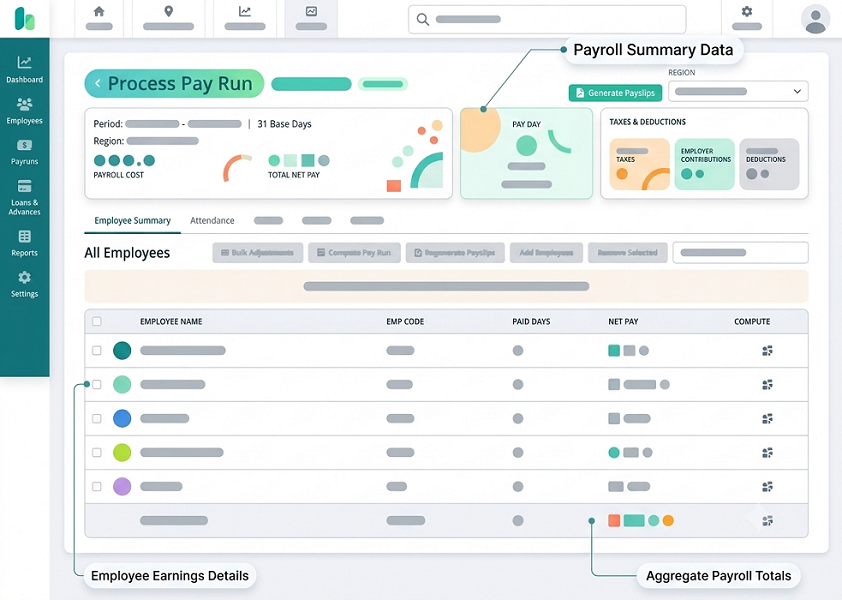
What Is Payroll Software?
Payroll Software is a digital system used to manage employee salary processing and related payroll activities.
Depending on the software and configuration, it can help businesses manage:
- Employee salary details
- Earnings and deductions
- Attendance
- Leave
- Overtime
- Salary calculations
- Statutory deductions
- Payslips
- Payroll reports
- Employee self-service
Instead of calculating payroll manually using spreadsheets, businesses can use software to process payroll through a structured workflow.
A typical payroll process is:
Employee Data → Attendance & Leave → Salary Calculation → Deductions → Payroll Validation → Payslip → Payroll Reports
How Does Payroll Software Work?
Payroll software generally works by collecting employee information, applying configured salary and payroll rules, calculating earnings and deductions, and generating payroll outputs. The exact process differs between software platforms, but the basic workflow is similar.
Step 1: Add Employee Information
The first step is creating employee records. Information may include:
- Employee name
- Employee ID
- Department
- Designation
- Joining date
- Work location
- Salary structure
- Bank information
- Tax-related information
- Statutory details
Maintaining accurate employee master data is essential because payroll calculations depend on it.
Step 2: Configure Salary Structures
Businesses can define salary components for each employee.
Earnings
- Basic Salary
- House Rent Allowance
- Special Allowance
- Conveyance Allowance
- Other Allowances
Deductions
- Provident Fund, where applicable
- Employee State Insurance, where applicable
- Professional Tax, where applicable
- Income-tax deductions, where applicable
- Other authorized deductions
The exact salary structure varies according to the organization, employee category, and applicable rules.
Step 3: Import or Integrate Attendance Data
Attendance can be an important payroll input. Information may include:
- Present days
- Absent days
- Paid leave
- Unpaid leave
- Overtime
- Late attendance
- Early leaving
- Working hours
Integrating attendance with payroll can reduce manual data entry.
Step 4: Process Leave
Leave information may affect salary calculations depending on the leave type and company policy. An integrated system can automatically transfer approved leave information into payroll.
Step 5: Calculate Working Days
Payroll software can calculate payable working days based on configured attendance and payroll rules.
Step 6: Calculate Earnings
The software calculates employee earnings according to the configured salary structure.
| Salary Component | Amount |
|---|---|
| Basic Salary | ₹25,000 |
| HRA | ₹10,000 |
| Special Allowance | ₹8,000 |
| Other Allowance | ₹2,000 |
| Gross Salary | ₹45,000 |
Step 7: Calculate Deductions
Payroll software can calculate configured deductions. These may include:
- Provident Fund
- ESI
- Professional Tax
- Income-tax/TDS
- Loan or advance deductions
- Other authorized deductions
Step 8: Process Overtime
If the organization tracks overtime, approved overtime information can be included in payroll. The payroll system can apply the configured overtime rate or amount.
Step 9: Calculate Net Salary
After earnings and applicable deductions are calculated, payroll software determines the employee's net salary.
Net Salary = Gross Earnings − Applicable Deductions
Step 10: Generate Payslips
After payroll is processed, the software can generate employee payslips. A payslip may contain employee info, pay period, earnings, deductions, gross/net salary, attendance info, and employer contributions.
Step 11: Generate Payroll Reports
Payroll software can generate reports for HR, management, finance, and payroll teams. Reports include salary registers, summaries, earnings/deductions reports, attendance, leave, and statutory reports.
Key Features of Payroll Software
- Employee Database: A centralized database storing payroll details.
- Salary Management: Configurable salary structures and components.
- Attendance Integration: Attendance inputs directly transferred into payroll.
- Leave Management: Approved leave factored into salary processing.
- Overtime Management: Tracked overtime included in pay calculations.
- Automated Salary Calculation: Performs configured calculations automatically.
- Statutory Payroll Processing: Supports applicable compliance and tax outputs.
- Payslip Generation: Creates digital payslips without manual effort.
- Employee Self-Service: Portals for staff to view payslips, tax docs, and leave.
- Payroll Reports: Rapid reporting for record-keeping and analysis.
Payroll Software vs. Excel
| Feature | Excel | Payroll Software |
|---|---|---|
| Employee database | Manual | Centralized |
| Salary calculation | Formulas | Automated |
| Attendance integration | Manual/import | Available |
| Leave management | Separate/manual | Integrated |
| Overtime | Manual | Configurable |
| Payslips | Manual | Automated |
| Reports | Manual | Automated |
| Employee self-service | Limited | Available |
| Audit trail | Limited | Available |
| Multiple locations | Difficult | Centralized |
How Attendance and Payroll Software Work Together
Attendance and payroll are closely connected. A typical workflow is:
Employee Check-In/Out → Attendance Management → Working Hours → Leave & Overtime → Payroll Processing → Salary Calculation → Payslip
Benefits of Payroll Software
- Saves Time: Reduces manual, repetitive calculation effort.
- Reduces Calculation Errors: Prevents common manual spreadsheet errors.
- Improves Payroll Accuracy: Standardizes input data.
- Faster Payslip Generation: Automatically issues digital payslips.
- Better Employee Transparency: Grants direct self-service access to staff.
- Easier Reporting: Quick report generation for finance and HR.
- Better Record Management: Simplifies record retrieval.
- Supports Business Growth: Handles expanding workforces seamlessly.
Who Should Use Payroll Software?
Payroll software benefits small businesses, medium companies, enterprises, manufacturing, retail, IT, construction, healthcare, education, logistics, and multi-location organizations.
What to Look for in Payroll Software
- Employee management
- Salary structure configuration
- Attendance integration
- Leave management
- Overtime management
- Statutory payroll support
- Payslip generation
- Employee self-service
- Payroll reports
- Bank payment support
- Role-based access
- Audit trails
- Data security
- Multi-location support
- Integration capabilities
- Customer support
Example of a Monthly Payroll Process
Before Payroll: HR updates new hires, exits, salary updates, attendance, leave, overtime, and other inputs.
Payroll Processing: Software computes Earnings → Deductions → Net Salary.
After Processing: Generates payslips, payroll register, salary reports, bank transfer files, and statutory reports.
Conclusion
Payroll Software automates employee salary processing by connecting records, attendance, leave, overtime, and deductions in one system. Integrating it with attendance tracking saves time, improves data accuracy, and streamlines reporting as organizations scale.
Instead of relying entirely on spreadsheets and manual calculations, businesses can use software to create a workflow such as: Employee Data → Attendance & Leave → Salary Calculation → Deductions → Payroll Validation → Payslip → Reports
When payroll software is integrated with Attendance Management Software, businesses can further reduce manual data entry and improve the flow of attendance information into payroll.
For growing organizations, payroll automation can help save time, improve record accuracy, simplify reporting, and provide employees with better access to payroll information. The key is to choose a system that matches the organization's workforce size, payroll requirements, statutory obligations, and future growth plans.
Salary structures, attendance, leave, deductions, reimbursements, taxes, and statutory contributions are processed together in InnBuilt Payroll Software. The controlled workflow calculates net pay and produces payslips and reports.