What Is Shift Management? A Complete Guide for Businesses
What Is Shift Management? A Complete Guide for Businesses
Managing employee schedules can become complicated when a business has multiple shifts, rotating schedules, night shifts, overtime, and employees working across different locations. Shift management is the process of planning, assigning, monitoring, and managing employee working shifts to ensure that the right employees are available at the right time.
For businesses such as manufacturing companies, hospitals, retail stores, restaurants, security agencies, logistics companies, and other organizations with shift-based operations, effective shift management can improve workforce utilization, attendance accuracy, and productivity.
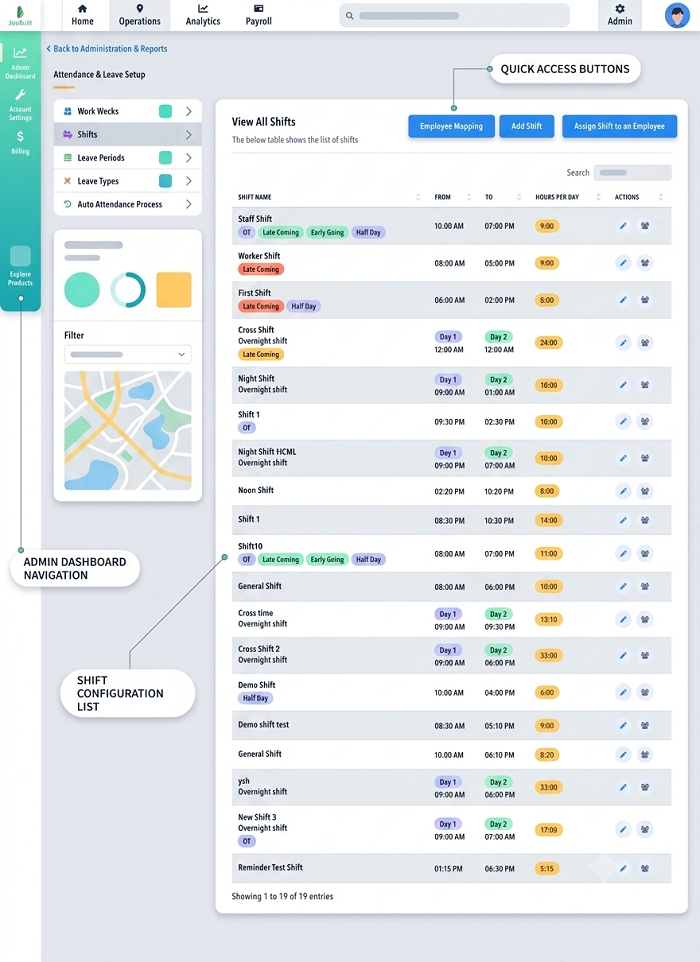
What Is Shift Management?
Shift management refers to the systematic process of creating employee schedules and managing working hours based on business requirements. It includes assigning employees to shifts, managing shift changes, tracking attendance, handling employee availability, and monitoring working hours.
A shift management system can be managed manually using spreadsheets and registers or automatically using shift management software.
For example, a company may have:
- General shift: 9:00 AM to 6:00 PM
- Morning shift: 6:00 AM to 2:00 PM
- Evening shift: 2:00 PM to 10:00 PM
- Night shift: 10:00 PM to 6:00 AM
The shift management process ensures that employees are assigned to the appropriate schedules and that their attendance is recorded correctly.
Why Is Shift Management Important?
Poor shift planning can result in understaffing, scheduling conflicts, excessive overtime, attendance issues, and payroll mistakes. An organized shift management process helps businesses maintain adequate staffing while giving employees clear information about their work schedules.
Effective shift management can help businesses:
- Plan employee schedules efficiently
- Reduce scheduling conflicts
- Improve workforce utilization
- Track employee attendance accurately
- Manage overtime and working hours
- Handle shift changes and swaps
- Improve payroll accuracy
- Support multiple shifts and locations
Key Components of Shift Management
1. Shift Scheduling
The first step is creating a schedule based on business requirements. Managers can assign employees to specific shifts according to their roles, availability, skills, and working-hour requirements.
A well-planned schedule helps ensure that every shift has sufficient employees.
2. Shift Assignment
Once the schedule is created, employees need to be assigned to their respective shifts. Employees should have clear information about their shift timings, location, and assigned working days.
Digital shift management systems can make this process faster and easier.
3. Attendance Tracking
Shift management and attendance management are closely connected. Employee attendance needs to be compared with the assigned shift to determine whether an employee arrived on time, came late, left early, or worked additional hours.
Integrating shift and attendance software can reduce manual calculations.
4. Shift Changes
Employees may sometimes need to change their scheduled shifts because of personal requirements, business needs, or staffing changes.
A shift management system can help managers review and approve shift-change requests while maintaining an updated schedule.
5. Shift Swapping
Some businesses allow employees to exchange shifts with colleagues. Managing these swaps manually can create confusion.
With automated shift management, employees can submit shift-swap requests while managers can review and approve them before the schedule is changed.
6. Overtime Management
Employees working beyond their scheduled hours may become eligible for overtime according to company policies and applicable rules.
By connecting shift schedules with attendance data, businesses can identify additional working hours more efficiently and use the information during payroll processing.
Common Shift Management Challenges
Businesses often face several challenges when managing employee shifts manually.
Last-Minute Absences
When an employee is absent unexpectedly, managers may need to find a replacement quickly. This becomes more difficult when several shifts operate simultaneously.
Scheduling Conflicts
Assigning an employee to overlapping shifts or failing to consider availability can create scheduling problems.
Manual Errors
Using spreadsheets or paper registers can result in incorrect shift assignments, outdated schedules, and data-entry mistakes.
Managing Rotational Shifts
Employees may move between morning, evening, and night shifts. Maintaining accurate schedules for rotational teams can be challenging without a centralized system.
Multiple Locations
Businesses with multiple branches or work sites need to manage employees and shifts across different locations. A centralized shift management platform can make this easier.
Payroll Errors
Incorrect shift timings can affect attendance calculations, overtime, late-coming deductions, and salary processing.
Shift Management Software
Shift management software helps businesses automate many activities involved in employee scheduling and workforce management.
Instead of maintaining multiple spreadsheets, HR teams can create shifts, assign employees, publish schedules, monitor attendance, and manage changes from a centralized system.
Depending on the software, features may include:
- Employee shift scheduling
- Shift templates
- Rotational shift management
- Attendance integration
- Employee self-service
- Shift-swap requests
- Overtime tracking
- Leave management
- Notifications and alerts
- Multiple-location management
- Reports and dashboards
- Payroll integration
Shift Management and Attendance Software
Integrating shift management with attendance software can provide businesses with better control over employee working hours.
For example, if an employee is assigned to a 9:00 AM–6:00 PM shift, the attendance system can compare the employee's actual punch-in and punch-out times against the scheduled shift.
This can help businesses identify:
- Late arrivals
- Early departures
- Absences
- Overtime
- Missed punches
- Shift deviations
This information can then be used for attendance reporting and payroll processing.
Shift Management for Different Industries
Manufacturing
Factories often operate multiple shifts to maintain continuous production. Shift management helps allocate employees according to production requirements.
Hospitals
Hospitals may operate 24/7 and require doctors, nurses, technicians, and support staff across different shifts.
Retail
Retail businesses can use shift management to ensure adequate staffing during peak hours, weekends, and holidays.
Restaurants and Hotels
Hospitality businesses often have changing staffing requirements throughout the day. Shift scheduling helps managers allocate employees according to operational demand.
Security Agencies
Security companies may need employees to work day and night shifts across several client locations. Centralized shift management can simplify scheduling and attendance tracking.
Construction
Construction companies can use shift management to organize workers across project sites and track attendance according to assigned schedules.
Benefits of Automated Shift Management
Saves HR Time
Automating shift scheduling reduces the time HR teams and managers spend creating and updating employee rosters.
Improves Workforce Planning
Managers can see staffing requirements and allocate employees more efficiently.
Reduces Scheduling Errors
Automated scheduling can help reduce duplicate assignments, overlapping shifts, and outdated schedules.
Improves Attendance Accuracy
When shifts are connected with attendance, employee working hours can be calculated against the correct schedule.
Supports Better Payroll Processing
Accurate shift and attendance data can help payroll teams calculate working hours, overtime, and other attendance-related salary components more efficiently.
Gives Employees Better Visibility
Employees can view their upcoming shifts and receive notifications about schedule changes through an employee mobile app or self-service portal.
How to Implement Effective Shift Management
Businesses can improve their shift management process by following a few practical steps:
- Identify staffing requirements for each shift.
- Define standard shift timings based on operational needs.
- Create employee schedules based on roles and availability.
- Communicate schedules clearly to employees.
- Track attendance against assigned shifts.
- Establish a process for shift changes and swaps.
- Monitor overtime and working hours.
- Review schedules regularly and adjust them based on business requirements.
- Use software to automate repetitive scheduling and attendance activities.
Conclusion
Shift management is an important part of workforce management for businesses operating with multiple or rotating shifts. A structured approach helps organizations schedule employees effectively, manage attendance, handle shift changes, and maintain adequate staffing.
For growing businesses, shift management software integrated with attendance and payroll software can reduce manual work and provide employees and managers with better visibility into schedules and working hours.
By moving from spreadsheets and manual registers to an automated shift management system, businesses can create a more organized, transparent, and efficient workforce management process.
InnBuilt Shift Management Software helps businesses plan schedules, assign working times, monitor attendance, and resolve roster exceptions. Employees receive clear and accessible shift information.