How Can Mobile Attendance Help Bahrain Teams Working Away From the Office?
How Can Mobile Attendance Help Bahrain Teams Working Away From the Office?
Introduction
Managing employees who work away from the office can be challenging for businesses in Bahrain. Field technicians visit customer locations, sales representatives travel between accounts, maintenance teams work across properties, delivery personnel follow changing routes, and project staff operate at multiple sites. Traditional office-based attendance systems may not capture these employees’ working hours accurately.
Mobile attendance systems offer a practical way to record attendance through smartphones or other authorised mobile devices. Employees can check in and check out from approved locations, submit attendance corrections, view assigned shifts, and report field visits without returning to the office or relying on paper timesheets.
For Bahrain employers, mobile attendance can improve workforce visibility, simplify timesheet approval, support payroll preparation, and help managers identify attendance exceptions earlier. However, a successful implementation requires clear policies, reliable technology, employee communication, and appropriate protection of personal data.
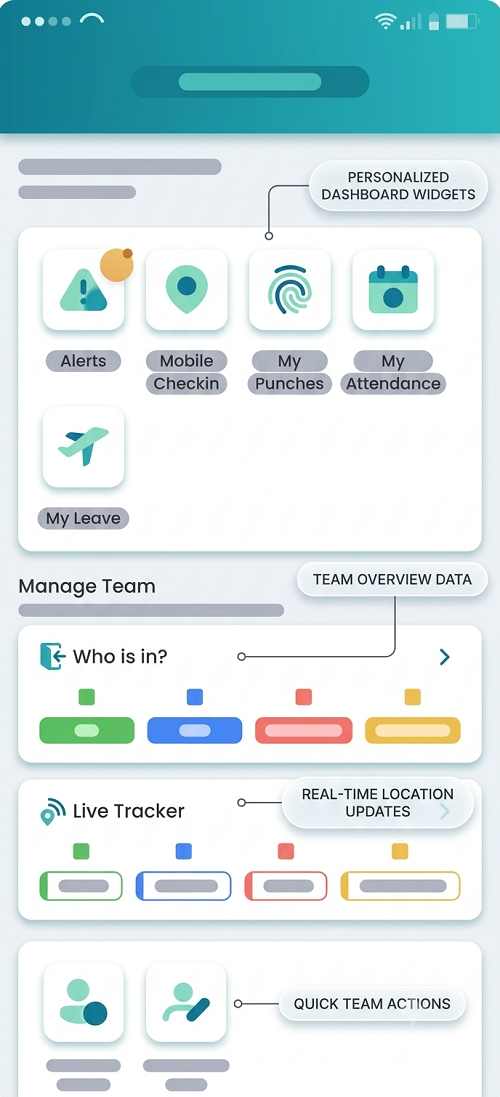
1. What Is Mobile Attendance?
Mobile attendance is a digital timekeeping method that allows employees to record the beginning and end of their working periods using an authorised mobile application or device.
Depending on the system, employees may be able to:
- Clock in and clock out using a smartphone.
- Record attendance at an assigned branch, project, or customer location.
- Confirm attendance using GPS or geofencing.
- View their scheduled shifts and assigned work locations.
- Submit missed-punch corrections.
- Record breaks and additional working hours.
- Attach supporting information to an attendance exception.
- Review submitted timesheets and approval status.
Mobile attendance can be particularly useful when employees do not report to a fixed workplace each day.
For example, a facilities management company in Manama may have cleaners and maintenance technicians assigned to different commercial buildings. A mobile attendance application can record their arrival and departure at each assigned site, allowing supervisors to compare attendance with the service schedule.
Mobile attendance should not be confused with continuous employee tracking. A system can be configured to capture location only when an employee checks in or performs another authorised work-related action, rather than tracking the employee throughout the day.
2. Why Bahrain Businesses Need Mobile Attendance
Bahrain businesses operate across offices, industrial facilities, commercial properties, customer sites, and project locations. Employees in these environments may have different schedules and attendance requirements.
Common challenges include:
- Employees starting work directly at customer locations.
- Supervisors managing staff across several sites.
- Paper timesheets arriving late or containing incomplete entries.
- Difficulty confirming whether a scheduled field visit took place.
- Manual calculation of travel-related work time and additional hours.
- Delayed reporting of absences and late arrivals.
- Attendance data reaching payroll after the monthly cutoff.
- Limited visibility into employees’ approved shift changes.
A mobile attendance system can centralise these records and make them accessible to authorised managers.
Common use cases
| Industry | Mobile attendance application |
|---|---|
| Facilities management | Record attendance at client properties |
| Field service | Link technician check-ins to service appointments |
| Logistics | Record driver attendance and shift starts |
| Construction | Capture attendance at authorised project sites |
| Retail | Track employees assigned to different branches |
| Sales and distribution | Record work starts and authorised customer visits |
| Healthcare and home care | Document scheduled staff visits and service periods |
| Security services | Verify guard attendance at client locations |
The appropriate configuration depends on the type of work, employee schedules, customer requirements, and applicable legal obligations.
3. How Mobile Attendance Works
A typical mobile attendance workflow includes the following steps.
Step 1: Create employee and work-location profiles
HR or operations teams configure employee profiles, departments, supervisors, work schedules, and assigned locations. For field teams, the system may also store customer appointments, project assignments, or approved service areas.
Step 2: Assign schedules and attendance rules
Managers assign each employee a shift, expected working hours, and relevant attendance requirements. If a team operates across multiple locations, the schedule should identify where the employee is expected to report.
Step 3: Employee checks in
At the beginning of work, the employee opens the application and records attendance. Depending on the policy, the system may capture a timestamp, location confirmation, device details, or a site-specific verification.
Step 4: Record work activity and exceptions
Employees or supervisors record relevant events, such as a delayed start, a customer-site reassignment, a missed punch, or an approved extension of working hours.
Step 5: Check out and submit the record
At the end of the shift or authorised work period, the employee records the finish time. The system compares the actual record with the planned schedule and flags discrepancies.
Step 6: Supervisor reviews the attendance
The supervisor checks exceptions, confirms the employee’s assignment, and approves or returns incomplete records for correction.
Step 7: HR and payroll reconcile hours
Approved attendance data is transferred to the timesheet or payroll process. Payroll staff verify ordinary hours, overtime, absences, and other applicable adjustments before processing wages.
This workflow creates a traceable record from the initial check-in to the final payroll calculation.
4. How GPS and Geofencing Improve Field Attendance
GPS and geofencing are common mobile attendance features, but they serve different purposes.
- GPS verification uses the device’s reported location at a particular time to help confirm where a check-in occurred.
- Geofencing defines a virtual boundary around an approved location. The application can flag a check-in made inside or outside that boundary.
For example, a maintenance company may configure approved attendance areas around customer buildings. When a technician checks in, the system can compare the reported location with the assigned site and flag any mismatch.
These features can help managers identify:
- Check-ins made far from the assigned location.
- Attendance recorded at an incorrect site.
- Employees assigned to the wrong branch.
- Inconsistent records requiring supervisor review.
However, GPS data is not conclusive proof that an employee performed the assigned work. Location accuracy can vary because of device settings, indoor conditions, connectivity, and environmental interference. Employees may also have legitimate reasons for checking in outside a defined boundary.
Best practice: Use location information as one verification signal, alongside schedules, work orders, supervisor confirmation, and other relevant evidence. Provide a process for employees to explain and correct legitimate exceptions.
5. Reducing Manual Timesheets and Attendance Errors
Paper timesheets and spreadsheet-based attendance often require several rounds of manual entry. A field employee may record hours on paper, submit them to a supervisor, and then rely on an administrator to enter the information into another system. Each transfer introduces the possibility of mistakes.
Mobile attendance can reduce these problems by capturing time records at the point of attendance and storing them in a central system.
Potential benefits include:
- Fewer duplicate data-entry tasks.
- More consistent attendance timestamps.
- Faster identification of missing punches.
- Clearer records of schedule changes.
- Easier retrieval of past attendance information.
- Reduced delays in supervisor approvals.
- Better reconciliation between attendance and payroll.
Automation does not eliminate the need for review. A mobile application can record the wrong shift, capture an inaccurate location, or fail to recognise an exceptional working arrangement. Employers should establish clear correction procedures and retain an audit trail of every approved change.
6. Improving Supervisor Visibility Across Multiple Sites
When employees work at different locations, managers may struggle to confirm whether staffing arrangements match operational requirements.
A central mobile attendance dashboard can show authorised users:
- Employees who have checked in.
- Employees who have not yet reported.
- Attendance exceptions requiring review.
- Employees assigned to each location.
- Pending timesheet approvals.
- Shift extensions and missing check-outs.
- Differences between planned and actual attendance.
For example, a security company serving several commercial buildings in Bahrain can use attendance dashboards to identify a post where a scheduled guard has not checked in. The operations team can investigate and arrange cover where needed. A facilities management provider can compare site attendance with client service schedules, while a field service company can review technician attendance against assigned work orders.
Dashboards should display only the information needed for each role. Supervisors responsible for one site may not need unrestricted access to attendance or location records for every employee in the organisation.
7. Connecting Mobile Attendance With Shift Scheduling
Mobile attendance is most useful when it is connected to the employee’s assigned schedule. Without schedule integration, a system may record that an employee checked in but cannot easily establish whether the person was expected to work at that time or location.
An integrated system can compare:
- Planned start and finish times.
- Actual clock-in and clock-out times.
- Approved shift swaps.
- Assigned work locations.
- Rest days and leave.
- Unplanned shift extensions.
- Missing or conflicting attendance entries.
Consider an employee scheduled to work from 8:00 AM to 4:00 PM at one customer location. If a manager reassigns the employee to another site, the revised assignment should be recorded before the attendance is reviewed. This helps prevent valid check-ins from being incorrectly flagged as exceptions.
For rotating-shift operations, the system should also handle overnight shifts accurately, preserve start and end dates, and avoid treating midnight as an automatic end of the working period.
8. Supporting More Accurate Payroll Preparation
Attendance data directly affects payroll when employees are paid according to hours worked, overtime, shift patterns, absences, or approved allowances. Mobile attendance can improve payroll preparation by supplying a consistent record of actual working time and relevant exceptions.
Before payroll is closed, employers should reconcile:
- Scheduled hours against actual attendance.
- Approved leave against recorded absences.
- Overtime approvals against additional hours worked.
- Night shifts and rest-day work against the applicable payroll rules.
- Missing punches and manual corrections against their approval records.
- Final approved timesheets against payroll totals.
A mobile check-in should not automatically trigger an overtime payment or determine that every additional minute is payable. Payroll teams must apply the applicable employment terms, company procedures, and Bahrain legal requirements. Similarly, a late check-in should not automatically result in a wage deduction without checking the circumstances and applicable rules.
By addressing exceptions before payroll cutoff, employers can reduce last-minute adjustments, repeated enquiries, and avoidable disputes.
9. Helping Employers Maintain Working-Hour Records
Bahrain employers should maintain reliable employment and working-hour records appropriate to their operations and legal obligations. Mobile attendance can make those records easier to organise and retrieve.
Useful records include:
- Employee details and assigned work patterns.
- Published shift schedules and amendments.
- Actual attendance timestamps.
- Break and working-hour information, where relevant.
- Overtime requests and approvals.
- Absence and leave records.
- Attendance correction histories.
- Supervisor-approved timesheets.
- Records used to support payroll calculations.
Bahrain’s Labour Law for the Private Sector, Law No. 36 of 2012, as amended, addresses working hours, rest periods, weekly rest, employee files, and labour inspections. Employers should check the current provisions and any applicable ministerial decisions when configuring their timekeeping policies.
Mobile attendance is a recordkeeping tool, not a guarantee of legal compliance. Employers remain responsible for ensuring that their schedules, calculations, approvals, and employment practices follow the applicable requirements.
10. Protecting Employee Privacy and Personal Data
Mobile attendance may involve personal information such as employee identifiers, timestamps, device information, and location data. Biometric verification or photographs may involve additional privacy considerations.
Bahrain’s Personal Data Protection Law, Law No. 30 of 2018, is an important reference when designing systems that collect and process employee information.
Employers should consider the following safeguards:
Collect only necessary data
If a timestamp and one-time location confirmation are sufficient, continuous location tracking may be unnecessary. The system should collect information proportionate to the defined attendance purpose.
Explain the attendance process
Provide employees with clear information about what the application records, when location information is collected, who can access the data, and how attendance disputes can be raised.
Restrict access
Use role-based permissions so that only authorised HR, operations, payroll, or IT personnel can view relevant records.
Secure records
Use appropriate authentication, encryption, access logs, and security procedures. Review the vendor’s data storage, hosting, subcontractor, and breach-response arrangements.
Establish retention and deletion rules
Keep attendance records for the periods required by applicable law and legitimate operational needs. Avoid indefinite retention of location histories or unnecessary device data.
Review cross-border data handling
If the attendance platform stores or transfers employee information outside Bahrain, assess the applicable legal requirements before enabling that arrangement.
Employers should not assume that employee consent alone resolves every data-protection issue. They should assess the applicable legal basis, transparency obligations, and other requirements under Bahrain’s data-protection framework.
11. Handling Poor Connectivity and Device Problems
Field teams may work in basements, industrial buildings, remote project areas, or locations with weak mobile coverage. A system that requires uninterrupted connectivity can create attendance gaps.
Before selecting a platform, employers should assess whether it supports:
- Secure offline attendance capture.
- Reliable synchronisation when connectivity returns.
- Clear identification of the original event time and later upload time.
- Alerts for failed or delayed synchronisation.
- Manual correction requests.
- Alternative attendance methods for employees without compatible devices.
- A documented process for device loss or application failure.
Offline records need appropriate safeguards. The system should not silently accept changes to timestamps or allow employees to edit original records without traceability.
Employers should also provide a practical fallback process, such as a supervisor-approved attendance form or site register, so a technical problem does not automatically become an unexplained absence.
12. Choosing the Right Mobile Attendance System
A suitable platform should fit the company’s workforce, attendance policy, and payroll process rather than relying solely on the number of features offered.
Evaluate the following capabilities:
| Feature | Why it matters |
|---|---|
| Mobile clock-in and clock-out | Records attendance for employees away from the office |
| GPS or geofencing controls | Supports location-specific verification where justified |
| Shift scheduling | Connects attendance to the correct roster |
| Offline mode | Supports sites with unreliable connectivity |
| Attendance correction workflow | Documents missing punches and legitimate exceptions |
| Overtime approval | Creates a traceable approval process |
| Payroll integration | Reduces duplicate data entry |
| Audit trail | Preserves changes and approvals |
| Role-based access | Limits access to authorised users |
| Reporting and exports | Supports payroll review and inspections |
| Data-protection controls | Helps safeguard employee information |
| Arabic and English support, where needed | Makes the application accessible to the workforce |
Before purchasing, test the system with employees from different roles, including staff working indoors, outdoors, overnight, and across multiple customer locations.
13. A Practical Implementation Plan for Bahrain Employers
Phase 1: Review existing processes
Identify how employees currently record attendance, how supervisors approve timesheets, and where errors or delays occur. Document the needs of each department.
Phase 2: Define the attendance policy
Specify who must use mobile attendance, when check-ins are required, which locations are approved, how breaks and shift changes are recorded, and how corrections are handled. The policy should explain that employees must record actual working time accurately and that the system is not intended to replace lawful working-hour and rest-period arrangements.
Phase 3: Assess privacy and security
Determine which data the application collects, how it is used, who receives access, where it is stored, and how long it is retained. Review the provider’s contractual and technical safeguards.
Phase 4: Run a pilot
Test the application with a small group of field employees and supervisors. Include common scenarios such as customer-site reassignment, weak connectivity, overnight shifts, missed punches, and emergency call-outs.
Phase 5: Train employees and managers
Provide simple instructions for checking in, checking out, requesting corrections, and reporting technical issues. Train supervisors to review exceptions fairly and consistently.
Phase 6: Integrate attendance with payroll
Map attendance codes to the payroll system, test overtime and absence calculations, and verify that approved hours reconcile with payroll totals before going live.
Phase 7: Monitor and improve
Review attendance accuracy, approval delays, employee feedback, and recurring technical issues. Adjust the configuration and procedures where necessary.
14. Measuring the Effectiveness of Mobile Attendance
Employers should evaluate whether the system improves attendance management rather than measuring success only by the number of mobile check-ins.
Useful indicators include:
- Attendance completeness: Percentage of shifts with all required attendance entries.
- Correction rate: Percentage of attendance records requiring manual correction.
- Approval turnaround: Average time required for supervisors to approve timesheets.
- Payroll discrepancy rate: Number of attendance-related payroll discrepancies per pay period.
- Unresolved exception rate: Percentage of attendance exceptions still open at payroll cutoff.
- System availability: Frequency and duration of application or synchronisation failures.
- Field coverage verification: Percentage of scheduled site assignments with complete attendance evidence.
- Employee support requests: Number and type of attendance-related queries.
Review these indicators by department or site where appropriate. A high correction rate may indicate a training problem, a poorly configured schedule, or unreliable connectivity rather than employee misconduct.
Employers should also check whether the system creates unnecessary burdens for workers or collects more personal information than is needed.
15. Common Mistakes to Avoid
Bahrain employers introducing mobile attendance should avoid these common problems:
- Treating a GPS location as conclusive proof of work performed.
- Tracking employee locations continuously without assessing necessity and legal requirements.
- Ignoring employees who lack compatible smartphones or reliable data access.
- Failing to create an offline or manual fallback procedure.
- Allowing attendance corrections without an audit trail.
- Automatically deducting pay for every late or missing check-in.
- Treating every extra minute as approved overtime without review.
- Ignoring overnight shifts and cross-midnight calculations.
- Giving supervisors access to unrelated employees’ location histories.
- Failing to explain the system’s purpose and operation to employees.
- Connecting mobile attendance to payroll without testing the calculations.
- Assuming software alone guarantees compliance with Bahrain labour law.
A well-designed process combines technology with fair policies, employee training, documented approvals, and regular reviews.
Conclusion
Mobile attendance can help Bahrain businesses manage employees who work away from the office by making attendance records more timely, visible, and consistent. It can support field teams, improve coordination across customer locations, reduce manual timesheet work, and provide better information for payroll preparation.
The strongest results come when mobile attendance is connected to shift scheduling, supervisor approvals, exception management, and payroll reconciliation. Employers should also plan for poor connectivity, maintain reliable audit trails, and protect employee information under applicable Bahrain data-protection requirements.
By selecting a suitable system and implementing it with clear policies, Bahrain employers can improve operational oversight without relying on excessive monitoring or treating automated records as infallible evidence.
Employees working away from a fixed office need a practical way to record time. InnBuilt Employee Tracking App can help Bahrain teams capture mobile check-ins tied to their assigned work locations.