How Can Face Recognition Attendance Help Malaysia Worksites Verify Check-Ins?
Managing employee attendance across Malaysian worksites can be challenging, particularly for businesses with large workforces, multiple entrances, rotating shifts and employees working in different locations. Construction projects, manufacturing plants, warehouses, hospitals, retail outlets and logistics facilities need reliable methods to confirm that employees have reported for duty.
Traditional attendance methods, such as paper registers, punch cards and shared access cards, may create problems when employees forget to record their attendance or clock in on behalf of colleagues. Face recognition attendance systems offer another way to verify employee check-ins by matching a person's face with an enrolled biometric profile.
When properly configured, these systems can help Malaysian employers improve attendance accuracy, reduce proxy clock-ins and connect verified check-in records with shift schedules and payroll. However, face recognition involves sensitive personal information and requires careful consideration of privacy, security, employee communication and applicable data protection requirements.
This article explains how face recognition attendance can help Malaysia worksites verify employee check-ins, what employers should consider before implementation and how the technology can support workforce and payroll management.
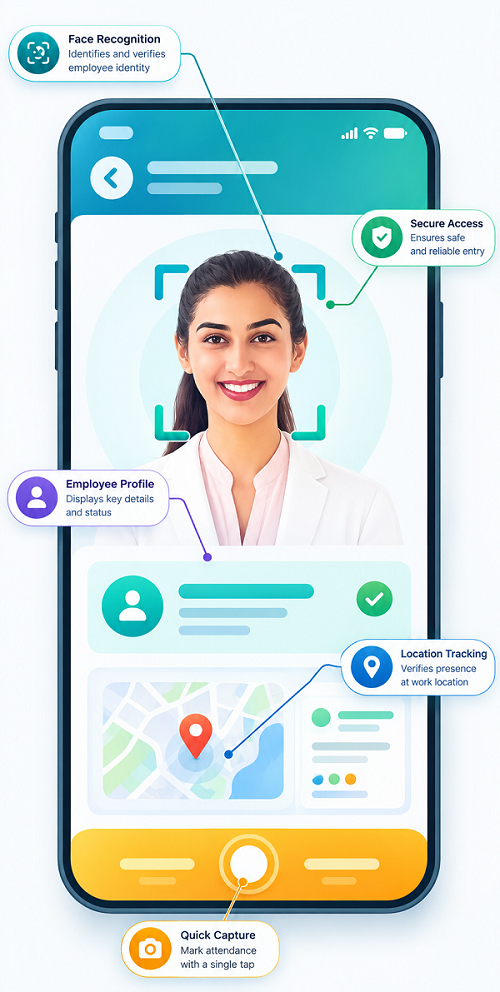
1. Understand How Face Recognition Attendance Works
Face recognition attendance systems use a camera and software to compare an employee's facial characteristics with a previously enrolled biometric template.
When an employee arrives at a worksite, the system captures an image or facial data, processes it and compares the result with the authorised employee records. If the system identifies a valid match, it records the attendance event.
A typical process involves:
- Employee enrollment in the attendance system.
- Secure creation of a facial template.
- Employee arrival at the designated attendance terminal.
- Camera-based facial verification.
- Matching against the enrolled profile.
- Recording the check-in date and time.
- Transferring the attendance record to the HR system.
The system can also record clock-out events and connect them to the employee's assigned shift.
Face recognition should be treated as an attendance verification tool, not as complete proof that an employee performed all scheduled duties. Managers may still need to review shift assignments, worksite access records and supervisor confirmations.
2. Reduce Proxy Attendance at Malaysian Worksites
One of the main advantages of face recognition attendance is reducing proxy clock-ins.
In a conventional card-based system, an employee may give an access card or attendance card to a colleague. That colleague could then record attendance on behalf of the absent employee.
Face recognition makes this type of practice more difficult because the system attempts to verify the person standing in front of the camera.
For example, at a manufacturing facility, employees may report to work in large groups before a morning shift. A face recognition terminal can verify each employee individually rather than relying only on a shared card or manual register.
This can help employers:
- Reduce attendance fraud.
- Identify unauthorised clock-ins.
- Improve the reliability of employee attendance records.
- Reduce manual register verification.
- Strengthen shift-start attendance monitoring.
However, the system should be tested for accuracy and should provide a manual verification process when an employee cannot be recognised.
3. Verify Employee Check-Ins at Multiple Worksite Entrances
Large Malaysian worksites may have several entrances, production areas, warehouses and administrative buildings. Employees may report to different locations depending on their department and shift.
A centralised face recognition attendance system can help employers record check-ins at authorised terminals across these locations.
For example:
| Worksite location | Attendance use |
|---|---|
| Main factory entrance | Verify employees reporting for production shifts |
| Warehouse entrance | Record warehouse staff attendance |
| Construction site gate | Verify authorised site personnel |
| Hospital staff entrance | Record employee attendance by department |
| Distribution centre | Track warehouse and logistics shift check-ins |
| Office entrance | Record administrative employee attendance |
Each terminal should be connected to the appropriate worksite and department in the attendance system.
This allows HR teams to review where employees recorded their attendance and whether the location matches their assigned shift.
A check-in at an authorised terminal does not necessarily prove that an employee remained at that location throughout the shift. Employers should use proportionate attendance and operational checks rather than assuming continuous presence.
4. Connect Face Recognition With Employee Shift Schedules
Face recognition becomes more useful when check-in records are matched with the employee's approved work schedule.
For example, a manufacturing company may operate three shifts:
| Shift | Scheduled time | Attendance verification |
|---|---|---|
| Morning | 7:00 a.m.–3:00 p.m. | Verify check-in before or around 7:00 a.m. |
| Evening | 3:00 p.m.–11:00 p.m. | Verify check-in before or around 3:00 p.m. |
| Night | 11:00 p.m.–7:00 a.m. | Match check-in and next-day check-out to one shift |
When an employee checks in, the system can compare the recorded timestamp with the assigned shift. It can then flag late arrivals, early check-ins, missed attendance events or check-ins outside the employee's assigned schedule.
The system should also recognise approved shift swaps, overtime extensions and schedule changes. Otherwise, an employee who has permission to work a different shift may incorrectly appear late or absent.
Managers should review flagged differences before taking action. A check-in outside the scheduled time may reflect an approved change rather than an attendance violation.
5. Verify Check-Ins at Construction and Remote Worksites
Construction and project-based businesses often have employees reporting to temporary or changing work locations. A central office attendance terminal may not be practical when workers are assigned to several sites.
Face recognition devices can be installed at authorised site entrances or used through supported mobile attendance applications. This can help site managers verify that the person recording attendance matches an enrolled employee profile.
For example, a construction company operating three projects could use separate attendance terminals at each site. HR could then review:
- Which employee checked in.
- The date and time of the check-in.
- The assigned project or worksite.
- Whether the employee was scheduled to work there.
- Whether the attendance record requires supervisor verification.
However, face recognition alone does not prove that an employee remained at the site or completed the assigned work. Employers should use it alongside appropriate site supervision, work allocation and safety procedures.
6. Improve Attendance Monitoring During Shift Changes
Worksites with multiple shifts often experience congestion when one team finishes and another team arrives. Manual attendance registers can become difficult to manage during these busy periods.
Face recognition terminals can help record employee check-ins and check-outs in a consistent way.
For example, at a warehouse operating morning and evening shifts, the system can record outgoing employees' clock-outs and incoming employees' clock-ins. Supervisors can review whether the next shift has sufficient attendance before operations begin.
Useful functions include:
- Recording check-in and check-out events.
- Matching employees with their assigned shifts.
- Flagging duplicate or unusual attendance events.
- Identifying employees who have not checked in.
- Generating department-level attendance summaries.
- Notifying supervisors about unresolved exceptions.
Employers should provide enough terminals and suitable placement to avoid long queues. A system that causes employees to wait for extended periods may create inaccurate clock-in times and operational delays.
7. Integrate Face Recognition With HR and Payroll Systems
Face recognition attendance is most effective when verified attendance records can be transferred to the organisation's HR and payroll systems.
The integration should connect employee profiles, shift rosters and attendance timestamps. This reduces the need for HR staff to manually transfer attendance information between different platforms.
| Integrated function | Business benefit |
|---|---|
| Employee database | Matches check-ins with the correct employee |
| Shift scheduling | Compares attendance against approved rosters |
| Leave management | Separates approved leave from unexplained absence |
| Overtime workflow | Sends additional hours for review and approval |
| Payroll processing | Provides verified attendance inputs |
| Attendance reporting | Shows punctuality and attendance trends |
| Audit history | Records attendance corrections and approvals |
For example, if an employee checks in at 7:15 a.m. for a 7:00 a.m. shift, the system can flag the 15-minute difference. The supervisor can review the record, check for an approved schedule change and confirm the correct attendance information before payroll processing.
A biometric match should not automatically determine salary deductions or overtime payments. HR must review the actual working time, applicable employment terms and statutory payment requirements.
8. Reduce Manual Attendance Administration
Manual attendance registers require supervisors or HR staff to review entries, identify missing information and transfer data into payroll systems. These activities can become time-consuming when a worksite has hundreds of employees.
Face recognition can reduce some of this administrative work by automatically recording check-in and check-out events.
Potential improvements include:
- Less manual data entry.
- Faster attendance report preparation.
- Reduced dependence on paper registers.
- Easier identification of missing punches.
- Faster reconciliation between rosters and attendance.
- More consistent reporting across multiple locations.
HR teams can spend more time investigating genuine exceptions instead of manually checking every attendance entry.
However, employers should retain a manual fallback process for power failures, network interruptions, device faults and employees who cannot be recognised.
9. Handle Recognition Errors and Provide an Alternative Check-In Method
Face recognition systems are not always accurate. Recognition may fail because of poor lighting, camera positioning, changes in appearance, protective equipment, face coverings or device quality.
Worksites such as factories and construction projects may also require employees to wear helmets, masks, safety glasses or other protective equipment.
Employers should establish a procedure for employees who cannot complete biometric verification.
A practical process may include:
- Ask the employee to try again at the designated terminal.
- Check whether lighting, camera position or device performance is affecting recognition.
- Refer unresolved cases to an authorised supervisor.
- Verify attendance using an alternative method, such as an access record or approved manual register.
- Record the reason for the alternative verification.
- Refer repeated technical failures to the system administrator.
Employees should not automatically be marked absent because a biometric device fails to recognise them. Employers need a fair alternative process that allows attendance to be verified without penalising employees for technical problems.
10. Protect Facial Data Under Malaysia's Personal Data Protection Law
Privacy and data security are major considerations when implementing face recognition attendance.
Malaysia's Personal Data Protection Act 2010 (PDPA), as amended by the Personal Data Protection (Amendment) Act 2024, is particularly relevant to employers processing employee biometric information in commercial transactions.
The 2024 amendment expressly includes biometric data within the definition of sensitive personal data. The relevant amendment took effect on 1 April 2025. This means employers should treat facial biometric templates and related information with appropriate safeguards.
Before implementing the system, employers should:
- Explain why facial information is being collected.
- Provide employees with an appropriate privacy notice.
- Identify the lawful basis and applicable conditions for processing sensitive personal data.
- Restrict access to authorised personnel.
- Protect biometric templates through encryption and access controls.
- Establish retention and secure deletion procedures.
- Assess the security of third-party attendance providers.
- Review whether biometric data is transferred outside Malaysia.
- Establish procedures for handling employee requests and data breaches.
Under Section 40 of the PDPA, processing sensitive personal data is subject to additional conditions, including explicit consent as a general route, with specified statutory exceptions. Employers should not assume that ordinary employment consent language automatically satisfies the requirements for processing biometric data. They should assess the appropriate legal basis and provide a suitable alternative where necessary.
The PDPA also does not apply to every organisation or every activity in the same way. Its scope and exemptions should be checked for the employer's circumstances.
11. Conduct a Privacy and Security Assessment Before Implementation
Employers should assess the privacy and operational risks before collecting employee facial information.
A data protection impact assessment can help identify how biometric data will be collected, used, stored, accessed and deleted.
Important questions include:
- Is face recognition necessary for the intended attendance purpose?
- Could a less intrusive method achieve the same result?
- What information is stored: an original image, a biometric template or both?
- Where is the information stored?
- Who can access it?
- How long is it retained?
- Does the supplier use the data for any additional purpose?
- What happens if the system is compromised?
- Can employees use an alternative verification method?
The Personal Data Protection Commissioner provides a Data Protection Impact Assessment Guideline and other data protection resources that employers can review before deployment.
Employers should also check whether they are required to appoint a Data Protection Officer. The Commissioner's guidance identifies relevant thresholds, including processing involving more than 20,000 data subjects, sensitive personal data involving more than 10,000 data subjects, or regular and systematic monitoring activities.
12. Choose Face Recognition Attendance Software Carefully
Not all face recognition attendance systems offer the same functionality. Employers should select a solution that supports their worksite conditions, employee numbers and shift arrangements.
| Selection factor | What employers should check |
|---|---|
| Recognition accuracy | Reliable matching under normal worksite conditions |
| Liveness detection | Ability to detect attempts using photographs or presentation attacks |
| Protective equipment compatibility | Performance with permitted masks, helmets or safety glasses |
| Multi-site support | Centralised management across locations |
| Offline functionality | Ability to handle temporary network interruptions |
| Shift integration | Support for rotating and overnight shifts |
| Payroll integration | Accurate transfer of verified attendance data |
| Data security | Encryption, access controls and secure storage |
| Audit trail | Records of corrections and administrative changes |
| Alternative check-in | Manual or other verification when recognition fails |
| Vendor support | Maintenance, software updates and technical assistance |
Employers should test the system in the actual work environment before introducing it across all sites. A solution that performs well in an office may not perform equally well in a dusty factory, outdoor construction site or poorly lit warehouse.
13. Train Employees, Supervisors and HR Teams
Successful implementation requires more than installing cameras and enrolling employee profiles. Workers and managers need to understand how the system operates and what to do when problems occur.
Employee training should explain:
- How to complete enrolment.
- Where to stand when checking in.
- How to use the attendance terminal.
- What happens when recognition fails.
- How to report an incorrect attendance record.
- How to request a correction.
- How their biometric information is handled.
Supervisors should learn how to review exceptions, verify attendance through alternative methods and escalate technical issues.
HR teams should be trained to reconcile face recognition records with approved rosters, leave records, overtime approvals and payroll data.
Employers should also provide clear communication about the system's purpose. Employees should understand that face recognition is being used for attendance verification and not for unrelated monitoring without an appropriate legal basis.
14. Monitor System Performance After Deployment
Employers should regularly evaluate whether face recognition attendance is improving worksite attendance management.
Useful performance indicators include:
| Performance indicator | What it measures |
|---|---|
| Successful recognition rate | Percentage of attempted check-ins successfully verified |
| Failed verification rate | Frequency of recognition failures |
| Manual correction rate | Number of records requiring human intervention |
| Proxy attendance incidents | Reported or detected attempts at false check-ins |
| Average check-in time | Time employees spend completing verification |
| Missing attendance records | Unresolved clock-in or clock-out events |
| Payroll correction rate | Attendance-related payroll adjustments |
| System downtime | Time the attendance service is unavailable |
Managers should review these indicators by worksite, terminal and shift. If one terminal consistently produces more recognition failures, the organisation may need to adjust lighting, camera placement, device maintenance or enrolment procedures.
Employers should also review employee feedback. A system that is technically accurate but difficult to use may create queues, frustration and avoidable attendance disputes.
15. Implement Face Recognition Attendance in Phases
A phased rollout helps employers identify technical and operational problems before deploying the system across the entire organisation.
A practical implementation plan could include:
- Assess worksite requirements: Identify employee numbers, entrances, shifts and existing attendance procedures.
- Review privacy obligations: Evaluate the collection and processing of biometric information.
- Select a suitable vendor: Compare recognition performance, security, integration and support.
- Run a pilot: Test the system at one location or department.
- Enrol employees: Follow documented procedures for collecting and securing biometric information.
- Train users: Explain check-in procedures and alternative verification methods.
- Connect HR systems: Link verified records with schedules and payroll.
- Evaluate performance: Review recognition failures, employee feedback and attendance accuracy.
- Expand deployment: Introduce the system at additional locations after resolving pilot issues.
Employers should retain an alternative attendance method throughout implementation and during system outages.
16. Checklist for Malaysia Employers
Before using face recognition to verify worksite check-ins, HR and operations teams can review the following checklist:
- Identify the business need for biometric attendance.
- Review whether a less intrusive method would be sufficient.
- Check applicable PDPA requirements.
- Provide an appropriate privacy notice.
- Establish the legal basis for processing biometric data.
- Review vendor security and data-storage arrangements.
- Set up secure employee enrolment.
- Test devices at actual worksite entrances.
- Connect attendance records with approved shift rosters.
- Establish an alternative check-in procedure.
- Train employees and supervisors.
- Configure attendance exception reports.
- Integrate verified attendance with payroll.
- Review system accuracy and employee feedback regularly.
- Establish retention, deletion and incident-response procedures.
Conclusion
Face recognition attendance can help Malaysia worksites verify employee check-ins, reduce proxy attendance and improve the accuracy of workforce records. It is particularly useful for businesses operating multiple locations, rotating shifts, factories, warehouses and construction projects.
However, successful implementation depends on more than recognition technology. Employers need reliable shift integration, alternative attendance procedures, supervisor review and accurate payroll reconciliation. They must also take particular care with employee privacy because biometric data is classified as sensitive personal data under Malaysia's amended PDPA.
By combining suitable technology with clear policies, secure data handling and employee communication, Malaysian businesses can improve attendance verification while maintaining a fair and responsible workplace.
Identity-linked check-ins can make busy worksite attendance easier to review. InnBuilt Face Attendance Software can help Malaysia supervisors compare recorded entries with staff assigned to each shift.