How Can Mobile Attendance Help Malaysia Teams Working at Client Sites?
How Can Mobile Attendance Help Malaysia Teams Working at Client Sites?
Many Malaysian businesses employ staff who work outside their regular office premises. Sales representatives, maintenance technicians, construction workers, security personnel, delivery teams, consultants and field-service employees often travel between client locations to complete their daily assignments.
For these employees, traditional attendance systems such as office-based biometric terminals and fixed punch clocks may not provide an accurate record of working hours. Employees may begin their day at a client's premises, travel between different sites or complete assignments without returning to the office.
Mobile attendance systems offer a practical solution by allowing employees to record their working hours through smartphones. Businesses can use these systems to monitor attendance, verify work schedules, manage field teams and improve payroll accuracy.
This article explains how mobile attendance can help Malaysia teams working at client sites and how employers can implement it effectively.
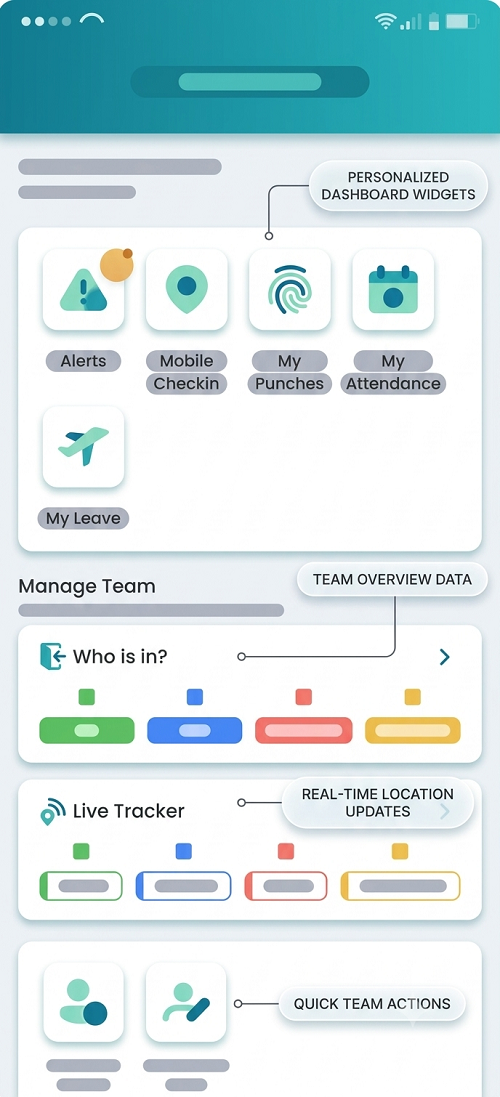
1. Understand the Attendance Challenges of Client-Site Employees
Employees working at client locations often follow different schedules and reporting arrangements from office-based staff. Their attendance may depend on customer appointments, service requests, project deadlines and travel requirements.
Common challenges include:
- Employees starting work directly at client premises.
- Difficulty accessing office-based attendance terminals.
- Employees travelling between multiple customer locations.
- Supervisors are unable to verify attendance immediately.
- Unrecorded travel between work assignments.
- Last-minute changes to client appointments.
- Employees forgetting to record their attendance.
- Delays in submitting paper-based timesheets.
- Difficulty identifying employees who are absent from assigned sites.
For example, a maintenance technician in Kuala Lumpur may visit three customer locations during a single working day. If the company uses only an office-based biometric system, it may not capture the technician's actual reporting time at the first client location.
A mobile attendance system can help record these events through a structured digital process.
2. Enable Employees to Clock In and Out Using Smartphones
One of the main benefits of mobile attendance is that employees can record their working hours without visiting the company's office.
Employees can use an authorised mobile application to:
- Clock in when they begin an assigned shift.
- Clock out when they finish work.
- Record attendance at approved client locations.
- Submit missed-punch correction requests.
- View their daily attendance history.
- Report technical problems.
- Check assigned shifts and schedules.
For example, a field-service employee scheduled to visit a customer in Petaling Jaya at 9:00 a.m. can record attendance using the company's mobile application when arriving at the approved location.
The attendance system can capture the timestamp and other authorised information associated with the punch.
Businesses should clearly explain whether employees are expected to clock in when starting work, arriving at a client site or beginning a particular assignment. These events are not necessarily the same, particularly when travel forms part of the employee's working arrangements.
3. Use GPS Location Verification for Client-Site Attendance
GPS-based attendance can help businesses verify whether employees are recording attendance near their assigned client locations.
When an employee clocks in or out through an authorised application, the system may capture the device's location, subject to the employee's device permissions and the system's configuration.
Useful GPS attendance features include:
- Location-based clock-in verification.
- Approved client-site geofencing.
- Site-specific attendance records.
- Location timestamps.
- Alerts for punches outside authorised areas.
- Location-based attendance reports.
For example, a company may assign a technician to a customer's factory in Shah Alam. The mobile application can be configured to accept attendance punches within an approved geographical area around the premises.
If the employee attempts to clock in outside that area, the system can flag the entry for supervisor review rather than automatically treating it as unauthorised absence.
GPS should be treated as supporting evidence rather than conclusive proof that an employee performed work. Location accuracy can be affected by indoor environments, device settings, connectivity and GPS limitations.
4. Manage Attendance Across Multiple Client Locations
Businesses providing services to several customers need a way to organise attendance by location.
Mobile attendance systems can help HR teams create site-specific schedules and assign employees to different customer premises.
For example:
| Employee | Assigned client location | Scheduled reporting time |
|---|---|---|
| Technician A | Shah Alam | 8:30 a.m. |
| Technician B | Petaling Jaya | 9:00 a.m. |
| Technician C | Klang | 8:00 a.m. |
| Technician D | Subang Jaya | 9:30 a.m. |
When employees record attendance, the system can associate each punch with the relevant assignment or approved site.
This helps managers identify:
- Employees who have reported to assigned locations.
- Employees with incomplete attendance records.
- Employees assigned to the wrong site.
- Site visits that require verification.
- Attendance discrepancies between schedules and actual punches.
For businesses operating across Kuala Lumpur, Selangor, Johor Bahru, Penang and other Malaysian locations, centralised mobile attendance can provide a consistent way to manage field teams.
5. Improve Supervisor Visibility Through Real-Time Attendance Updates
Supervisors may find it difficult to monitor employees who work at different client premises throughout the day.
Mobile attendance systems can provide dashboards showing attendance information as employees submit their punches.
Managers may be able to view:
- Employees who have clocked in.
- Employees who have not reported as scheduled.
- Employees currently assigned to client sites.
- Late check-ins.
- Missing clock-out records.
- Pending attendance correction requests.
- Site-wise attendance summaries.
For example, a facilities-management supervisor responsible for 20 employees across five customer locations can use a central dashboard to review attendance without calling every employee individually.
However, businesses should distinguish between an attendance dashboard and continuous employee tracking. A system that records clock-in and clock-out locations does not necessarily need to track employees continuously throughout the day.
6. Connect Mobile Attendance With Employee Shift Scheduling
Client-site employees may work different shifts depending on customer requirements, project schedules and service agreements.
Mobile attendance becomes more effective when it is connected to the company's shift-planning system.
Useful scheduling features include:
- Employee-specific shift assignments.
- Client-site reporting schedules.
- Rotating shifts.
- Weekend work schedules.
- Approved shift changes.
- Substitute employee assignments.
- Public holiday schedules.
- Overtime approval workflows.
For example, a security-services company may assign employees to different customer premises with morning, evening and overnight shifts.
The mobile application can display each employee's approved schedule and compare the recorded punch against the assigned shift.
This helps HR identify genuine late arrivals while avoiding incorrect alerts caused by outdated rosters or authorised schedule changes.
7. Record Attendance Between Multiple Client Visits
Some employees visit several customer locations during a single shift. Businesses should decide which attendance events need to be recorded.
Depending on the job, a mobile attendance system may support:
- Start-of-work attendance.
- Arrival at the first client location.
- Arrival and departure at subsequent sites.
- Approved breaks.
- Completion of the final assignment.
- End-of-work attendance.
For example, a technician may follow this schedule:
| Activity | Time |
|---|---|
| Start work | 8:30 a.m. |
| Arrive at Client A | 9:00 a.m. |
| Complete Client A assignment | 10:30 a.m. |
| Arrive at Client B | 11:15 a.m. |
| Complete Client B assignment | 1:00 p.m. |
| Arrive at Client C | 2:00 p.m. |
| Finish work | 5:30 p.m. |
The employer should establish whether travel between client locations is treated as working time under the applicable employment arrangements and legislation. Recording a site visit should not automatically be interpreted as a separate shift or as proof of additional working hours.
A clear attendance policy helps employees understand which events they must record and how travel time is handled.
8. Reduce Manual Timesheets and Attendance Errors
Paper-based timesheets can create administrative difficulties when employees work at different client locations.
Common problems include:
- Incomplete timesheets.
- Incorrect attendance dates.
- Duplicate entries.
- Delayed supervisor approvals.
- Unclear working-hour calculations.
- Missing signatures.
- Manual data-entry mistakes.
Mobile attendance reduces reliance on paper records by storing attendance information digitally.
For example, instead of submitting a weekly timesheet containing handwritten reporting and departure times, a field employee can record attendance through an application each working day.
HR teams can then review the digital records and export approved information for payroll processing.
Manual corrections may still be necessary, but they should be supported by explanations, approval records and an audit trail.
9. Integrate Mobile Attendance With Payroll Software
Mobile attendance becomes particularly useful when its approved data can flow directly into payroll software.
This integration helps Malaysia businesses reduce the effort required to transfer attendance information between departments.
Useful payroll integration features include:
- Regular working-hour calculations.
- Approved overtime inputs.
- Late-arrival reports.
- Absence records.
- Leave information.
- Shift allowances.
- Attendance correction history.
- Payroll exception reports.
For example, if a field technician completes an approved overtime assignment at a client site, the attendance system can record the relevant time. The supervisor can verify the work and approve the overtime input before it is transferred to payroll.
Businesses should not assume that a mobile punch automatically authorises overtime. Attendance evidence and overtime approval are separate controls.
Payroll teams should also check whether approved working hours, allowances and any attendance-related adjustments comply with applicable employment requirements and contractual terms.
10. Manage Missed Punches and Location Exceptions
Mobile applications can also help businesses resolve attendance exceptions for employees working away from the office.
Common exceptions include:
- Employee forgets to clock in.
- Employee forgets to clock out.
- GPS is unavailable.
- Mobile internet connection fails.
- Employee arrives at an alternative client site.
- Client appointments change unexpectedly.
- Application stops responding.
- The employee's phone battery runs out.
A practical correction workflow should allow employees to submit the actual attendance time and explain the reason for the missing record.
Supervisors can then verify the request using available evidence, such as work orders, customer visit records, approved schedules or service reports.
The system should preserve the original entry, correction reason, approval details and amendment history. It should not silently replace the original attendance information.
11. Protect Employee Privacy When Using Mobile Attendance
Mobile attendance systems may collect personal information, including employee identifiers, device details, GPS coordinates, photographs and biometric information.
Malaysian businesses should assess privacy risks before introducing location-based attendance.
Important considerations include:
Explain the purpose of collection: Inform employees why location information is needed and how it will be used.
Limit location collection: Consider capturing location only when employees perform attendance actions instead of tracking their movements continuously.
Restrict access: Only authorised HR personnel, supervisors and administrators should access attendance information according to their roles.
Secure the information: Use appropriate access controls, authentication and data-security measures.
Set retention periods: Retain records according to applicable legal, operational and business requirements.
Review third-party providers: Understand where attendance data is stored, who can access it and whether service providers process personal data on the employer's behalf.
Provide privacy information: Explain relevant data-handling practices through appropriate employee notices and policies.
The Personal Data Protection Act 2010 (PDPA), as amended, is relevant to the processing of personal data in commercial transactions where it applies. Employers should assess their obligations, including security, notice and disclosure requirements.
12. Consider Malaysia's Employment Laws When Managing Field Attendance
Mobile attendance software should support compliance with the employment legislation applicable to each employee.
Employment Act 1955
The Employment Act 1955 applies within its territorial and statutory scope in Peninsular Malaysia and Labuan.
Relevant provisions include:
- Section 60A: Covers hours of work, rest intervals and overtime requirements for covered employees.
- Section 60C: Provides specific provisions for shift workers.
- Section 61: Requires employers to maintain prescribed employee registers and retain relevant particulars for the required period.
The general normal working-hour limit under Section 60A is 45 hours per week, subject to the Act's provisions and applicable exceptions.
Mobile attendance records can help employers review actual working hours, but software alone does not establish compliance. Employers must ensure that schedules, breaks, overtime and wage calculations are handled according to the applicable rules.
Sabah and Sarawak
Businesses with employees working in Sabah and Sarawak must also consider their respective Labour Ordinances.
The Sabah Labour Ordinance and Sarawak Labour Ordinance were amended in 2025, with the amendments taking effect on 1 May 2025.
Employers should configure attendance policies according to the applicable legislation for each employee's work location rather than applying one set of rules across all Malaysian states without review.
Employee records
Attendance information should be retained in a form that supports internal reviews, payroll verification and inspection by the relevant authorities.
Section 61 of the Employment Act 1955 contains employee-register requirements for employees covered by that provision. Businesses should also check the relevant subsidiary regulations and the recordkeeping requirements under the applicable Sabah and Sarawak legislation.
13. Choose Mobile Attendance Software With the Right Features
Not every attendance application is suitable for employees working at customer premises.
Businesses should evaluate software based on their operational needs.
| Feature | Business benefit |
|---|---|
| GPS-based punch verification | Helps verify attendance location |
| Geofencing | Supports approved site-based attendance |
| Multiple site assignments | Manages employees across client locations |
| Mobile clock-in and clock-out | Records attendance remotely |
| Offline attendance support | Helps manage temporary connectivity problems |
| Shift scheduling | Matches punches with assigned work schedules |
| Supervisor approval | Controls attendance corrections |
| Payroll integration | Reduces manual payroll data entry |
| Attendance dashboards | Improves visibility of field teams |
| Audit trails | Records changes and approvals |
| Data security controls | Helps protect employee information |
Businesses should also test mobile attendance applications across different smartphone models and network conditions before deploying them to all employees.
14. Train Field Employees and Supervisors
Employees may not immediately understand how to use a new mobile attendance application, particularly if they previously relied on manual timesheets or office-based attendance devices.
Training should cover:
- How to log in securely.
- How to clock in and out.
- How to select the correct client location.
- How to check assigned schedules.
- How to report a missed punch.
- How to handle GPS or network errors.
- How to submit attendance correction requests.
- How to view personal attendance records.
Supervisors should receive additional training on verifying attendance, approving corrections, reviewing location exceptions and escalating unusual cases.
Businesses should provide simple instructions and a support contact for employees who experience application problems at client sites.
15. Implement Mobile Attendance Through a Phased Approach
A phased rollout helps businesses identify operational problems before introducing mobile attendance across the entire workforce.
A practical implementation plan includes:
- Identify field teams: List employees who regularly work at client premises.
- Map client locations: Create approved site records and assign employees.
- Define attendance rules: Decide which events employees must record.
- Select software: Evaluate mobile attendance, GPS, scheduling and payroll integration features.
- Set privacy controls: Define location collection, access and retention practices.
- Run a pilot: Test the application with a small group of employees.
- Collect feedback: Identify problems with connectivity, GPS accuracy and usability.
- Train users: Provide instructions for employees and supervisors.
- Integrate payroll: Test the transfer of approved attendance information.
- Review performance: Monitor missed punches, late arrivals and correction requests after implementation.
A pilot involving technicians, sales representatives or maintenance employees can help businesses understand how the application performs under real client-site conditions.
16. Measure the Effectiveness of Mobile Attendance
After implementation, HR teams should monitor whether the system improves attendance management.
Useful performance indicators include:
| KPI | What it measures |
|---|---|
| Missed-punch frequency | How often employees submit incomplete attendance records |
| Late check-in frequency | Number of recorded late arrivals |
| Attendance correction rate | Frequency of manual amendments |
| Approval turnaround time | Time taken to review attendance requests |
| Site attendance compliance | Whether employees record attendance at assigned locations |
| Payroll exception rate | Attendance-related discrepancies identified during payroll |
| Application usage rate | Employee adoption of the mobile system |
| Technical failure rate | Frequency of application or device problems |
These indicators can help management identify whether attendance problems are caused by employee behaviour, system limitations, unclear procedures or unrealistic scheduling.
The goal should be to improve attendance accuracy and operational visibility, not simply increase employee monitoring.
Conclusion
Mobile attendance can help Malaysia businesses manage teams working at client sites by providing a practical way to record working hours, verify approved work locations and monitor attendance exceptions.
With smartphone-based clock-in and clock-out, GPS verification, site assignments, shift scheduling and payroll integration, employers can reduce paperwork and improve attendance visibility across field operations.
However, successful implementation requires more than installing an application. Businesses should establish clear attendance policies, train employees, verify attendance corrections, protect personal information and follow the employment legislation applicable to each work location.
A well-designed mobile attendance process helps businesses manage field employees more efficiently while maintaining accurate and transparent workforce records.
Client-site workers need an attendance process that follows the assignment. InnBuilt Employee Tracking App can help Malaysia teams record mobile check-ins and review visits away from the office.