How Can Malaysia Restaurants Record Split Shifts and Actual Hours Worked?
How Can Malaysia Restaurants Record Split Shifts and Actual Hours Worked?
Restaurants in Malaysia often operate across breakfast, lunch, and dinner service periods. To match staffing levels with customer demand, many businesses use split shifts, where employees work two or more separate periods within the same day, with a break between them.
For example, a restaurant employee may work from 10:00 a.m. to 2:00 p.m., take several hours off, and return from 6:00 p.m. to 10:00 p.m. Although the employee has worked two separate periods, both must be recorded accurately to determine total working hours, attendance, overtime, and payroll.
Relying on a single daily check-in and check-out can create errors because it may count the gap between shifts as working time. Restaurants therefore need a reliable system that records every work period separately and calculates actual hours based on approved attendance information.
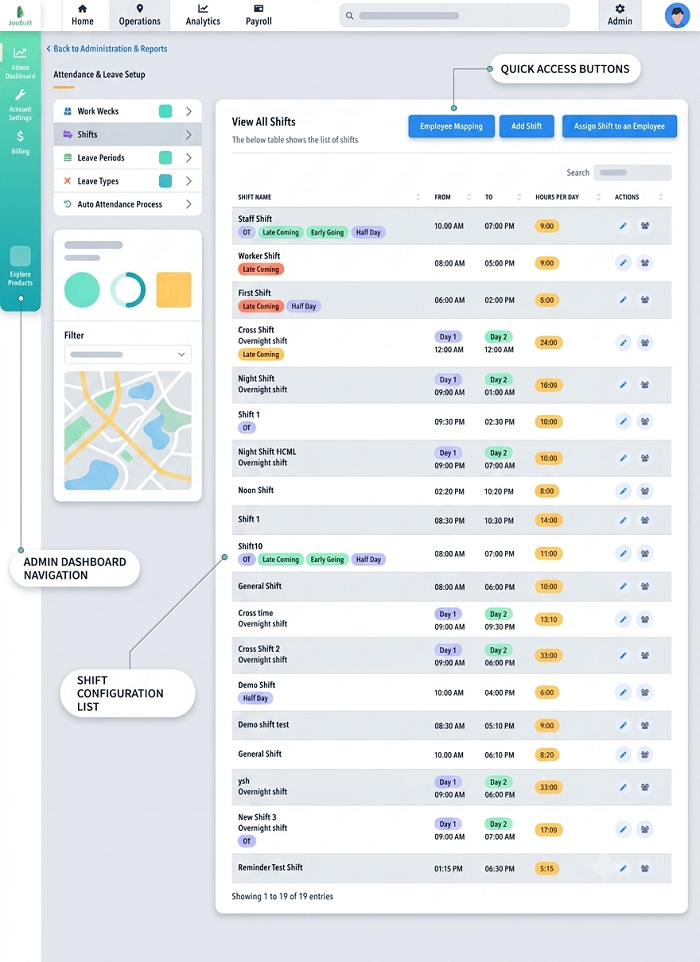
1. Create Separate Attendance Records for Each Work Period
The first step is to record every shift segment independently rather than treating a split shift as one continuous working period.
For example, an employee may have the following schedule:
| Work period | Scheduled time |
|---|---|
| First shift | 10:00 a.m. – 2:00 p.m. |
| Split-shift break | 2:00 p.m. – 6:00 p.m. |
| Second shift | 6:00 p.m. – 10:00 p.m. |
| Total scheduled working time | 8 hours |
The attendance system should record four important events:
- First shift check-in.
- First shift check-out.
- Second shift check-in.
- Second shift check-out.
This prevents the system from incorrectly counting the four-hour gap as working time.
Restaurants should also maintain separate records for additional work periods if employees are called back for an approved task.
2. Prepare Split-Shift Schedules Based on Restaurant Demand
Managers should prepare employee schedules according to expected customer traffic and service requirements.
Common split-shift arrangements include:
- Breakfast and dinner service.
- Lunch and evening service.
- Lunch service followed by late-night operations.
- Weekend lunch and dinner coverage.
- Special event or banquet assignments.
For example, a restaurant in Kuala Lumpur may require additional kitchen employees during lunch and dinner but fewer staff during the afternoon period.
Managers can assign suitable employees to separate work periods instead of scheduling everyone for one continuous shift.
Each schedule should clearly show the employee's expected start time, end time, break period, and assigned department.
3. Use Digital Attendance Systems to Record Actual Check-In and Check-Out Times
Digital attendance systems can help restaurants capture the actual time employees begin and finish each work period.
Depending on the system, employees may record attendance through:
- Mobile attendance applications.
- Biometric attendance terminals.
- QR code scanning.
- NFC-enabled devices.
- Shared restaurant attendance kiosks.
For example, a waiter scheduled to work from 11:00 a.m. to 3:00 p.m. may check in at 11:08 a.m. and check out at 3:05 p.m. The system should preserve these actual timestamps rather than automatically replacing them with the scheduled times.
The same process should apply when the employee returns for the evening shift.
Digital records help managers compare scheduled hours with actual attendance and identify discrepancies before payroll processing.
4. Record the Split-Shift Gap Separately From Working Hours
The gap between two work periods should be clearly identified in the attendance record.
For example:
| Attendance event | Time |
|---|---|
| First check-in | 10:00 a.m. |
| First check-out | 2:00 p.m. |
| Break begins | 2:00 p.m. |
| Second check-in | 6:00 p.m. |
| Second check-out | 10:00 p.m. |
| Total recorded working time | 8 hours |
| Split-shift gap | 4 hours |
The system should not automatically treat the entire period from 10:00 a.m. to 10:00 p.m. as 12 working hours.
Restaurants should define how unpaid breaks, paid breaks, and other periods are classified in accordance with applicable employment requirements and the employee's terms of employment.
5. Compare Scheduled Hours With Actual Hours Worked
Managers should review actual attendance against the published schedule.
A comparison can identify:
- Late arrivals.
- Early departures.
- Employees returning late after a split-shift break.
- Unscheduled additional work.
- Missing check-outs.
- Extended service periods.
- Approved shift changes.
For example, an employee may be scheduled for an evening shift from 6:00 p.m. to 10:00 p.m. but actually work until 10:45 p.m. because of a busy restaurant service.
The additional 45 minutes should be recorded and reviewed under the restaurant's overtime approval process and applicable employment rules.
Scheduled hours should not replace actual attendance records when calculating working time.
6. Calculate Total Daily Hours Across All Shift Segments
Restaurants should calculate total working time by adding the actual duration of each approved work period.
For example:
| Work period | Actual attendance | Hours worked |
|---|---|---|
| First shift | 10:05 a.m. – 2:10 p.m. | 4 hours 5 minutes |
| Second shift | 6:00 p.m. – 10:20 p.m. | 4 hours 20 minutes |
| Total | Two separate work periods | 8 hours 25 minutes |
The system should calculate each segment separately and then combine the approved working hours.
It should also preserve the original timestamps so managers can investigate corrections or disputes.
Payroll teams should apply the relevant working-time rules rather than assuming that all time between the first arrival and final departure is payable working time.
7. Manage Last-Minute Changes to Split-Shift Schedules
Restaurant operations can change quickly because of reservations, staff shortages, customer demand, or special events.
Managers may need to adjust shift timings or ask employees to return earlier or later than originally planned.
A digital scheduling system should allow authorised managers to:
- Update the first shift.
- Change the second shift.
- Record additional work periods.
- Approve shift swaps.
- Document employee availability.
- Notify employees about schedule changes.
For example, a restaurant may ask an employee to return at 5:30 p.m. instead of 6:00 p.m. because of a large group booking.
The revised schedule should be recorded with the approval details. This helps avoid disputes between scheduled hours and actual attendance.
8. Track Overtime Across Split Shifts
Overtime calculations can become complicated when employees work multiple periods during the same day.
Restaurants should combine relevant working-time records and apply the appropriate legal and contractual rules.
Managers should review:
- Total actual working hours.
- Applicable normal working hours.
- Additional work beyond scheduled hours.
- Approved overtime.
- Rest-day work.
- Public holiday work.
- Applicable overtime payment rates.
For example, an employee may work four hours during lunch and five hours during dinner because of an unexpected event. The system should capture all nine hours and provide payroll with the information needed to determine whether overtime is payable.
Employers should not assume that a split-shift gap automatically resets the employee's daily working-hour calculation.
The applicable treatment should be checked against the relevant employment legislation and the employee's employment terms.
9. Monitor Missed Punches and Incomplete Attendance Records
Employees may occasionally forget to check out after lunch service or fail to check in when returning for the evening shift.
An attendance system should identify incomplete records instead of automatically calculating working hours from the scheduled timetable.
Common attendance exceptions include:
- First shift check-in without check-out.
- Second shift check-out without check-in.
- Duplicate check-ins.
- Missing evening attendance.
- Incorrect shift assignment.
- Attendance recorded under the wrong employee.
- Unapproved changes to timestamps.
A practical correction process should allow the employee to submit an explanation and the manager to approve the adjustment.
The original attendance record should remain available for audit purposes.
10. Use Department-Wise Attendance Reports
Restaurants may schedule different employees for kitchen operations, service, housekeeping, cleaning, delivery, and management duties.
Attendance reports should allow managers to review working hours by department and shift.
Useful report categories include:
- Employee-wise attendance.
- Department-wise working hours.
- Split-shift attendance.
- Scheduled versus actual hours.
- Overtime hours.
- Late arrivals.
- Early departures.
- Missing attendance records.
- Approved attendance corrections.
For example, a restaurant manager can review whether enough kitchen employees reported for the evening shift without manually checking every employee's attendance register.
Department-level reporting also helps identify recurring staffing shortages during busy service periods.
11. Integrate Attendance Records With Payroll Software
Accurate split-shift records should flow into payroll systems without requiring repeated manual calculations.
An attendance-to-payroll integration can transfer:
- Employee details.
- Scheduled work periods.
- Actual check-in and check-out timestamps.
- Total approved working hours.
- Overtime information.
- Rest-day and public holiday attendance.
- Approved corrections.
For example, a payroll administrator can review an employee's two separate work periods and confirm the total approved working time before processing monthly wages.
The system should preserve a clear record of attendance changes and payroll adjustments.
Restaurants should also ensure that payroll calculations reflect the applicable statutory requirements and employment arrangements.
12. Maintain Compliance With Malaysian Employment Requirements
Restaurants operating in Malaysia should ensure that split-shift arrangements comply with the employment legislation applicable to their location.
For establishments in Peninsular Malaysia and Labuan, the Employment Act 1955 is an important reference. Employers should review provisions relating to working hours, rest periods, rest days, overtime, and public holidays.
Different labour legislation applies in Sabah and Sarawak, so restaurants operating in those states should check the relevant local requirements.
Important scheduling considerations include:
- Applicable limits on normal working hours.
- Required rest periods.
- Weekly rest-day arrangements.
- Overtime eligibility and payment.
- Public holiday work.
- Proper attendance and payroll documentation.
A split shift should not be used to avoid applicable working-hour protections or overtime obligations. Employers should assess the actual working arrangement rather than relying only on the shift labels used in the attendance system.
13. Protect Employee Attendance and Personal Information
Digital attendance platforms may collect employee identification, attendance timestamps, device information, and sometimes location or biometric data.
Restaurants should handle this information responsibly.
Practical controls include:
- Informing employees about attendance data collection.
- Explaining the purpose of attendance monitoring.
- Restricting access to authorised managers and HR staff.
- Securing attendance records.
- Establishing appropriate retention periods.
- Reviewing third-party attendance software providers.
- Allowing employees to question inaccurate attendance records.
Where biometric or GPS attendance features are used, businesses should assess their obligations under Malaysia's Personal Data Protection Act 2010, as amended in 2024, and relevant guidance.
Best Practices for Recording Split Shifts and Actual Hours Worked
Malaysia restaurants can improve split-shift attendance management by following these practices:
- Create separate shift segments: Record each working period independently.
- Publish clear schedules: Show employees their start times, end times, and split-shift gaps.
- Capture actual attendance: Preserve real check-in and check-out timestamps.
- Separate breaks from working time: Avoid counting the gap between shifts as working hours without a valid basis.
- Calculate total daily hours: Combine all relevant work periods accurately.
- Control schedule changes: Require appropriate supervisor approval for revised shifts.
- Review incomplete records: Resolve missed punches before payroll processing.
- Monitor overtime: Apply relevant working-hour rules to the complete attendance record.
- Use department-wise reports: Review staffing levels across kitchen, service, and other teams.
- Integrate with payroll: Transfer approved attendance information accurately.
- Protect employee data: Apply suitable privacy, access, security, and retention controls.
Conclusion
Malaysia restaurants can record split shifts and actual hours worked by maintaining separate attendance entries for each work period, capturing actual check-in and check-out times, and calculating total working hours without including the gap between shifts as ordinary working time.
Digital attendance systems make it easier to manage changing restaurant schedules, identify missed punches, review overtime, and transfer approved attendance information into payroll software.
However, technology alone is not enough. Managers must maintain clear shift policies, approve schedule changes, review attendance exceptions, and follow the employment requirements applicable to their location.
With accurate attendance records and consistent scheduling practices, restaurants can manage lunch and dinner staffing more effectively while improving payroll accuracy and employee transparency.
A restaurant split shift has more than one working period to account for. InnBuilt Attendance Software can help Malaysia managers review separate clock-ins against the lunch and dinner roster.