What Should Qatar Employers Consider Before Using Geo-Fenced Attendance for Field Staff?
Introduction
Managing attendance for employees who work outside a central office can be challenging for employers in Qatar. Field technicians, maintenance teams, delivery personnel, sales representatives, construction supervisors, and facilities management staff may travel between customer locations, project sites, and remote work areas throughout the day.
Traditional attendance methods, such as paper registers, office-based biometric terminals, and manual timesheets, may not accurately capture when these employees begin work, arrive at assigned locations, or finish their shifts. These limitations can create payroll discrepancies, delays in service delivery, and difficulties verifying attendance across multiple sites.
Geo-fenced attendance offers a way to record attendance when an employee's mobile device enters or leaves a predefined geographical area. When combined with mobile attendance applications and workforce management software, it can help employers improve visibility into field operations and reduce manual attendance processing.
However, implementing geo-fenced attendance requires more than enabling GPS tracking. Qatar employers should consider location accuracy, employee privacy, device availability, work schedules, connectivity, payroll integration, and the applicable legal framework.
This guide explains the key considerations for using geo-fenced attendance for field staff in Qatar and outlines practical steps for implementing it responsibly.
1. What Is Geo-Fenced Attendance?
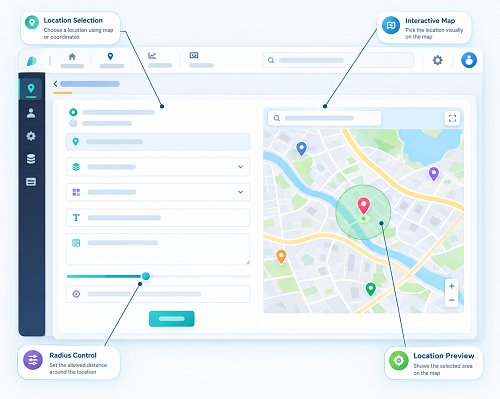
Geo-fenced attendance uses geographical boundaries to support attendance recording at approved locations. A geofence is a virtual boundary created around a physical location, such as a customer facility, construction site, warehouse, or service area.
When an employee's authorised mobile device enters or leaves the defined area, the attendance application may detect the event and trigger an attendance action, notification, or prompt.
For example, a facilities management company in Qatar may create geofences around several commercial properties. When a technician arrives at an assigned property, the mobile application can verify whether the device is within the permitted area and allow the technician to record the start of a visit.
A typical workflow includes:
- Location setup: The employer defines the approved worksite or customer location on a map.
- Employee assignment: HR or the operations team assigns the employee to the relevant site, work order, or shift.
- Location verification: The mobile application checks the device's reported location against the configured boundary.
- Attendance recording: The employee clocks in or out through the approved process.
- Exception management: The system flags events such as a missed punch, an inaccurate location reading, or a check-in outside the permitted area.
- Timesheet processing: Approved records are transferred to the attendance or payroll system.
Importantly, a device entering a geofence does not necessarily mean that an employee has started working. Employers should distinguish between location detection, employee check-in, and approval of working hours.
2. Why Should Qatar Employers Consider Geo-Fenced Attendance?
Qatar businesses often manage field employees across several customer premises, construction projects, industrial facilities, and service locations. Tracking attendance consistently across these locations can be difficult when employees use manual timesheets or report their arrival through phone calls and messages.
Geo-fenced attendance can support more structured workforce management.
Better visibility into field attendance
Managers can review whether employees recorded attendance at assigned locations and whether check-ins occurred within the expected time window.
Reduced manual timesheet processing
Automated location checks and mobile check-in workflows can reduce the number of attendance entries that HR staff need to collect and reconcile manually.
Improved customer service coordination
For field service businesses, arrival and departure records can help operations teams coordinate appointments, monitor missed visits, and investigate delays.
More reliable payroll inputs
Location-linked attendance records can provide additional evidence for reviewing timesheets, overtime claims, and attendance discrepancies. Payroll accuracy still depends on correct shift rules, approved working hours, and appropriate calculations.
Better multi-site reporting
A centralised platform can provide a consistent view of attendance across different project sites, customer premises, and operational teams.
These benefits depend on implementation quality. A poorly configured geofence can create false alerts, missed check-ins, and employee frustration.
3. Which Field Roles Can Benefit from Geo-Fenced Attendance?
Geo-fencing is particularly useful when employees must report to identifiable locations as part of their work.
| Employee group | Potential application |
|---|---|
| Field service technicians | Verify arrival at customer locations and record service visits |
| Construction supervisors | Record attendance at assigned project sites |
| Facilities management teams | Track attendance across commercial and residential properties |
| Delivery and logistics staff | Support attendance recording at depots, warehouses, or delivery hubs |
| Sales representatives | Record visits to approved customer locations when appropriate |
| Maintenance workers | Link attendance events to scheduled maintenance jobs |
| Security personnel | Record attendance at assigned posts or facilities |
| Inspection teams | Associate site attendance with scheduled inspection assignments |
Geo-fencing may be less suitable as the only attendance method for employees whose work involves frequent travel, changing destinations, remote locations, or unpredictable assignments. In these cases, employers may need a flexible mobile check-in process or supervisor-approved alternative.
4. What Location Accuracy Should Employers Expect?
GPS and other mobile location technologies are not perfectly accurate. Reported locations may vary because of buildings, weather conditions, device settings, network availability, and the surrounding environment.
In Qatar, field staff may work around high-rise buildings, industrial facilities, covered parking areas, large construction projects, and indoor customer premises. These environments can make location verification less reliable.
Factors that affect accuracy
- GPS signal quality: Buildings and other obstructions can affect satellite signals.
- Indoor environments: Location estimates inside buildings may be less precise than those outdoors.
- Device settings: Disabled location services or restricted application permissions may prevent reliable verification.
- Network availability: Poor connectivity can delay location updates or attendance synchronisation.
- Geofence size: Boundaries that are too small may reject legitimate check-ins.
- Device quality: Different smartphones can report different location accuracy.
- Battery-saving settings: Some operating systems restrict background location activity.
Recommended practices
Employers should test the system at actual work locations before deployment. Configure geofence boundaries based on the site's physical layout and the accuracy the technology can reasonably achieve.
Where supported, the application should display location confidence or accuracy information and allow a controlled exception process when a legitimate check-in cannot be verified.
Do not automatically penalise employees because their phones report an inaccurate location. Supervisors should be able to review the circumstances and correct genuine errors through an auditable process.
5. How Should Employers Configure Geofence Boundaries?
Geofence configuration directly affects the reliability of attendance records. A boundary that is too broad may accept check-ins from nearby roads or public areas, while a boundary that is too narrow may reject employees who are physically present at the worksite.
Consider the physical layout
A compact customer office may require a different boundary from a large construction project or industrial facility.
When configuring a location, consider:
- The actual site entrance
- The size and shape of the property
- Nearby roads and public spaces
- Building entrances and parking areas
- Multiple buildings within the same complex
- Restricted access zones
- Areas where GPS signals are weak
Use site-specific rules
Avoid applying one geofence radius to every location. Large project sites may require different settings from small retail premises or customer offices.
For locations where employees must check in at a particular entrance or designated area, consider combining geofencing with a QR code, NFC checkpoint, approved terminal, or supervisor verification.
Review boundaries periodically
Customer premises may change, construction sites may expand, and teams may be reassigned. Assign responsibility for reviewing site coordinates and updating boundaries when work locations change.
A geofence should support a practical attendance process rather than create an unnecessary barrier for employees who are legitimately reporting for work.
6. How Can Employers Protect Employee Privacy?
Geo-fenced attendance involves location information, which can reveal where an employee is at a particular time. Continuous location tracking can collect considerably more information than is necessary simply to record attendance.
Qatar employers should assess the applicable privacy requirements, including Qatar's Personal Data Privacy Protection Law, Law No. 13 of 2016, and any applicable amendments, implementing requirements, or sector-specific rules. The exact obligations depend on the organisation, the processing activity, and the circumstances of use.
Before implementing geo-fenced attendance, employers should establish clear limits on how location data is collected and used.
Collect only what is necessary
If the purpose is to verify attendance at an assigned location, consider whether checking location at clock-in and clock-out is sufficient instead of tracking an employee throughout the day.
Explain the system to employees
Provide clear information about:
- Why location data is collected
- When location checks take place
- Whether tracking continues outside working hours
- Who can access location and attendance records
- How long the records are retained
- How employees can challenge inaccurate records
- What happens when a device or application fails
Restrict access
Location data should only be accessible to authorised personnel who need it for legitimate operational purposes. Managers should not receive unrestricted access to every employee's location history by default.
Define retention periods
Establish documented retention and deletion rules for location events and attendance records, taking account of applicable legal, payroll, and recordkeeping requirements.
Assess the legal basis
Determine the applicable legal basis and any required notices, permissions, assessments, or other safeguards before collecting location information. Do not assume that employee consent alone resolves every legal or employment issue.
Avoid unnecessary off-duty tracking
Configure the application so that location checks occur only when justified by the stated attendance purpose. Where feasible, provide a clear indication when location access is active and avoid collecting location data outside the permitted work context.
Privacy safeguards should be part of the system design, not an afterthought.
7. Should Employers Use Automatic or Employee-Initiated Check-Ins?
Employers must decide whether the application should automatically detect a geofence event or require employees to tap a check-in button.
Both approaches have advantages and limitations.
| Method | Advantages | Considerations |
|---|---|---|
| Employee-initiated mobile check-in | Employees know when attendance is recorded; reduces ambiguity about starting work | Requires employees to remember to check in |
| Automatic geofence detection | Can prompt attendance actions when employees enter or leave a site | Background permissions, battery settings, and location accuracy can affect performance |
| QR code at the worksite | Provides a deliberate checkpoint action and can be useful indoors | Codes can be shared or copied unless additional controls are used |
| Supervisor-verified attendance | Provides a fallback when devices or location services fail | Requires staff time and consistent approval procedures |
| Fixed biometric or access terminal | Useful at permanent entry points | Less practical for mobile staff and changing locations |
For many field teams, an employee-initiated check-in supported by location verification offers a practical balance. It records a deliberate attendance action while using geofencing as an additional control.
Automatic detection may be useful for specific workflows, but employers should test how it performs across different devices, sites, and operating conditions.
8. How Can Geo-Fenced Attendance Integrate with Payroll?
Geo-fenced attendance is most useful when verified events feed into an established timesheet and payroll process.
A recommended workflow is:
- The employee receives an assigned shift, customer visit, or work order.
- The employee records a check-in through the authorised mobile application.
- The application checks whether the device is within the approved location boundary.
- The attendance system records the event, timestamp, employee ID, and relevant site information.
- Check-out events and recorded working time are matched to the shift or assignment.
- Missing punches, unusual travel patterns, and other exceptions are flagged for review.
- Supervisors approve corrections and any relevant overtime.
- Approved attendance records are transferred to payroll.
- Payroll staff review calculations and retain supporting records.
Location verification should be treated as one part of the evidence used to process attendance. Being inside a geofence does not prove that an employee worked continuously for the entire period.
Likewise, a device leaving a geofence does not necessarily mean that an employee has stopped working. The employee may be travelling to another customer, attending an off-site assignment, or completing work that does not require remaining at one location.
For employers in Qatar, the payroll configuration should support applicable employment rules, approved working hours, overtime procedures, weekly rest arrangements, and relevant statutory requirements.
9. How Should Employers Manage Connectivity and Device Problems?
Field employees may work in locations where mobile data is unreliable or where company devices have limited battery life. A dependable attendance system must accommodate these conditions.
Offline attendance recording
Where supported, the application may securely store attendance events locally and synchronise them when connectivity returns. Employers should confirm how timestamps are protected, how delayed events are identified, and how conflicting records are handled.
Battery and device management
Employees should understand the minimum device requirements and how to maintain sufficient battery power during shifts. For company-issued devices, employers may establish charging and replacement procedures.
Alternative verification
Create a fallback process for situations such as:
- A damaged or lost phone
- A failed GPS reading
- A depleted battery
- A mobile application outage
- A missing data connection
- A legitimate check-in outside the configured boundary
Fallbacks may include supervisor verification, a site QR code, an approved attendance terminal, or a documented manual entry.
Exception review
All manual changes should record who made the correction, when it was made, the reason, and any required approval. This helps maintain accountability without treating technical failures as employee misconduct.
10. How Can Employers Prevent Attendance Fraud Without Over-Monitoring?
Geofencing can reduce some attendance discrepancies, but location alone is not sufficient to establish that a particular employee is present or performing assigned duties.
Employers should apply proportionate controls that fit the work involved.
Useful measures include:
- Linking check-ins to individual employee accounts
- Requiring authenticated access to the attendance application
- Matching attendance with approved shifts and work orders
- Using QR or NFC checkpoints at selected locations
- Reviewing unusual or duplicate attendance events
- Maintaining a record of manual corrections
- Requiring supervisor approval for exceptions
- Comparing attendance with customer visit records when appropriate
- Conducting periodic audits of attendance and payroll records
Employers should avoid excessive tracking or intrusive monitoring when a less intrusive control would meet the same objective.
For example, a service company may verify a technician's arrival at a customer location and record completion of the assigned work order. It may not need to collect continuous location data throughout the technician's entire shift.
The aim is to produce reliable attendance evidence while respecting employee privacy and maintaining trust.
11. What Should Qatar Employers Check Before Selecting Software?
Before purchasing a geo-fenced attendance solution, employers should assess both the technology and the administrative workflows it supports.
Essential features
- Configurable geofence boundaries for different sites
- Employee-initiated mobile check-in and check-out
- Support for Android and iOS devices, where required
- Clear location-permission controls
- Offline recording and synchronisation, where supported
- Shift scheduling and work-order assignment
- Multi-site attendance dashboards
- Missing-punch and exception alerts
- Supervisor approval workflows
- Integration with payroll and HR software
- Audit trails for attendance corrections
- Role-based access to location records
- Configurable data retention and deletion
- Security controls and vendor support
Questions to ask vendors
- How does the application determine whether a device is inside a geofence?
- Does it display the reported location accuracy?
- How does it behave when GPS or mobile data is unavailable?
- Can administrators configure different boundaries for different sites?
- Can employees see when location data is being collected?
- Does the application collect location data in the background?
- Where are location and attendance records stored?
- What security and access controls protect the data?
- How are attendance corrections recorded and audited?
- How does the software integrate with the existing payroll system?
Employers should test the software at real worksites before committing to a full rollout. Vendor demonstrations alone may not reveal problems with GPS accuracy, indoor environments, employee devices, or shift handovers.
12. How Can Employers Measure Success?
A geo-fenced attendance system should be evaluated through measurable operational improvements.
Recommended key performance indicators (KPIs) include:
- Percentage of successful location-verified check-ins
- Number of failed or disputed check-ins
- Attendance correction rate
- Average time spent processing field timesheets
- Number of missing check-in and check-out events
- Number of payroll adjustments caused by attendance errors
- Time taken to resolve attendance exceptions
- Number of disputed customer visits
- Frequency of manual overrides
- Employee complaints about location accuracy or privacy
Establish a baseline before implementation and compare performance after the system has been operating for a reasonable period.
A high successful-check-in rate is not enough on its own. Employers should also monitor false rejections, unnecessary location collection, employee feedback, and the time required to resolve exceptions.
The objective is to improve attendance reliability without introducing excessive administration or unfair outcomes.
Frequently Asked Questions (FAQs)
1. What is geo-fenced attendance?
Geo-fenced attendance uses a virtual geographical boundary around a workplace or customer location to support attendance verification. An authorised mobile application checks whether the device is within the permitted area when an employee records attendance.
2. Is geo-fenced attendance suitable for field employees in Qatar?
It can be useful for technicians, maintenance teams, construction supervisors, delivery staff, and other employees who report to identifiable locations. Employers should assess the team's work patterns, site conditions, device availability, and location accuracy before implementation.
3. Does geofencing prove that an employee is working?
No. It provides location-related evidence, not conclusive proof of working time or task completion. Employers should combine attendance records with shift assignments, work orders, approved timesheets, and appropriate supervisor review.
4. Can geo-fenced attendance work without an internet connection?
Some systems support secure offline attendance recording and later synchronisation, while others require a live connection. Employers should verify how timestamps, location data, and delayed uploads are handled by the specific application.
5. Should employers track field employees continuously?
Continuous tracking is not always necessary for attendance management. Employers should assess whether location verification at check-in and check-out can achieve the intended purpose, and collect additional location data only where justified and permitted.
6. What happens when GPS accuracy is poor?
The system may fail to verify the employee's location or may report an inaccurate position. Employers should provide an alternative check-in process, review exceptions fairly, and avoid automatically penalising employees for technical failures.
Conclusion
Geo-fenced attendance can help Qatar employers manage field staff by linking attendance events to approved work locations. It can reduce manual timesheet processing, improve visibility across multiple sites, support customer-visit verification, and provide more consistent information for payroll.
However, location data is not infallible, and a device entering a geofence does not automatically prove that an employee has started work. Employers must consider location accuracy, device limitations, employee privacy, connectivity, exception handling, and payroll integration before deployment.
The most effective approach combines location verification with clear attendance rules, employee-initiated check-ins where appropriate, documented fallback procedures, secure data handling, and human review.
By selecting suitable software and implementing proportionate safeguards, Qatar employers can improve field attendance management while maintaining reliable records and respecting employee privacy.
A geo-fence is useful only when site boundaries and employee expectations are clear. InnBuilt Employee Tracking App can help Qatar field teams review assigned-site check-ins and location exceptions.