Payroll and Attendance Management for Remote Employees in Saudi Arabia
Payroll and Attendance Management for Remote Employees in Saudi Arabia
Remote and hybrid work arrangements have changed how companies manage employee attendance, working hours, leave, overtime, and payroll. For employers in Saudi Arabia, managing remote employees requires more than simply allowing staff to work from home. Companies need clear policies, accurate attendance records, compliant employment contracts, secure employee data practices, and reliable payroll processes.
For HR and payroll teams, the main challenge is connecting remote attendance data with payroll calculations while ensuring that working arrangements remain consistent with Saudi employment requirements.
A well-designed remote-work management process can help employers track working hours, manage leave and overtime, approve attendance, process payroll accurately, and maintain appropriate records without relying on physical office attendance.
What Is Remote Employee Management?
Remote employee management involves administering employees who perform some or all of their work away from the employer's traditional workplace.
Depending on the business, employees may work:
- Fully remotely
- On a hybrid schedule
- From home
- From an approved remote location
- At customer locations
- Across different branches
- From multiple locations during a working week
The applicable employment arrangement should be clearly documented in the employment contract or relevant company policy.
Why Remote Attendance Management Matters
Traditional attendance systems often rely on:
Office entry → Biometric punch → Exit punch
Remote employees require a different process:
Work schedule → Digital check-in → Working hours → Breaks → Check-out → Manager approval
Without a reliable system, employers may face:
- Missing attendance records
- Incorrect working-hour calculations
- Payroll discrepancies
- Unapproved overtime
- Leave conflicts
- Difficulty monitoring attendance across teams
- Manual administrative work
A digital attendance platform can provide a centralized record of remote working time.
Create a Clear Remote Work Policy
Before implementing technology, employers should define how remote work operates.
A remote-work policy can specify:
- Eligible employees
- Approved remote locations
- Working hours
- Core working hours
- Attendance requirements
- Breaks
- Availability expectations
- Manager approvals
- Overtime authorization
- Leave procedures
- Equipment responsibilities
- Information-security requirements
- Data-protection requirements
Employees should understand exactly how attendance and payroll will be affected by remote work.
Remote Work and Employment Contracts
Remote work should be aligned with the employee's employment arrangement.
HR should maintain accurate records of:
- Employee details
- Job title
- Salary
- Working hours
- Employment status
- Contract duration
- Work location where relevant
- Remote-work arrangement
- Applicable benefits
If an employee's working arrangement changes materially, HR should ensure that the necessary documentation is completed according to applicable Saudi Arabia requirements.
How to Track Remote Attendance
Remote attendance software can use several methods.
Digital Check-In and Check-Out
Employees record their start and end times through a web or mobile application.
Mobile Attendance
Employees use an authorized mobile application to record attendance.
Timesheets
Employees submit working hours for manager approval.
Task-Based Tracking
For some roles, working time can be combined with task or project records.
Manager Approval
Managers review exceptions and approve attendance before payroll processing.
The appropriate method depends on the nature of the employee's role and the employer's policy.
Fixed Working Hours vs. Flexible Hours
Remote employees may work under different schedules.
Fixed Schedule
For example: 8:00 AM – 5:00 PM. Employees are expected to work according to a defined schedule.
Flexible Schedule
Employees may have flexibility within an approved range, subject to required working hours and business needs.
Hybrid Schedule
Employees may work remotely on specific days and from the office on others.
Payroll and attendance software should support all relevant schedules.
Connect Attendance With Payroll
One of the biggest benefits of integrated HR technology is the ability to connect attendance with payroll.
The process can be:
Remote schedule → Employee check-in/check-out → Attendance record → Manager approval → Leave and overtime processing → Payroll calculation → Salary payment
This reduces the need for payroll teams to manually re-enter attendance information.
Managing Working Hours
Employers should define how working hours are recorded for remote employees.
The system may capture:
- Start time
- End time
- Breaks
- Total hours
- Approved additional hours
- Absence
- Leave
- Public holidays
- Rest days
Payroll teams should use approved records rather than relying on informal messages or employee estimates.
Remote Overtime Management
Remote employees may occasionally work beyond their normal schedule.
However, employers should distinguish between voluntary work and employer-authorized additional work.
A remote attendance system can provide an approval workflow:
Employee records additional hours → Manager reviews → Manager approves/rejects → Payroll receives approved information
This helps prevent unauthorized overtime from being automatically added to payroll. Any overtime calculation should follow the applicable Saudi Arabia employment requirements.
Remote Leave Management
Remote employees should use the same formal leave-management process established by the employer.
Employees can submit:
- Annual leave
- Sick leave
- Other applicable leave
- Emergency leave
- Approved absence
The system can automatically update: Attendance → Leave balance → Payroll. This reduces payroll errors caused by employees being incorrectly marked absent.
Public Holidays and Rest Days
Remote work does not mean that employers can ignore applicable working-time, rest-day, and holiday requirements.
The attendance system should identify:
- Scheduled working days
- Rest days
- Public holidays
- Approved work on holidays
- Approved additional hours
The employee's actual schedule should be used when calculating attendance.
Saudi Arabia Payroll Processing for Remote Employees
Remote employees should generally remain within the employer's normal payroll framework unless their employment arrangement requires different treatment.
Payroll should continue to process:
- Basic salary
- Allowances
- Approved variable pay
- Applicable deductions
- Social insurance contributions where applicable
- Approved overtime
- Leave-related adjustments
- Other contractual payroll components
Remote status by itself should not be treated as a separate payroll category unless required by the employer's arrangement or applicable rules.
GOSI Considerations
Employers should determine the applicable General Organization for Social Insurance (GOSI) treatment based on the employee's status and current Saudi Arabia regulations.
Payroll teams should maintain accurate information about:
- Employee nationality
- Employment status
- Registered wage
- Applicable contribution rules
- Employee contributions
- Employer contributions
Remote work does not automatically eliminate applicable social-insurance obligations. The exact treatment should be verified against current GOSI requirements.
Wage Protection and Remote Payroll
Employers subject to Saudi wage-protection requirements should ensure that remote employees' salary payments are processed consistently with applicable requirements.
Payroll teams should reconcile:
Approved payroll → Salary payment → Bank transaction → Applicable wage reporting
Remote working arrangements should not create a separate or informal payroll process.
Remote Work and Saudization
Remote employees should also be considered when employers plan their workforce and assess applicable Saudization requirements.
The relevant treatment depends on:
- Employee nationality
- Profession
- Salary
- Contract
- Establishment
- Applicable localization decision
Employers should not assume that an employee working remotely is automatically excluded from or included in a particular Saudization calculation. HR should verify the latest applicable HRSD requirements.
Managing Remote Employees Across Saudi Arabia
A company may have remote employees working from Riyadh, Jeddah, Dammam, Khobar, Makkah, Madinah, or other locations.
A centralized HR system can allow managers to view:
- Employee details
- Department
- Work schedule
- Attendance
- Leave
- Overtime
- Payroll status
This is especially useful when managers and employees are geographically distributed.
GPS Attendance for Remote Employees
Some employers use GPS-based attendance to confirm that an employee is checking in from an approved location. However, location tracking should not automatically be enabled simply because employees work remotely.
Employers should assess:
- Why location data is needed
- Whether a less intrusive method is available
- What information is collected
- When location is collected
- Who can access it
- How long it is retained
Saudi Arabia's Personal Data Protection Law (PDPL) should be considered when processing employee location information.
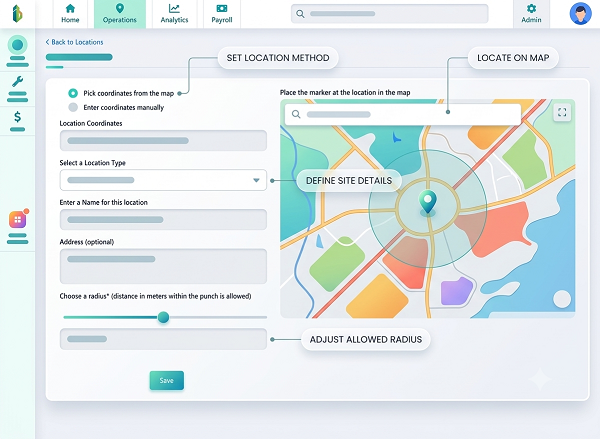
Geo-Fencing for Remote Attendance
Geo-fencing creates a virtual geographic boundary around an approved location. For example, an employer may configure an approved work location and allow attendance registration only within that area.
However, employers should ensure that geo-fencing is proportionate to the business purpose and consistent with applicable privacy requirements. A company should avoid collecting continuous employee location information when only a simple attendance confirmation is necessary.
Privacy and PDPL Considerations
Remote attendance systems can process personal information such as employee identity, attendance records, location, device information, IP information, working schedules, and leave information. Employers should establish appropriate safeguards.
Data Minimization
Collect only the information necessary for the attendance purpose.
Access Control
Only authorized personnel should access attendance and location data.
Purpose Limitation
Use employee data for defined and legitimate purposes.
Security
Apply appropriate technical and organizational security measures.
Retention
Do not retain attendance and location information longer than necessary under applicable requirements.
Transparency
Employees should receive appropriate information about how their data is collected and used.
Should Employers Continuously Track Remote Employees?
Continuous location tracking is generally much more intrusive than recording attendance at the start and end of a work period. Employers should consider whether continuous tracking is actually necessary.
For many office-based remote roles, a simple attendance mechanism may be sufficient. For field employees, delivery personnel, technicians, or employees traveling between customer locations, location-based monitoring may have a stronger business justification. The monitoring method should be appropriate to the employee's role and business purpose.
Remote Attendance Without GPS
Companies can also manage attendance without continuous location tracking. Options include:
- Web check-in
- Mobile check-in
- Timesheets
- Manager approval
- Work schedules
- Task management
- Employee self-service
This may be appropriate for knowledge workers whose physical location does not affect job performance.
Biometric Attendance for Remote Employees
Face recognition or fingerprint attendance is generally more difficult to implement remotely than office-based biometric attendance.
Where biometric information is considered, employers should assess:
- Whether biometric processing is necessary
- Applicable legal requirements
- Employee privacy
- Data security
- Storage arrangements
- Access restrictions
- Alternative attendance methods
A less intrusive attendance method may be preferable where it can achieve the same business objective.
Remote Attendance Exceptions
A good attendance system should allow employees to report exceptions, such as internet failure, device failure, emergencies, approved offsite work, customer visits, business travel, or system outages. Managers should be able to review and approve these exceptions.
Managing Remote Employee Absence
Remote employees can sometimes be incorrectly marked absent when they forget to check in.
An exception workflow can allow:
Employee submits attendance correction → Manager reviews → HR approves if required → Attendance record updated → Payroll recalculated if necessary
This is better than allowing payroll staff to change attendance records without documentation.
Attendance Audit Trails
Every attendance modification should ideally record the original entry, modified entry, reason, person who made the change, date and time of modification, and approval status. This helps HR investigate payroll discrepancies and maintain reliable records.
Remote Employee Payroll Reports
Payroll teams should generate reports showing total employees, remote employees, attendance exceptions, approved overtime, leave, absences, payroll adjustments, unapproved attendance, and salary variations. Managers can use these reports to identify unusual patterns before payroll is finalized.
Use HR Software for Remote Workforce Management
An integrated HR platform can combine:
Attendance
Record remote working hours.
Leave
Manage leave requests and approvals.
Payroll
Process salary using approved payroll inputs.
Employee Self-Service
Allow employees to view attendance and submit corrections.
Manager Dashboard
Give managers visibility over team attendance.
Location Controls
Use location verification where justified.
Alerts
Notify HR about attendance exceptions.
Reports
Generate workforce and payroll reports.
Recommended Remote Payroll Workflow
- Define the Remote Work Arrangement: Document the employee's schedule and working expectations.
- Configure the Employee Profile: Enter salary, schedule, department, and employment information.
- Configure Attendance: Select the appropriate attendance method.
- Employee Records Attendance: The employee checks in and out according to company policy.
- Manager Reviews: The manager approves attendance exceptions and additional hours.
- HR Reviews: HR checks unusual attendance or leave situations.
- Payroll Calculates Salary: Approved attendance and other payroll inputs are processed.
- Payroll Reconciliation: Payroll compares the payroll register with approved inputs.
- Salary Payment: Salary is processed through the applicable payment mechanism.
- Record Retention: Attendance and payroll records are securely retained according to applicable requirements.
Frequently Asked Questions
Can remote employees be included in normal Saudi Arabia payroll?
Yes. Remote work does not automatically require a separate payroll system. Employees can generally be processed through the employer's normal payroll framework, subject to their employment arrangements and applicable Saudi Arabia requirements.
How should employers track attendance for remote employees?
Employers can use web or mobile attendance, timesheets, approved schedules, or other suitable methods. The method should match the nature of the work and the employer's attendance policy.
Is GPS tracking mandatory for remote employees?
No general assumption should be made that GPS tracking is required simply because an employee works remotely. Employers should determine whether location information is necessary for a legitimate business purpose and consider applicable privacy requirements.
Can remote employees receive overtime?
Where applicable, overtime should be managed according to the employee's contract, authorization process, and Saudi Arabia employment requirements. Employers should maintain clear records of approved additional working hours.
Should remote employees receive the same salary as office employees?
Remote status by itself does not automatically determine salary. Compensation should be based on the employee's contract, role, working arrangement, and applicable employment requirements.
Does remote work affect GOSI?
Remote work does not automatically remove applicable GOSI obligations. Employers should determine the correct treatment based on employee status and current GOSI requirements.
How can payroll software help remote employees?
Payroll software can connect attendance, leave, overtime, employee records, statutory calculations, approvals, and payroll processing, reducing manual data entry and improving payroll accuracy.
How can companies protect remote employee attendance data?
Employers should apply appropriate access controls, security measures, data-minimization practices, retention policies, and other safeguards required under applicable Saudi Arabia data-protection requirements.
Conclusion
Payroll and attendance management for remote employees in Saudi Arabia requires a combination of clear policies, accurate attendance records, integrated payroll processes, controlled approvals, and responsible employee-data management.
Employers should avoid treating remote work as an informal arrangement. Instead, they can create a structured workflow:
Remote Work Policy → Employee Schedule → Attendance → Approval → Leave & Overtime → Payroll → Salary Payment → Record Keeping
For organizations with distributed teams, HR and payroll software can provide a centralized platform for attendance, leave, payroll, employee records, and workforce reporting. The goal should not be to monitor employees as extensively as possible. Instead, employers should collect the information necessary to administer work effectively, process payroll accurately, meet applicable legal obligations, and protect employee privacy.
Remote employees need flexible attendance controls. InnBuilt Attendance Software supports Saudi Arabia teams with mobile check-ins, work-hour visibility, leave workflows, manager approvals, and payroll integration.