Shift Management Software in Saudi Arabia: A Complete Guide for Employers
Shift Management Software in Saudi Arabia: A Complete Guide for Employers
Managing employee shifts can become complicated when a business operates across multiple branches, departments, projects, or work schedules. Retail stores may need morning and evening teams, hospitals may operate around the clock, construction companies may use project-based shifts, and logistics businesses may require employees across warehouses and delivery operations.
For employers in Saudi Arabia, effective shift management is particularly important when employees work different schedules, night shifts, rotational shifts, weekends, or extended operating hours.
Shift management software helps employers create work schedules, assign employees to shifts, monitor attendance, manage shift changes, track overtime, and connect attendance information with payroll.
Instead of preparing schedules manually in spreadsheets or communicating shift assignments through messages, businesses can use a centralized system to manage workforce schedules and attendance.
Saudi Arabia employers must also configure shift schedules with applicable labor requirements. The Ministry of Human Resources and Social Development (HRSD) states that the standard limits are generally eight actual working hours per day or 48 hours per week, with reduced working hours for Muslim workers during Ramadan. The Labor Law also contains provisions specifically addressing shift work, rest periods, and overtime.
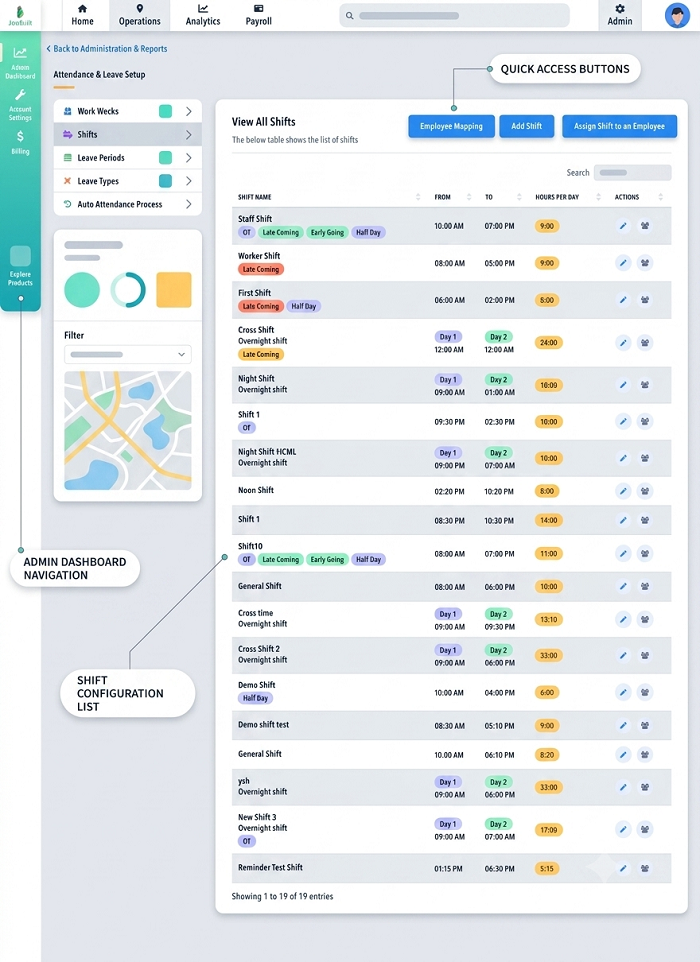
What Is Shift Management Software?
Shift management software is a digital workforce-management system that allows employers to plan, assign, monitor, and manage employee work schedules.
Depending on the platform, it may include:
- Shift scheduling
- Employee availability
- Shift assignment
- Rotational schedules
- Attendance tracking
- Mobile attendance
- GPS attendance
- Geo-fencing
- Leave management
- Overtime tracking
- Shift swapping
- Late and early-leaving alerts
- Employee notifications
- Manager approvals
- Payroll integration
- Workforce reports
A typical workflow looks like:
Create Shift → Assign Employee → Employee Receives Schedule → Employee Checks In → Attendance Recorded → Shift Completed → Overtime Calculated → Payroll Updated
This creates a more organized process for HR and operations teams.
Why Shift Management Is Important in Saudi Arabia
Many businesses in Saudi Arabia operate beyond conventional office hours.
Examples include:
- Retail stores
- Restaurants
- Hotels
- Hospitals
- Security agencies
- Manufacturing plants
- Construction projects
- Logistics companies
- Warehouses
- Call centers
- Facility-management companies
- Maintenance services
- Transportation businesses
These businesses may use:
- Morning shifts
- Evening shifts
- Night shifts
- Rotational shifts
- Split shifts
- Weekend shifts
- Extended shifts
- Project-based schedules
Managing these schedules manually can create errors.
Common problems include:
- Employees assigned to overlapping shifts
- Unfilled shifts
- Incorrect attendance
- Excessive overtime
- Last-minute scheduling problems
- Employees missing schedule updates
- Payroll discrepancies
- Difficulty managing multiple branches
Shift management software can centralize these processes.
Key Features of Shift Management Software
1. Shift Creation
HR managers can create different shifts according to business requirements.
For example:
Morning Shift: 7:00 AM–3:00 PM
Evening Shift: 3:00 PM–11:00 PM
Night Shift: 11:00 PM–7:00 AM
The exact schedule can be configured according to the employer's operating model and applicable legal requirements.
2. Employee Shift Assignment
Once shifts are created, managers can assign employees to them.
Assignments can be based on:
- Department
- Location
- Job role
- Skills
- Availability
- Project
- Employment schedule
This reduces the need to maintain separate spreadsheets for every department.
3. Rotational Shift Scheduling
Businesses operating continuously may rotate employees between different shifts.
For example:
Week 1 → Morning
Week 2 → Evening
Week 3 → Night
The system can create recurring schedules and notify employees of upcoming assignments.
4. Multiple Shift Templates
Businesses can create reusable shift templates.
Examples include:
- Standard shift
- Weekend shift
- Night shift
- Holiday shift
- Emergency shift
- Project shift
- Temporary shift
This makes scheduling faster when the same patterns occur repeatedly.
5. Employee Availability
Managers can record employee availability and use it while preparing schedules.
This can help identify potential scheduling conflicts before shifts are published.
6. Shift Notifications
Employees can receive notifications about:
- New shifts
- Shift changes
- Shift cancellations
- Schedule updates
- Upcoming shifts
- Approved shift swaps
This reduces reliance on manual communication.
Shift Management and Attendance
Shift scheduling becomes more useful when integrated with attendance management.
The system can compare:
Scheduled Shift vs. Actual Attendance
For example:
| Employee | Scheduled | Check-in | Check-out | Status |
|---|---|---|---|---|
| Employee A | 8:00 AM–4:00 PM | 7:55 AM | 4:05 PM | Present |
| Employee B | 9:00 AM–5:00 PM | 9:18 AM | 5:00 PM | Late |
| Employee C | 3:00 PM–11:00 PM | 3:02 PM | 11:10 PM | Present + OT |
This provides HR teams with a more structured basis for attendance and payroll processing.
Shift Management and Saudi Arabia Working-Hour Requirements
Employers should configure their workforce software with the applicable Saudi lArabia abor requirements rather than assuming that every employee can simply be assigned any schedule.
Under Article 98, the Saudi Arabia Labor Law generally limits actual working time to eight hours per day where the daily standard is used, or 48 hours per week where the weekly standard is used. For Muslim workers during Ramadan, actual working hours are reduced to six hours per day or 36 hours per week.
The law also provides for certain exceptions and special categories, so employers should assess the rules applicable to their workforce.
Shift Work
Article 100 addresses establishments where work requires shifts. With Ministry approval, working hours may be increased beyond the ordinary daily or weekly limits, provided the average working hours over a period of three weeks or less do not exceed eight hours per day or 48 hours per week.
Therefore, shift management software should support configurable schedules and averaging rules where legally applicable rather than applying one rigid scheduling formula to every employee.
Break Management
Shift scheduling should also account for rest, prayer, and meal breaks.
HRSD states that workers generally should not work for more than five consecutive hours without a break for rest, prayer, and meals of at least 30 minutes, and the worker should not remain at the workplace for more than 12 hours in a single day.
The break period is not counted as actual working hours under the cited provisions, and the worker is not under the employer's authority during the break.
A shift-management system can therefore include configurable break rules so that schedules provide appropriate rest periods.
Weekly Rest and Shift Scheduling
Employers also need to account for weekly rest when creating schedules.
HRSD states that Friday is the weekly rest day under the Labor Law, although it may be substituted for some workers with another day of the week after notifying the competent Labor Office, subject to the applicable requirements. The weekly rest period must be at least 24 consecutive hours.
A scheduling platform can help employers identify weekly-rest assignments when employees work different schedules.
Overtime Management
One of the most important features of shift management software is overtime tracking.
Overtime can occur when:
- Employees work beyond scheduled hours
- Employees cover another employee's shift
- Employees work on holidays
- Employees work additional hours during peak periods
- Employees extend their shifts
HRSD states that overtime compensation is generally based on the hourly wage plus 50% of the worker's basic wage. With the worker's consent, paid compensatory leave may be provided instead of overtime pay under the applicable rules.
The Labor Law also treats hours worked on official holidays and vacations as overtime under the cited provision.
Software can help employers calculate and review overtime, but payroll teams should ensure that the configured rules reflect the employee category, applicable law, company policies, and approved exceptions.
Managing Shift Swaps
Employees may occasionally need to exchange shifts.
For example:
Employee A: Morning shift
Employee B: Evening shift
Employee A requests a swap because of a personal commitment.
Instead of changing the schedule manually, a shift-management system can provide a workflow:
Employee Request → Manager Approval → Schedule Updated → Employee Notification → Attendance Rule Updated
This creates a digital record of the change.
Managing Last-Minute Shift Changes
Businesses frequently face unexpected staffing requirements.
Examples include:
- Employee absence
- Sudden increase in customer demand
- Emergency maintenance
- Staff shortage
- Employee leave
- Unexpected project requirements
Managers can use the software to identify available employees and assign replacement shifts.
This is particularly useful for hospitals, restaurants, hotels, security companies, logistics businesses, and 24/7 operations.
Shift Management for Multiple Saudi Arabia Branches
Companies operating across Saudi Arabia may have different schedules at different locations.
For example:
| City | Example Operation |
|---|---|
| Riyadh | Corporate and retail teams |
| Jeddah | Retail and hospitality |
| Dammam | Warehouse and logistics |
| Khobar | Service operations |
| Jubail | Industrial operations |
| Mecca | Hospitality and facility teams |
| Medina | Retail and service teams |
A centralized shift-management system can allow administrators to create location-specific schedules.
Managers can filter schedules by:
- City
- Branch
- Department
- Employee
- Shift
- Supervisor
- Project
Shift Management for Retail Businesses
Retail businesses often operate morning and evening shifts.
A store may need:
- Opening staff
- Sales employees
- Cashiers
- Supervisors
- Closing staff
Shift management software can help managers ensure that enough employees are scheduled during peak hours.
It can also help monitor:
- Late arrivals
- Early departures
- Absences
- Shift coverage
- Overtime
- Attendance
Shift Management for Restaurants and Hotels
Hospitality businesses frequently require multiple teams.
A hotel may have:
- Front-desk shifts
- Housekeeping shifts
- Kitchen shifts
- Security shifts
- Maintenance shifts
Restaurants may need different staffing levels during breakfast, lunch, dinner, and late-night operations.
Software can help managers schedule employees according to expected demand and operating hours.
Shift Management for Hospitals
Hospitals require specialized scheduling because operations can continue around the clock.
Shift management may include:
- Day shifts
- Evening shifts
- Night shifts
- Rotational schedules
- Weekend schedules
- Emergency coverage
The software can help managers track employee assignments and identify unfilled shifts.
For healthcare organizations, scheduling should also account for role requirements, qualifications, staffing policies, and applicable employment rules.
Shift Management for Security Agencies
Security businesses may operate 24/7.
Employees can be assigned to:
- Day security
- Night security
- Site-specific shifts
- Rotational shifts
- Relief shifts
A digital system can connect employees with specific security locations and shifts.
When combined with GPS or geo-fenced attendance, the employer can also verify attendance at approved locations where appropriate.
Shift Management for Construction Companies
Construction projects may have different operating requirements.
A project manager may create:
- Day shifts
- Night shifts
- Weekend shifts
- Maintenance shifts
- Project-specific shifts
Employees can be assigned based on:
- Project
- Worksite
- Job role
- Shift
- Supervisor
This can help HR teams connect project attendance with payroll.
Shift Management for Logistics and Warehousing
Logistics businesses often need employees at different times of the day.
For example:
Warehouse Shift A: 6:00 AM–2:00 PM
Warehouse Shift B: 2:00 PM–10:00 PM
Warehouse Shift C: 10:00 PM–6:00 AM
The system can assign employees to each shift and compare schedules with actual attendance.
Managers can also identify staffing gaps before the shift begins.
Mobile Shift Management
Mobile access is particularly useful for field employees and distributed teams.
Employees can use a mobile application to:
- View schedules
- Receive shift notifications
- Check attendance
- Request leave
- Request shift swaps
- View updated assignments
- Check work locations
Managers can use mobile access to approve requests and make schedule changes while away from their desks.
GPS and Geo-fencing for Shift Attendance
Businesses with field employees can combine shift management with GPS or geo-fencing.
For example:
Assigned Shift: 8:00 AM–4:00 PM
Assigned Location: Customer Site
Geo-fence: Defined around worksite
Check-in: Employee enters approved location
This can connect:
Employee + Shift + Location + Attendance
However, employee location data should be managed in accordance with applicable Saudi personal-data protection requirements.
Shift Management and Saudi Arabia PDPL
Shift-management systems can process personal data such as employee names, schedules, attendance information, leave records, and, where integrated with GPS or geo-fencing, location information.
Organizations using such features should assess the applicable requirements under Saudi Arabia's Personal Data Protection Law.
Important considerations can include:
- Purpose of data processing
- Appropriate legal basis
- Transparency
- Data minimization
- Access control
- Security
- Retention
- Vendor processing
- International data transfers
For example, if a company uses GPS to verify attendance at field locations, it should define why the location information is required and avoid collecting more information than necessary.
Shift Scheduling and Payroll Integration
A major benefit of shift-management software is its ability to connect schedules and attendance with payroll.
A typical workflow is:
Shift Created → Employee Assigned → Employee Checks In → Actual Hours Recorded → Late / Early / Overtime Calculated → Attendance Approved → Payroll Input Generated
This can reduce manual data entry.
Payroll Data Can Include
Depending on the system:
- Regular working hours
- Overtime
- Late hours
- Absence
- Paid leave
- Unpaid leave
- Holiday work
- Shift-related allowances
- Attendance adjustments
Payroll teams should still review calculations and apply the appropriate legal and contractual rules.
Benefits of Shift Management Software
1. Reduced Manual Scheduling
HR teams can create and manage schedules digitally.
2. Better Shift Visibility
Employees can see their upcoming schedules.
3. Fewer Scheduling Conflicts
The system can help identify overlapping or conflicting assignments.
4. Improved Attendance Accuracy
Scheduled shifts can be compared with actual attendance.
5. Better Overtime Control
Managers can identify additional working hours.
6. Faster Shift Changes
Managers can update schedules without maintaining multiple spreadsheets.
7. Better Multi-Branch Management
Organizations can manage different locations from one platform.
8. Improved Payroll Processing
Approved attendance information can flow into payroll.
9. Better Employee Communication
Employees can receive schedule notifications.
10. Centralized Reporting
HR and operations teams can analyze workforce schedules and attendance.
Manual Shift Scheduling vs. Shift Management Software
| Area | Manual Scheduling | Shift Management Software |
|---|---|---|
| Schedule creation | Spreadsheet/manual | Digital |
| Employee notifications | Manual | Automated |
| Shift changes | Manual | Centralized |
| Attendance comparison | Time-consuming | Automated |
| Overtime monitoring | Manual | System-based |
| Multi-location management | Difficult | Centralized |
| Shift swaps | Messages/forms | Approval workflow |
| Reporting | Manual | Automated |
| Payroll integration | Limited | Available with integration |
| Workforce visibility | Limited | Centralized |
How to Implement Shift Management Software
Step 1: Identify Workforce Types
Separate employees by:
- Department
- Location
- Job role
- Shift type
- Employment category
Step 2: Document Current Shifts
List existing schedules and identify common problems.
Step 3: Create Shift Templates
Build standard shift patterns.
Step 4: Configure Breaks and Rest
Configure applicable break and rest rules.
Step 5: Assign Employees
Connect employees with appropriate shifts and locations.
Step 6: Integrate Attendance
Connect schedules with attendance tracking.
Step 7: Configure Overtime
Define approval and calculation rules according to applicable requirements.
Step 8: Integrate Payroll
Connect approved attendance information with payroll where required.
Step 9: Train Employees
Show employees how to access schedules and request changes.
Step 10: Monitor and Improve
Review attendance, overtime, shift coverage, and scheduling issues regularly.
Best Practices for Saudi Arabia Employers
Employers can improve shift management by:
- Maintaining accurate employee records.
- Creating standardized shift templates.
- Assigning employees according to role and location.
- Publishing schedules in advance where practical.
- Providing employees with schedule notifications.
- Recording shift changes digitally.
- Monitoring overtime.
- Configuring applicable working-hour and break rules.
- Maintaining accurate attendance records.
- Reviewing weekly rest requirements.
- Connecting approved attendance with payroll.
- Restricting access to employee information.
- Reviewing GPS and geo-fencing settings where used.
- Regularly checking software configurations against current Saudi Arabia requirements.
Common Shift Management Problems
Employee Shortages
A shift may have fewer employees than required.
Solution: Use staffing reports and replacement workflows.
Shift Overlaps
Two employees may be assigned conflicting schedules.
Solution: Use automated schedule validation.
Last-Minute Absences
An employee may call in sick before a shift.
Solution: Maintain an availability and replacement workflow.
Excessive Overtime
Employees may repeatedly work beyond scheduled hours.
Solution: Monitor overtime dashboards and require appropriate approvals.
Incorrect Attendance
An employee's actual attendance may not match the assigned shift.
Solution: Integrate attendance with shift schedules.
Poor Communication
Employees may not know when their schedules change.
Solution: Use automated notifications.
Shift Management Dashboard
A useful dashboard can display:
- Today's shifts
- Upcoming shifts
- Employees working
- Employees absent
- Late employees
- Open shifts
- Shift swaps
- Overtime
- Attendance exceptions
- Branch-level staffing
- Department-level staffing
Managers can then identify problems before they affect operations.
Shift Management Checklist
Before implementing a shift-management system, employers can review:
- Employee database is accurate
- Branches and worksites are configured
- Shift templates are created
- Employees are assigned correctly
- Employee availability is recorded
- Break rules are configured
- Weekly rest schedules are considered
- Ramadan working-hour rules are configured where applicable
- Overtime rules are reviewed
- Shift swaps have an approval process
- Attendance is integrated
- Payroll integration is available where required
- Employees receive schedule notifications
- Managers have appropriate access
- Reports are available
- GPS/geo-fencing is configured appropriately where required
- Personal-data protection requirements are considered
- Employees are trained
Frequently Asked Questions
What is shift management software?
Shift management software is a digital system used to create employee schedules, assign shifts, manage changes, monitor attendance, track overtime, and support workforce planning.
Is shift management software useful for Saudi Arabia businesses?
Yes. It can be particularly useful for businesses operating multiple shifts, branches, projects, warehouses, hospitals, restaurants, hotels, security operations, and other organizations with variable work schedules.
Can shift management software track attendance?
Yes. Many systems integrate shift scheduling with attendance management so employers can compare scheduled hours with actual attendance.
Can shift software manage night shifts?
Yes. Most modern workforce-management platforms support day, evening, night, and rotational shifts.
Can employees request shift swaps?
Many systems provide employee self-service workflows where employees can request shift changes or swaps subject to manager approval.
Can shift management software integrate with payroll?
Yes. Approved attendance, overtime, leave, and working-hour information can be transferred to payroll systems through integration.
Can GPS be combined with shift management?
Yes. GPS and geo-fencing can be combined with shift schedules for field employees when location verification is required.
Does Saudi labor law regulate shift work?
Yes. Saudi Labor Law contains specific provisions concerning working hours, rest periods, weekly rest, overtime, and shift work. Employers should configure schedules according to the rules applicable to their employees and business activities.
What are the standard working hours in Saudi Arabia?
The Labor Law generally provides for a maximum of eight actual working hours per day or 48 hours per week, depending on the applicable daily or weekly standard. Muslim workers have reduced actual working hours during Ramadan to six hours per day or 36 hours per week. Certain categories and industries may be subject to specific rules or exceptions.
How is overtime handled in Saudi Arabia?
Under the cited Labor Law provisions, overtime compensation is generally the hourly wage plus 50% of the basic wage, with an option for paid compensatory leave with the worker's consent under the applicable rules.
Conclusion
Shift management software can help Saudi Arabia employers move from manual scheduling to a centralized and more structured workforce-management process.
By combining shift scheduling, employee self-service, attendance tracking, overtime management, leave management, mobile access, GPS or geo-fencing where appropriate, and payroll integration, businesses can manage complex work schedules more efficiently.
The software is particularly useful for retail, hospitality, healthcare, construction, logistics, manufacturing, security, facility management, and 24/7 operations.
However, technology should support—not replace—proper workforce planning and legal compliance. Saudi Arabia employers need to configure schedules around applicable working-hour limits, rest periods, weekly rest, overtime rules, Ramadan requirements, employee categories, and other relevant requirements. HRSD's current guidance confirms the importance of working-hour schedules, rest periods, and shift start and end times in shift-based workplaces.
A well-designed shift-management system can ultimately give employers better workforce visibility, help employees understand their schedules, reduce administrative work, improve attendance and payroll processes, and create a more consistent approach to managing shifts across Saudi Arabia.
InnBuilt Shift Management Software helps employers in Saudi Arabia create rosters, assign employees, manage availability, approve swaps, and monitor coverage. Scheduled shifts connect with actual attendance and payroll calculations in one workflow.