10 Things to Look for When Buying Payroll Software in Singapore
10 Things to Look for When Buying Payroll Software in Singapore
Choosing payroll software is an important decision for Singapore businesses. Payroll involves more than calculating monthly salaries. Employers must manage Central Provident Fund (CPF) contributions, itemised payslips, overtime, leave payments, tax reporting, statutory deductions and employee records. Errors can lead to compliance problems, payment delays and additional administrative work.
The right payroll software can help HR and finance teams automate calculations, reduce manual data entry, improve payroll accuracy and maintain reliable records. However, not every payroll solution offers the same features or supports Singapore's statutory requirements.
Before purchasing a system, businesses should evaluate its compliance capabilities, calculation accuracy, reporting functions, integrations, security and total cost.
Here are 10 important things to look for when buying payroll software in Singapore.
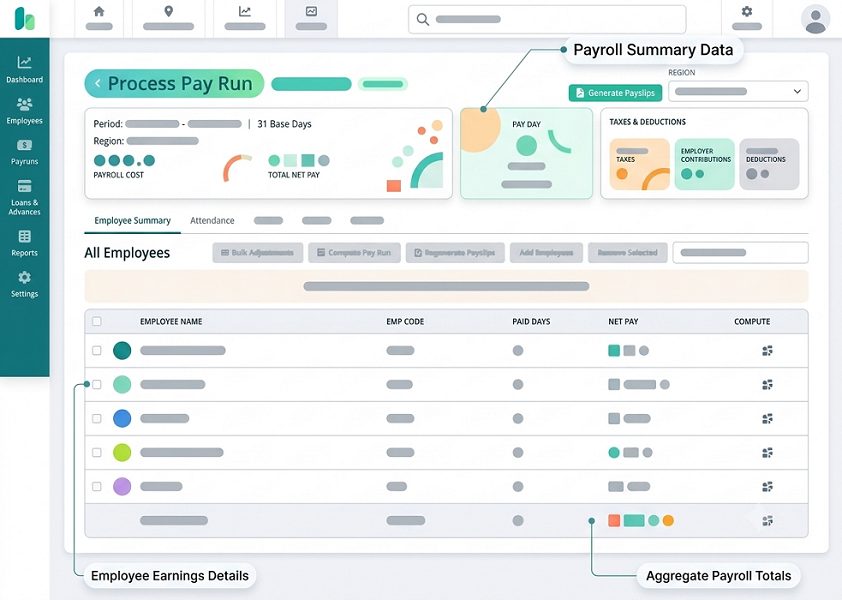
1. Singapore Statutory Payroll Compliance
Local statutory compliance should be one of the first things to evaluate. Payroll software must support Singapore's employment and payroll requirements rather than relying on generic international payroll calculations.
Check whether the system can handle:
- CPF contributions for eligible Singapore Citizens and Permanent Residents.
- Different CPF contribution rates based on employee age and residency status.
- Skills Development Levy (SDL) calculations.
- Applicable Foreign Worker Levy (FWL) information and payment workflows.
- Itemised payslip requirements.
- Salary payment records and payroll history.
- Applicable overtime, rest-day and public-holiday payments.
- Annual employment income reporting to IRAS.
CPF contribution calculations deserve particular attention. Rates can vary according to an employee's age, citizenship or Permanent Resident status, wages and applicable contribution rules. For example, CPF contribution rates for employees aged above 55 to 60 and above 60 to 65 increased from 1 January 2026. Software should apply the correct rates based on the relevant payroll period rather than using outdated settings.
What to ask the vendor: How does the system receive statutory updates, and how quickly are changes to CPF rates and other payroll requirements reflected in calculations?
2. Accurate CPF and Statutory Contribution Calculations
CPF calculations are among the most important functions of Singapore payroll software. Manual calculations can become complicated when a company employs workers of different ages, residency statuses and salary levels.
A suitable system should:
- Calculate employer and employee CPF contributions separately.
- Apply the correct contribution rates based on employee age.
- Support different contribution rules for Singapore Citizens and Permanent Residents.
- Handle Ordinary Wages (OW) and Additional Wages (AW).
- Apply the relevant wage ceilings and contribution limits.
- Follow CPF rounding requirements.
- Generate contribution summaries for payroll review.
The software should also make it easy to review the calculation for each employee. HR and finance teams should be able to identify the wages considered, applicable rates and resulting contribution amounts.
Look for a system that supports CPF submission workflows or integrates with the CPF Board's approved payment and submission processes. Some solutions may also offer CPF EZPay integration or data-linking capabilities.
What to ask the vendor: Can the software correctly process CPF calculations for employees with different ages, residency statuses, wage levels, bonuses and salary adjustments?
3. Automated Salary, Overtime and Allowance Calculations
Payroll software should calculate employee earnings accurately, even when the organisation has different salary structures and working arrangements.
A business may employ monthly-rated, hourly-rated, daily-rated, part-time, shift-based and commission-based employees. The software should support the relevant payment components without requiring HR teams to maintain separate manual spreadsheets.
Important features include:
- Basic salary calculations.
- Fixed and variable allowances.
- Overtime calculations.
- Rest-day payments.
- Public-holiday payments.
- Shift allowances and night-shift payments.
- Sales commissions and incentives.
- Bonuses and one-time payments.
- Unpaid leave and absence deductions.
- Salary adjustments and arrears.
The system should allow businesses to configure different salary structures for different employee groups.
For example, a retail company may pay monthly salaries to store managers, hourly wages to part-time employees and sales commissions to sales staff. Payroll software should handle these arrangements within a consistent payroll process.
It is also important to check whether the system supports applicable Employment Act requirements. Part 4 provisions on hours of work, overtime and rest days apply only to eligible employees, so the software should allow employers to configure rules according to employee coverage rather than applying identical calculations to everyone.
What to ask the vendor: Can the system calculate overtime, public-holiday pay, shift allowances and variable earnings using configurable rules for different employee categories?
4. Itemised Payslip Generation
Singapore employers covered by the Employment Act must issue itemised payslips to employees. These payslips must contain the applicable salary and payment details, including basic salary, allowances, deductions, overtime information where applicable and net salary.
Employers generally need to provide payslips together with salary payment. If that is not possible, they must provide them within three working days of payment.
Payroll software should automatically generate payslips after each payroll cycle.
Check whether the system supports:
- Employee and employer details.
- Salary period and payment date.
- Basic salary and applicable salary rates.
- Allowances and additional payments.
- Overtime hours and overtime pay, where applicable.
- Fixed and ad hoc deductions.
- Employee CPF deductions.
- Net salary payable.
- Digital payslip distribution.
- Historical payslip access.
Employee self-service is another useful feature. Employees should be able to access their payslips securely through a web portal or mobile application without repeatedly contacting HR.
What to ask the vendor: Can the software generate Singapore-compliant itemised payslips and distribute them securely to employees after payroll processing?
5. IRAS Auto-Inclusion Scheme (AIS) Support
Annual employment income reporting is another important payroll responsibility.
Under the Inland Revenue Authority of Singapore's (IRAS) Auto-Inclusion Scheme (AIS), participating employers submit employment income information electronically so that the information can be included in employees' individual income tax returns.
For the 2026 income year, employers with five or more employees must participate in AIS. Employers who receive an IRAS notice to file employment income electronically must also comply with the applicable requirement.
When evaluating payroll software, check whether it can:
- Prepare employment income information for IRAS submission.
- Generate the relevant IR8A and applicable appendix information.
- Support the required AIS technical file format.
- Submit employment income records through the supported API process.
- Identify missing or inconsistent employee information.
- Support amendments and revised submissions.
- Maintain records of submitted information.
IRAS publishes a list of payroll software vendors that support AIS submissions. However, being listed does not mean IRAS endorses the software. Employers should also evaluate the system's internal controls and suitability for their payroll operations.
What to ask the vendor: Does the software support the latest AIS requirements, and can it handle corrections or amended employment income submissions?
6. Integration With Attendance, Leave and HR Systems
Payroll depends on accurate employee and working-time information. When attendance, leave and payroll are managed in separate systems, HR teams may need to transfer data manually.
This increases the possibility of errors, duplicated entries and payroll delays.
Look for payroll software that integrates with:
- Attendance management: Imports approved working hours, attendance records, overtime and shift information.
- Leave management: Retrieves approved annual leave, sick leave, unpaid leave and other relevant absence records.
- HR management: Receives employee details, salary structures, joining dates, employment status and department information.
- Time and shift scheduling: Supports payroll calculations using approved schedules and recorded working hours.
- Accounting software: Transfers payroll expenses and journal entries to finance systems.
- Banking platforms: Supports salary payment files or other approved payment workflows.
For example, when an employee takes approved unpaid leave, the leave system should pass the relevant information to payroll. The payroll team can then review the deduction before finalising the salary.
Integration should not automatically turn every attendance exception or unapproved absence into a salary deduction. The business should define approval rules and maintain appropriate review controls.
What to ask the vendor: Does the software provide ready-made integrations or APIs for the attendance, leave, HR and accounting systems your business already uses?
7. Payroll Approval Workflows and Internal Controls
Payroll involves sensitive financial information. A reliable system should provide clear approval processes and prevent unauthorised changes to salary data.
Without proper controls, one person may be able to edit employee salaries, calculate payroll, approve payments and modify completed payroll records. This creates unnecessary operational and financial risks.
Look for features such as:
- Role-based user permissions.
- Separate payroll preparation and approval responsibilities.
- Multi-level approval workflows.
- Salary change approval.
- Overtime and allowance approval.
- Payroll variance reports.
- Alerts for unusual salary changes.
- Audit trails for edits and approvals.
- Payroll period locking after final approval.
- Controlled reopening of completed payroll periods.
For example, an HR executive may prepare the monthly payroll, while the HR manager reviews salary changes and the finance manager approves the final payroll summary.
The system should record who made a change, when it was made and what information was modified.
IRAS also publishes recommended controls for payroll software, making these controls a useful reference when evaluating a vendor's security and payroll processing capabilities.
What to ask the vendor: Can the software enforce separate preparation, review and approval responsibilities while maintaining a complete audit trail?
8. Employee Self-Service and Mobile Accessibility
Employee self-service can reduce routine HR queries and make payroll information easier to access.
Instead of contacting HR for every payslip or salary-related question, employees should be able to retrieve relevant information through a secure portal or mobile application.
Useful employee self-service features include:
- Payslip downloads.
- Annual salary and payment history.
- CPF contribution information.
- Tax-related employment income information.
- Leave balance visibility.
- Approved claims and reimbursements.
- Personal information updates.
- Bank account detail update requests.
- Payroll-related announcements.
Mobile accessibility is particularly useful for organisations with employees working across multiple outlets, construction sites, warehouses, retail locations or customer premises.
However, employee self-service should include appropriate security controls. Sensitive salary and personal information should not be accessible to unauthorised users.
What to ask the vendor: Can employees securely access their payslips and payroll information through mobile devices, and can HR control which information each employee can view or update?
9. Payroll Data Security, Privacy and Record Management
Payroll software stores sensitive employee information, including names, identification details, salary information, bank account details, CPF information and tax-related records.
Businesses should therefore assess the vendor's data protection and security capabilities before purchasing the system.
Important features to examine include:
- Encryption of data in transit and at rest.
- Multi-factor authentication.
- Role-based access controls.
- Secure employee login.
- Audit logs and activity monitoring.
- Regular security updates.
- Backup and recovery procedures.
- Secure data export.
- Data retention and deletion controls.
- Protection against unauthorised downloads.
- Documented security incident response procedures.
Singapore's Personal Data Protection Act (PDPA) requires organisations to protect personal data and retain it only for as long as necessary for business or legal purposes, subject to applicable exceptions.
If payroll data is stored or processed outside Singapore, employers should also check whether the vendor has appropriate safeguards for overseas transfers. The PDPA does not impose a blanket requirement that all payroll data must be stored locally in Singapore.
Businesses should also review the vendor's role in handling personal data, contractual responsibilities, access arrangements and data breach notification procedures.
What to ask the vendor: Where is payroll data stored, who can access it, what security measures are implemented, and how can the business retrieve or securely delete its data when the contract ends?
10. Pricing, Implementation, Customer Support and Scalability
The cheapest payroll software may not necessarily provide the best long-term value. Businesses should compare the full cost of ownership rather than focusing only on the advertised monthly subscription.
Payroll software pricing may depend on:
- Number of employees.
- Number of payroll entities.
- Payroll processing frequency.
- Available statutory compliance features.
- Employee self-service access.
- Attendance and leave integrations.
- AIS submission capabilities.
- Custom reports.
- Implementation and data migration.
- Training and customer support.
Also check whether the vendor charges separately for additional users, integrations, payroll reports, statutory updates or technical assistance.
Implementation support is particularly important when moving from spreadsheets or an existing payroll system. The vendor should explain how it will migrate employee details, salary structures, leave balances, historical payroll records and statutory information.
Before signing a contract, review the following:
| Evaluation area | What to check |
|---|---|
| Implementation | Setup process, migration support and timelines |
| Training | HR, finance and employee training |
| Customer support | Support channels, operating hours and escalation process |
| Software updates | How statutory and feature updates are delivered |
| Scalability | Ability to support additional employees and entities |
| Data export | Availability of payroll and employee records |
| Contract terms | Renewal, cancellation and additional charges |
Businesses should also consider whether the software can support future expansion. A company that currently processes payroll for 30 employees may eventually need to manage several hundred employees across multiple departments or entities.
What to ask the vendor: What is the complete first-year and ongoing cost, and can the system scale without requiring a costly replacement?
Payroll Software Evaluation Checklist for Singapore Businesses
Before selecting a payroll solution, use this checklist to compare shortlisted vendors.
| Evaluation criteria | What a suitable system should provide |
|---|---|
| Singapore compliance | Support for applicable CPF, SDL, payslip and employment requirements |
| CPF calculations | Correct rates, wage ceilings and contribution calculations |
| Salary processing | Basic salary, overtime, allowances, bonuses and deductions |
| Payslips | Automated itemised payslips and secure distribution |
| IRAS reporting | Support for applicable AIS submission requirements |
| Integrations | Connections with attendance, leave, HR and accounting systems |
| Approval controls | Role-based permissions, approvals and audit trails |
| Employee self-service | Secure mobile and web access |
| Data protection | Encryption, backups, access controls and retention management |
| Pricing and support | Transparent costs, implementation and reliable assistance |
Common Mistakes to Avoid When Buying Payroll Software
Even when businesses compare multiple vendors, they may overlook important requirements during the selection process.
Avoid these common mistakes:
-
Choosing software based only on price
A low subscription fee may exclude important features such as statutory reporting, integrations, employee self-service or implementation support. Compare the total cost before making a decision.
-
Assuming every payroll system supports Singapore compliance
International payroll software may not automatically support Singapore-specific CPF calculations, AIS submissions or itemised payslip requirements. Verify local functionality during the demonstration.
-
Ignoring payroll calculation accuracy
A system may have an attractive dashboard but still produce incorrect calculations for bonuses, overtime, deductions or different employee categories. Test actual payroll scenarios before purchasing.
-
Overlooking integration requirements
If payroll cannot connect with attendance, leave and HR systems, employees' working hours and approved leave may need to be entered manually.
-
Not testing approval controls
Payroll should not depend entirely on one person's access and judgement. Check whether the software supports appropriate review, approval and audit processes.
-
Failing to review data security
Payroll information is confidential. Do not select a vendor without reviewing its access controls, security measures, backup arrangements and data handling responsibilities.
-
Skipping a pilot or demonstration
Ask vendors to demonstrate real payroll scenarios using representative employee records and salary structures. This helps identify calculation and workflow limitations before implementation.
Conclusion
Buying payroll software in Singapore requires careful evaluation of statutory compliance, calculation accuracy, reporting, integrations and data protection. The right solution should help businesses process salaries efficiently while maintaining accurate records and supporting their payroll responsibilities.
Before making a final decision, test the software using actual business scenarios. Check CPF calculations, overtime payments, allowances, deductions, itemised payslips, AIS reporting and payroll approval workflows. Also review implementation costs, customer support and the vendor's ability to support future business growth.
A well-selected payroll system can reduce administrative work, improve payroll accuracy, strengthen internal controls and give HR and finance teams greater confidence in every payroll cycle.
A Singapore payroll buyer checklist covering contribution inputs, payslips, approval controls, reporting, integrations and support. Compare InnBuilt Payroll Software with other shortlisted tools.