How to Compare Payroll Software Vendors for Singapore SMEs
How to Compare Payroll Software Vendors for Singapore SMEs
Choosing payroll software is not simply about finding a system that can calculate monthly salaries. Singapore SMEs must also consider CPF contributions, statutory reporting, itemised payslips, employee records, payroll approvals and data security. The right software should make these responsibilities easier to manage without adding unnecessary costs or administrative complexity.
However, payroll vendors often advertise similar features. Many claim to offer automated payroll, CPF calculations, tax reporting and employee self-service. The actual differences become clear only when businesses examine the software's capabilities, test real payroll scenarios and review the vendor's support arrangements.
For SMEs with limited HR and finance resources, selecting the right vendor can reduce manual work, minimise payroll errors and support business growth.
This article explains how to compare payroll software vendors for Singapore SMEs, including the key evaluation criteria, questions to ask during demonstrations and a practical vendor comparison checklist.
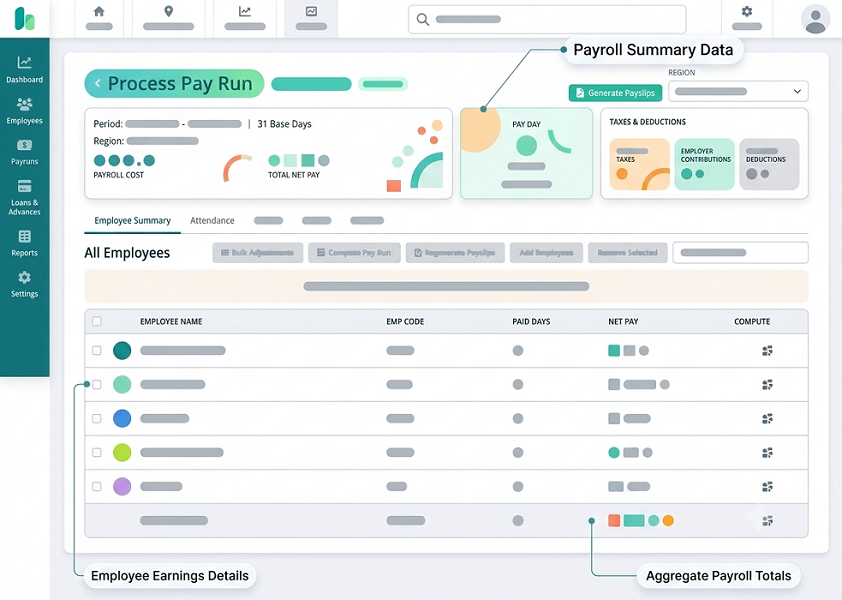
1. Start by Identifying Your SME's Payroll Requirements
Before contacting vendors, identify what your business actually needs from payroll software. A small company with 10 employees may require only salary processing, CPF calculations and payslip generation. A growing business with 100 employees may need attendance integration, leave management, multiple approval levels and accounting connections.
Start by reviewing your existing payroll process.
Consider the following:
- Number of employees and payroll frequency.
- Types of employees, including full-time, part-time and contract staff.
- Salary structures and payment arrangements.
- CPF contribution requirements.
- Overtime, shift allowances and variable payments.
- Leave, claims and reimbursement workflows.
- IRAS employment income reporting requirements.
- Number of payroll entities or business locations.
- Existing HR, attendance and accounting software.
- Payroll approval responsibilities.
For example, a retail SME may have monthly-paid managers, hourly-paid sales assistants and employees working rotating shifts. A professional services company may have mostly monthly-paid employees with bonuses, commissions and expense reimbursements.
These businesses need different payroll configurations.
Comparison tip: Prepare a written list of essential, desirable and optional features before requesting vendor quotations. This prevents your team from paying for modules it does not need.
2. Compare Singapore Payroll Compliance Capabilities
Local statutory compliance should be a major part of your vendor evaluation. A system designed for international payroll may not automatically support all Singapore-specific requirements.
Compare whether each vendor supports:
- CPF contribution calculations and submission workflows.
- Skills Development Levy (SDL) calculations.
- Applicable Self-Help Group (SHG) contributions.
- Itemised payslip generation.
- Employment income reporting to IRAS.
- Applicable overtime and rest-day calculations.
- Salary and employment record management.
- Relevant statutory reporting updates.
CPF calculations require particular attention because contribution rates depend on factors such as employee age, citizenship or Permanent Resident status, wages and applicable contribution ceilings. The vendor should demonstrate how the system applies the relevant rules and handles rate changes.
For example, CPF contribution rates changed for certain older employee age groups from 1 January 2026. A suitable system should apply the correct rates for the relevant payroll period rather than relying on outdated settings.
Also examine whether the vendor provides automatic statutory updates or requires administrators to configure changes manually.
Questions to ask vendors:
- How frequently are Singapore statutory payroll rules updated?
- Are CPF calculations automatically updated when contribution rates change?
- Can the software handle different employee age groups and residency statuses?
- Does the system provide reports for reviewing statutory deductions and contributions?
- What happens if a statutory calculation needs correction?
3. Check IRAS AIS and One-Stop Payroll Support
Annual employment income reporting is an important consideration when comparing Singapore payroll vendors.
The Auto-Inclusion Scheme (AIS) allows participating employers to submit employees' employment income information electronically to IRAS. For the 2026 income year, employers with five or more employees are required to participate, as are employers who receive an IRAS notice to submit electronically.
When comparing vendors, check whether the software supports:
- Preparation of Form IR8A information.
- Relevant appendices, including Appendices 8A and 8B.
- Direct AIS submission through the IRAS Application Programming Interface (API).
- Amendment submissions for previously submitted records.
- Taxable and non-taxable remuneration classification.
- Employment income reconciliation and verification reports.
Do not assume that every vendor advertising AIS support provides direct submission. Some systems may only generate files or reports that employers must submit separately.
IRAS maintains a list of AIS payroll software vendors for the relevant Year of Assessment. It also publishes recommended payroll software controls. Being listed means that the software has passed the relevant technical validation; it does not mean IRAS endorses the product or guarantees its overall quality.
You can also check whether a vendor supports One-Stop Payroll (OSP). OSP-ready software can support submissions to multiple government agencies, including annual employment income information to IRAS, monthly CPF contribution information to CPF Board and specified survey responses to MOM.
Questions to ask vendors:
- Is the software listed for the relevant AIS Year of Assessment?
- Does it submit information directly through the IRAS API?
- Does it support OSP submissions?
- Can it generate reconciliation reports before submission?
- How are rejected or amended submissions handled?
4. Compare Payroll Calculation Features
A payroll system should handle the actual salary structures used by your business. Comparing vendors based only on basic salary processing can lead to problems when the company introduces new payment arrangements.
Evaluate each system's ability to calculate:
| Payroll component | What to check |
|---|---|
| Basic salary | Monthly, daily and hourly salary structures |
| Overtime | Configurable rules for eligible employees |
| Allowances | Fixed, variable and shift-related allowances |
| Bonuses | Annual bonuses and one-time payments |
| Commissions | Sales-based and performance-based payments |
| Deductions | Unpaid leave and authorised deductions |
| Public holidays | Applicable holiday payments |
| Rest days | Relevant rest-day payment calculations |
| Reimbursements | Claims and approved expense payments |
| Final salary | Salary adjustments and final settlement calculations |
Pay particular attention to how the system handles different employee categories.
For example, an SME employing office staff, warehouse workers and part-time retail assistants may need different working-hour and salary calculation rules.
The vendor should also demonstrate how the system handles new joiners, resignations, salary revisions, unpaid leave and retroactive adjustments.
Remember that statutory overtime provisions do not apply identically to every employee. The software should support the relevant rules for eligible employees rather than applying one universal overtime formula.
Comparison tip: Ask every vendor to process the same sample payroll containing basic salary, overtime, allowances, unpaid leave and a bonus. Compare the results against your own verified calculations.
5. Evaluate Integration With Existing Business Systems
SMEs often use different applications for attendance, leave, employee information and accounting. Payroll software that operates independently may require repeated manual data entry.
Compare the integration capabilities of each vendor.
| Integration | Business benefit |
|---|---|
| Attendance software | Imports approved working hours and overtime |
| Leave management | Retrieves approved leave and unpaid absence information |
| HR management | Maintains employee profiles and salary details |
| Claims management | Transfers approved reimbursements |
| Accounting software | Posts payroll expenses and journal entries |
| Banking platforms | Supports salary payment files or approved payment workflows |
| Business intelligence tools | Supports management reporting and analysis |
For example, when an employee takes approved unpaid leave, the leave system should transfer the relevant information to payroll. HR can then review the deduction before approving the payroll run.
Check whether integrations are available through built-in connectors, APIs or third-party middleware. Also ask whether integration setup, maintenance or additional transactions attract separate charges.
Questions to ask vendors:
- Which accounting and HR platforms are already supported?
- Are integrations included in the subscription?
- Can the software connect to our existing attendance system?
- Does it support API-based integration?
- How are failed or incomplete data transfers identified and corrected?
6. Compare Payroll Approval Workflows and Audit Controls
Payroll involves sensitive financial information, so SMEs should not overlook internal controls.
A suitable system should allow different employees to perform payroll preparation, review and approval according to their responsibilities.
Compare features such as:
- Role-based access permissions.
- Separate payroll preparation and approval.
- Multi-level approval workflows.
- Salary revision approvals.
- Overtime and allowance approvals.
- Payroll variance reports.
- Audit trails for changes.
- Payroll period locking.
- Controlled reopening of completed payroll runs.
For example, an HR executive may prepare the monthly payroll, the HR manager may verify employee changes, and the finance manager may approve the final payment summary.
The system should record who made changes, when they were made and which values were modified.
IRAS recommends controls such as appropriate access rights, audit trails, payroll submission controls and reconciliation reports. These provide useful criteria when comparing vendors.
Comparison tip: Ask vendors to demonstrate a salary revision from beginning to end, including the approval process and the audit history.
7. Assess Employee Self-Service and Mobile Accessibility
Employee self-service can reduce routine HR queries and make payroll information easier to access.
When comparing vendors, check whether employees can use a web portal or mobile application to:
- Download monthly payslips.
- Review salary payment history.
- Access relevant CPF information.
- View approved claims and reimbursements.
- Check leave balances.
- Submit personal information update requests.
- Access relevant employment documents.
The employee interface should be straightforward. Employees should not need extensive training to download a payslip or find their salary information.
Also check whether the software supports different access permissions for employees, supervisors and HR administrators.
For SMEs with employees working across retail outlets, warehouses or field locations, mobile accessibility can be particularly useful.
Questions to ask vendors:
- Is employee self-service included in the quoted price?
- Is the mobile application available for Android and iOS?
- Can employees access historical payslips?
- Can employees update their bank details directly, or must HR approve changes?
- How is access protected when an employee leaves the company?
8. Compare Data Security, Privacy and Backup Arrangements
Payroll software contains confidential employee and financial information. SMEs should evaluate data protection measures before signing a contract.
Review the following security features:
| Security area | What to verify |
|---|---|
| Data encryption | Protection of information in transit and at rest |
| User authentication | Secure login and multi-factor authentication |
| Access permissions | Access limited according to job responsibilities |
| Audit logs | Records of access and changes |
| Data backup | Backup frequency and recovery procedures |
| Data retention | Configurable retention and deletion controls |
| Data export | Ability to retrieve records in usable formats |
| Vendor access | Controls over vendor personnel accessing payroll data |
| Incident response | Procedures for investigating and reporting data breaches |
Singapore's Personal Data Protection Act (PDPA) requires organisations to protect personal data and manage its retention appropriately. If the vendor stores or processes information overseas, ask how it complies with applicable overseas transfer requirements.
You should also establish who is responsible for handling data protection incidents and how quickly the vendor will notify your organisation if a security issue affects payroll information.
Comparison tip: Request the vendor's security documentation, data processing terms and backup and recovery procedures. Do not rely only on general statements such as "enterprise-grade security."
9. Compare Pricing, Implementation and Ongoing Support
Payroll software prices can vary significantly depending on the vendor's pricing model and the features included.
Some vendors charge per employee, while others offer fixed monthly packages or customised enterprise pricing.
Compare the complete cost rather than the advertised subscription alone.
| Cost component | Questions to consider |
|---|---|
| Subscription | Is pricing per employee, per user or per company? |
| Payroll modules | Are statutory calculations and reporting included? |
| Employee self-service | Is mobile access included? |
| Implementation | Is there a one-time setup fee? |
| Data migration | Are historical payroll records transferred at extra cost? |
| Integrations | Are API connections or accounting integrations charged separately? |
| Training | Is initial training included? |
| Support | Are there different support packages? |
| Upgrades | Are statutory updates included? |
| Additional entities | Are separate payroll companies charged extra? |
Implementation and customer support are particularly important for SMEs with small HR teams.
Ask the vendor how long implementation normally takes, whether historical payroll data can be migrated and what assistance is provided during the first live payroll cycle.
Also compare support arrangements, including:
- Support availability during Singapore business hours.
- Email, telephone and chat assistance.
- Response and escalation procedures.
- Payroll-specific technical support.
- Assistance during year-end tax reporting.
- Training for new HR and finance users.
A vendor offering a low subscription price may become expensive if essential integrations, training and support are charged separately.
Comparison tip: Request a written quotation based on the same employee count, modules, integrations and implementation requirements from every shortlisted vendor.
10. Evaluate Vendor Experience, Scalability and Long-Term Suitability
The vendor should be capable of supporting your business beyond the initial implementation.
A payroll system that works for 15 employees may not be suitable when the company grows to 150 employees or establishes additional business entities.
Evaluate the vendor's experience and long-term capabilities.
Consider:
- Experience supporting Singapore SMEs.
- Knowledge of Singapore payroll requirements.
- Frequency of software updates.
- Product development roadmap.
- Customer support availability.
- References from businesses of similar size.
- Ability to support multiple entities.
- Regional payroll capabilities, if expansion is planned.
- Data export and migration options.
- Contract renewal and termination terms.
Ask for references or case studies from businesses with similar payroll complexity.
Also check what happens if you decide to change vendors. You should be able to retrieve employee information, payroll history, payslips, tax records and relevant audit information in usable formats.
Questions to ask vendors:
- How many Singapore SMEs currently use the platform?
- Can the software support additional employees and entities?
- How frequently are product and compliance updates released?
- What happens to our data if we terminate the contract?
- Can you provide references from businesses with similar requirements?
Common Mistakes Singapore SMEs Should Avoid
1. Choosing a vendor based only on price
A low subscription fee does not guarantee that the system includes the statutory reporting, integrations and support your company needs.
2. Assuming AIS listing means IRAS endorsement
IRAS validates technical requirements for AIS submissions. It does not endorse the overall software or guarantee its security, usability or suitability.
3. Ignoring implementation costs
Data migration, employee setup, integration and training can increase the total cost of ownership.
4. Not testing real payroll scenarios
A generic demonstration may not reveal problems with part-time employees, overtime, bonuses, unpaid leave or salary adjustments.
5. Overlooking customer support
Payroll deadlines are important. Understand how the vendor handles urgent calculation issues, rejected submissions and system interruptions.
6. Failing to review exit arrangements
Before signing, confirm that the company can retrieve its payroll records and relevant documents if it switches vendors.
7. Buying unnecessary modules
A small business may not need a full HRMS with recruitment, performance management and advanced workforce planning. Select the smallest package that meets current and reasonably foreseeable requirements.
Conclusion
Comparing payroll software vendors for Singapore SMEs requires more than reviewing feature lists and subscription prices. Businesses should assess statutory compliance, CPF calculation accuracy, IRAS reporting, integration capabilities, security, approval workflows and long-term support.
The most suitable vendor is one that can handle your actual payroll requirements reliably without introducing unnecessary complexity or expense.
Before signing a contract, shortlist two or three vendors, request comparable quotations and conduct demonstrations using the same payroll scenarios. Verify their statutory submission capabilities through official government resources, review the service agreement and calculate the total cost of ownership.
A structured comparison helps SMEs choose payroll software that supports accurate salary processing, reduces administrative work and remains suitable as the business grows.
Compare vendors using the same pay scenarios, implementation scope and total costs. Include InnBuilt in a Singapore SME evaluation with clear acceptance criteria.