What Should Singapore Managers See on a Live Field Team Dashboard?
What Should Singapore Managers See on a Live Field Team Dashboard?
Introduction
Managing a mobile workforce can be challenging when employees work across multiple customer locations, construction sites, commercial buildings and industrial facilities. Managers need to know whether employees have started their assignments, reached the correct locations, completed scheduled work and are available for additional jobs.
A live field team dashboard brings this information together in one place. It uses data from GPS-enabled mobile applications, attendance systems, job management tools and employee schedules to provide an overview of field operations.
For example, a facilities management company in Singapore may have technicians working in Jurong, Tampines, Woodlands and the Central Business District. A manager should be able to view their latest reported locations, assigned jobs, attendance status and outstanding tasks without contacting each employee individually.
A useful dashboard should not simply display a map with employee markers. It should help managers make decisions, identify operational problems and coordinate field activities.
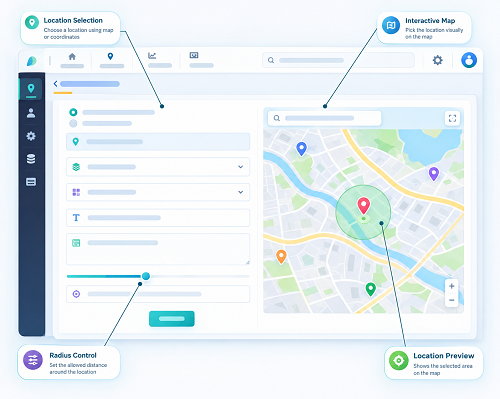
1. Live Employee Location Map
The first feature managers should see is a live or regularly updated map showing the latest available locations of field employees.
This allows supervisors to understand where employees are operating and whether they are close to their assigned customer locations.
The map should ideally display:
- Employee name or identification.
- Latest reported GPS position.
- Last location update time.
- Current job assignment.
- Employee work status.
- Assigned customer or worksite.
- Location history, where authorised.
- Navigation or route information, where available.
For example, a maintenance manager may need to identify which technician is closest to an urgent repair request in Paya Lebar. A location map can help shortlist employees who may be suitable for the assignment.
Managers should also be able to distinguish between a live update and an older location record. A marker based on a location received 30 minutes ago should not be presented as the employee's confirmed current position.
2. Employee Availability and Work Status
Location alone does not tell managers whether an employee can accept another assignment.
A technician may be close to a customer but already working on a complex repair. Another employee may be travelling to a job, taking an authorised break or waiting for equipment.
The dashboard should display clear availability and work status indicators.
| Status | What it tells the manager |
|---|---|
| Available | Employee can potentially receive a new assignment |
| Assigned | Employee has an allocated job |
| Travelling | Employee is on the way to a worksite |
| On site | Employee has arrived at the assigned location |
| In progress | Employee is performing the job |
| On break | Employee is taking an authorised break |
| On hold | Work is temporarily paused |
| Completed | Assigned work has been completed |
| Offline | Application is not currently reporting updates |
| On leave | Employee is unavailable due to approved leave |
These statuses help dispatchers avoid assigning work to employees who are already occupied.
The dashboard should also show when the status was last updated and allow authorised employees to update it through their mobile applications.
3. Job Assignment and Work Order Overview
Managers should be able to see all active, pending and completed work orders without opening each employee's individual record.
A job overview helps managers understand the team's workload and identify assignments that require attention.
Useful information includes:
- Job reference number.
- Customer or client name.
- Worksite address.
- Job category.
- Assigned technician.
- Job priority.
- Scheduled start time.
- Expected completion time.
- Current job status.
- Job completion details.
For example, a Singapore equipment servicing company may have 35 open work orders across several locations. The dashboard should help managers identify how many jobs are assigned, how many remain unallocated and which assignments are approaching their deadlines.
Managers should also be able to filter jobs by customer, location, technician, priority and status.
4. Daily Attendance and Check-In Information
Attendance information is important because managers need to know whether employees have started their scheduled shifts and arrived at the required workplaces.
The dashboard should display relevant attendance details, such as:
- Scheduled shift start time.
- Actual check-in time.
- Check-in location.
- Geofence verification result, where used.
- Late arrivals.
- Missed check-ins.
- Check-out records.
- Attendance exceptions.
- Manager approval status.
For example, a construction supervisor may need to check whether employees have arrived at an assigned site before the day's work begins.
A geofenced check-in can help verify that an employee's device was within an approved location boundary when the attendance action was recorded. However, GPS presence alone does not prove that the employee completed the assigned work.
Managers should be able to review exceptions and distinguish between genuine attendance problems and technical issues such as poor GPS reception or network interruptions.
5. Job Progress and Completion Status
A live dashboard should show how work is progressing throughout the day.
Managers need to identify jobs that are completed, underway, delayed or waiting for action.
A useful job progress section may include:
- Total jobs scheduled.
- Jobs assigned.
- Jobs accepted by employees.
- Employees travelling to customer locations.
- Jobs currently in progress.
- Jobs completed.
- Jobs placed on hold.
- Cancelled assignments.
- Jobs awaiting reassignment.
For example, a field service manager may notice that several maintenance jobs remain in the travelling status longer than expected. The manager can contact the relevant employees, review traffic conditions and update customer appointment estimates.
The dashboard should ideally display job status changes as they are received from mobile applications, while showing the timestamp of the latest update.
6. Technician Dispatch and Scheduling Information
A field team dashboard should help managers decide who should receive the next assignment.
Dispatch decisions should consider more than employee proximity. The dashboard should combine location information with availability, technical skills, workload and appointment commitments.
Managers should be able to review:
- Employees available for new jobs.
- Technicians currently working nearby.
- Employees with the required technical skills.
- Unassigned work orders.
- Upcoming appointments.
- Existing job commitments.
- Estimated travel times, where supported.
- Potential scheduling conflicts.
For example, if a customer in Woodlands reports an urgent equipment failure, a dispatcher can check which qualified technicians are available in the surrounding area.
The IMDA field service management solution requirements specifically identify scheduling technicians based on their skills, availability and proximity to jobs as a relevant capability.
7. Travel Time and Route Information
Travel is a significant part of many field service operations. Managers should be able to understand how much time employees spend travelling between assignments.
A dashboard may display:
- Current travel status.
- Planned route.
- Estimated arrival time.
- Actual arrival time.
- Travel duration.
- Distance travelled.
- Route changes, where supported.
- Delayed journeys.
For example, a technician travelling from Jurong East to a customer site in the Central Business District may experience delays during peak traffic periods. The dashboard can help the dispatcher identify the delay and decide whether to update the customer or reassign the job.
Managers should not rely exclusively on straight-line distance when estimating travel time. Road conditions, site access and parking requirements can influence actual arrival times.
Travel information should also be interpreted in context. A longer route may be necessary because of equipment collection, customer instructions or road restrictions.
8. Alerts and Exception Notifications
Managers should not have to monitor every employee and work order continuously to identify operational problems.
A useful dashboard should highlight important exceptions and notify the appropriate people.
Examples include:
- The employee has not checked in by the scheduled start time.
- The technician has not accepted an assigned job.
- The employee has not updated job status.
- Customer appointments are approaching without an arrival update.
- The job has exceeded its planned duration.
- High-priority work remains unassigned.
- A technician reports a problem at the worksite.
- Required equipment or spare parts are unavailable.
- Location updates have stopped unexpectedly.
- A job is approaching its SLA deadline.
Alerts should be prioritised so that managers can focus on issues that require immediate action.
For example, an urgent customer repair approaching its response deadline should be more prominent than a routine maintenance job scheduled for the following week.
Managers should also be able to configure alert thresholds according to job type, customer commitments and operational requirements.
9. Overtime and Working-Hour Information
Managers need visibility into employee working hours, particularly when field assignments extend beyond scheduled shifts.
The dashboard should provide relevant information to help supervisors identify employees who may be approaching overtime or working-hour limits applicable to their employment arrangements.
Useful fields include:
- Scheduled working hours.
- Actual recorded hours.
- Start and end times.
- Break records.
- Overtime hours.
- Pending overtime approvals.
- Rest-day assignments.
- Shift exceptions.
For example, a maintenance employee may receive an urgent evening assignment after completing a normal shift. The dashboard can help the manager review the employee's existing hours before approving additional work.
However, employers should configure working-hour and overtime rules according to the employee's eligibility under Singapore's Employment Act and applicable contractual arrangements. Part IV provisions on hours of work, overtime and rest days do not apply to every employee.
The dashboard should support accurate recordkeeping and payroll review rather than automatically treating every additional hour as statutory overtime.
10. Site Visit and Customer Appointment Details
Field teams often visit multiple customer locations in one working day.
Managers should be able to see whether employees have attended their assigned sites and whether the relevant customer visits have been recorded.
Useful information includes:
- Customer or site name.
- Scheduled visit time.
- Actual arrival time.
- Departure time.
- Visit duration.
- Check-in verification.
- Service activity performed.
- Customer acknowledgement.
- Follow-up requirements.
For example, a sales support employee may have four scheduled customer visits across Singapore. The manager should be able to review which visits have been completed and which remain outstanding.
Site visit records should be linked to the appropriate work order or customer record so that the organisation can understand the purpose of each visit.
A GPS check-in can support visit verification, but it should not be treated as conclusive proof that a meeting or service activity took place.
11. Employee Workload and Resource Utilisation
A dashboard should help managers distribute work fairly and identify employees who are overloaded or underutilised.
Useful workload indicators include:
- Number of assigned jobs per employee.
- Completed jobs.
- Pending jobs.
- Average job duration.
- Travel time.
- Unallocated work.
- Upcoming assignments.
- Leave and availability information.
For example, a field service manager may find that one technician has eight assignments while another has only three. Before reallocating work, the manager should review the complexity, location and expected duration of each job.
A useful dashboard should support workload balancing without encouraging managers to judge employee performance solely by the number of completed jobs.
Different employees may handle different service categories, customer requirements and technical challenges.
12. Customer Service and SLA Performance
Field service businesses need to monitor whether customer appointments and service commitments are being met.
A dashboard should make important customer service indicators visible.
Examples include:
- Jobs completed within the agreed appointment window.
- Average response time.
- Average resolution time.
- Jobs approaching SLA deadlines.
- Delayed appointments.
- Repeat service visits.
- Customer complaints.
- Customer satisfaction feedback.
For example, a facilities management company may have a contractual requirement to respond to urgent maintenance requests within a specified period.
The dashboard should highlight assignments approaching the response deadline so that managers can intervene before a service commitment is missed.
Managers should also be able to filter performance by customer, service type, worksite and technician.
13. Job Completion Evidence and Service Reports
Managers need more than a completed status to confirm that a service assignment has been properly documented.
A live dashboard should link completed jobs to the supporting records submitted by field employees.
These may include:
- Work completion notes.
- Photographs before and after service.
- Digital checklists.
- Customer signatures.
- Equipment inspection details.
- Parts and materials used.
- Follow-up recommendations.
- Customer feedback.
For example, a technician completing an air-conditioning repair at a commercial building may submit photographs, describe the fault and record the replacement parts used.
The manager should be able to review these records before closing the work order or forwarding it for billing.
The IMDA field service management requirements identify mobile capabilities such as work order access, digital records, photographs, signatures and offline data capture as useful operational features.
14. Safety and Incident Alerts
Field employees may work in industrial environments, construction areas, customer facilities and other locations where safety risks need attention.
A dashboard should provide visibility into relevant safety incidents and operational alerts.
Useful information may include:
- Reported workplace incidents.
- Employee emergency alerts.
- Site access problems.
- Safety checklist completion.
- High-risk job assignments.
- Outstanding corrective actions.
- Emergency contact information.
- Incident investigation status.
For example, if a technician reports an unsafe equipment condition, the manager should be able to identify the affected work order and take appropriate action.
Where employee safety features involve location sharing or emergency monitoring, employers should explain the purpose and configure access carefully.
A safety dashboard should support incident response rather than become an unrestricted employee surveillance tool.
15. Inventory and Equipment Availability
Field employees may require spare parts, tools and equipment to complete their assignments.
Managers should be able to see whether the required resources are available before dispatching a technician.
A useful dashboard may show:
- Spare parts availability.
- Equipment assigned to technicians.
- Stock levels.
- Materials used on completed jobs.
- Items awaiting replenishment.
- Equipment maintenance status.
- Tools requiring inspection or replacement.
For example, a technician assigned to repair an industrial pump may need specific replacement components. The manager should be able to check whether the technician has the required parts or needs to collect them before travelling to the customer location.
Integrating inventory information with job dispatch can reduce unnecessary return trips and incomplete service visits.
16. Reports and Key Performance Indicators
Managers should be able to review daily operational performance through clear charts, summaries and filters.
A dashboard should not overwhelm users with dozens of unrelated metrics. It should highlight the indicators that help them make decisions.
| KPI | What it measures | Why managers need it |
|---|---|---|
| Jobs assigned | Total work orders allocated | Understand daily workload |
| Jobs completed | Completed service assignments | Monitor operational output |
| Unassigned jobs | Work awaiting allocation | Identify dispatch backlogs |
| Average response time | Time taken to respond to requests | Evaluate customer responsiveness |
| On-time arrival rate | Appointments reached within agreed windows | Monitor scheduling performance |
| First-time fix rate | Jobs completed without repeat visits | Review service effectiveness |
| Average job duration | Time spent completing assignments | Identify scheduling patterns |
| Travel time per job | Time spent travelling | Evaluate route efficiency |
| Overtime hours | Additional working hours recorded | Support workforce planning |
| SLA achievement | Jobs meeting service commitments | Monitor customer obligations |
| Job reassignment rate | Frequency of assignment changes | Identify scheduling issues |
Managers should be able to filter reports by date, employee, team, worksite, customer and job category.
They should also be able to compare current performance with previous periods and identify trends.
17. Privacy and Access Controls
A live field team dashboard may contain employee names, attendance information, GPS locations, work schedules and customer details.
Singapore employers should ensure that the dashboard provides appropriate access restrictions and protects personal information.
The PDPA includes an employment-related exception that may permit certain collection, use and disclosure of employee personal data for reasonable employment management purposes without consent. However, employers must still inform employees of the purposes involved and comply with other applicable PDPA obligations.
Important dashboard controls include:
- Role-based access for managers and supervisors.
- Restricted visibility of employee location history.
- Secure administrator accounts.
- Access logs for sensitive records.
- Appropriate data retention settings.
- Secure data exports.
- Clear employee monitoring policies.
- Controls over access by external vendors.
For example, a team supervisor may need to see the current locations of assigned employees, while senior management may only need aggregated operational reports.
The Ministry of Manpower has also emphasised the importance of informing workers about workplace monitoring purposes and implementing appropriate safeguards for collected information.
18. Customise Dashboard Views for Different Management Roles
Not every manager needs to see the same information.
A dispatcher requires immediate visibility into employee locations and unassigned jobs. An operations manager may need workload and SLA reports, while senior management may focus on broader productivity and service trends.
A well-designed dashboard should support different views.
| User role | Most important dashboard information |
|---|---|
| Dispatcher | Live employee locations, availability, job assignments and travel updates |
| Field supervisor | Attendance, site visits, job progress and employee workload |
| Operations manager | Job completion, SLA performance, overtime and resource utilisation |
| HR manager | Attendance exceptions, working hours, leave and overtime records |
| Service manager | Customer complaints, repeat visits, response times and service quality |
| Senior management | Overall productivity, operating costs and customer service performance |
Role-specific dashboards reduce information overload and make it easier for each user to focus on relevant decisions.
19. Evaluate Dashboard Usability Before Purchasing Software
Before selecting a live field team tracking platform, Singapore businesses should test whether managers can understand and use the dashboard during normal operations.
A practical evaluation should include:
- Open the live employee location map.
- Check how frequently location updates are received.
- Identify employees who are available for new assignments.
- Review active and unassigned work orders.
- Filter jobs by customer, location and priority.
- Check attendance and geofence exceptions.
- Review delayed appointments and SLA alerts.
- Examine employee workload and overtime information.
- Open a completed job and review its supporting documents.
- Export attendance and job performance reports.
- Test access permissions for different manager roles.
- Check dashboard usability on desktop, tablet and mobile devices.
Businesses should also test the dashboard during busy periods and when multiple employees update their job statuses simultaneously.
A good platform should make important information easy to find without requiring managers to navigate through several unrelated screens.
Conclusion
A live field team dashboard should help Singapore managers understand employee locations, job progress, availability, attendance and customer service performance from one central platform.
The most useful dashboards combine a live location map with job assignments, technician availability, dispatch information, attendance exceptions, travel details, alerts and performance reports. Managers should also be able to review service completion evidence, working-hour information and relevant safety updates.
The right dashboard depends on the organisation's size, field workforce structure and service requirements. A small maintenance business may need basic location and job status visibility, while a larger facilities management company may require advanced scheduling, SLA monitoring, inventory integration and role-specific reporting.
By selecting a dashboard that presents accurate, relevant and actionable information, Singapore businesses can improve field coordination, respond to customer requests more effectively and manage mobile employees with greater operational visibility.
Define which assignments, active visits and alerts a manager needs on one screen. Compare InnBuilt dashboard options against Singapore supervisors' daily questions.