What Should Singapore Businesses Test in a Live Tracking Demo?
What Should Singapore Businesses Test in a Live Tracking Demo?
Introduction
Live tracking software helps Singapore businesses monitor field employees, vehicles and operational activities across multiple locations. Companies in logistics, construction, facilities management, delivery, maintenance and field services can use these systems to improve coordination, monitor job progress and gain better visibility into daily operations.
However, selecting the right platform requires more than watching a vendor demonstrate vehicles or employees moving on a digital map. Businesses need to understand whether the software performs reliably under actual working conditions and whether its features support their operational requirements.
A product demonstration provides an opportunity to test GPS accuracy, mobile applications, location-based attendance, route planning, job assignments, geofencing, reporting, integrations and data security before committing to a subscription.
Singapore businesses should prepare practical test scenarios and ask vendors to demonstrate how the system handles both normal activities and unexpected situations.
Here are 12 important areas to test during a live tracking software demo.
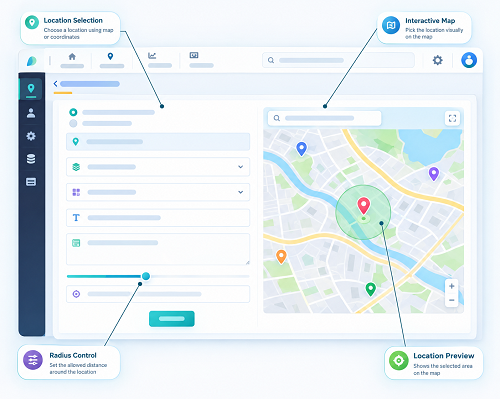
1. Test Real-Time GPS Accuracy and Location Updates
The first feature to test is the accuracy and frequency of GPS location updates.
A live tracking platform should show where vehicles or authorised field employees are located and when their positions were last updated.
During the demonstration, ask the vendor to show:
- Live GPS location on an interactive map.
- Location refresh intervals.
- Last-known location and timestamp.
- Movement and stationary status.
- Location history.
- Tracking of multiple employees or vehicles.
- Notifications when a device stops transmitting.
- Location updates when a mobile device changes networks.
For example, a Singapore facilities management company may have technicians travelling between customer locations in Jurong, Tampines and Woodlands. Managers need current location information to determine which technician is available for a new assignment.
Practical demo test: Ask the vendor to track a mobile device or vehicle while it moves between two locations. Check how quickly the displayed location changes and whether the timestamp accurately reflects the latest update.
Also test the system in areas where GPS reception may be weaker, such as underground car parks and dense commercial buildings.
What to verify: The platform should clearly distinguish between a current location and an outdated last-known location. Ask whether location refresh frequency can be configured and whether different subscription packages have different limits.
2. Test Mobile Application Functionality
Field employees usually depend on mobile devices rather than desktop computers. The tracking application should therefore be simple, responsive and reliable.
During the demo, ask the vendor to demonstrate the application on the types of smartphones used by your employees.
Test whether users can:
- Log in securely.
- View assigned jobs.
- Share authorised location information.
- Check in and check out.
- Receive new assignment notifications.
- Update job progress.
- Upload photographs and documents.
- Contact supervisors.
- View their work schedules.
- Submit completion information.
For example, a maintenance technician should be able to open the mobile application, view a service request, travel to the customer location, update the job status and upload a photograph after completing the work.
The application should not require employees to navigate through multiple complicated screens for routine activities.
Practical demo test: Ask a field employee to complete a typical work assignment using the mobile application without assistance from the vendor.
What to verify: Check usability, loading speed, compatibility with Android and iOS devices, battery consumption and mobile data usage.
3. Test GPS-Based Attendance and Location Verification
Businesses that want to manage attendance alongside live tracking should check whether the software provides dedicated attendance functionality.
Location tracking alone does not necessarily establish that an employee has started work or completed an assigned shift. The platform should provide a defined check-in and check-out process if attendance management is required.
Test features such as:
- GPS-based clock-in and clock-out.
- Location-verified attendance.
- Geofenced attendance at approved sites.
- Employee attendance history.
- Missed check-in notifications.
- Attendance correction requests.
- Supervisor approval workflows.
- Attendance report generation.
For example, a cleaning services company may assign employees to several commercial buildings. The supervisor should be able to review check-in records for each location and identify missing attendance entries.
Practical demo test: Configure a test worksite and ask an employee to check in from an approved location. Then attempt a check-in from outside the permitted area and observe how the system responds.
What to verify: Confirm whether location restrictions are configurable and whether the system records exceptions. Ask whether attendance data can be exported to payroll or another attendance platform.
4. Test Geofencing and Site Entry and Exit Alerts
Geofencing allows businesses to establish virtual boundaries around warehouses, customer premises, project sites and other operating locations.
The software can generate alerts when a tracked device enters or leaves a defined area.
During the demo, test whether managers can:
- Create new geofences.
- Set geofence boundaries.
- Assign geofences to specific employees or vehicles.
- Receive entry and exit notifications.
- View site visit history.
- Identify unauthorised departures.
- Generate location-based reports.
- Manage multiple locations.
For example, a construction company may create virtual boundaries around its active project sites. Managers can monitor when authorised vehicles enter or leave those locations.
A field service company may use similar functionality to receive an alert when a technician reaches a customer's premises.
Practical demo test: Ask the vendor to create a geofence around a test location. Move a tracked device into and out of that boundary and check whether notifications are generated correctly.
What to verify: Check alert accuracy, notification delays, configuration flexibility and whether geofencing is included in the standard package or charged separately.
5. Test Route Planning and Optimisation
Businesses with employees or vehicles travelling between several locations should test the platform's route management capabilities.
Route planning can help operations teams organise visits, reduce unnecessary travel and monitor whether field teams are following assigned journeys.
Ask the vendor to demonstrate:
- Route creation.
- Multi-stop journey planning.
- Route optimisation.
- Estimated arrival times.
- Route deviation alerts.
- Travel distance calculations.
- Journey history.
- Customer location management.
- Traffic-aware route suggestions, where supported.
For example, a Singapore delivery company may have several customer appointments across the island. A dispatcher should be able to organise stops and assign routes based on delivery priorities.
Practical demo test: Create a sample journey involving three or four customer locations. Ask the vendor to optimize the route and then demonstrate how the platform displays the actual journey.
What to verify: Check whether the software considers appointment times, employee availability, vehicle capacity and job priorities. Also ask whether route optimisation is automated or requires manual configuration.
6. Test Job Assignment and Work Order Management
Live tracking becomes more useful when location information is connected to daily work assignments.
Businesses should check whether the platform can help managers assign jobs, monitor progress and respond to delays.
Test the following capabilities:
- Creating new work orders.
- Assigning jobs to employees.
- Viewing available employees.
- Reassigning jobs.
- Sending job instructions.
- Updating job status.
- Recording job start and completion times.
- Tracking overdue assignments.
- Uploading completion photographs.
- Capturing customer signatures, where required.
For example, an equipment maintenance company may receive an urgent repair request. The dispatcher should be able to identify an available technician, assign the job and monitor progress.
Practical demo test: Create a sample job, assign it to an employee, update its status from pending to in progress and then completed. Ask the vendor to demonstrate how the supervisor sees each update.
What to verify: Check whether job assignments are connected to employee locations and whether managers can filter work orders by team, customer, site and status.
7. Test Notifications and Exception Alerts
A tracking platform should help managers identify operational problems without requiring them to monitor the dashboard continuously.
Automated alerts can notify supervisors when an event requires attention.
During the demo, test whether the platform can generate alerts for:
- Vehicle or employee entry into a geofence.
- Departure from an approved location.
- Route deviations.
- Extended vehicle idling.
- Speeding, where vehicle monitoring is supported.
- Missed check-ins.
- Delayed job completion.
- Device disconnection.
- Unusual vehicle movement.
For example, if a delivery vehicle remains stationary for an unusually long period, an alert may help the dispatcher investigate a possible delay.
Practical demo test: Configure a test alert for a route deviation or geofence exit. Trigger the event and check whether the notification reaches the correct supervisor.
What to verify: Ask whether alerts can be customised by event, employee, vehicle, location and recipient. Also check whether notifications are available through the dashboard, mobile application, email or SMS and whether additional charges apply.
8. Test Offline Functionality and Network Recovery
Field employees may work in locations where mobile data connectivity is temporarily unavailable. A useful tracking application should explain what happens when the device loses its network connection.
This is particularly important for businesses operating in basements, industrial facilities, remote work areas or locations with inconsistent connectivity.
During the demo, test whether the application can:
- Detect network disconnection.
- Display the last successful location update.
- Store permitted activity records locally.
- Queue job updates for later synchronisation.
- Restore data when connectivity returns.
- Avoid duplicate records.
- Identify missing or incomplete information.
For example, a technician may complete a job in an underground facility where mobile connectivity is weak. The application should explain whether the employee can save the completion details and synchronise them later.
Practical demo test: Disconnect the test mobile device from the internet. Attempt a permitted job update or check-in, reconnect the device and observe how the application handles the stored information.
What to verify: Ask the vendor which features work offline. Do not assume that offline job updates automatically mean continuous GPS tracking is available without a network connection.
9. Test Reporting and Analytics Dashboards
Tracking information is more valuable when businesses can convert it into operational insights.
Managers should test whether the software provides useful reports on employee activity, vehicle usage, site visits and job completion.
Look for reports covering:
- Employee location history.
- Vehicle journey history.
- Daily site visits.
- Travel distance and duration.
- Job completion rates.
- Delayed assignments.
- Attendance summaries.
- Vehicle idle time.
- Driver behaviour, where supported.
- Team and branch performance.
For example, a service company may review monthly reports to identify teams with frequent appointment delays or unusually long travel times.
Practical demo test: Ask the vendor to generate a report for a sample date range. Filter it by employee, team and location, then export the results into Excel or PDF.
What to verify: Check whether reports are configurable, whether historical records are retained for a suitable period and whether managers can schedule automatic reports.
IMDA's transport management solution guidance identifies dashboards, reporting, job history and analytics as relevant capabilities for businesses assessing transport management systems.
10. Test Integration With Existing Business Systems
Businesses should check whether live tracking software can exchange information with their existing applications.
Integration can reduce duplicate data entry and improve coordination between operations, HR, payroll and customer service teams.
Ask the vendor to demonstrate integration with relevant systems, such as:
- HR management software.
- Attendance systems.
- Payroll platforms.
- Workforce scheduling applications.
- Field service management software.
- Customer relationship management systems.
- Enterprise resource planning platforms.
- Delivery management applications.
- Inventory and asset management tools.
For example, a field service company may want completed job information to flow into its customer management system. Another company may need approved attendance records to be transferred to payroll.
Practical demo test: Ask the vendor to demonstrate a sample data transfer between the tracking platform and an existing application. If a live integration is unavailable, request a demonstration of the API or export/import workflow.
What to verify: Confirm which integrations are included, which require additional fees and how the vendor handles failed synchronisation, duplicate records and data updates.
11. Test Data Privacy, Security and Access Permissions
Live tracking platforms may collect employee location histories, personal identifiers, attendance records and operational information.
Singapore businesses should assess the platform's security controls and their obligations under the Personal Data Protection Act (PDPA).
During the demo, ask the vendor to demonstrate:
- Role-based access permissions.
- Secure login procedures.
- Multi-factor authentication.
- User access management.
- Location history access restrictions.
- Audit logs.
- Data export controls.
- Data retention settings.
- Account deactivation.
- Security incident response procedures.
For example, a supervisor may need access to the locations of employees assigned to their team, while a payroll administrator may only need approved attendance information.
Practical demo test: Create separate administrator, supervisor and employee accounts. Check whether each user can access only the information required for their responsibilities.
Also ask the vendor to explain what happens to employee location information outside working hours and how tracking can be configured according to the company's stated purposes.
Under Singapore's PDPA, organisations must consider appropriate purposes, notification requirements and reasonable security arrangements when handling personal data. Employment-related exceptions may apply in some situations, but they do not remove all obligations.
What to verify: Request privacy documentation, security policies, data processing terms and information about data storage, overseas transfers and deletion procedures.
12. Test Pricing, Implementation and Customer Support
The final part of the demonstration should cover the commercial and operational arrangements.
Businesses should understand the complete cost of implementing and maintaining the system, rather than focusing only on the advertised subscription price.
Ask the vendor to explain:
- Subscription fees per employee, vehicle or user.
- GPS device purchase or rental costs.
- Installation and configuration charges.
- Mobile data and connectivity fees.
- Advanced feature charges.
- Integration costs.
- Training fees.
- Technical support arrangements.
- Contract duration and renewal terms.
- Data export and cancellation procedures.
For example, a business with 50 field employees may receive a quotation based on 50 users, while another provider may charge separately for GPS devices, reporting modules and integration services.
Practical demo test: Ask the vendor to prepare a quotation based on the company's actual number of employees, vehicles, locations and required modules.
Also ask the provider to demonstrate its support process, including how users raise tickets, report technical problems and receive assistance.
What to verify: Review the total cost of ownership, implementation timeline, training arrangements, service commitments and future scalability.
Live Tracking Demo Testing Checklist
The following checklist can help Singapore businesses evaluate vendors consistently during product demonstrations.
| Feature to test | Demonstration activity | Expected result |
|---|---|---|
| GPS accuracy | Track a moving device | Reliable location and timestamp |
| Mobile application | Complete a field assignment | Simple and responsive user experience |
| Attendance | Check in at an approved site | Correct location-based attendance record |
| Geofencing | Enter and leave a test boundary | Accurate entry and exit alerts |
| Route planning | Create a multi-stop journey | Practical route and journey visibility |
| Job assignment | Assign and complete a test job | Clear job status updates |
| Notifications | Trigger a test alert | Correct alert reaches the right person |
| Offline mode | Disconnect and reconnect a device | Clear handling of stored information |
| Reporting | Generate a filtered report | Accurate and exportable information |
| Integration | Transfer sample records | Reliable data exchange |
| Security | Test different user roles | Appropriate access restrictions |
| Pricing and support | Request a detailed quotation | Transparent costs and service terms |
Questions to Ask Vendors During a Live Tracking Demo
In addition to testing the software, businesses should ask vendors specific questions about product capabilities and limitations.
- How frequently does the system update employee or vehicle locations?
- Does the platform support both employee tracking and vehicle tracking?
- Can location tracking be restricted to authorised working periods?
- What happens when a mobile device loses connectivity?
- Can managers create geofences without technical assistance?
- Does the software include attendance and job management?
- Can employees update work orders through the mobile application?
- Which integrations are available?
- How long is historical location data retained?
- Can businesses export their data if they change providers?
- What security controls protect employee and business information?
- What are the complete subscription, installation and support costs?
Businesses should request clear answers in writing, particularly for features that are described as optional, under development or dependent on third-party hardware.
How to Select the Best Live Tracking Software After the Demo
Once demonstrations are complete, businesses should consolidate their findings and compare vendors against their actual requirements.
A weighted evaluation scorecard can help.
| Evaluation criterion | Suggested weight |
|---|---|
| GPS accuracy and reliability | 15% |
| Mobile application usability | 10% |
| Attendance and employee tracking | 10% |
| Job assignment and work management | 15% |
| Route planning and geofencing | 10% |
| Notifications and reporting | 10% |
| System integration | 10% |
| Data privacy and security | 10% |
| Pricing, implementation and support | 10% |
| Total | 100% |
Rate each vendor from 1 to 5 for every criterion, then calculate its weighted score.
Businesses should also identify any essential requirements that a vendor fails to meet. A high overall score should not compensate for a critical weakness, such as unreliable location updates, missing security controls or lack of required integrations.
Where possible, conduct a pilot with a small group of actual field employees before rolling out the software across the organisation.
Conclusion
A live tracking software demo is an important opportunity for Singapore businesses to evaluate whether a platform can support their real operational requirements.
Companies should test GPS accuracy, mobile applications, attendance verification, geofencing, route planning, job assignments, alerts, offline functionality, reporting, integrations and data security.
The demonstration should involve practical scenarios rather than relying only on vendor presentations. Testing the software with actual employees, devices and work locations can reveal limitations that may not be visible during a standard product walkthrough.
By using a structured checklist, asking detailed questions and comparing vendors against consistent criteria, businesses can select a live tracking solution that improves field visibility, supports better coordination and provides long-term operational value.
Simulate a typical job from dispatch through arrival, completion and exception handling. Check the employee and supervisor experiences in an InnBuilt demo.